DNS over Wireguard with AllowedIP 0.0.0.0/0 not working - part 2

Received the recorded video, thanks!

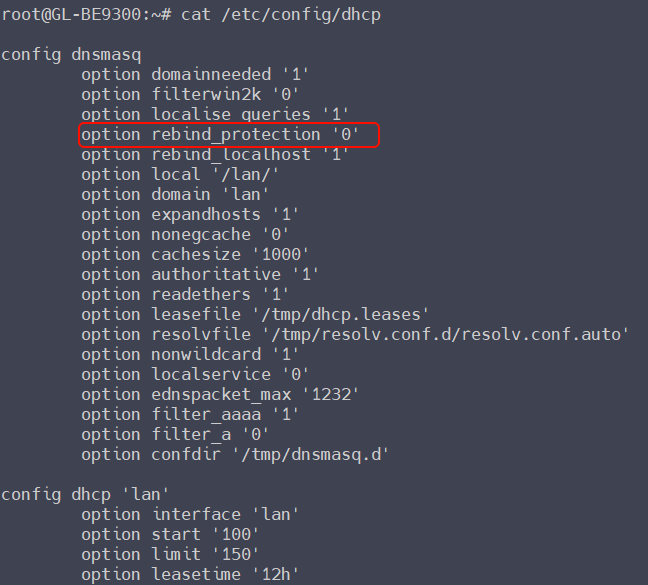
It seems odd — I'd like to check the configuration: cat /etc/config/dhcp

The option rebind_protection '0' entry under config dnsmasq corresponds to the "DNS Rebinding Attack Protection" disabled of GL GUI.

Please try to SSH to the router, and using uci to configure this option, to check whether the GUI updates accordingly (1 is enable, 0 is disable):

uci set dhcp.@dnsmasq[0].rebind_protection='1'
uci commit dhcp

uci set dhcp.@dnsmasq[0].rebind_protection='0'
uci commit dhcp

If you're not very familiar with SSH, you can share the router with support team so we can check this:

Please PM me your router MAC address and the Admin Panel password.

PROBLEM SOLVED!

Here‘s what I‘ve done:

  • Execture uci set dhcp.@dnsmasq[0].rebind_protection='1' in the shell
  • Gave me an error pointing at line 77, so I looked at line 77 in the /etc/config/dhcp file
  • At line 77 there was written the following: address=/domain.tld/internal_ip
  • With this I wanted to redirect all queries going to domain.tld to a tunnel ip, so that these queries dont go out to the internet
  • I deleted this line in the dhcp config file and executed following command: uci commit dhcp && /etc/init.d/dnsmasq restart
  • Then the DNS rebinding attack protection was disabled in the GUI
  • After restarting the Wireguard tunnel everything worked as expected (ping and traceroute and DNS working as expected)

Thank you for your help Bruce.

If you could point me to a document where it is described how I can configure this DNS override properly, this would be great. The aim is, that all DNS queries that go to a domain and all its subdomains is routed to a specific address in the Wireguard tunnel.
That would be great. Thank you.

Nevermind, I‘ll do the overwrites on the vpn Server. Then all clients profit.

1 Like
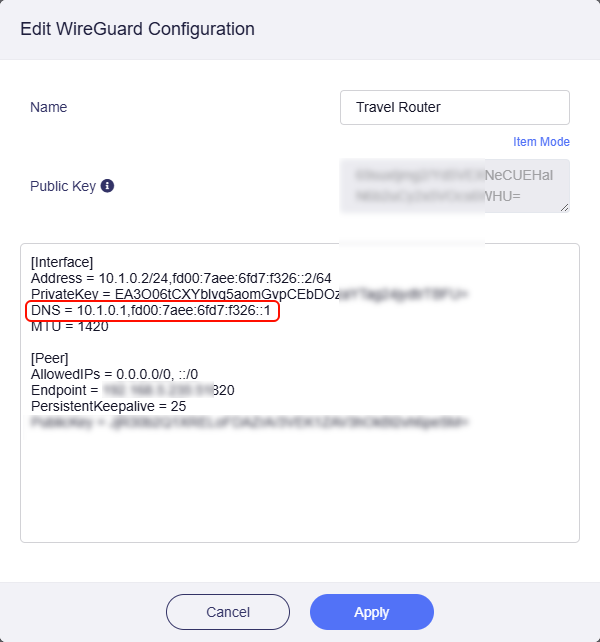
  1. Ensure the DNS in your VPN profile points to the VPN server's tunnel IP, for example:

  2. Override DNS Settings of All Clients, recommended to enable. Leave other settings default, and DNS mode is auto.

All DNS requests of this router (VPN client) will be through this VPN tunnel to the VPN server, where they will be handled by VPN server.

Thank you for your help, everything is now working as expected. :+1: