I think this is common among all domestic ISPs.
They assign a WAN IP, but in this process I would like to ask if the ISP’s DNS is involved in granting that WAN IP.
Whether this is the case or not, the configuration for resolving addresses with DNS does not seem to be bypassed. In other words, if I use dnsleaktest, for example, the DNS continues to be the ISP’s DNS even if I enter another.
Is there a way to avoid this? A menu option would be interesting.
Apparently, this does not happen when using a VPN on the PC, but I am not entirely sure.
Is there some kind of lock to block the chosen DNS? How?
I have seen a video of a Mikrotik router that has a specific button for this.
Hi!
Typically, PPPoE or DHCP are responsible for assigning WAN IP addresses and DNS servers, and these two elements are usually unrelated.
Regarding DNS leak still shows your ISP's DNS servers even after you have specified alternative ones, this is probably because your ISP is hijacking unencrypted DNS traffic.
You could try using encrypted DNS to prevent this.
The instructions are as follows:
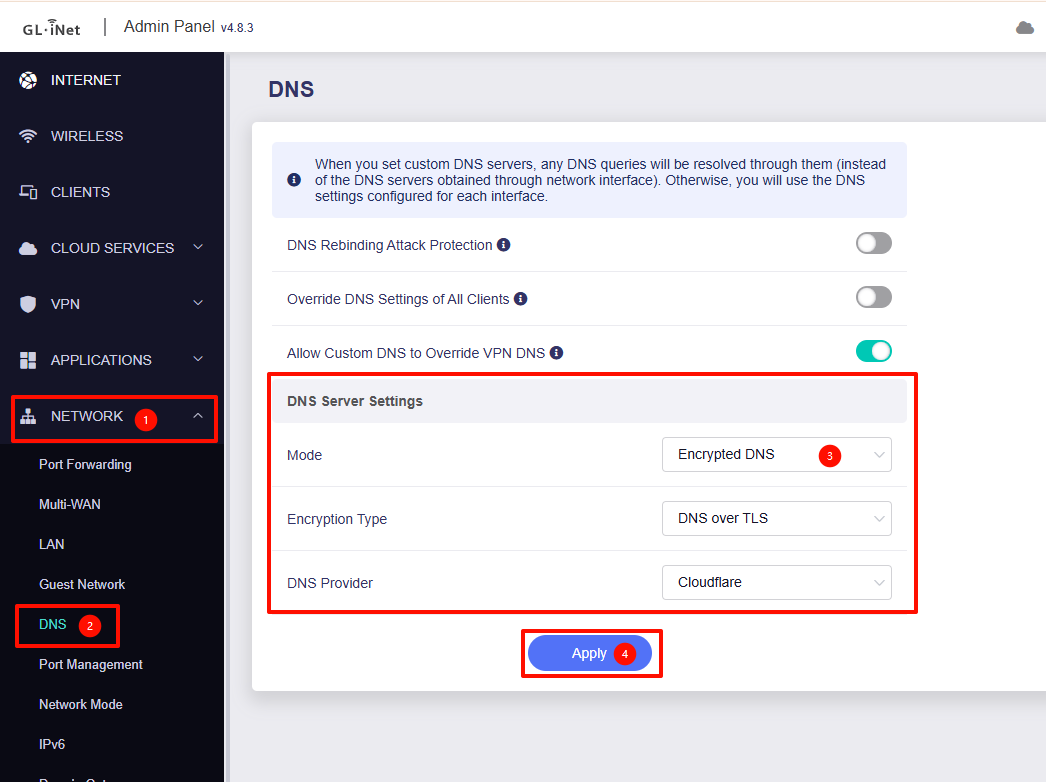
And If you want the router to forward all unencrypted DNS requests from LAN devices, enable “Override DNS Settings of All Clients”.
So protection is envolved ? (is unabled). Can you give a solution with LUCI?
Thank you.
Some told me something about forwarding
Sorry for the late reply.
Currently, the GL UI is the only interface where encrypted DNS is officially supported and fully integrated.
LuCI does not provide this feature by default.
If you wish to configure encrypted DNS in LuCI, you can do so by manually installing and configuring a third-party package such as luci-app-https-dns-proxy.
Please note that third-party plugins are not officially supported by GL.iNet.
For setup details, you can follow the OpenWrt community documentation here:
This topic was automatically closed 90 days after the last reply. New replies are no longer allowed.