I have problems with the DDNS not working. It had been working for months but stopped a couple of days ago.
Is there a status page? Is anyone else experiencing problems or is all ok?
I have tried resetting the router and i can connect to the WAN IP address.
The DDNS Test always fails. I don’t know how to troubleshoot further?
Is there a host name for the DDNS service?
Hi
Could you please let us know:
- The router model and the firmware version
- DDNS Test results
- Please SSH into router and run the commands below to check if DNS is working properly
nslookup $(uci get gl_ddns.glddns.domain)
If the DNS is not working, try changing the DNS to Google to see if it helps or not.
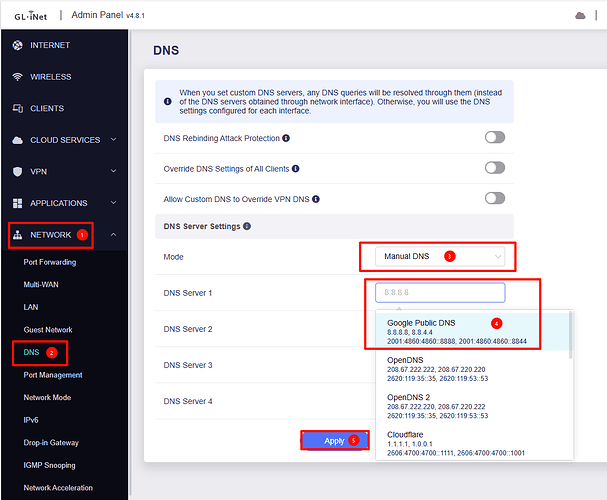
- If it still doesn't work after switching DNS, try running the following command and check again.
lua /usr/lib/gl_ddns/get_ddns_registered_ip.lua
I ran a testing on BE9300 v4.8.1, and DDNS is functioning properly.
1. The router model and the firmware version
GL-SFT1200 (April 2025)
Admin Panel v4.3.25
2. DDNS Test results
The DNS record for this DDNS domain could not be found in the DNS server. Please check the Internet connection of the device.
3. Please SSH into router and run the commands below to check if DNS is working properly
root@GL-SFT1200:~# nslookup $(uci get gl_ddns.glddns.domain)
Server: 192.168.0.1
Address: 192.168.0.1#53
**** server can't find cu6b1bd.glddns dot com: NXDOMAIN**
**** server can't find cu6b1bd.glddns dot com: NXDOMAIN**
4. If it still doesn't work after switching DNS, try running the following command and check again.
root@GL-SFT1200:/usr/lib/gl_ddns# lua /usr/lib/gl_ddns/get_ddns_registered_ip.lua
lua: cannot open /usr/lib/gl_ddns/get_ddns_registered_ip.lua: No such file or directory
root@GL-SFT1200:/usr/lib/gl_ddns# lsdynamic_dns_functions.sh dynamic_dns_updater.sh get_ddns_post_cmd.lua
5. MORE
root@GL-SFT1200:~# ping forum.gl-inet dot com
PING forum.gl-inet dot com (172.67.145.231): 56 data bytes
64 bytes from 172.67.145.231: seq=0 ttl=54 time=30.229 ms
from the system log…
Wed Oct 15 02:00:21 2025 user.notice ddns-scripts[5022]: glddns: PID '5022' terminated by 'SIGTERM' at 2025-10-15 02:00
Wed Oct 15 02:00:22 2025 authpriv.notice sudo: root : TTY=unknown ; PWD=/ ; USER=root ; GROUP=nonevpn ; COMMAND=/usr/lib/gl_ddns/dynamic_dns_updater.sh -- start
Wed Oct 15 02:00:24 2025 user.notice ddns-scripts[6658]: ddns: PID '6658' started at 2025-10-15 02:00
Wed Oct 15 02:00:24 2025 user.warn ddns-scripts[6658]: ddns: Service section disabled! - TERMINATE
Wed Oct 15 02:00:24 2025 user.notice ddns-scripts[6661]: glddns: PID '6661' started at 2025-10-15 02:00
Wed Oct 15 02:00:24 2025 user.warn ddns-scripts[6658]: ddns: PID '6658' exit WITH ERROR '1' at 2025-10-15 02:00
Wed Oct 15 02:00:25 2025 user.warn ddns-scripts[6661]: glddns: NO valid IP found
Wed Oct 15 02:00:30 2025 user.err ddns-scripts[6661]: glddns: cURL Error: '28'
Wed Oct 15 02:00:30 2025 user.warn ddns-scripts[6661]: glddns: Transfer failed - retry 1/0 in 60 seconds
Wed Oct 15 02:01:34 2025 user.err ddns-scripts[6661]: glddns: cURL Error: '28'
The other unusual thing is that some devices Tapo camera and ecoflow battery work, others refuse eg Sonoff Zigbee hub, although it is registered on the network with lan ip, however it does not function.
We tested using an SFT1200 with the same firmware locally, and DDNS worked correctly.
Based on the log messages, the DDNS script appears unable to obtain your public IP address, so this may be a network-related issue.
Is the SFT1200 located behind a firewall?
Please SSH into your router, run the following commands, and share the results with us:
curl -vvv http://checkip.dyndns.com
curl -vvv https://ddns.glddns.com/
There is no firewall unless the isp has done something. It had been very stable for months.
It is a prepaid data sim from scancom Three Network with a usb dongle (ZTE MF833, CAT4/4G)
I had heard there were general problems because of the Vodafone and Three merger.
I have taken the equipment home to troubleshoot though the signal is poor where i live but still just works. Where i normally have it it has full signal.
root@GL-SFT1200:~# curl -vvv http:// checkip.dyndns. com
GET / HTTP/1.1
Host: checkip.dyndns. com
User-Agent: curl/7.63.0
Accept: /
- Empty reply from server
curl: (52) Empty reply from server
root@GL-SFT1200:~# curl -vvv https:// ddns.glddns. com/
- TLSv1.3 (OUT), TLS handshake, Client hello (1):
- OpenSSL SSL_connect: SSL_ERROR_SYSCALL in connection to ddns.glddns. com:443
curl: (35) OpenSSL SSL_connect: SSL_ERROR_SYSCALL in connection to ddns.glddns. com:443
root@GL-SFT1200:~# curl -vvv http:// checkip.amazonaws. com/
GET / HTTP/1.1
Host: checkip.amazonaws. com
User-Agent: curl/7.63.0
Accept: /
< HTTP/1.1 200
< Date: Wed, 15 Oct 2025 21:42:37 GMT
< Content-Type: text/plain;charset=UTF-8
< Content-Length: 14
< Server: nginx
<
94.196.37.138
If i run the curl command from my pc (Using my pc and the usb dongle).
curl response.zip (2.9 KB)
https:// ddns. glddns .com/
404 Not Found openresty/1.27.1.1
http:// checkip. dyndns .com/
Current IP Address: 188.29.144 .52
Based on the curl response, it appears to be a network-related issue.
Could you connect the SFT1200 to GoodCloud and share it with us for remote troubleshooting?
The current situation
I have pulled out a couple of other gl routers, MT300A and MT300N-V2
I think there is a separate problem here. The SFT1200 intermittently rarely recognises the USB tethering dongle. I have reset, upgraded, and downgraded the firmware but same.
If I provide it with an ethernet WAN it will pick up the dongle as well. Pull the ethernet and its gone. I have tested android phone tethering (same nothing).
I have attached them to goodcloud and I am testing with the MT300N-V2 at the moment.
You will know much of this, I am documenting for myself and others.
The ZTE MF833N USB dongle provides a DMZ to 192.168.8.1 and serves a status and settings webpage 192.168.0.1 where the WAN IP address can be seen, example 94.197.72.208
IP Address 192.168.0.178 Gateway 192.168.0.1 DNS Server 192.168.0.1
http:// checkip.amazonaws .com/ gives a matching 94.197.72.208
The USB dongle is set to APN "3internet" which when using Three and had since April 2025 given a pooled non CGNAT IP and DDNS could be used. On the 10th of October 10am it stopped. I have contacted Scancom that provide the Three network data card. Why Three and Vodafone don’t tell people what they are doing, it is a colossal nuisance and waste of time for their customers!
I have continued testing to see how I can more easily diagnose CGNAT.
tracert to the gl router remotely gives a clue... (careful not to leave a direct connection available)
tracert 94.197.72.208...
cust-141.195.128.43.cgn.as5482 .net [141.195.128.43]
*cgn
Enabling HTTPS no access to https:// 94.197.72.208 no access.
Enabling ping on the wan, Request timed out.
Enabling ssh 94.197.72.208, putty timeout.
Wireguard says Active but does not work.
The router has now been giving a different reply to its DDNS Test function.
The IP from DDNS domain resolution is not the same as the WAN IPs of the device. You need an Internet Public IP address to use the Dynamic DNS. If this router is behind NAT, you may need to set up port forward in your ISP router. If you have VPN Client enabled, please disabled "Services from GL.iNet Use VPN" in the global options.
IP from DDNS Domain Resolution
IPv4
94.197.72.208
Interface WAN IP
Tethering
192.168.0.178
The address must be CGNAT, but the test explanation, i don't think takes into account the DMZ approach of the USB dongle.
Could you explain why the https:// ddns. glddns .com/ 404 Not Found openresty/1.27.1.1
Feel free to access the devices.
Regarding the SFT1200 USB tethering issue, please verify whether you are using the original power adapter or another power supply rated at 5V/3A.
An insufficient power supply may cause instability in USB tethering functionality.
The DDNS test result simply indicates that there may be a mismatch between the interface IP address and the public internet address.
If you have already configured port forwarding or DMZ on your main router, you can safely ignore this notification.
The 404 response is expected, as the domain does not host any web content.
This command is only used to verify connectivity between the router and the GL DDNS server, so receiving a 404 response means the network connection is functioning normally.
Using a decent power supply & cable fixed the intermittent tethering.
Thank you for your support
This topic was automatically closed 30 days after the last reply. New replies are no longer allowed.