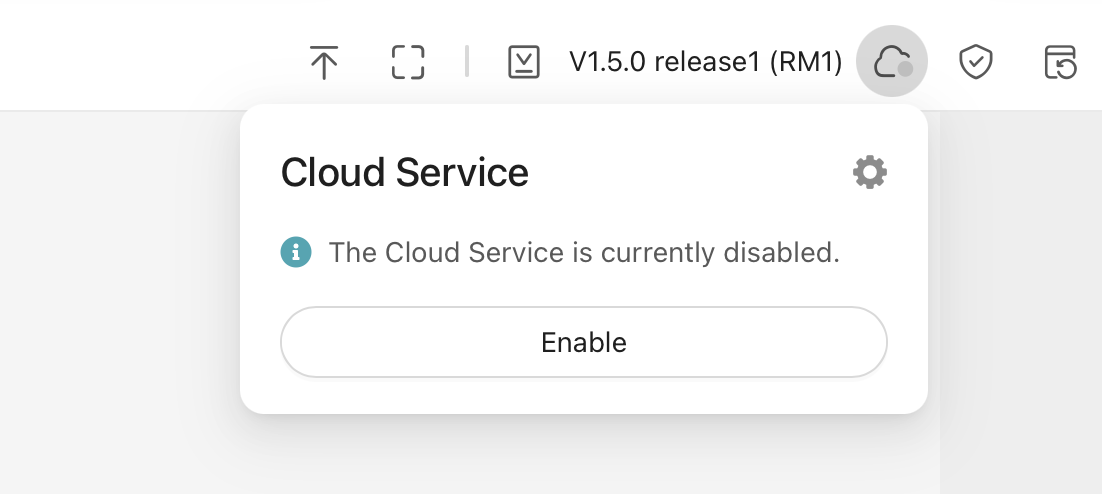
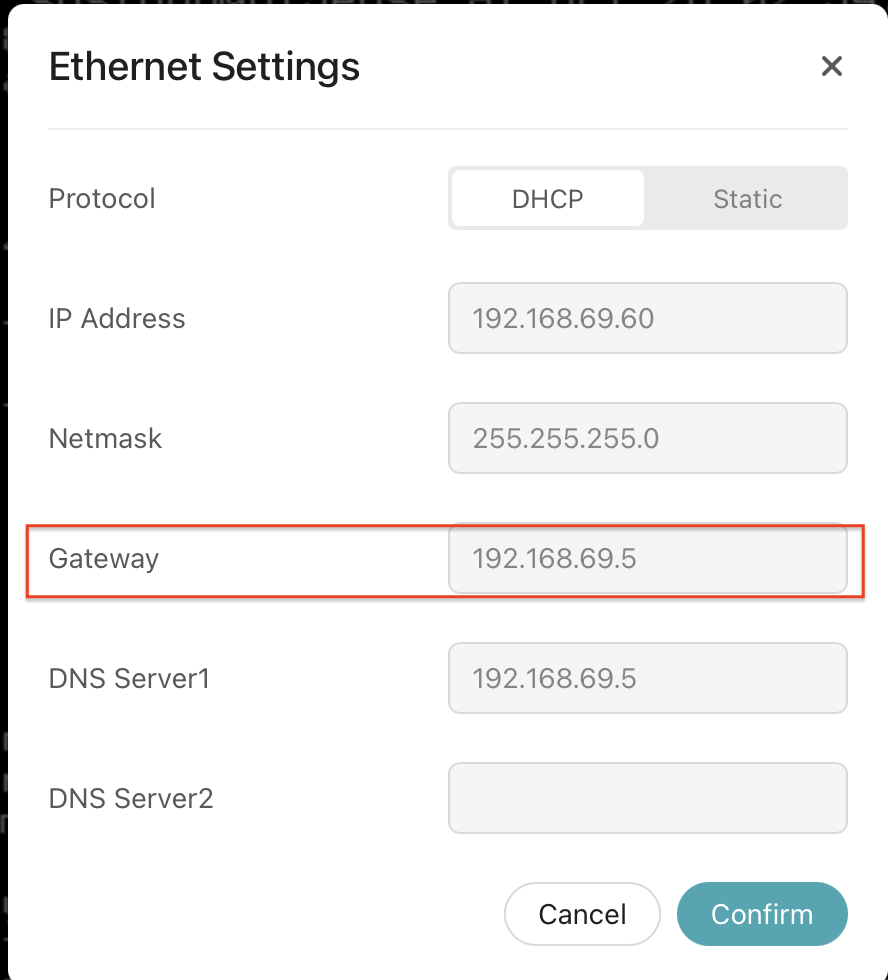
I unbind my GLKVM cloud access and disable cloud remote access, and disabled Tailscale, but I am seeing ICMP ping floods. Looks mostly to DNS servers.
Doesn't seem like the GLKVM is being a good citizen by flooding DNS servers with pings.
Is gl.inet going to fix this?
I temporarily added a FW rule to block ICMP requests from the GLKVM.
15:32:21.037665 94:83:c4:bb:17:1f > 64:62:66:21:c8:40, ethertype IPv4 (0x0800), length 98: (tos 0x0, ttl 64, id 16056, offset 0, flags [DF], proto ICMP (1), length 84)
    192.168.69.60 > 1.1.1.1: ICMP echo request, id 1285, seq 1, length 64
15:32:21.043988 64:62:66:21:c8:40 > 94:83:c4:bb:17:1f, ethertype IPv4 (0x0800), length 98: (tos 0x0, ttl 57, id 32318, offset 0, flags [none], proto ICMP (1), length 84)
    1.1.1.1 > 192.168.69.60: ICMP echo reply, id 1285, seq 1, length 64
15:32:21.056535 94:83:c4:bb:17:1f > 64:62:66:21:c8:40, ethertype IPv4 (0x0800), length 98: (tos 0x0, ttl 64, id 40559, offset 0, flags [DF], proto ICMP (1), length 84)
    192.168.69.60 > 8.8.8.8: ICMP echo request, id 1287, seq 1, length 64
15:32:21.061990 64:62:66:21:c8:40 > 94:83:c4:bb:17:1f, ethertype IPv4 (0x0800), length 98: (tos 0x0, ttl 117, id 0, offset 0, flags [none], proto ICMP (1), length 84)
    8.8.8.8 > 192.168.69.60: ICMP echo reply, id 1287, seq 1, length 64
15:32:21.074029 94:83:c4:bb:17:1f > 64:62:66:21:c8:40, ethertype IPv4 (0x0800), length 98: (tos 0x0, ttl 64, id 4038, offset 0, flags [DF], proto ICMP (1), length 84)
    192.168.69.60 > 208.67.222.222: ICMP echo request, id 1289, seq 1, length 64
15:32:21.080540 64:62:66:21:c8:40 > 94:83:c4:bb:17:1f, ethertype IPv4 (0x0800), length 98: (tos 0x0, ttl 54, id 5252, offset 0, flags [none], proto ICMP (1), length 84)
    208.67.222.222 > 192.168.69.60: ICMP echo reply, id 1289, seq 1, length 64
15:32:22.097616 94:83:c4:bb:17:1f > 64:62:66:21:c8:40, ethertype IPv4 (0x0800), length 98: (tos 0x0, ttl 64, id 16100, offset 0, flags [DF], proto ICMP (1), length 84)
    192.168.69.60 > 1.1.1.1: ICMP echo request, id 1291, seq 1, length 64
15:32:22.103976 64:62:66:21:c8:40 > 94:83:c4:bb:17:1f, ethertype IPv4 (0x0800), length 98: (tos 0x0, ttl 57, id 10640, offset 0, flags [none], proto ICMP (1), length 84)
    1.1.1.1 > 192.168.69.60: ICMP echo reply, id 1291, seq 1, length 64
15:32:22.115354 94:83:c4:bb:17:1f > 64:62:66:21:c8:40, ethertype IPv4 (0x0800), length 98: (tos 0x0, ttl 64, id 40810, offset 0, flags [DF], proto ICMP (1), length 84)
    192.168.69.60 > 8.8.8.8: ICMP echo request, id 1293, seq 1, length 64
15:32:22.121298 64:62:66:21:c8:40 > 94:83:c4:bb:17:1f, ethertype IPv4 (0x0800), length 98: (tos 0x0, ttl 117, id 0, offset 0, flags [none], proto ICMP (1), length 84)
    8.8.8.8 > 192.168.69.60: ICMP echo reply, id 1293, seq 1, length 64
15:32:22.137824 94:83:c4:bb:17:1f > 64:62:66:21:c8:40, ethertype IPv4 (0x0800), length 98: (tos 0x0, ttl 64, id 4310, offset 0, flags [DF], proto ICMP (1), length 84)
    192.168.69.60 > 208.67.222.222: ICMP echo request, id 1295, seq 1, length 64
15:32:22.144277 64:62:66:21:c8:40 > 94:83:c4:bb:17:1f, ethertype IPv4 (0x0800), length 98: (tos 0x0, ttl 54, id 5380, offset 0, flags [none], proto ICMP (1), length 84)
    208.67.222.222 > 192.168.69.60: ICMP echo reply, id 1295, seq 1, length 64
15:32:23.155054 94:83:c4:bb:17:1f > 64:62:66:21:c8:40, ethertype IPv4 (0x0800), length 98: (tos 0x0, ttl 64, id 16205, offset 0, flags [DF], proto ICMP (1), length 84)
    192.168.69.60 > 1.1.1.1: ICMP echo request, id 1299, seq 1, length 64
15:32:23.161281 64:62:66:21:c8:40 > 94:83:c4:bb:17:1f, ethertype IPv4 (0x0800), length 98: (tos 0x0, ttl 57, id 34863, offset 0, flags [none], proto ICMP (1), length 84)
    1.1.1.1 > 192.168.69.60: ICMP echo reply, id 1299, seq 1, length 64
15:32:23.175245 94:83:c4:bb:17:1f > 64:62:66:21:c8:40, ethertype IPv4 (0x0800), length 98: (tos 0x0, ttl 64, id 40871, offset 0, flags [DF], proto ICMP (1), length 84)
    192.168.69.60 > 8.8.8.8: ICMP echo request, id 1301, seq 1, length 64
15:32:23.180784 64:62:66:21:c8:40 > 94:83:c4:bb:17:1f, ethertype IPv4 (0x0800), length 98: (tos 0x0, ttl 117, id 0, offset 0, flags [none], proto ICMP (1), length 84)
    8.8.8.8 > 192.168.69.60: ICMP echo reply, id 1301, seq 1, length 64
15:32:23.195173 94:83:c4:bb:17:1f > 64:62:66:21:c8:40, ethertype IPv4 (0x0800), length 98: (tos 0x0, ttl 64, id 4486, offset 0, flags [DF], proto ICMP (1), length 84)
    192.168.69.60 > 208.67.222.222: ICMP echo request, id 1303, seq 1, length 64
15:32:23.201764 64:62:66:21:c8:40 > 94:83:c4:bb:17:1f, ethertype IPv4 (0x0800), length 98: (tos 0x0, ttl 54, id 5471, offset 0, flags [none], proto ICMP (1), length 84)
    208.67.222.222 > 192.168.69.60: ICMP echo reply, id 1303, seq 1, length 64
15:32:24.214081 94:83:c4:bb:17:1f > 64:62:66:21:c8:40, ethertype IPv4 (0x0800), length 98: (tos 0x0, ttl 64, id 16331, offset 0, flags [DF], proto ICMP (1), length 84)
    192.168.69.60 > 1.1.1.1: ICMP echo request, id 1305, seq 1, length 64
15:32:24.220563 64:62:66:21:c8:40 > 94:83:c4:bb:17:1f, ethertype IPv4 (0x0800), length 98: (tos 0x0, ttl 57, id 29467, offset 0, flags [none], proto ICMP (1), length 84)
    1.1.1.1 > 192.168.69.60: ICMP echo reply, id 1305, seq 1, length 64
15:32:24.233142 94:83:c4:bb:17:1f > 64:62:66:21:c8:40, ethertype IPv4 (0x0800), length 98: (tos 0x0, ttl 64, id 41080, offset 0, flags [DF], proto ICMP (1), length 84)
    192.168.69.60 > 8.8.8.8: ICMP echo request, id 1307, seq 1, length 64
15:32:24.238545 64:62:66:21:c8:40 > 94:83:c4:bb:17:1f, ethertype IPv4 (0x0800), length 98: (tos 0x0, ttl 117, id 0, offset 0, flags [none], proto ICMP (1), length 84)
    8.8.8.8 > 192.168.69.60: ICMP echo reply, id 1307, seq 1, length 64
15:32:24.252086 94:83:c4:bb:17:1f > 64:62:66:21:c8:40, ethertype IPv4 (0x0800), length 98: (tos 0x0, ttl 64, id 4721, offset 0, flags [DF], proto ICMP (1), length 84)
    192.168.69.60 > 208.67.222.222: ICMP echo request, id 1309, seq 1, length 64
15:32:24.258599 64:62:66:21:c8:40 > 94:83:c4:bb:17:1f, ethertype IPv4 (0x0800), length 98: (tos 0x0, ttl 54, id 5613, offset 0, flags [none], proto ICMP (1), length 84)
    208.67.222.222 > 192.168.69.60: ICMP echo reply, id 1309, seq 1, length 64
15:32:25.273808 94:83:c4:bb:17:1f > 64:62:66:21:c8:40, ethertype IPv4 (0x0800), length 98: (tos 0x0, ttl 64, id 16616, offset 0, flags [DF], proto ICMP (1), length 84)
    192.168.69.60 > 1.1.1.1: ICMP echo request, id 1311, seq 1, length 64
15:32:25.279996 64:62:66:21:c8:40 > 94:83:c4:bb:17:1f, ethertype IPv4 (0x0800), length 98: (tos 0x0, ttl 57, id 39514, offset 0, flags [none], proto ICMP (1), length 84)
    1.1.1.1 > 192.168.69.60: ICMP echo reply, id 1311, seq 1, length 64
15:32:25.294210 94:83:c4:bb:17:1f > 64:62:66:21:c8:40, ethertype IPv4 (0x0800), length 98: (tos 0x0, ttl 64, id 41238, offset 0, flags [DF], proto ICMP (1), length 84)
    192.168.69.60 > 8.8.8.8: ICMP echo request, id 1313, seq 1, length 64
15:32:25.299531 64:62:66:21:c8:40 > 94:83:c4:bb:17:1f, ethertype IPv4 (0x0800), length 98: (tos 0x0, ttl 117, id 0, offset 0, flags [none], proto ICMP (1), length 84)
    8.8.8.8 > 192.168.69.60: ICMP echo reply, id 1313, seq 1, length 64
15:32:25.311596 94:83:c4:bb:17:1f > 64:62:66:21:c8:40, ethertype IPv4 (0x0800), length 98: (tos 0x0, ttl 64, id 4980, offset 0, flags [DF], proto ICMP (1), length 84)
    192.168.69.60 > 208.67.222.222: ICMP echo request, id 1315, seq 1, length 64
15:32:25.318003 64:62:66:21:c8:40 > 94:83:c4:bb:17:1f, ethertype IPv4 (0x0800), length 98: (tos 0x0, ttl 54, id 5638, offset 0, flags [none], proto ICMP (1), length 84)
    208.67.222.222 > 192.168.69.60: ICMP echo reply, id 1315, seq 1, length 64
15:32:26.332170 94:83:c4:bb:17:1f > 64:62:66:21:c8:40, ethertype IPv4 (0x0800), length 98: (tos 0x0, ttl 64, id 16683, offset 0, flags [DF], proto ICMP (1), length 84)
    192.168.69.60 > 1.1.1.1: ICMP echo request, id 1317, seq 1, length 64
15:32:26.338522 64:62:66:21:c8:40 > 94:83:c4:bb:17:1f, ethertype IPv4 (0x0800), length 98: (tos 0x0, ttl 57, id 3082, offset 0, flags [none], proto ICMP (1), length 84)
    1.1.1.1 > 192.168.69.60: ICMP echo reply, id 1317, seq 1, length 64
15:32:26.350292 94:83:c4:bb:17:1f > 64:62:66:21:c8:40, ethertype IPv4 (0x0800), length 98: (tos 0x0, ttl 64, id 41536, offset 0, flags [DF], proto ICMP (1), length 84)
    192.168.69.60 > 8.8.8.8: ICMP echo request, id 1319, seq 1, length 64
15:32:26.355759 64:62:66:21:c8:40 > 94:83:c4:bb:17:1f, ethertype IPv4 (0x0800), length 98: (tos 0x0, ttl 117, id 0, offset 0, flags [none], proto ICMP (1), length 84)
    8.8.8.8 > 192.168.69.60: ICMP echo reply, id 1319, seq 1, length 64
15:32:26.369682 94:83:c4:bb:17:1f > 64:62:66:21:c8:40, ethertype IPv4 (0x0800), length 98: (tos 0x0, ttl 64, id 5194, offset 0, flags [DF], proto ICMP (1), length 84)
    192.168.69.60 > 208.67.222.222: ICMP echo request, id 1321, seq 1, length 64
15:32:26.376338 64:62:66:21:c8:40 > 94:83:c4:bb:17:1f, ethertype IPv4 (0x0800), length 98: (tos 0x0, ttl 54, id 5741, offset 0, flags [none], proto ICMP (1), length 84)
    208.67.222.222 > 192.168.69.60: ICMP echo reply, id 1321, seq 1, length 64
15:32:27.391385 94:83:c4:bb:17:1f > 64:62:66:21:c8:40, ethertype IPv4 (0x0800), length 98: (tos 0x0, ttl 64, id 16720, offset 0, flags [DF], proto ICMP (1), length 84)
    192.168.69.60 > 1.1.1.1: ICMP echo request, id 1323, seq 1, length 64
15:32:27.397597 64:62:66:21:c8:40 > 94:83:c4:bb:17:1f, ethertype IPv4 (0x0800), length 98: (tos 0x0, ttl 57, id 22863, offset 0, flags [none], proto ICMP (1), length 84)
    1.1.1.1 > 192.168.69.60: ICMP echo reply, id 1323, seq 1, length 64
15:32:27.408695 94:83:c4:bb:17:1f > 64:62:66:21:c8:40, ethertype IPv4 (0x0800), length 98: (tos 0x0, ttl 64, id 41772, offset 0, flags [DF], proto ICMP (1), length 84)
    192.168.69.60 > 8.8.8.8: ICMP echo request, id 1325, seq 1, length 64
15:32:27.414433 64:62:66:21:c8:40 > 94:83:c4:bb:17:1f, ethertype IPv4 (0x0800), length 98: (tos 0x0, ttl 117, id 0, offset 0, flags [none], proto ICMP (1), length 84)
    8.8.8.8 > 192.168.69.60: ICMP echo reply, id 1325, seq 1, length 64
15:32:27.428384 94:83:c4:bb:17:1f > 64:62:66:21:c8:40, ethertype IPv4 (0x0800), length 98: (tos 0x0, ttl 64, id 5301, offset 0, flags [DF], proto ICMP (1), length 84)
    192.168.69.60 > 208.67.222.222: ICMP echo request, id 1327, seq 1, length 64
15:32:27.435084 64:62:66:21:c8:40 > 94:83:c4:bb:17:1f, ethertype IPv4 (0x0800), length 98: (tos 0x0, ttl 54, id 5850, offset 0, flags [none], proto ICMP (1), length 84)
    208.67.222.222 > 192.168.69.60: ICMP echo reply, id 1327, seq 1, length 64
15:32:28.449213 94:83:c4:bb:17:1f > 64:62:66:21:c8:40, ethertype IPv4 (0x0800), length 98: (tos 0x0, ttl 64, id 16960, offset 0, flags [DF], proto ICMP (1), length 84)
    192.168.69.60 > 1.1.1.1: ICMP echo request, id 1329, seq 1, length 64
15:32:28.456028 64:62:66:21:c8:40 > 94:83:c4:bb:17:1f, ethertype IPv4 (0x0800), length 98: (tos 0x0, ttl 57, id 37227, offset 0, flags [none], proto ICMP (1), length 84)
    1.1.1.1 > 192.168.69.60: ICMP echo reply, id 1329, seq 1, length 64
15:32:28.468722 94:83:c4:bb:17:1f > 64:62:66:21:c8:40, ethertype IPv4 (0x0800), length 98: (tos 0x0, ttl 64, id 41978, offset 0, flags [DF], proto ICMP (1), length 84)
    192.168.69.60 > 8.8.8.8: ICMP echo request, id 1331, seq 1, length 64
15:32:28.474330 64:62:66:21:c8:40 > 94:83:c4:bb:17:1f, ethertype IPv4 (0x0800), length 98: (tos 0x0, ttl 117, id 0, offset 0, flags [none], proto ICMP (1), length 84)
    8.8.8.8 > 192.168.69.60: ICMP echo reply, id 1331, seq 1, length 64
15:32:28.485502 94:83:c4:bb:17:1f > 64:62:66:21:c8:40, ethertype IPv4 (0x0800), length 98: (tos 0x0, ttl 64, id 5499, offset 0, flags [DF], proto ICMP (1), length 84)
    192.168.69.60 > 208.67.222.222: ICMP echo request, id 1333, seq 1, length 64
15:32:28.492013 64:62:66:21:c8:40 > 94:83:c4:bb:17:1f, ethertype IPv4 (0x0800), length 98: (tos 0x0, ttl 54, id 6037, offset 0, flags [none], proto ICMP (1), length 84)
    208.67.222.222 > 192.168.69.60: ICMP echo reply, id 1333, seq 1, length 64
15:32:29.510019 94:83:c4:bb:17:1f > 64:62:66:21:c8:40, ethertype IPv4 (0x0800), length 98: (tos 0x0, ttl 64, id 17166, offset 0, flags [DF], proto ICMP (1), length 84)
    192.168.69.60 > 1.1.1.1: ICMP echo request, id 1335, seq 1, length 64
15:32:29.516513 64:62:66:21:c8:40 > 94:83:c4:bb:17:1f, ethertype IPv4 (0x0800), length 98: (tos 0x0, ttl 57, id 33558, offset 0, flags [none], proto ICMP (1), length 84)
    1.1.1.1 > 192.168.69.60: ICMP echo reply, id 1335, seq 1, length 64
15:32:29.531892 94:83:c4:bb:17:1f > 64:62:66:21:c8:40, ethertype IPv4 (0x0800), length 98: (tos 0x0, ttl 64, id 42055, offset 0, flags [DF], proto ICMP (1), length 84)
    192.168.69.60 > 8.8.8.8: ICMP echo request, id 1337, seq 1, length 64
15:32:29.537674 64:62:66:21:c8:40 > 94:83:c4:bb:17:1f, ethertype IPv4 (0x0800), length 98: (tos 0x0, ttl 117, id 0, offset 0, flags [none], proto ICMP (1), length 84)
    8.8.8.8 > 192.168.69.60: ICMP echo reply, id 1337, seq 1, length 64
15:32:29.551788 94:83:c4:bb:17:1f > 64:62:66:21:c8:40, ethertype IPv4 (0x0800), length 98: (tos 0x0, ttl 64, id 5523, offset 0, flags [DF], proto ICMP (1), length 84)
    192.168.69.60 > 208.67.222.222: ICMP echo request, id 1339, seq 1, length 64
15:32:29.558684 64:62:66:21:c8:40 > 94:83:c4:bb:17:1f, ethertype IPv4 (0x0800), length 98: (tos 0x0, ttl 54, id 6133, offset 0, flags [none], proto ICMP (1), length 84)
    208.67.222.222 > 192.168.69.60: ICMP echo reply, id 1339, seq 1, length 64
15:32:29.613057 94:83:c4:bb:17:1f > 64:62:66:21:c8:40, ethertype IPv4 (0x0800), length 62: (tos 0x0, ttl 64, id 41545, offset 0, flags [DF], proto UDP (17), length 48)
    192.168.69.60.58402 > 74.125.250.129.19302: [udp sum ok] UDP, length 20
15:32:29.632603 64:62:66:21:c8:40 > 94:83:c4:bb:17:1f, ethertype IPv4 (0x0800), length 74: (tos 0x0, ttl 43, id 0, offset 0, flags [none], proto UDP (17), length 60)
    74.125.250.129.19302 > 192.168.69.60.58402: [udp sum ok] UDP, length 32
15:32:29.636730 94:83:c4:bb:17:1f > 64:62:66:21:c8:40, ethertype IPv4 (0x0800), length 70: (tos 0x0, ttl 64, id 41551, offset 0, flags [DF], proto UDP (17), length 56)
    192.168.69.60.58402 > 74.125.250.129.19302: [udp sum ok] UDP, length 28
15:32:29.656547 64:62:66:21:c8:40 > 94:83:c4:bb:17:1f, ethertype IPv4 (0x0800), length 74: (tos 0x0, ttl 43, id 0, offset 0, flags [none], proto UDP (17), length 60)
    74.125.250.129.19302 > 192.168.69.60.58402: [udp sum ok] UDP, length 32
15:32:30.572443 94:83:c4:bb:17:1f > 64:62:66:21:c8:40, ethertype IPv4 (0x0800), length 98: (tos 0x0, ttl 64, id 17451, offset 0, flags [DF], proto ICMP (1), length 84)
    192.168.69.60 > 1.1.1.1: ICMP echo request, id 1341, seq 1, length 64
15:32:30.578774 64:62:66:21:c8:40 > 94:83:c4:bb:17:1f, ethertype IPv4 (0x0800), length 98: (tos 0x0, ttl 57, id 18979, offset 0, flags [none], proto ICMP (1), length 84)
    1.1.1.1 > 192.168.69.60: ICMP echo reply, id 1341, seq 1, length 64
15:32:30.592996 94:83:c4:bb:17:1f > 64:62:66:21:c8:40, ethertype IPv4 (0x0800), length 98: (tos 0x0, ttl 64, id 42068, offset 0, flags [DF], proto ICMP (1), length 84)
    192.168.69.60 > 8.8.8.8: ICMP echo request, id 1343, seq 1, length 64
15:32:30.598594 64:62:66:21:c8:40 > 94:83:c4:bb:17:1f, ethertype IPv4 (0x0800), length 98: (tos 0x0, ttl 117, id 0, offset 0, flags [none], proto ICMP (1), length 84)
    8.8.8.8 > 192.168.69.60: ICMP echo reply, id 1343, seq 1, length 64
15:32:30.612068 94:83:c4:bb:17:1f > 64:62:66:21:c8:40, ethertype IPv4 (0x0800), length 98: (tos 0x0, ttl 64, id 5742, offset 0, flags [DF], proto ICMP (1), length 84)
    192.168.69.60 > 208.67.222.222: ICMP echo request, id 1345, seq 1, length 64
15:32:30.618612 64:62:66:21:c8:40 > 94:83:c4:bb:17:1f, ethertype IPv4 (0x0800), length 98: (tos 0x0, ttl 54, id 6216, offset 0, flags [none], proto ICMP (1), length 84)
    208.67.222.222 > 192.168.69.60: ICMP echo reply, id 1345, seq 1, length 64
15:32:31.634463 94:83:c4:bb:17:1f > 64:62:66:21:c8:40, ethertype IPv4 (0x0800), length 98: (tos 0x0, ttl 64, id 17765, offset 0, flags [DF], proto ICMP (1), length 84)
    192.168.69.60 > 1.1.1.1: ICMP echo request, id 1347, seq 1, length 64
15:32:31.640864 64:62:66:21:c8:40 > 94:83:c4:bb:17:1f, ethertype IPv4 (0x0800), length 98: (tos 0x0, ttl 57, id 43446, offset 0, flags [none], proto ICMP (1), length 84)
    1.1.1.1 > 192.168.69.60: ICMP echo reply, id 1347, seq 1, length 64
15:32:31.653102 94:83:c4:bb:17:1f > 64:62:66:21:c8:40, ethertype IPv4 (0x0800), length 98: (tos 0x0, ttl 64, id 42191, offset 0, flags [DF], proto ICMP (1), length 84)
    192.168.69.60 > 8.8.8.8: ICMP echo request, id 1349, seq 1, length 64
15:32:31.658595 64:62:66:21:c8:40 > 94:83:c4:bb:17:1f, ethertype IPv4 (0x0800), length 98: (tos 0x0, ttl 117, id 0, offset 0, flags [none], proto ICMP (1), length 84)
    8.8.8.8 > 192.168.69.60: ICMP echo reply, id 1349, seq 1, length 64
15:32:31.669806 94:83:c4:bb:17:1f > 64:62:66:21:c8:40, ethertype IPv4 (0x0800), length 98: (tos 0x0, ttl 64, id 5945, offset 0, flags [DF], proto ICMP (1), length 84)
    192.168.69.60 > 208.67.222.222: ICMP echo request, id 1351, seq 1, length 64
15:32:31.676411 64:62:66:21:c8:40 > 94:83:c4:bb:17:1f, ethertype IPv4 (0x0800), length 98: (tos 0x0, ttl 54, id 6224, offset 0, flags [none], proto ICMP (1), length 84)
    208.67.222.222 > 192.168.69.60: ICMP echo reply, id 1351, seq 1, length 64
15:32:32.689825 94:83:c4:bb:17:1f > 64:62:66:21:c8:40, ethertype IPv4 (0x0800), length 98: (tos 0x0, ttl 64, id 17785, offset 0, flags [DF], proto ICMP (1), length 84)
    192.168.69.60 > 1.1.1.1: ICMP echo request, id 1353, seq 1, length 64
15:32:32.696472 64:62:66:21:c8:40 > 94:83:c4:bb:17:1f, ethertype IPv4 (0x0800), length 98: (tos 0x0, ttl 57, id 35233, offset 0, flags [none], proto ICMP (1), length 84)
    1.1.1.1 > 192.168.69.60: ICMP echo reply, id 1353, seq 1, length 64
15:32:32.707618 94:83:c4:bb:17:1f > 64:62:66:21:c8:40, ethertype IPv4 (0x0800), length 98: (tos 0x0, ttl 64, id 42336, offset 0, flags [DF], proto ICMP (1), length 84)
    192.168.69.60 > 8.8.8.8: ICMP echo request, id 1355, seq 1, length 64
15:32:32.713485 64:62:66:21:c8:40 > 94:83:c4:bb:17:1f, ethertype IPv4 (0x0800), length 98: (tos 0x0, ttl 117, id 0, offset 0, flags [none], proto ICMP (1), length 84)
    8.8.8.8 > 192.168.69.60: ICMP echo reply, id 1355, seq 1, length 64
15:32:32.727133 94:83:c4:bb:17:1f > 64:62:66:21:c8:40, ethertype IPv4 (0x0800), length 98: (tos 0x0, ttl 64, id 6062, offset 0, flags [DF], proto ICMP (1), length 84)
    192.168.69.60 > 208.67.222.222: ICMP echo request, id 1357, seq 1, length 64
15:32:32.733938 64:62:66:21:c8:40 > 94:83:c4:bb:17:1f, ethertype IPv4 (0x0800), length 98: (tos 0x0, ttl 54, id 6250, offset 0, flags [none], proto ICMP (1), length 84)
    208.67.222.222 > 192.168.69.60: ICMP echo reply, id 1357, seq 1, length 64
15:32:33.750175 94:83:c4:bb:17:1f > 64:62:66:21:c8:40, ethertype IPv4 (0x0800), length 98: (tos 0x0, ttl 64, id 18030, offset 0, flags [DF], proto ICMP (1), length 84)
    192.168.69.60 > 1.1.1.1: ICMP echo request, id 1359, seq 1, length 64
15:32:33.757022 64:62:66:21:c8:40 > 94:83:c4:bb:17:1f, ethertype IPv4 (0x0800), length 98: (tos 0x0, ttl 57, id 36416, offset 0, flags [none], proto ICMP (1), length 84)
    1.1.1.1 > 192.168.69.60: ICMP echo reply, id 1359, seq 1, length 64
15:32:33.771809 94:83:c4:bb:17:1f > 64:62:66:21:c8:40, ethertype IPv4 (0x0800), length 98: (tos 0x0, ttl 64, id 42437, offset 0, flags [DF], proto ICMP (1), length 84)
    192.168.69.60 > 8.8.8.8: ICMP echo request, id 1361, seq 1, length 64
15:32:33.777647 64:62:66:21:c8:40 > 94:83:c4:bb:17:1f, ethertype IPv4 (0x0800), length 98: (tos 0x0, ttl 117, id 0, offset 0, flags [none], proto ICMP (1), length 84)
    8.8.8.8 > 192.168.69.60: ICMP echo reply, id 1361, seq 1, length 64
15:32:33.792337 94:83:c4:bb:17:1f > 64:62:66:21:c8:40, ethertype IPv4 (0x0800), length 98: (tos 0x0, ttl 64, id 6268, offset 0, flags [DF], proto ICMP (1), length 84)
    192.168.69.60 > 208.67.222.222: ICMP echo request, id 1363, seq 1, length 64
15:32:33.799560 64:62:66:21:c8:40 > 94:83:c4:bb:17:1f, ethertype IPv4 (0x0800), length 98: (tos 0x0, ttl 54, id 6321, offset 0, flags [none], proto ICMP (1), length 84)
    208.67.222.222 > 192.168.69.60: ICMP echo reply, id 1363, seq 1, length 64
15:32:34.812496 94:83:c4:bb:17:1f > 64:62:66:21:c8:40, ethertype IPv4 (0x0800), length 98: (tos 0x0, ttl 64, id 18044, offset 0, flags [DF], proto ICMP (1), length 84)
    192.168.69.60 > 1.1.1.1: ICMP echo request, id 1365, seq 1, length 64
15:32:34.818791 64:62:66:21:c8:40 > 94:83:c4:bb:17:1f, ethertype IPv4 (0x0800), length 98: (tos 0x0, ttl 57, id 8547, offset 0, flags [none], proto ICMP (1), length 84)
    1.1.1.1 > 192.168.69.60: ICMP echo reply, id 1365, seq 1, length 64
15:32:34.830134 94:83:c4:bb:17:1f > 64:62:66:21:c8:40, ethertype IPv4 (0x0800), length 98: (tos 0x0, ttl 64, id 42752, offset 0, flags [DF], proto ICMP (1), length 84)
    192.168.69.60 > 8.8.8.8: ICMP echo request, id 1367, seq 1, length 64
15:32:34.836103 64:62:66:21:c8:40 > 94:83:c4:bb:17:1f, ethertype IPv4 (0x0800), length 98: (tos 0x0, ttl 117, id 0, offset 0, flags [none], proto ICMP (1), length 84)
    8.8.8.8 > 192.168.69.60: ICMP echo reply, id 1367, seq 1, length 64
15:32:34.851798 94:83:c4:bb:17:1f > 64:62:66:21:c8:40, ethertype IPv4 (0x0800), length 98: (tos 0x0, ttl 64, id 6451, offset 0, flags [DF], proto ICMP (1), length 84)
    192.168.69.60 > 208.67.222.222: ICMP echo request, id 1369, seq 1, length 64
15:32:34.858361 64:62:66:21:c8:40 > 94:83:c4:bb:17:1f, ethertype IPv4 (0x0800), length 98: (tos 0x0, ttl 54, id 6541, offset 0, flags [none], proto ICMP (1), length 84)
    208.67.222.222 > 192.168.69.60: ICMP echo reply, id 1369, seq 1, length 64
15:32:35.870646 94:83:c4:bb:17:1f > 64:62:66:21:c8:40, ethertype IPv4 (0x0800), length 98: (tos 0x0, ttl 64, id 18180, offset 0, flags [DF], proto ICMP (1), length 84)
    192.168.69.60 > 1.1.1.1: ICMP echo request, id 1371, seq 1, length 64
15:32:35.877068 64:62:66:21:c8:40 > 94:83:c4:bb:17:1f, ethertype IPv4 (0x0800), length 98: (tos 0x0, ttl 57, id 54945, offset 0, flags [none], proto ICMP (1), length 84)
    1.1.1.1 > 192.168.69.60: ICMP echo reply, id 1371, seq 1, length 64
15:32:35.889857 94:83:c4:bb:17:1f > 64:62:66:21:c8:40, ethertype IPv4 (0x0800), length 98: (tos 0x0, ttl 64, id 42974, offset 0, flags [DF], proto ICMP (1), length 84)
    192.168.69.60 > 8.8.8.8: ICMP echo request, id 1373, seq 1, length 64
15:32:35.895693 64:62:66:21:c8:40 > 94:83:c4:bb:17:1f, ethertype IPv4 (0x0800), length 98: (tos 0x0, ttl 117, id 0, offset 0, flags [none], proto ICMP (1), length 84)
    8.8.8.8 > 192.168.69.60: ICMP echo reply, id 1373, seq 1, length 64
15:32:35.909544 94:83:c4:bb:17:1f > 64:62:66:21:c8:40, ethertype IPv4 (0x0800), length 98: (tos 0x0, ttl 64, id 6750, offset 0, flags [DF], proto ICMP (1), length 84)
    192.168.69.60 > 208.67.222.222: ICMP echo request, id 1375, seq 1, length 64
15:32:35.916390 64:62:66:21:c8:40 > 94:83:c4:bb:17:1f, ethertype IPv4 (0x0800), length 98: (tos 0x0, ttl 54, id 6563, offset 0, flags [none], proto ICMP (1), length 84)
    208.67.222.222 > 192.168.69.60: ICMP echo reply, id 1375, seq 1, length 64
 , their routers had this issue also when multi wan was added.
 1. Network Congestion and Bandwidth Waste
 2. Increased Latency and Ping Spikes
 3. Security and Abuse Concerns
 4. Device and Power Drain
 5. Misleading Diagnostics