While running a Wireguard client on a GL-X3000 (kernel 5.4.211), there is an odd TCP situation when attempting to access LAN side clients from an external (wireguard server side).
Initially, the tunnel comes up and I can ping the LAN clients from my server side, however, SSH and HTTPS to these clients fail. Packet captures show that some of the ssh packets arrive to the server, but not all. I believe that some of these packets are not marked correctly and are therefore being sent to the wrong route.
But if I bounce the eth0 interface on the GL-X3000, suddenly SSH and HTTPS work fine. This will not survive a reboot, of course.
This feels like a bug; has anyone seen this behavior? I’ve read other posts that suggest something similar.
Hi
Could you please clarify or try the following?
-
What firmware version are you currently running? You can find both the Version and Firmware Type under System → Upgrade.
-
Could you clarify what you mean by "bounce the eth0 interface"? Do you mean physically unplugging and reconnecting the Ethernet cable connected to eth0?
-
Please SSH into the router and run the following commands:
iptables-save | grep vpn_in_new_mark
conntrack -L | grep tcp | grep 22
(If your SSH service is listening on a port other than 22, please replace 22 with the appropriate port number.)
Here are the answers to your questions. I will try to provide as much info as I can, but I had to go with another configuration; basically bypassing the GUI and setting everything up in the /etc/config/network & /etc/config/firewall files (which works reliably).
-
Version: 4.0, Firmware Type: 0803release
-
Yes, unplugging and reconnecting the interface is how I discoverd it will work. Then I scripted this to do the same on boot, after X seconds: ifconfig eth0 down ; ifconfig eth0 up ;
-
I do not have the iptables-save output or conntrack -L, but I do have the following
From iptables -t mangle -L -vn:
PREROUTING:
86202 20M vpn_in_new_mark all -- * * 0.0.0.0/0 0.0.0.0/0
Chain vpn_in_new_mark
pkts bytes target     prot opt in     out     source               destination
1052 54792 CONNMARK   tcp  --  wgclient1 *       0.0.0.0/0            0.0.0.0/0            ctstate NEW connmark match ! 0x1000/0xf000 /* wgclient1_in_new_connmark `*`/ CONNMARK xset 0x1000/0xf000
0     0 CONNMARK   udp  --  wgclient1 *       0.0.0.0/0            0.0.0.0/0            ctstate NEW connmark match ! 0x1000/0xf000 /`*` wgclient1_in_new_connmark `*`/ CONNMARK xset 0x1000/0xf000
14 13764 CONNMARK   icmp --  wgclient1 *       0.0.0.0/0            0.0.0.0/0            ctstate NEW connmark match ! 0x1000/0xf000 /`*` wgclient1_in_new_connmark */ CONNMARK xset 0x1000/0xf000
conntrack -L grep for a LAN client target address while attempting to ssh on tcp 22:
root@GL-X3000:~# conntrack -L | grep 172.16.10.20 conntrack v1.4.6 (conntrack-tools): 91 flow entries have been shown.
conntrack -E while trying to connect to the router GUI (172.16.10.1) via HTTPS
[NEW] tcp 6 120 SYN_SENT src=10.20.0.63 dst=172.16.10.1 sport=54398 dport=443
[UNREPLIED] src=172.16.10.1 dst=10.20.0.63 sport=443 dport=54398 mark=4096
[UPDATE] tcp 6 60 SYN_RECV src=10.20.0.63 dst=172.16.10.1 sport=54398 dport=443 src=172.16.10.1 dst=10.20.0.63 sport=443 dport=54398 mark=4096
[UPDATE] tcp 6 7440 ESTABLISHED src=10.20.0.63 dst=172.16.10.1 sport=54398 dport=443 src=172.16.10.1 dst=10.20.0.63 sport=443 dport=54398 [ASSURED] mark=4096
[UPDATE] tcp 6 120 FIN_WAIT src=10.20.0.63 dst=172.16.10.1 sport=54398 dport=443 src=172.16.10.1 dst=10.20.0.63 sport=443 dport=54398 [ASSURED] mark=4096
[UPDATE] tcp 6 60 CLOSE_WAIT src=10.20.0.63 dst=172.16.10.1 sport=54398 dport=443 src=172.16.10.1 dst=10.20.0.63 sport=443 dport=54398 [ASSURED] mark=4096
Again, if I took the eth0 interface down and then back up, it worked very reliably after that change. It would be great if I could use this through the GUI, as that would greatly simplify the workflow for configuring these machines. Instead, I have manually modified the network and firewall files to get a working solution.
Thanks
Hi
Based on the conntrack output, it appears that the connection from the WireGuard Server to the LAN is not being established correctly.
Could you please check the following?
-
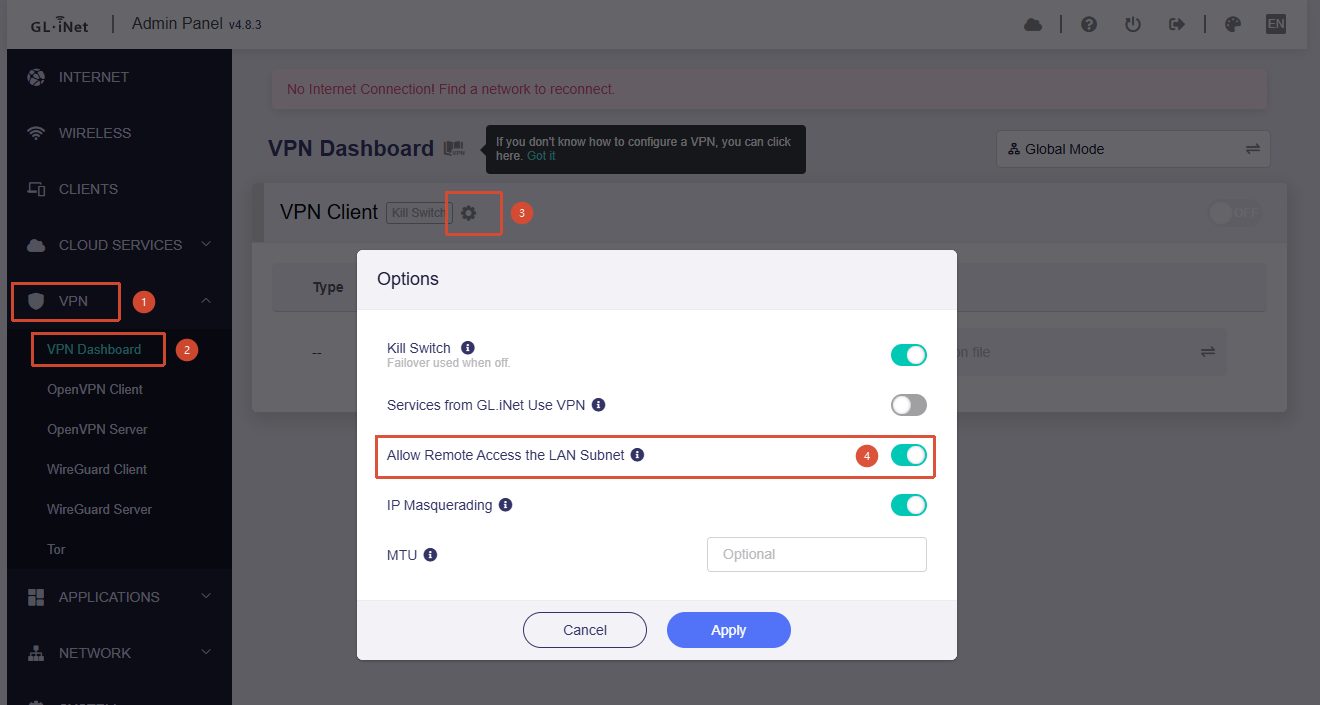
Go to Admin Panel → VPN → VPN Dashboard and verify that Allow Remote Access to the LAN Subnet is enabled.
-
If it is already enabled but the issue still persists, could you please follow the guide below and share your device with us via GoodCloud so we can investigate it remotely?
Technical Support via GoodCloud - GL.iNet Router Docs 4
Kindly send us the router's MAC address and admin password via private message so that we can access it.