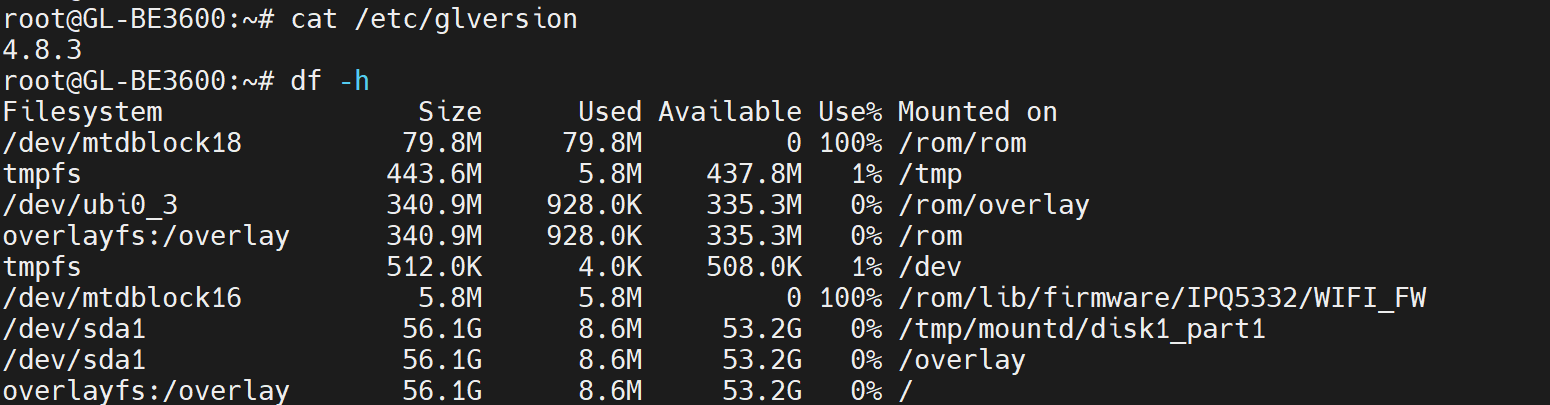
I have been trying to get Extroot to work on a Slate 7 router running 4.8.1(newest firmware as of this writing).
It seems as if the boot order in the GL.iNet custom kernel does not allow this to work.
I am using the following config
root@GL-BE3600:~# uci show fstab
fstab.@global[0]=global
fstab.@global[0].anon_swap='0'
fstab.@global[0].anon_mount='1'
fstab.@global[0].auto_swap='1'
fstab.@global[0].auto_mount='1'
fstab.@global[0].delay_root='5'
fstab.@global[0].check_fs='0'
fstab.extroot=mount
fstab.extroot.uuid='4d9409af-2236-4d22-996b-c7ecc257609f'
fstab.extroot.target='/overlay'
fstab.extroot.enabled='1'
We can see in the log that it does attempt to mount the extroot but the device is not yet present
Thu Jan 15 16:04:22 2026 user.err kernel: [ 16.421414] block: extroot: cannot find device with UUID 4d9409af-2236-4d22-996b-c7ecc257609f
Later in the boot process we see USB devices are discovered and enumerated
Thu Jan 15 16:04:22 2026 kern.info kernel: [   23.325275] hub 1-0:1.0: USB hub found
Thu Jan 15 16:04:22 2026 kern.info kernel: [   23.330807] hub 1-0:1.0: 1 port detected
Thu Jan 15 16:04:22 2026 kern.info kernel: [   23.336674] xhci-hcd xhci-hcd.0.auto: xHCI Host Controller
Thu Jan 15 16:04:22 2026 kern.info kernel: [   23.338419] xhci-hcd xhci-hcd.0.auto: new USB bus registered, assigned bus number 2
Thu Jan 15 16:04:22 2026 kern.info kernel: [   23.343767] xhci-hcd xhci-hcd.0.auto: Host supports USB 3.0 SuperSpeed
Thu Jan 15 16:04:22 2026 kern.info kernel: [   23.351352] usb usb2: We don't know the algorithms for LPM for this host, disabling LPM.
Thu Jan 15 16:04:22 2026 kern.info kernel: [   23.358477] hub 2-0:1.0: USB hub found
Thu Jan 15 16:04:22 2026 kern.info kernel: [   23.366192] hub 2-0:1.0: 1 port detected
Thu Jan 15 16:04:22 2026 kern.info kernel: [   23.778949] scsi host0: uas
Thu Jan 15 16:04:22 2026 kern.notice kernel: [   23.786425] scsi 0:0:0:0: Direct-Access      USB      SanDisk 3.2Gen1 1.00 PQ: 0 ANSI: 7
Thu Jan 15 16:04:22 2026 kern.notice kernel: [   23.791230] sd 0:0:0:0: [sda] 240328704 512-byte logical blocks: (123 GB/115 GiB)
Thu Jan 15 16:04:22 2026 kern.notice kernel: [   23.796351] sd 0:0:0:0: [sda] Write Protect is off
Thu Jan 15 16:04:22 2026 kern.debug kernel: [   23.803329] sd 0:0:0:0: [sda] Mode Sense: 43 00 00 00
Thu Jan 15 16:04:22 2026 kern.notice kernel: [   23.803771] sd 0:0:0:0: [sda] Write cache: enabled, read cache: enabled, doesn't support DPO or FUA
Thu Jan 15 16:04:22 2026 kern.info kernel: [   23.823137]  sda: sda1
If we try to increase delay_root to 20 to give more time for hardware to be detected it does not help
Thu Jan 15 16:08:50 2026 user.err kernel: [   31.494880] block: extroot: cannot find device with UUID 4d9409af-2236-4d22-996b-c7ecc257609f
...
Thu Jan 15 16:08:50 2026 kern.info kernel: [   38.305970] hub 1-0:1.0: USB hub found
Thu Jan 15 16:08:50 2026 kern.info kernel: [   38.312894] hub 1-0:1.0: 1 port detected
Thu Jan 15 16:08:50 2026 kern.info kernel: [   38.338734] hub 2-0:1.0: USB hub found
Thu Jan 15 16:08:50 2026 kern.info kernel: [   38.346505] hub 2-0:1.0: 1 port detected
...
Thu Jan 15 16:08:50 2026 kern.info kernel: [   38.777910] scsi host0: uas
Thu Jan 15 16:08:50 2026 kern.notice kernel: [   38.779842] scsi 0:0:0:0: Direct-Access      USB      SanDisk 3.2Gen1 1.00 PQ: 0 ANSI: 7
Thu Jan 15 16:08:50 2026 kern.notice kernel: [   38.783827] sd 0:0:0:0: [sda] 240328704 512-byte logical blocks: (123 GB/115 GiB)
Thu Jan 15 16:08:50 2026 kern.notice kernel: [   38.788870] sd 0:0:0:0: [sda] Write Protect is off
Thu Jan 15 16:08:50 2026 kern.debug kernel: [   38.795597] sd 0:0:0:0: [sda] Mode Sense: 43 00 00 00
Thu Jan 15 16:08:50 2026 kern.notice kernel: [   38.796102] sd 0:0:0:0: [sda] Write cache: enabled, read cache: enabled, doesn't support DPO or FUA
Thu Jan 15 16:08:50 2026 kern.info kernel: [   38.816670]  sda: sda1
Thu Jan 15 16:08:50 2026 kern.notice kernel: [   38.818662] sd 0:0:0:0: [sda] Attached SCSI removable disk
All we have done is push back the boot process but the GL.iNet custom kernel does not attempt to discover USB hardware till after extroot fails.
I have been using this process for many years and this still works as expected in the vanilla open source builds of openWRT.
Does GL.iNet intend to fix this so the boot order permits using external fs as the overlay root?
Thank you.