I have set up multiple wireguard connection profiles as failover which is supported in fw 4.9.0, but it never works. I just had another wg server problem but the failover didnt work and I had to manually switch servers.
it stayed on the server even no internet was working anymore for a minute or so.
either the test threshold is too low, or the fail over doesnt work at all. please give option to lower the test interval to some own timer or change it to something like 20 seconds or so sending out 3 pings and if it doesnt work change servers
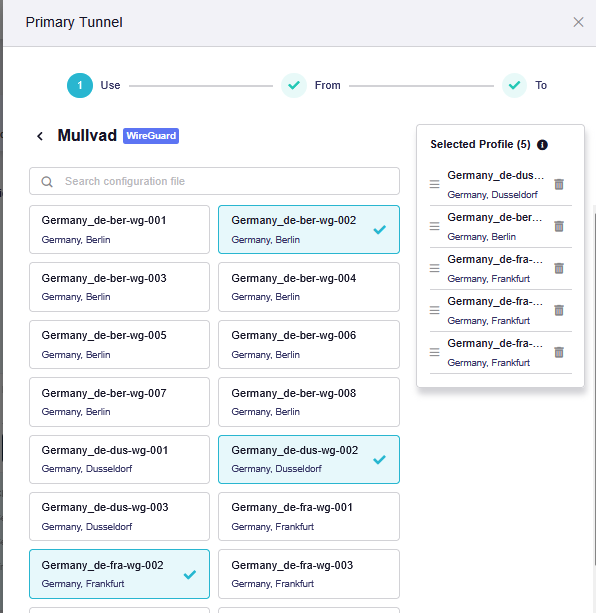
In firmware v4.9.0, when multiple profiles are selected within the same VPN tunnel, the router monitors the currently active profile. When the current profile is detected as failed, the tunnel should automatically try the next profile in the list.
Could you please check the following when the issue occurs?
What happened to the WireGuard server or connection when the issue occurred? What status did the tunnel show on the VPN Dashboard—Connected or Connecting?
Did the tunnel remain on the same profile, or did it automatically try the next profile in the list? Did Internet access recover immediately only after you manually selected the next profile?
If the tunnel still showed Connected , was Internet access completely unavailable or intermittent?
If possible, could you please also provide a screenshot of the VPN Dashboard and the VPN connection log while the issue is occurring?
We have noted your suggestion to make the detection interval and failure threshold configurable and will forward it for further evaluation.
It still shows connected but on the clients connections breaks down, either partially like huge paket loss, or totally for a while. It happenes every few days randomly. I just notice it when I am working on my client. When it happens I instantly go on my Brume 3 login and look, but it shows still green connected and it wont switch the profile.
I have also AdGuard Home enabled and have a suspicion, it might have something to do with it. Because sometimes, not sure if 100%, DNS lockup breaks down on the clients and when I look onto the Brume I still can ping hosts without VPN but not on the clients anymore.
I have this issue with randomly AdGuard Home lockups not working through the VPN since months too. I selected parallel lockups but that didnt help it seems.
The VPN connection is still showing connected since a week or so even I had multiple little connection drops in that time window, the logs never show any useful informations at all, not even connection infos or how long the connection is on
Also that you need to configure a 2nd VPN to use VPN cascading is somehow stupid, it doesnt seem to properly use the main VPN for example, and you always need to disconnect/connect both to switch. That should be changed too in the future.
From the screenshot, both WGServerCascading and Primary Tunnel are currently using the same Mullvad profile and server.
The difference is their traffic source: WGServerCascading appears to apply to clients connected through the VPN Server, while Primary Tunnel applies to All Clients.
Could you please confirm whether the affected clients are local LAN clients or remote clients connected to the Brume 3 VPN Server?
Since the VPN remains shown as Connected and you mentioned that DNS resolution stops working, could you please check whether the issue is related to AdGuard Home or its upstream DNS connections.
Can the client ping a public IP address, such as 1.1.1.1 ?
Can the client resolve and access domain names?
When the issue occurs again, please go to AdGuard Home , run Test upstreams
a minute later the connection worked again and it showed
but Glinet web interface always showed connected to VPN and didnt fail over, but clients didnt work anymore during the time.
I have a suspicion that Adguard randomly stops working even I have multiple DNS set up and parallel requests active, it somehow totally breaks down for these short period of times. Either this is a bug in Adguard, or the VPN for real stopped working, but then the failover didnt work. What is the testing time window for the current implementation of the fail over? Maybe it is too short?
I will try to quickly go into SSH and do a ping test of 1.1.1.1, also on clients and also host resolv. I dont have in my hands when it happenes next so it could be a while.
Could it also be that 1.1.1.1 randomly blocks Mullvad traffic? I have a lot of Cloudfare blocks on my clients with lots of Mullvad servers. But the DNS shouldnt block as I read into it no matter what. Also I have 3 DNS set up in Adguard:
tls://94.140.14.140
tls://9.9.9.9
tls://1.1.1.1
with parallel request active. I set it to parallel because I wanted to see if that helps anything, but it didnt.
No it is my main laptop I am using 99% of the time at home, connected via LAN to Brume 3. And randomly since months, it stops working and I have these issues.
I did this because of the change of the Dashboard with the fw change. Did I do it right? I just wanted to set up wireguard server cascading, but it is a bit counterintuitive set it up like this with the new way the new Dashboard works.
If stop the main tunnel, it still shows WGServerCascading “connected”. This makes zero sense! I dont want 2 connections, and also how does it first show the same one, but if you disconnect primary, it still shows primary on with WGServerCascading ?
The web documentation is also not properly changed for this and doesnt help at all how to properly set it up:
Even under fw 4.8 and higher it doesnt show the new web interface and how to set up wg server cascading properly next to main vpn
Thank you for the additional information and screenshots.
Regarding AdGuard Home, the screenshot confirms that AdGuard Home could not use tls://9.9.9.9:853 at that moment.
However, Parallel requests sends each DNS query to all configured upstream servers and uses the first valid response, so one unavailable upstream alone should not normally cause DNS to stop completely.
To rule out an upstream configuration issue, could you please change the mode to Load-balancing and test one official DoT hostname at a time:
If the issue occurs again, please also check whether the affected client can ping 1.1.1.1 .
If the IP is reachable but domains cannot be resolved, the issue is related to DNS; if the IP is also unreachable, we will need to investigate the VPN data path.
Regarding VPN Cascading, in firmware 4.9, All Clients already includes clients connected to the router’s WireGuard or OpenVPN Server.
If both local clients and VPN Server clients use the same Mullvad connection, you need one Primary Tunnel configured as From: All Clients and To: All Targets .
The separate WGServerCascading tunnel is an independent VPN instance, which is why it remains connected after Primary Tunnel is disconnected.
A separate cascading tunnel is required if VPN Server clients need to use a different VPN Profile or policy from local clients.
I had another issue around 2 hours ago. Where suddenly traffic broke down again on my client. I could ping 1.1.1.1 but also a domain like cnn.com fine but suddenly no traffic to twitch.tv worked anymore inside Edge, where it still worked in Firefox and other clients. The weird thing was, opening a InPrivate window in Edge twitch.tv loaded, but in normal window it didnt work anymore. Clearing all cookies and data didnt help, restarting Edge didnt help. Changing the Wireguard server helped and then it worked again fine in Edge. I have no explenation for this. Maybe the socket was somehow broken and bound to twitch.tv + edge + NAT on the router not sure.
The latest Twitch issue appears to be different from the previous complete connection loss. This currently points more towards the normal Edge profile, an extension, or a cached browser connection.
If it happens again, please do not switch the WireGuard server immediately.
Could you please take a screenshot of the complete Edge error page, and run the following command in PowerShell:
Test-NetConnection www.twitch.tv -Port 443
Please also temporarily disable any Edge extensions that may affect website or network traffic, such as ad-blocking, privacy, security, proxy, VPN, or DNS extensions, and test Twitch again.
If the issue remains, please try clearing the Edge host cache and socket pools and test Twitch again:
Open edge://net-internals/#dns and click Clear host cache .
Open edge://net-internals/#sockets and click Flush socket pools .
These operations do not delete cookies, passwords, or browsing history, but flushing the socket pools may interrupt open pages, streams, or downloads. Please save any unsent form data and pause active downloads before performing them.