Use case
I use Policy Mode to run two NordVPN tunnels simultaneously with different countries, bound to different networks… main network exits in the US, guest network exits in Japan. This works well and was noticeably easier to set up than the equivalent on my ASUS travel router.
The limit I’ve run into is that there are only three fixed network slots: Main, Guest, and IoT. Two are now committed to VPN exits, which leaves one. I’d like a third exit country, plus a no-VPN passthrough network for sites that reject VPN address ranges (common with Japanese payment and government sites).
Request
Allow users to create additional networks beyond the three fixed slots, each selectable as a source in Policy Mode.
Why this seems achievable
The VPN side already supports this — Policy Mode matches on connection type, and v4.8 rebuilt the VPN subsystem for multiple simultaneous tunnels. The constraint is on the wireless/network side, where the three slots are fixed. Generalising those into N user-defined networks would let the existing Policy Mode capability be used fully.
I’m aware this is possible via LuCI, but networks created there aren’t visible to the GL.iNet UI, so they can’t be used as Policy Mode sources — which is the part that matters.
Related
This overlaps with the existing request for per-network ACL policies across Primary/Guest/IoT — both point at the same underlying limitation of a fixed three-network model.
Thanks for the work on v4.8/v4.9 — the NordVPN access token integration in particular is a big improvement over manual config handling.
Thanks for the pointer — that Subnet page is exactly the direction I was hoping for. Custom VLAN networks with their own gateway, DHCP, AP isolation and WAN access control per subnet would solve the three-slot ceiling entirely.
One thing I noticed: the page documents creating the subnets but doesn't mention the VPN side at all. My use case depends on being able to select a new subnet as a source in VPN Policy Mode, the way Guest Network can be selected today. If that plumbing isn't there, extra subnets don't help me. Does anyone know whether VLAN networks created on the Subnet page appear as selectable sources in Policy Mode?
On your Blink issue — I think the same feature helps you, for a slightly different reason. Your problem is that AP Isolation has to be OFF so the camera can reach its sync module, but you presumably still want the cameras separated from your main network. Those are two different isolation mechanisms that currently get conflated: AP Isolation controls whether devices on the same network can see each other, while subnet separation controls whether they can see the other networks. Right now you're forced to choose.
With custom subnets you could put a dedicated camera subnet in place, leave AP Isolation off inside it so the camera and sync module talk normally, and rely on it being its own subnet to keep it away from your main LAN. Best of both, rather than trading one against the other.
Good to know 4.10 is where this lands. Not before my trip, but worth waiting for.
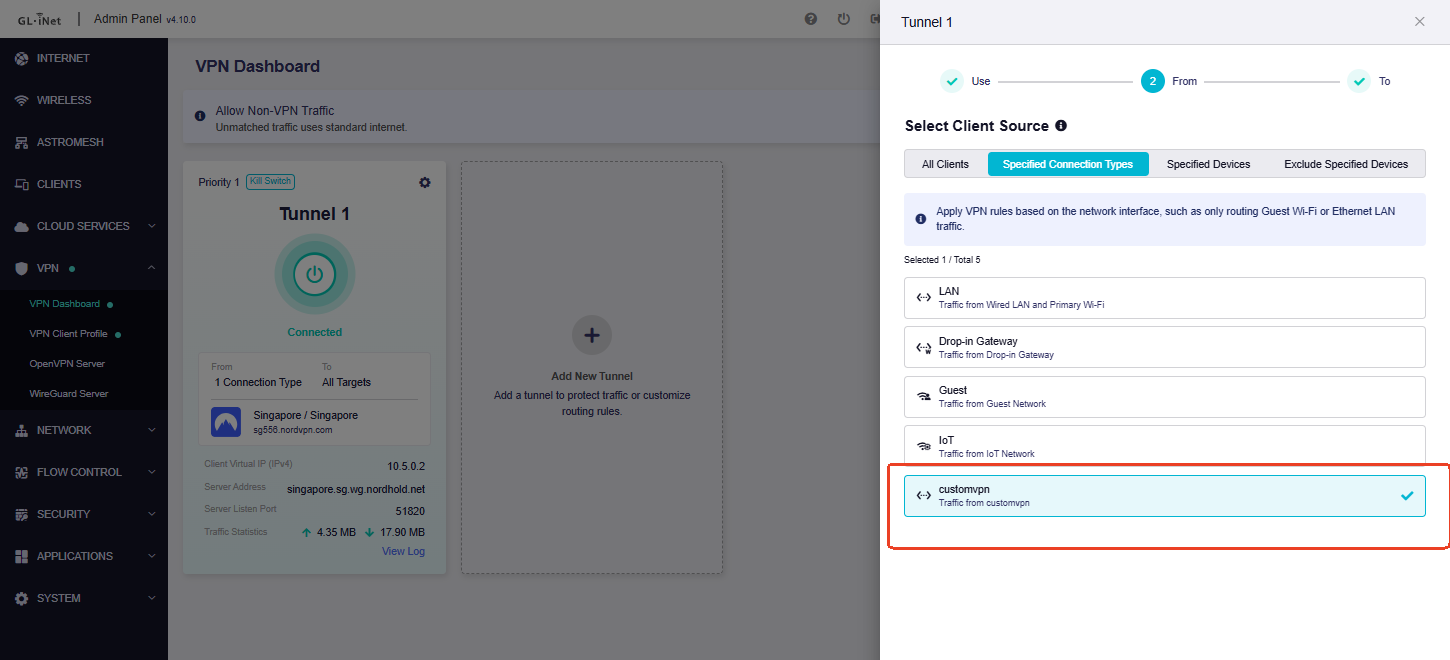
A custom network can be used as a separate source in VPN Policy Mode and assigned to a different VPN tunnel.
For the current v4.9.x firmware on Slate 7 (GL-BE3600), you can also create an additional Wi-Fi network manually.
The following example creates a new independent network named customvpn , with both a 2.4 GHz and 5 GHz SSID, and makes this network available as a source in VPN Policy Mode.
Before applying the configuration, please first make sure wifi2g2 , wifi5g2 , wlan05 , and wlan15 are not already being used:
uci show wireless | grep -E "wifi2g2|wifi5g2|wlan05|wlan15"
If there is no output, you can use the following configuration. Please replace YOUR_WIFI_PASSWORD with your preferred Wi-Fi password.
# Create the custom network
uci set network.br_customvpn='device'
uci set network.br_customvpn.type='bridge'
uci set network.br_customvpn.name='br-customvpn'

uci set network.customvpn='interface'
uci set network.customvpn.proto='static'
uci set network.customvpn.device='br-customvpn'
uci set network.customvpn.ipaddr='192.168.20.1'
uci set network.customvpn.netmask='255.255.255.0'

# DHCP server
uci set dhcp.customvpn='dhcp'
uci set dhcp.customvpn.interface='customvpn'
uci set dhcp.customvpn.start='100'
uci set dhcp.customvpn.limit='150'
uci set dhcp.customvpn.leasetime='12h'

# Firewall zone
uci set firewall.customvpn='zone'
uci set firewall.customvpn.name='customvpn'
uci set firewall.customvpn.input='REJECT'
uci set firewall.customvpn.output='ACCEPT'
uci set firewall.customvpn.forward='REJECT'
uci add_list firewall.customvpn.network='customvpn'

# Allow the custom network to access WAN
uci set firewall.customvpn_wan='forwarding'
uci set firewall.customvpn_wan.src='customvpn'
uci set firewall.customvpn_wan.dest='wan'

# Allow DHCP
uci set firewall.customvpn_dhcp='rule'
uci set firewall.customvpn_dhcp.name='Allow-CustomVPN-DHCP'
uci set firewall.customvpn_dhcp.src='customvpn'
uci set firewall.customvpn_dhcp.proto='udp'
uci set firewall.customvpn_dhcp.dest_port='67-68'
uci set firewall.customvpn_dhcp.target='ACCEPT'

# Allow DNS
uci set firewall.customvpn_dns='rule'
uci set firewall.customvpn_dns.name='Allow-CustomVPN-DNS'
uci set firewall.customvpn_dns.src='customvpn'
uci add_list firewall.customvpn_dns.proto='tcp'
uci add_list firewall.customvpn_dns.proto='udp'
uci set firewall.customvpn_dns.dest_port='53'
uci set firewall.customvpn_dns.target='ACCEPT'

# Create an additional 5 GHz SSID
uci set wireless.wifi5g2='wifi-iface'
uci set wireless.wifi5g2.device='wifi1'
uci set wireless.wifi5g2.network='customvpn'
uci set wireless.wifi5g2.mode='ap'
uci set wireless.wifi5g2.ssid='Custom-VPN-5G'
uci set wireless.wifi5g2.encryption='psk2+ccmp'
uci set wireless.wifi5g2.key='YOUR_WIFI_PASSWORD'
uci set wireless.wifi5g2.wds='1'
uci set wireless.wifi5g2.isolate='0'
uci set wireless.wifi5g2.hidden='0'
uci set wireless.wifi5g2.ifname='wlan15'
uci set wireless.wifi5g2.ieee80211k='1'
uci set wireless.wifi5g2.bss_transition='1'
uci set wireless.wifi5g2.sae='0'
uci set wireless.wifi5g2.disabled='0'

# Create an additional 2.4 GHz SSID
uci set wireless.wifi2g2='wifi-iface'
uci set wireless.wifi2g2.device='wifi0'
uci set wireless.wifi2g2.network='customvpn'
uci set wireless.wifi2g2.mode='ap'
uci set wireless.wifi2g2.ssid='Custom-VPN-2.4G'
uci set wireless.wifi2g2.encryption='psk2+ccmp'
uci set wireless.wifi2g2.key='YOUR_WIFI_PASSWORD'
uci set wireless.wifi2g2.wds='1'
uci set wireless.wifi2g2.isolate='0'
uci set wireless.wifi2g2.hidden='0'
uci set wireless.wifi2g2.ifname='wlan05'
uci set wireless.wifi2g2.ieee80211k='1'
uci set wireless.wifi2g2.bss_transition='1'
uci set wireless.wifi2g2.sae='0'
uci set wireless.wifi2g2.disabled='0'

# Add the custom network as a VPN Policy source
uci add_list route_policy.global.append_source_if='customvpn'

# Save the configuration
uci commit network
uci commit dhcp
uci commit firewall
uci commit wireless
uci commit route_policy

reboot
This configuration creates an independent 192.168.20.0/24 network, with the router using 192.168.20.1 as its gateway and DHCP server. Both Custom-VPN-2.4G and Custom-VPN-5G are attached to the same customvpn network, so devices connected to either SSID will receive a 192.168.20.x address.
After the router reboots, go to: VPN Dashboard → Add/Edit Tunnel → From → Specified Connection Types
Hi Charles, thank you, this is a genuinely thorough answer.
I’m taking a trip next week to Japan for about 3 weeks with a working config, so I’ll hold off on running this until I’m back rather than rebuilding my networks now. But it’s exactly what I needed.
One follow-up: when the Subnet page arrives on the Slate 7 in v4.10, will networks created there appear as Policy Mode sources automatically, without the CLI step?