I would like some advice on enabling smoother Wi-Fi roaming in the following setup:
Brume 3 as my main router.
Flint 2 connected to the Brume 3 via Ethernet, running in Access Point mode.
Beryl AX also connected to the Brume 3 via Ethernet, running in Access Point mode.
Both access points provide Wi-Fi access and wired Ethernet connectivity to several devices.
Both access points provide Wi-Fi with the same SSID for 2.4 and 5Ghz
The Flint 2 and Beryl AX are both running firmware 4.11. My understanding was that this release introduced mesh support, but I cannot find any mesh settings when these devices are in Access Point mode.
My main goal is smoother roaming between the two access points as I move around the house. Since both APs already have wired connections to the main router, I would like to keep Ethernet as their backhaul.
I understand that mesh and fast roaming are separate features, so I would appreciate clarification on the following:
Is mesh supported in firmware 4.11 on these specific models, and is it available in Access Point mode? Can a Flint 2 and a Beryl AX participate in the same mesh with wired backhaul?
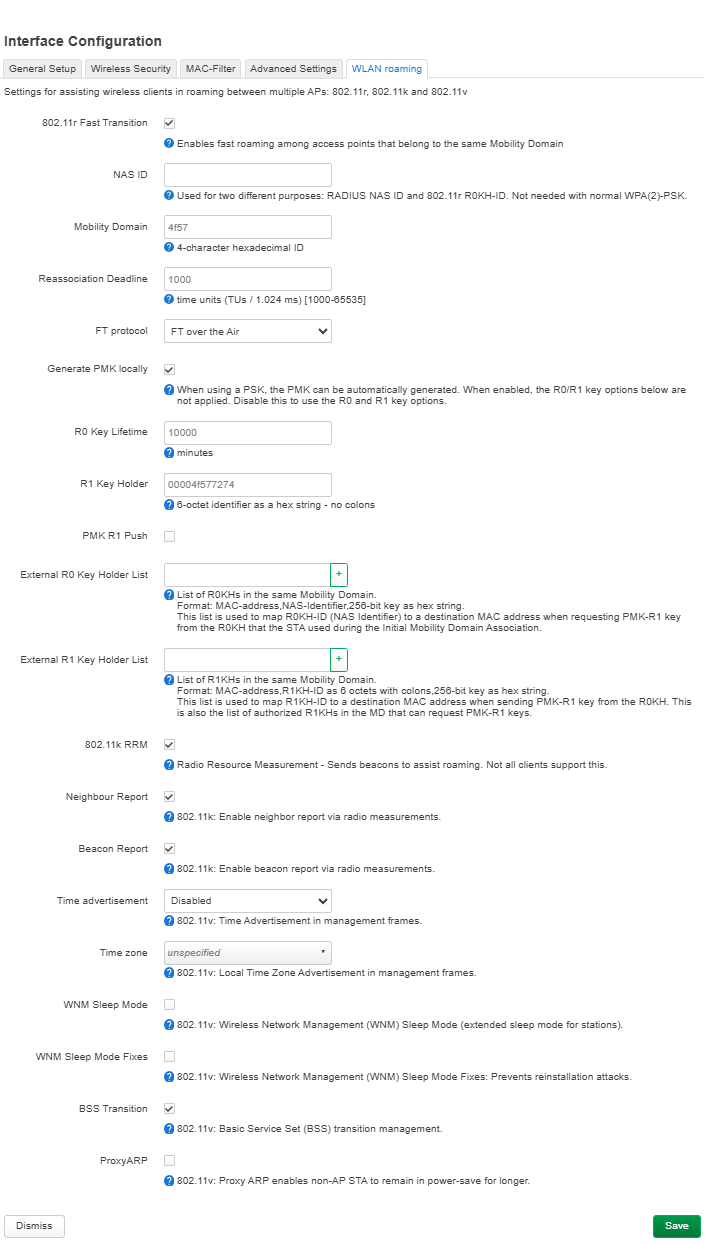
If mesh is unavailable in AP mode, can 802.11k/v/r, particularly 802.11r Fast Transition, be enabled independently to improve roaming?
Is there a supported way to configure this through the GL.iNet interface or LuCI? If manual configuration is required, could you provide the recommended settings and explain whether they persist across reboots and firmware updates?
What configuration do you recommend for this topology, including SSID, security settings, channels, and any roaming-related settings that need to match between the two APs?
If this is currently unsupported, are there plans to add mesh or fast-roaming controls to Access Point mode?
I would like to keep the Brume 3 as the main router.
The Mesh menu is absent because the current GL.iNet EasyMesh implementation requires the Mesh Main Router to operate in Router mode. Mesh nodes act as managed bridges/APs and can use Ethernet backhaul, but a Mesh Main Router operating in AP/bridge mode behind the Brume 3 is not currently supported. Flint 2 and Beryl AX received Mesh in the v4.11 firmware line, but your requested all-AP topology cannot use it. GL.iNet staff have confirmed that AP-mode Mesh is under discussion, with no committed version or ETA: Mesh Network in AP mode using firmware ver 4.11.
For your present topology, keep both devices in AP mode and configure:
The same SSID, passphrase, and security mode on both APs.
Fixed, different non-overlapping channels—use 20 MHz and channels 1, 6, or 11 on 2.4 GHz; select separate clean channels on 5 GHz.
Similar channel widths on each AP and enough physical overlap for clients to discover the next AP, without excessive transmit power.
WPA2-PSK/AES for maximum client compatibility, or identical WPA2/WPA3 settings on both if all clients support them.
This permits ordinary client-controlled roaming, although clients may remain attached to a weaker AP longer than desired. The official GL.iNet web interface does not independently expose 802.11r configuration. Manual 802.11r configuration through LuCI is not a supported configuration for this firmware/model combination, and its persistence through GL.iNet GUI changes or firmware upgrades is not guaranteed. This feature is not officially supported by GL.iNet. Any guidance is provided on a best-effort basis, and GL.iNet Technical Support may not be able to troubleshoot or maintain this configuration. If retaining the Brume 3 as the gateway is mandatory, the matched AP configuration above is currently the supported approach; otherwise, using one compatible Wi-Fi router as the Mesh Main Router in Router mode would be required for GL.iNet Mesh and wired backhaul.
This reply was generated by AI. Please verify its accuracy.
GL.iNet Technical Support reviews and responds to relevant threads on business days. Please allow time for a staff response.
Thank you for sharing your network setup and requirements.
The AI response has already covered the current Mesh limitations in AP mode and the recommended Wi-Fi settings for roaming between wired access points.
You can keep your current v4.11 firmware and follow those recommendations to improve roaming performance.
For additional guidance on channel selection, transmit power, and Wi-Fi coverage, please refer to our documentation:
Alternatively, if you want to use 802.11r Fast Transition, both Flint 2 and Beryl AX support it with GL.iNet's official op24 firmware.
You can find the corresponding firmware here:
After installing the compatible firmware, you can enable it through LuCI → Network → Wireless → Edit → WLAN Roaming.