Hi
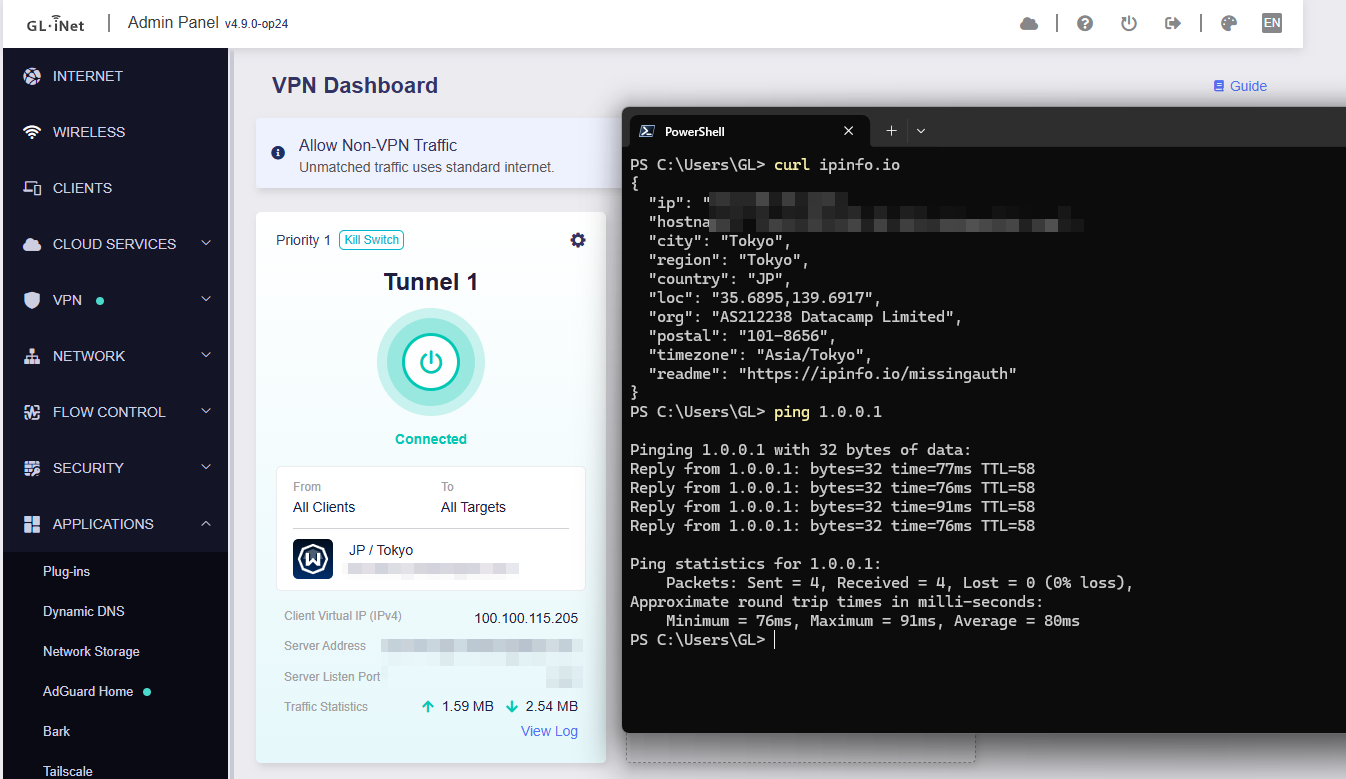
We tested locally using MT6000 v4.9.0-op24 beta2 (released on 2026-06-01). With a similar configuration (DPI + AdGuard Home + Windscribe VPN client), everything appears to be working normally, and the VPN can operate correctly:
Please
Try to upgrade to this version and check whether the issue still persists.
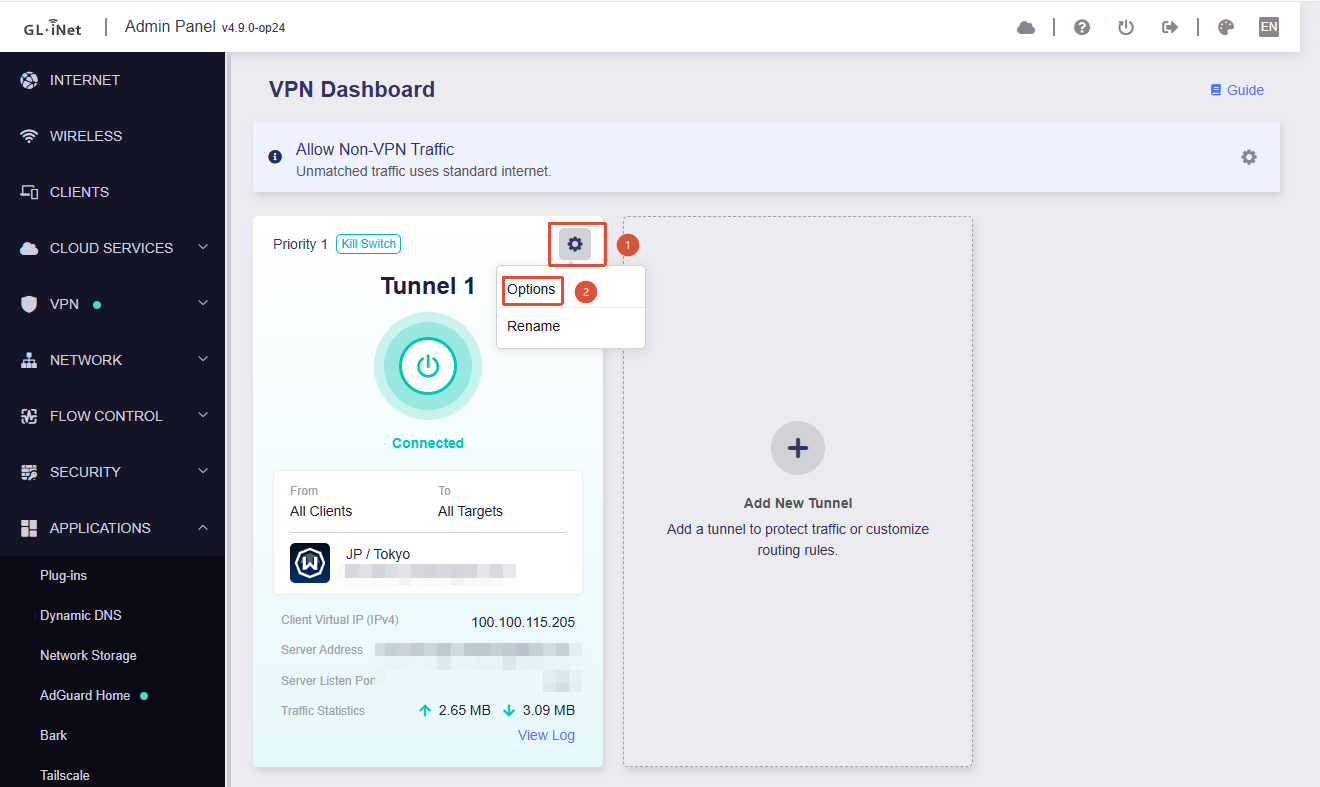
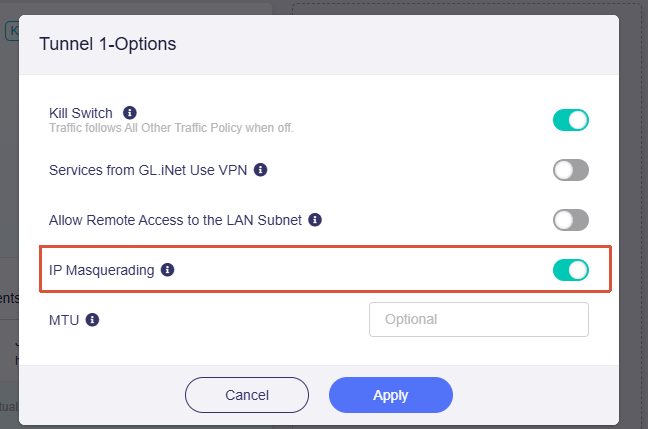
Make sure that IP Masquerading for the corresponding tunnel is enabled :
Has anyone else noticed that in op-24 v4.9.0, IP masquerading of the wireguard tunnel is not working (fresh install without keeping settings)? I have DPI inspection and Adguard both running as well as Windscribe VPN client if that makes a difference although IP masquarading was fine with these features all on the op-21 version of the firmware on Flint-2! Everything else that I have tried seem to be working fine so far.
3 Likes
Hi
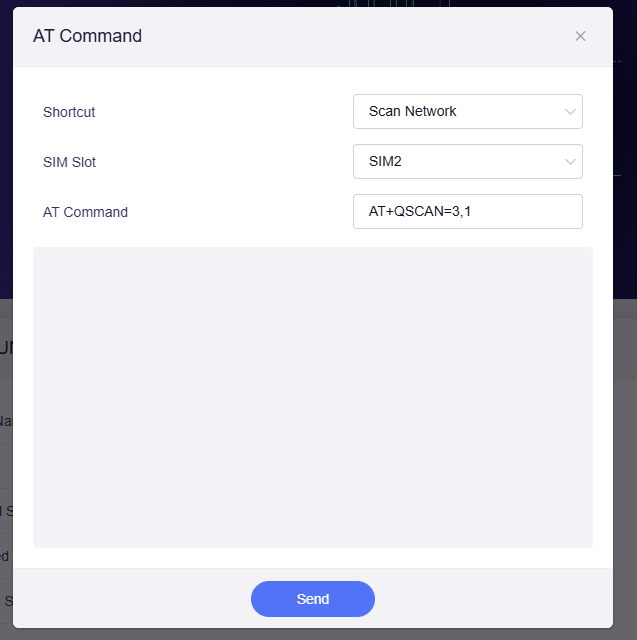
I think you can directly edit the file to customize the AT command list.
The reference steps are as follows:
Copy and decompress the corresponding file:
cp /www/views/gl-sdk4-ui-internet.common.js.gz ./
gzip -d gl-sdk4-ui-internet.common.js.gz
Use SCP or other tools to transfer the file to your local machine for formatting and editing.
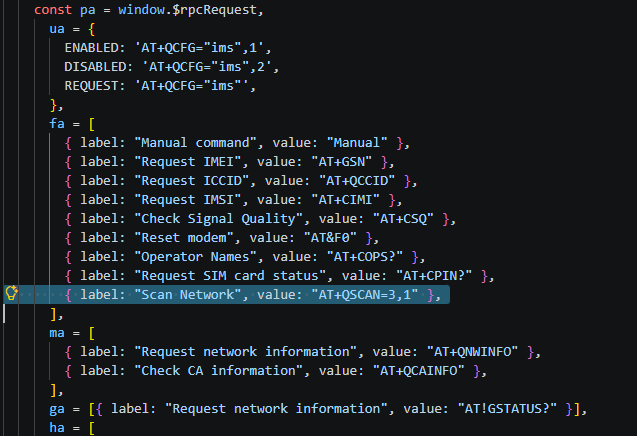
Locate the corresponding definition list and modify it:
Transfer the modified file back to the router.
Compress it and place it back into the source directory:
gzip -c gl-sdk4-ui-internet.common.js > gl-sdk4-ui-internet.common.js.gz
cp gl-sdk4-ui-internet.common.js.gz /www/views/
chmod 664 /www/views/gl-sdk4-ui-internet.common.js.gz
Result:
1 Like
Hi
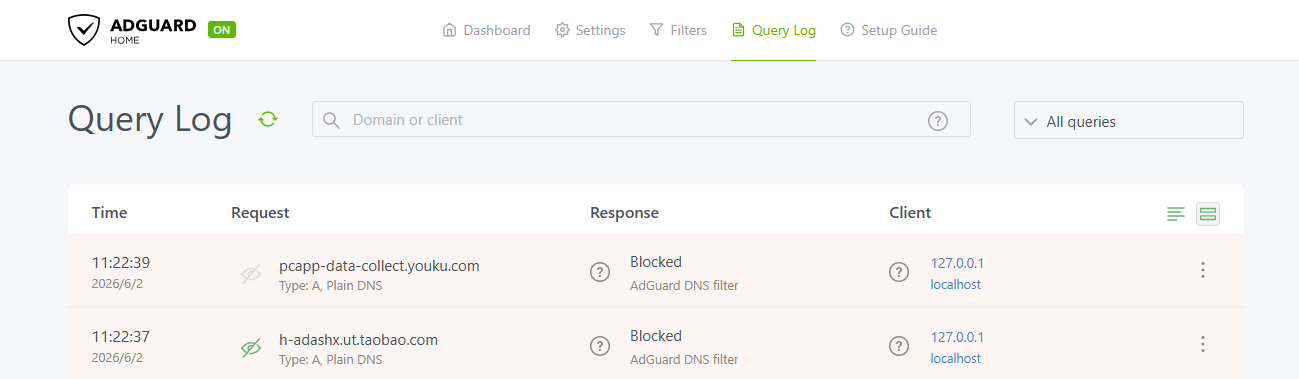
If “AdGuard Home Handle Client Requests” is not enabled:
LAN DNS requests will first be handled by the router’s dnsmasq instance
dnsmasq will then forward the requests to AdGuard Home for processing
As a result, AdGuard Home will not be able to see which client initiated the request (e.g. 192.168.8.0/24), and it will only see requests coming from the local dnsmasq process (127.0.0.1).
When it is enabled:
LAN DNS requests can be sent directly to AdGuard Home
Therefore, AdGuard Home is able to see the actual client IP addresses
Hi
@gnirtS @dgsound
Thank you for the suggestion to allow configuring SQM Download to “0” in order to disable downstream traffic shaping.
We will further discuss this with the product team.
1 Like
EBE
June 1, 2026, 6:05pm
403
I’ve been having multiple issues with Surfshark Wireguard and Adguard home enabled.
I had updated Adguard home to the latest, then the fix after the bugged version, but since the screw up, decided to revert back to the version that was on by default to avoid issues whilst troubleshooting.
I can’t get these working together. I will either get blocks on normal sites until one of the other is disabled. Other times I have no access to apps and other times ads where I had none on some apps.
I think it would be really helpful to have a CLEAR, concise guide for the basic user on how to set up a FLint 2 with both a Wireguard VPN and Adguard home. By this, I mean, what should go in the upstream DNS servers, the Bootstrap Servers, what, if anything must be changed in the VPN client card’s DNS settings (I thing you mentioned this in a reply), which settings under adguard to change, as it’s very confusing. A simple step by step guide I’m sure would help people and prevent a lot of posts.
Today I lost everything again and a complete crash whilst trying to get the settings working. I reset the firmware back to 4.9.0 beta 1 with no restoration of settings and manually configured everything again painstakingly.
I have left Adguard home working but have not enabled VPN as I can see this will just repeat the problems. I did also have my USB mounted to save the Adguard logs, but again we found out there were no logs due to the way GL have this set up internally in RAM. So that was aborted and back to writing logs to router flash.
meo
June 1, 2026, 10:02pm
404
on v4.9.0-op24, my time is out of sync, the admin panel has only timezone selection, even the Luci has no NTP configuration, only “Sync with browser” while my other routers on official OpenWrt have options for network time protocol servers, etc…
Here’s the 4.9.x-op24 conversation
4.9.x-op24
1 Like
Why? How do you intend to use it?
Will there be a long-term fix for using PBR and a Roku? I don't want to only use Global mode with AGH.
Hi
A significant increase in memory usage while updating DNS filter lists is expected behavior in AdGuard Home, including the latest v0.107.76 release (see the Github issues below):
opened 01:20AM - 18 Mar 23 UTC
closed 11:34AM - 11 Jul 24 UTC
question
### Prerequisites
- [X] I have checked the [Wiki](https://github.com/AdguardT… eam/AdGuardHome/wiki) and [Discussions](https://github.com/AdguardTeam/AdGuardHome/discussions) and found no answer
- [X] I have searched other issues and found no duplicates
- [X] I want to report a bug and not ask a question
### Operating system type
Linux, OpenWrt
### CPU architecture
AMD64
### Installation
GitHub releases or script from README
### Setup
On a router, DHCP is handled by the router
### AdGuard Home version
v0.108.0-a.466+9f7a582d
### Description
#### What did you do?
Installed AGH on router and set filters to update every 24h.
Filters are saved in /opt (not RAM) trying to use less RAM, also logs are reduced to spare RAM.
#### Expected result
While using around 250MB of RAM for AdGuardHome only, the router usually still has more than 70 MB of free RAM.
AdGuardHome should manage the available RAM to update filters without crashing.
#### Actual result
"top" command shows that AGH is reserving 932 MB when there are 406 MB usable (229% of VSZ).
When comes the time to update filters, AGH tries to allocate 932 MB and then it invokes oom-killer on itself due to lack of free RAM.
#### Screenshots (if applicable)

```
[ 61.700658] AdGuardHome invoked oom-killer: gfp_mask=0x1100dca(GFP_HIGHUSER_MOVABLE|__GFP_ZERO), order=0, oom_score_adj=0
[ 61.700723] CPU: 0 PID: 5074 Comm: AdGuardHome Not tainted 5.15.98 #0
[ 61.710610] Hardware name: Xiaomi AX3600 (DT)
[ 61.717031] Call trace:
[ 61.721365] dump_backtrace+0x0/0x180
[ 61.723627] show_stack+0x18/0x30
[ 61.727445] dump_stack_lvl+0x6c/0x88
[ 61.730743] dump_stack+0x18/0x34
[ 61.734389] dump_header+0x44/0x180
[ 61.737687] oom_kill_process+0x1e0/0x1e4
[ 61.740987] out_of_memory+0x1c8/0x2fc
[ 61.745153] __alloc_pages_slowpath.constprop.0+0x82c/0xa44
[ 61.748803] __alloc_pages+0x210/0x25c
[ 61.754268] alloc_zeroed_user_highpage_movable+0x24/0x30
[ 61.758091] wp_page_copy+0x378/0x88c
[ 61.763556] do_wp_page+0xa0/0x434
[ 61.767200] __handle_mm_fault+0x69c/0xa70
[ 61.770500] handle_mm_fault+0x148/0x1f0
[ 61.774580] do_page_fault+0x14c/0x3e0
[ 61.778660] do_mem_abort+0x44/0xb0
[ 61.782218] el0_da+0x24/0x60
[ 61.785603] el0t_64_sync_handler+0xac/0x114
[ 61.788731] el0t_64_sync+0x184/0x188
[ 61.793138] Mem-Info:
[ 61.796632] active_anon:67573 inactive_anon:42 isolated_anon:0
[ 61.796632] active_file:170 inactive_file:28 isolated_file:0
[ 61.796632] unevictable:0 dirty:0 writeback:0
[ 61.796632] slab_reclaimable:1701 slab_unreclaimable:9055
[ 61.796632] mapped:25 shmem:20 pagetables:362 bounce:0
[ 61.796632] kernel_misc_reclaimable:0
[ 61.796632] free:4878 free_pcp:146 free_cma:0
[ 61.811694] Node 0 active_anon:270292kB inactive_anon:168kB active_file:680kB inactive_file:112kB unevictable:0kB isolated(anon):0kB isolated(file):0kB mapped:100kB dirty:0kB writeback:0kB shmem:80kB writeback_tmp:0kB kernel_stack:2160kB pagetables:1448kB all_unreclaimable? yes
[ 61.835988] DMA free:19512kB min:16384kB low:20480kB high:24576kB reserved_highatomic:0KB active_anon:270276kB inactive_anon:168kB active_file:72kB inactive_file:472kB unevictable:0kB writepending:0kB present:524288kB managed:416628kB mlocked:0kB bounce:0kB free_pcp:584kB local_pcp:256kB free_cma:0kB
[ 61.862645] lowmem_reserve[]: 0 0 0 0
[ 61.884844] DMA: 647*4kB (UME) 421*8kB (UME) 265*16kB (UME) 66*32kB (UME) 19*64kB (UME) 8*128kB (UM) 6*256kB (UME) 2*512kB (UM) 2*1024kB (M) 0*2048kB 0*4096kB = 19156kB
[ 61.888502] 215 total pagecache pages
[ 61.903598] 0 pages in swap cache
[ 61.907176] Swap cache stats: add 0, delete 0, find 0/0
[ 61.910458] Free swap = 0kB
[ 61.915474] Total swap = 0kB
[ 61.918628] 131072 pages RAM
[ 61.921475] 0 pages HighMem/MovableOnly
[ 61.924330] 26915 pages reserved
[ 61.927889] Tasks state (memory values in pages):
[ 61.931372] [ pid ] uid tgid total_vm rss pgtables_bytes swapents oom_score_adj name
[ 61.936003] [ 732] 81 732 344 30 32768 0 0 ubusd
[ 61.944523] [ 733] 0 733 226 9 32768 0 0 askfirst
[ 61.952762] [ 768] 0 768 263 16 28672 0 0 urngd
[ 61.961248] [ 1285] 514 1285 332 21 32768 0 0 logd
[ 61.969307] [ 1345] 0 1345 941 131 32768 0 0 rpcd
[ 61.977477] [ 1802] 0 1802 690 26 40960 0 0 hostapd
[ 61.985547] [ 1803] 0 1803 690 26 40960 0 0 wpa_supplicant
[ 61.993620] [ 1817] 101 1817 780 52 40960 0 0 hostapd
[ 62.002646] [ 1818] 101 1818 760 32 40960 0 0 wpa_supplicant
[ 62.010895] [ 1867] 0 1867 515 52 32768 0 0 netifd
[ 62.019913] [ 2148] 0 2148 405 29 32768 0 0 odhcpd
[ 62.028190] [ 2207] 0 2207 328 13 28672 0 0 crond
[ 62.036421] [ 2273] 0 2273 688 35 32768 0 0 uhttpd
[ 62.044691] [ 3439] 0 3439 276 16 32768 0 0 dropbear
[ 62.052853] [ 3835] 0 3835 690 28 36864 0 0 dnsmasq
[ 62.061444] [ 3845] 453 3845 1179 97 40960 0 0 dnsmasq
[ 62.069628] [ 4645] 0 4645 255774 66712 692224 0 0 AdGuardHome
[ 62.077846] [ 4791] 0 4791 341 24 28672 0 0 sh
[ 62.086503] [ 4915] 0 4915 690 28 40960 0 0 ntpd
[ 62.094493] [ 4937] 123 4937 327 14 32768 0 0 ntpd
[ 62.102745] [ 5095] 0 5095 341 28 28672 0 0 sh
[ 62.110844] [ 5096] 0 5096 327 13 32768 0 0 logger
[ 62.118545] [ 5113] 0 5113 327 9 28672 0 0 sleep
[ 62.126806] oom-kill:constraint=CONSTRAINT_NONE,nodemask=(null),cpuset=/,mems_allowed=0,global_oom,task_memcg=/,task=AdGuardHome,pid=4645,uid=0
[ 62.135075] Out of memory: Killed process 4645 (AdGuardHome) total-vm:1023096kB, anon-rss:266848kB, file-rss:0kB, shmem-rss:0kB, UID:0 pgtables:676kB oom_score_adj:0
[ 95.885732] IPv6: ADDRCONF(NETDEV_CHANGE): phy1-ap0: link becomes ready
[ 95.885960] br-lan: port 5(phy1-ap0) entered blocking state
```
```
PID PPID USER STAT VSZ %VSZ %CPU COMMAND
7479 1 root S 932m 229% 0% /usr/bin/AdGuardHome -c /etc/adguardhome.yaml -w /opt/AdGuardHome -s run --no-check-update
```
#### Additional information
Right now it's running edge build, but it also happens with beta build and with v107.
The problem seems to be AGH trying to blindly allocate 930 MB of RAM when it should instead check how much free RAM there is (more than 70 MB) and manage to update the filters with it.
I suppose 70 MB should be plenty RAM to update any lists.
opened 06:35PM - 13 Mar 26 UTC
waiting for data
### Prerequisites
- [x] I have checked the [Wiki](https://github.com/AdguardTea… m/AdGuardHome/wiki) and [Discussions](https://github.com/AdguardTeam/AdGuardHome/discussions/categories/q-a) and found no answer
- [x] I have searched other issues and found no duplicates
- [x] I want to report a bug and not [ask a question or ask for help](https://github.com/AdguardTeam/AdGuardHome/discussions/categories/q-a)
- [x] I have set up AdGuard Home correctly and [configured clients to use it](https://github.com/AdguardTeam/AdGuardHome/wiki/Clients). (Use the [Discussions](https://github.com/AdguardTeam/AdGuardHome/discussions/categories/q-a) for help with installing and configuring clients.)
### Platform (OS and CPU architecture)
Linux, AMD64 (aka x86_64)
### Installation
Other (please mention in the description)
### Setup
On one machine
### AdGuard Home version
v0.107.73
### Action
High memory and CPY usage during a couple of hours every day. This issue started after upgrading to "v0.107.73".
I have 512mb allocated to AdGuard Home and have never had this issue before the upgrade.
RAM usage is normally around 300mb and for CPU, below 1%
The high usage starts at around 9-10pm (09:00-10:00). I can see small peaks before the upgrade but never to this extent.
<img width="1205" height="719" alt="Image" src="https://github.com/user-attachments/assets/7f82b3dd-165d-4d09-91ff-558a0d08c263" />
Cant find any settings that starts anything daily during that time.
`journalctl` during those hours today (2026-03-13):
```sh
Mar 13 07:38:01 adguard CRON[401]: pam_unix(cron:session): session opened for user root(uid=0) by root(uid=0)
Mar 13 07:38:01 adguard CRON[403]: (root) CMD (cd / && run-parts --report /etc/cron.hourly)
Mar 13 07:38:01 adguard CRON[401]: pam_unix(cron:session): session closed for user root
Mar 13 08:38:01 adguard CRON[406]: pam_unix(cron:session): session opened for user root(uid=0) by root(uid=0)
Mar 13 08:38:01 adguard CRON[408]: (root) CMD (cd / && run-parts --report /etc/cron.hourly)
Mar 13 08:38:01 adguard CRON[406]: pam_unix(cron:session): session closed for user root
Mar 13 09:38:01 adguard CRON[412]: pam_unix(cron:session): session opened for user root(uid=0) by root(uid=0)
Mar 13 09:38:01 adguard CRON[414]: (root) CMD (cd / && run-parts --report /etc/cron.hourly)
Mar 13 09:38:01 adguard CRON[412]: pam_unix(cron:session): session closed for user root
Mar 13 10:42:47 adguard postfix/master[264]: warning: unix_trigger_event: read timeout for service public/pickup
Mar 13 10:43:53 adguard postfix/master[264]: warning: unix_trigger_event: read timeout for service public/pickup
Mar 13 10:45:11 adguard postfix/master[264]: warning: unix_trigger_event: read timeout for service public/pickup
Mar 13 10:46:23 adguard postfix/master[264]: warning: unix_trigger_event: read timeout for service public/pickup
Mar 13 10:47:19 adguard postfix/master[264]: warning: unix_trigger_event: read timeout for service public/pickup
Mar 13 10:48:30 adguard postfix/master[264]: warning: unix_trigger_event: read timeout for service public/pickup
Mar 13 10:49:32 adguard postfix/master[264]: warning: unix_trigger_event: read timeout for service public/pickup
Mar 13 10:50:47 adguard postfix/master[264]: warning: unix_trigger_event: read timeout for service public/pickup
Mar 13 10:51:44 adguard postfix/master[264]: warning: unix_trigger_event: read timeout for service public/pickup
Mar 13 10:52:56 adguard postfix/master[264]: warning: unix_trigger_event: read timeout for service public/pickup
Mar 13 10:54:18 adguard postfix/master[264]: warning: unix_trigger_event: read timeout for service public/pickup
Mar 13 10:55:00 adguard postfix/master[264]: warning: unix_trigger_event: read timeout for service public/pickup
Mar 13 10:56:38 adguard postfix/master[264]: warning: unix_trigger_event: read timeout for service public/pickup
Mar 13 10:57:16 adguard postfix/master[264]: warning: unix_trigger_event: read timeout for service public/pickup
Mar 13 10:58:38 adguard postfix/master[264]: warning: unix_trigger_event: read timeout for service public/pickup
Mar 13 10:59:37 adguard postfix/master[264]: warning: unix_trigger_event: read timeout for service public/pickup
Mar 13 11:00:52 adguard postfix/master[264]: warning: unix_trigger_event: read timeout for service public/pickup
Mar 13 11:01:57 adguard postfix/master[264]: warning: unix_trigger_event: read timeout for service public/pickup
Mar 13 11:02:50 adguard postfix/master[264]: warning: unix_trigger_event: read timeout for service public/pickup
Mar 13 11:03:53 adguard postfix/master[264]: warning: unix_trigger_event: read timeout for service public/pickup
Mar 13 11:05:09 adguard postfix/master[264]: warning: unix_trigger_event: read timeout for service public/pickup
Mar 13 11:06:03 adguard postfix/master[264]: warning: unix_trigger_event: read timeout for service public/pickup
Mar 13 11:07:06 adguard postfix/master[264]: warning: unix_trigger_event: read timeout for service public/pickup
Mar 13 11:08:18 adguard postfix/master[264]: warning: unix_trigger_event: read timeout for service public/pickup
Mar 13 11:09:24 adguard postfix/master[264]: warning: unix_trigger_event: read timeout for service public/pickup
Mar 13 11:11:11 adguard postfix/master[264]: warning: unix_trigger_event: read timeout for service public/pickup
Mar 13 11:11:37 adguard postfix/master[264]: warning: unix_trigger_event: read timeout for service public/pickup
Mar 13 11:13:58 adguard postfix/master[264]: warning: unix_trigger_event: read timeout for service public/pickup
Mar 13 11:14:13 adguard postfix/master[264]: warning: unix_trigger_event: read timeout for service public/pickup
Mar 13 11:15:49 adguard postfix/master[264]: warning: unix_trigger_event: read timeout for service public/pickup
Mar 13 11:17:10 adguard postfix/master[264]: warning: unix_trigger_event: read timeout for service public/pickup
Mar 13 11:17:54 adguard postfix/master[264]: warning: unix_trigger_event: read timeout for service public/pickup
Mar 13 11:19:07 adguard postfix/master[264]: warning: unix_trigger_event: read timeout for service public/pickup
Mar 13 11:20:26 adguard postfix/master[264]: warning: unix_trigger_event: read timeout for service public/pickup
Mar 13 11:21:12 adguard postfix/master[264]: warning: unix_trigger_event: read timeout for service public/pickup
Mar 13 11:22:23 adguard postfix/master[264]: warning: unix_trigger_event: read timeout for service public/pickup
Mar 13 11:23:25 adguard postfix/master[264]: warning: unix_trigger_event: read timeout for service public/pickup
Mar 13 11:24:39 adguard postfix/master[264]: warning: unix_trigger_event: read timeout for service public/pickup
Mar 13 11:25:49 adguard postfix/master[264]: warning: unix_trigger_event: read timeout for service public/pickup
Mar 13 11:26:42 adguard postfix/master[264]: warning: unix_trigger_event: read timeout for service public/pickup
Mar 13 11:27:40 adguard postfix/master[264]: warning: unix_trigger_event: read timeout for service public/pickup
Mar 13 11:28:52 adguard postfix/master[264]: warning: unix_trigger_event: read timeout for service public/pickup
Mar 13 11:29:40 adguard postfix/master[264]: warning: unix_trigger_event: read timeout for service public/pickup
Mar 13 11:31:06 adguard postfix/master[264]: warning: unix_trigger_event: read timeout for service public/pickup
Mar 13 11:32:05 adguard postfix/master[264]: warning: unix_trigger_event: read timeout for service public/pickup
Mar 13 11:32:32 adguard CRON[417]: pam_unix(cron:session): session opened for user root(uid=0) by root(uid=0)
Mar 13 11:33:01 adguard postfix/master[264]: warning: unix_trigger_event: read timeout for service public/pickup
Mar 13 11:33:11 adguard CRON[425]: (root) CMD (cd / && run-parts --report /etc/cron.hourly)
Mar 13 11:34:14 adguard postfix/master[264]: warning: unix_trigger_event: read timeout for service public/pickup
Mar 13 11:35:04 adguard postfix/master[264]: warning: unix_trigger_event: read timeout for service public/pickup
Mar 13 11:36:14 adguard postfix/master[264]: warning: unix_trigger_event: read timeout for service public/pickup
Mar 13 15:54:43 adguard systemd[1]: AdGuardHome.service: A process of this unit has been killed by the OOM killer.
Mar 13 11:37:01 adguard postfix/master[264]: warning: unix_trigger_event: read timeout for service public/pickup
Mar 13 15:54:43 adguard systemd[1]: AdGuardHome.service: Main process exited, code=killed, status=9/KILL
Mar 13 11:38:24 adguard postfix/master[264]: warning: unix_trigger_event: read timeout for service public/pickup
Mar 13 15:54:43 adguard systemd[1]: AdGuardHome.service: Failed with result 'oom-kill'.
Mar 13 11:39:15 adguard postfix/master[264]: warning: unix_trigger_event: read timeout for service public/pickup
Mar 13 15:54:43 adguard systemd[1]: AdGuardHome.service: Consumed 12min 20.928s CPU time, 489.4M memory peak.
Mar 13 11:40:24 adguard postfix/master[264]: warning: unix_trigger_event: read timeout for service public/pickup
Mar 13 11:41:42 adguard postfix/master[264]: warning: unix_trigger_event: read timeout for service public/pickup
Mar 13 11:42:34 adguard postfix/master[264]: warning: unix_trigger_event: read timeout for service public/pickup
Mar 13 11:43:36 adguard postfix/master[264]: warning: unix_trigger_event: read timeout for service public/pickup
Mar 13 11:45:40 adguard postfix/master[264]: warning: unix_trigger_event: read timeout for service public/pickup
Mar 13 11:45:48 adguard postfix/master[264]: warning: unix_trigger_event: read timeout for service public/pickup
Mar 13 11:46:20 adguard CRON[417]: pam_unix(cron:session): session closed for user root
Mar 13 11:47:46 adguard postfix/master[264]: warning: unix_trigger_event: read timeout for service public/pickup
Mar 13 11:48:33 adguard postfix/master[264]: warning: unix_trigger_event: read timeout for service public/pickup
Mar 13 11:49:40 adguard postfix/master[264]: warning: unix_trigger_event: read timeout for service public/pickup
Mar 13 11:50:53 adguard postfix/master[264]: warning: unix_trigger_event: read timeout for service public/pickup
Mar 13 11:51:40 adguard postfix/master[264]: warning: unix_trigger_event: read timeout for service public/pickup
Mar 13 11:52:46 adguard postfix/master[264]: warning: unix_trigger_event: read timeout for service public/pickup
Mar 13 11:53:52 adguard postfix/master[264]: warning: unix_trigger_event: read timeout for service public/pickup
Mar 13 11:54:55 adguard postfix/master[264]: warning: unix_trigger_event: read timeout for service public/pickup
Mar 13 11:56:15 adguard postfix/master[264]: warning: unix_trigger_event: read timeout for service public/pickup
Mar 13 11:57:00 adguard postfix/master[264]: warning: unix_trigger_event: read timeout for service public/pickup
Mar 13 11:58:13 adguard postfix/master[264]: warning: unix_trigger_event: read timeout for service public/pickup
Mar 13 11:59:05 adguard postfix/master[264]: warning: unix_trigger_event: read timeout for service public/pickup
Mar 13 12:00:09 adguard postfix/master[264]: warning: unix_trigger_event: read timeout for service public/pickup
Mar 13 12:01:16 adguard postfix/master[264]: warning: unix_trigger_event: read timeout for service public/pickup
Mar 13 12:02:10 adguard postfix/master[264]: warning: unix_trigger_event: read timeout for service public/pickup
Mar 13 12:03:14 adguard postfix/master[264]: warning: unix_trigger_event: read timeout for service public/pickup
Mar 13 12:04:28 adguard postfix/master[264]: warning: unix_trigger_event: read timeout for service public/pickup
Mar 13 12:05:16 adguard postfix/master[264]: warning: unix_trigger_event: read timeout for service public/pickup
Mar 13 12:06:18 adguard postfix/master[264]: warning: unix_trigger_event: read timeout for service public/pickup
Mar 13 12:07:22 adguard postfix/master[264]: warning: unix_trigger_event: read timeout for service public/pickup
Mar 13 12:08:23 adguard postfix/master[264]: warning: unix_trigger_event: read timeout for service public/pickup
Mar 13 12:09:26 adguard postfix/master[264]: warning: unix_trigger_event: read timeout for service public/pickup
Mar 13 12:10:27 adguard postfix/master[264]: warning: unix_trigger_event: read timeout for service public/pickup
Mar 13 12:31:29 adguard postfix/master[264]: warning: unix_trigger_event: read timeout for service public/pickup
Mar 13 12:32:21 adguard postfix/master[264]: warning: unix_trigger_event: read timeout for service public/pickup
Mar 13 12:33:20 adguard postfix/master[264]: warning: unix_trigger_event: read timeout for service public/pickup
Mar 13 12:34:50 adguard postfix/master[264]: warning: unix_trigger_event: read timeout for service public/pickup
Mar 13 12:35:48 adguard postfix/master[264]: warning: unix_trigger_event: read timeout for service public/pickup
Mar 13 12:37:04 adguard postfix/master[264]: warning: unix_trigger_event: read timeout for service public/pickup
Mar 13 12:37:51 adguard postfix/master[264]: warning: unix_trigger_event: read timeout for service public/pickup
Mar 13 12:39:03 adguard postfix/master[264]: warning: unix_trigger_event: read timeout for service public/pickup
Mar 13 12:40:31 adguard postfix/master[264]: warning: unix_trigger_event: read timeout for service public/pickup
Mar 13 12:41:05 adguard postfix/master[264]: warning: unix_trigger_event: read timeout for service public/pickup
Mar 13 12:42:28 adguard postfix/master[264]: warning: unix_trigger_event: read timeout for service public/pickup
Mar 13 12:43:25 adguard postfix/master[264]: warning: unix_trigger_event: read timeout for service public/pickup
Mar 13 12:44:28 adguard postfix/master[264]: warning: unix_trigger_event: read timeout for service public/pickup
Mar 13 12:44:35 adguard CRON[427]: pam_unix(cron:session): session opened for user root(uid=0) by root(uid=0)
Mar 13 12:45:14 adguard CRON[441]: (root) CMD (cd / && run-parts --report /etc/cron.hourly)
Mar 13 12:45:29 adguard postfix/master[264]: warning: unix_trigger_event: read timeout for service public/pickup
Mar 13 12:47:10 adguard postfix/master[264]: warning: unix_trigger_event: read timeout for service public/pickup
Mar 13 12:47:31 adguard postfix/master[264]: warning: unix_trigger_event: read timeout for service public/pickup
Mar 13 12:49:32 adguard postfix/master[264]: warning: unix_trigger_event: read timeout for service public/pickup
Mar 13 12:50:47 adguard postfix/master[264]: warning: unix_trigger_event: read timeout for service public/pickup
Mar 13 12:51:23 adguard postfix/master[264]: warning: unix_trigger_event: read timeout for service public/pickup
Mar 13 12:52:53 adguard postfix/master[264]: warning: unix_trigger_event: read timeout for service public/pickup
Mar 13 12:53:46 adguard postfix/master[264]: warning: unix_trigger_event: read timeout for service public/pickup
Mar 13 12:55:13 adguard postfix/master[264]: warning: unix_trigger_event: read timeout for service public/pickup
Mar 13 12:55:58 adguard postfix/master[264]: warning: unix_trigger_event: read timeout for service public/pickup
Mar 13 12:57:16 adguard postfix/master[264]: warning: unix_trigger_event: read timeout for service public/pickup
Mar 13 12:58:35 adguard postfix/master[264]: warning: unix_trigger_event: read timeout for service public/pickup
Mar 13 12:59:39 adguard postfix/master[264]: warning: unix_trigger_event: read timeout for service public/pickup
Mar 13 13:00:55 adguard postfix/master[264]: warning: unix_trigger_event: read timeout for service public/pickup
Mar 13 13:01:32 adguard postfix/master[264]: warning: unix_trigger_event: read timeout for service public/pickup
Mar 13 13:01:52 adguard CRON[427]: pam_unix(cron:session): session closed for user root
Mar 13 13:03:02 adguard postfix/master[264]: warning: unix_trigger_event: read timeout for service public/pickup
Mar 13 13:04:14 adguard postfix/master[264]: warning: unix_trigger_event: read timeout for service public/pickup
Mar 13 13:04:56 adguard postfix/master[264]: warning: unix_trigger_event: read timeout for service public/pickup
Mar 13 13:06:26 adguard postfix/master[264]: warning: unix_trigger_event: read timeout for service public/pickup
Mar 13 13:07:36 adguard postfix/master[264]: warning: unix_trigger_event: read timeout for service public/pickup
Mar 13 13:08:18 adguard postfix/master[264]: warning: unix_trigger_event: read timeout for service public/pickup
Mar 13 13:09:38 adguard postfix/master[264]: warning: unix_trigger_event: read timeout for service public/pickup
Mar 13 13:10:34 adguard postfix/master[264]: warning: unix_trigger_event: read timeout for service public/pickup
Mar 13 13:11:36 adguard postfix/master[264]: warning: unix_trigger_event: read timeout for service public/pickup
Mar 13 13:13:23 adguard postfix/master[264]: warning: unix_trigger_event: read timeout for service public/pickup
Mar 13 13:13:45 adguard postfix/master[264]: warning: unix_trigger_event: read timeout for service public/pickup
Mar 13 13:16:18 adguard postfix/master[264]: warning: unix_trigger_event: read timeout for service public/pickup
Mar 13 13:17:14 adguard postfix/master[264]: warning: unix_trigger_event: read timeout for service public/pickup
Mar 13 13:18:16 adguard postfix/master[264]: warning: unix_trigger_event: read timeout for service public/pickup
Mar 13 13:20:08 adguard postfix/master[264]: warning: unix_trigger_event: read timeout for service public/pickup
Mar 13 13:20:26 adguard postfix/master[264]: warning: unix_trigger_event: read timeout for service public/pickup
Mar 13 13:22:17 adguard postfix/master[264]: warning: unix_trigger_event: read timeout for service public/pickup
Mar 13 13:23:03 adguard postfix/master[264]: warning: unix_trigger_event: read timeout for service public/pickup
Mar 13 13:24:20 adguard postfix/master[264]: warning: unix_trigger_event: read timeout for service public/pickup
Mar 13 13:25:12 adguard postfix/master[264]: warning: unix_trigger_event: read timeout for service public/pickup
Mar 13 13:26:31 adguard postfix/master[264]: warning: unix_trigger_event: read timeout for service public/pickup
Mar 13 13:27:40 adguard postfix/master[264]: warning: unix_trigger_event: read timeout for service public/pickup
Mar 13 13:28:25 adguard postfix/master[264]: warning: unix_trigger_event: read timeout for service public/pickup
Mar 13 13:29:31 adguard postfix/master[264]: warning: unix_trigger_event: read timeout for service public/pickup
Mar 13 13:30:31 adguard postfix/master[264]: warning: unix_trigger_event: read timeout for service public/pickup
Mar 13 13:32:09 adguard postfix/master[264]: warning: unix_trigger_event: read timeout for service public/pickup
Mar 13 13:32:50 adguard postfix/master[264]: warning: unix_trigger_event: read timeout for service public/pickup
Mar 13 13:34:02 adguard postfix/master[264]: warning: unix_trigger_event: read timeout for service public/pickup
Mar 13 13:35:05 adguard postfix/master[264]: warning: unix_trigger_event: read timeout for service public/pickup
Mar 13 13:36:03 adguard postfix/master[264]: warning: unix_trigger_event: read timeout for service public/pickup
Mar 13 13:37:09 adguard postfix/master[264]: warning: unix_trigger_event: read timeout for service public/pickup
Mar 13 13:38:16 adguard postfix/master[264]: warning: unix_trigger_event: read timeout for service public/pickup
Mar 13 13:39:26 adguard postfix/master[264]: warning: unix_trigger_event: read timeout for service public/pickup
Mar 13 13:40:20 adguard postfix/master[264]: warning: unix_trigger_event: read timeout for service public/pickup
Mar 13 13:41:19 adguard postfix/master[264]: warning: unix_trigger_event: read timeout for service public/pickup
Mar 13 13:42:21 adguard postfix/master[264]: warning: unix_trigger_event: read timeout for service public/pickup
Mar 13 13:43:22 adguard postfix/master[264]: warning: unix_trigger_event: read timeout for service public/pickup
Mar 13 13:43:36 adguard dhclient[245]: DHCPREQUEST for 192.168.1.41 on eth0 to 192.168.1.1 port 67
Mar 13 13:43:59 adguard dhclient[245]: DHCPACK of 192.168.1.41 from 192.168.1.1
Mar 13 13:46:16 adguard postfix/master[264]: warning: unix_trigger_event: read timeout for service public/pickup
Mar 13 13:46:37 adguard postfix/master[264]: warning: unix_trigger_event: read timeout for service public/pickup
Mar 13 13:48:11 adguard postfix/master[264]: warning: unix_trigger_event: read timeout for service public/pickup
Mar 13 13:48:21 adguard CRON[440]: pam_unix(cron:session): session opened for user root(uid=0) by root(uid=0)
Mar 13 13:49:38 adguard postfix/master[264]: warning: unix_trigger_event: read timeout for service public/pickup
Mar 13 13:49:44 adguard CRON[455]: (root) CMD (cd / && run-parts --report /etc/cron.hourly)
Mar 13 13:50:13 adguard postfix/master[264]: warning: unix_trigger_event: read timeout for service public/pickup
Mar 13 13:51:41 adguard postfix/master[264]: warning: unix_trigger_event: read timeout for service public/pickup
Mar 13 13:52:39 adguard postfix/master[264]: warning: unix_trigger_event: read timeout for service public/pickup
Mar 13 13:53:53 adguard postfix/master[264]: warning: unix_trigger_event: read timeout for service public/pickup
Mar 13 13:54:38 adguard postfix/master[264]: warning: unix_trigger_event: read timeout for service public/pickup
Mar 13 13:56:36 adguard postfix/master[264]: warning: unix_trigger_event: read timeout for service public/pickup
Mar 13 13:57:23 adguard postfix/master[264]: warning: unix_trigger_event: read timeout for service public/pickup
Mar 13 13:58:31 adguard postfix/master[264]: warning: unix_trigger_event: read timeout for service public/pickup
Mar 13 13:59:30 adguard postfix/master[264]: warning: unix_trigger_event: read timeout for service public/pickup
Mar 13 14:02:43 adguard postfix/master[264]: warning: unix_trigger_event: read timeout for service public/pickup
Mar 13 14:03:13 adguard postfix/master[264]: warning: unix_trigger_event: read timeout for service public/pickup
Mar 13 14:05:45 adguard postfix/master[264]: warning: unix_trigger_event: read timeout for service public/pickup
Mar 13 14:07:35 adguard postfix/master[264]: warning: unix_trigger_event: read timeout for service public/pickup
Mar 13 14:08:00 adguard postfix/master[264]: warning: unix_trigger_event: read timeout for service public/pickup
Mar 13 14:09:34 adguard postfix/master[264]: warning: unix_trigger_event: read timeout for service public/pickup
Mar 13 14:10:36 adguard postfix/master[264]: warning: unix_trigger_event: read timeout for service public/pickup
Mar 13 14:12:45 adguard postfix/master[264]: warning: unix_trigger_event: read timeout for service public/pickup
Mar 13 14:13:34 adguard postfix/master[264]: warning: unix_trigger_event: read timeout for service public/pickup
Mar 13 14:14:57 adguard postfix/master[264]: warning: unix_trigger_event: read timeout for service public/pickup
Mar 13 14:16:23 adguard postfix/master[264]: warning: unix_trigger_event: read timeout for service public/pickup
Mar 13 14:18:06 adguard postfix/master[264]: warning: unix_trigger_event: read timeout for service public/pickup
Mar 13 14:19:30 adguard postfix/master[264]: warning: unix_trigger_event: read timeout for service public/pickup
Mar 13 14:20:27 adguard postfix/master[264]: warning: unix_trigger_event: read timeout for service public/pickup
Mar 13 14:21:43 adguard postfix/master[264]: warning: unix_trigger_event: read timeout for service public/pickup
Mar 13 14:22:33 adguard CRON[440]: pam_unix(cron:session): session closed for user root
Mar 13 14:22:58 adguard postfix/master[264]: warning: unix_trigger_event: read timeout for service public/pickup
Mar 13 14:23:40 adguard postfix/master[264]: warning: unix_trigger_event: read timeout for service public/pickup
Mar 13 14:24:52 adguard postfix/master[264]: warning: unix_trigger_event: read timeout for service public/pickup
Mar 13 14:25:54 adguard postfix/master[264]: warning: unix_trigger_event: read timeout for service public/pickup
Mar 13 14:27:00 adguard postfix/master[264]: warning: unix_trigger_event: read timeout for service public/pickup
Mar 13 14:28:13 adguard postfix/master[264]: warning: unix_trigger_event: read timeout for service public/pickup
Mar 13 14:29:17 adguard postfix/master[264]: warning: unix_trigger_event: read timeout for service public/pickup
Mar 13 14:30:20 adguard postfix/master[264]: warning: unix_trigger_event: read timeout for service public/pickup
Mar 13 14:31:14 adguard postfix/master[264]: warning: unix_trigger_event: read timeout for service public/pickup
Mar 13 14:32:36 adguard postfix/master[264]: warning: unix_trigger_event: read timeout for service public/pickup
Mar 13 14:33:16 adguard postfix/master[264]: warning: unix_trigger_event: read timeout for service public/pickup
Mar 13 14:34:53 adguard postfix/master[264]: warning: unix_trigger_event: read timeout for service public/pickup
Mar 13 14:36:21 adguard postfix/master[264]: warning: unix_trigger_event: read timeout for service public/pickup
Mar 13 14:36:48 adguard postfix/master[264]: warning: unix_trigger_event: read timeout for service public/pickup
Mar 13 14:38:15 adguard postfix/master[264]: warning: unix_trigger_event: read timeout for service public/pickup
Mar 13 14:39:50 adguard postfix/master[264]: warning: unix_trigger_event: read timeout for service public/pickup
Mar 13 14:41:27 adguard postfix/master[264]: warning: unix_trigger_event: read timeout for service public/pickup
Mar 13 14:41:53 adguard postfix/master[264]: warning: unix_trigger_event: read timeout for service public/pickup
Mar 13 14:43:28 adguard postfix/master[264]: warning: unix_trigger_event: read timeout for service public/pickup
Mar 13 14:44:50 adguard postfix/master[264]: warning: unix_trigger_event: read timeout for service public/pickup
Mar 13 14:46:09 adguard postfix/master[264]: warning: unix_trigger_event: read timeout for service public/pickup
Mar 13 14:47:40 adguard postfix/master[264]: warning: unix_trigger_event: read timeout for service public/pickup
Mar 13 14:48:20 adguard postfix/master[264]: warning: unix_trigger_event: read timeout for service public/pickup
Mar 13 14:52:20 adguard postfix/master[264]: warning: unix_trigger_event: read timeout for service public/pickup
Mar 13 14:52:49 adguard postfix/master[264]: warning: unix_trigger_event: read timeout for service public/pickup
Mar 13 14:54:23 adguard postfix/master[264]: warning: unix_trigger_event: read timeout for service public/pickup
Mar 13 14:56:36 adguard postfix/master[264]: warning: unix_trigger_event: read timeout for service public/pickup
Mar 13 14:57:19 adguard postfix/master[264]: warning: unix_trigger_event: read timeout for service public/pickup
Mar 13 14:59:12 adguard postfix/master[264]: warning: unix_trigger_event: read timeout for service public/pickup
Mar 13 14:59:45 adguard postfix/master[264]: warning: unix_trigger_event: read timeout for service public/pickup
Mar 13 15:07:33 adguard postfix/master[264]: warning: unix_trigger_event: read timeout for service public/pickup
Mar 13 15:08:07 adguard postfix/master[264]: warning: unix_trigger_event: read timeout for service public/pickup
Mar 13 15:10:35 adguard postfix/master[264]: warning: unix_trigger_event: read timeout for service public/pickup
Mar 13 15:11:11 adguard postfix/master[264]: warning: unix_trigger_event: read timeout for service public/pickup
Mar 13 15:13:29 adguard postfix/master[264]: warning: unix_trigger_event: read timeout for service public/pickup
Mar 13 15:14:45 adguard postfix/master[264]: warning: unix_trigger_event: read timeout for service public/pickup
Mar 13 15:15:55 adguard postfix/master[264]: warning: unix_trigger_event: read timeout for service public/pickup
Mar 13 15:16:52 adguard postfix/master[264]: warning: unix_trigger_event: read timeout for service public/pickup
Mar 13 15:18:59 adguard postfix/master[264]: warning: unix_trigger_event: read timeout for service public/pickup
Mar 13 15:20:01 adguard postfix/master[264]: warning: unix_trigger_event: read timeout for service public/pickup
Mar 13 15:21:56 adguard postfix/master[264]: warning: unix_trigger_event: read timeout for service public/pickup
Mar 13 15:23:44 adguard postfix/master[264]: warning: unix_trigger_event: read timeout for service public/pickup
Mar 13 15:26:16 adguard postfix/master[264]: warning: unix_trigger_event: read timeout for service public/pickup
Mar 13 15:27:41 adguard postfix/master[264]: warning: unix_trigger_event: read timeout for service public/pickup
Mar 13 15:30:01 adguard postfix/master[264]: warning: unix_trigger_event: read timeout for service public/pickup
Mar 13 15:32:16 adguard postfix/master[264]: warning: unix_trigger_event: read timeout for service public/pickup
Mar 13 15:33:48 adguard postfix/master[264]: warning: unix_trigger_event: read timeout for service public/pickup
Mar 13 15:36:25 adguard postfix/master[264]: warning: unix_trigger_event: read timeout for service public/pickup
Mar 13 15:38:35 adguard postfix/master[264]: warning: unix_trigger_event: read timeout for service public/pickup
Mar 13 15:54:43 adguard postfix/master[264]: warning: unix_trigger_event: read timeout for service public/pickup
Mar 13 15:54:43 adguard postfix/master[264]: warning: unix_trigger_event: read timeout for service public/qmgr
Mar 13 15:54:43 adguard postfix/master[264]: warning: unix_trigger_event: read timeout for service public/pickup
Mar 13 15:54:43 adguard CRON[465]: pam_unix(cron:session): session opened for user root(uid=0) by root(uid=0)
Mar 13 15:54:43 adguard CRON[451]: pam_unix(cron:session): session opened for user root(uid=0) by root(uid=0)
Mar 13 15:54:43 adguard CRON[468]: pam_unix(cron:session): session opened for user root(uid=0) by root(uid=0)
Mar 13 15:54:43 adguard CRON[473]: (root) CMD (cd / && run-parts --report /etc/cron.hourly)
Mar 13 15:54:43 adguard CRON[474]: (root) CMD (cd / && run-parts --report /etc/cron.hourly)
Mar 13 15:54:43 adguard CRON[475]: (root) CMD (cd / && run-parts --report /etc/cron.hourly)
Mar 13 15:54:43 adguard CRON[468]: pam_unix(cron:session): session closed for user root
Mar 13 15:54:43 adguard CRON[465]: pam_unix(cron:session): session closed for user root
Mar 13 15:54:43 adguard CRON[451]: pam_unix(cron:session): session closed for user root
Mar 13 15:54:43 adguard systemd[1]: Starting apt-daily.service - Daily apt download activities...
Mar 13 15:54:43 adguard systemd[1]: Starting postfix-resolvconf.service - Updates postfix copy of resolv.conf...
Mar 13 15:54:43 adguard systemd[1]: postfix-resolvconf.service: Deactivated successfully.
Mar 13 15:54:43 adguard systemd[1]: Finished postfix-resolvconf.service - Updates postfix copy of resolv.conf.
Mar 13 15:54:43 adguard dhclient[245]: bound to 192.168.1.41 -- renewal in 27621 seconds.
Mar 13 15:54:53 adguard systemd[1]: AdGuardHome.service: Scheduled restart job, restart counter is at 2.
Mar 13 15:54:53 adguard systemd[1]: Started AdGuardHome.service - AdGuard Home: Network-level blocker.
Mar 13 15:55:14 adguard systemd-networkd-wait-online[494]: Timeout occurred while waiting for network connectivity.
Mar 13 15:57:20 adguard apt-helper[479]: E: Sub-process /lib/systemd/systemd-networkd-wait-online returned an error code (1)
Mar 13 16:01:28 adguard systemd[1]: AdGuardHome.service: A process of this unit has been killed by the OOM killer.
Mar 13 16:01:28 adguard systemd[1]: AdGuardHome.service: Main process exited, code=killed, status=9/KILL
Mar 13 16:01:28 adguard systemd[1]: AdGuardHome.service: Failed with result 'oom-kill'.
Mar 13 16:01:28 adguard systemd[1]: AdGuardHome.service: Consumed 16.457s CPU time, 484.5M memory peak.
Mar 13 16:01:29 adguard systemd[1]: apt-daily.service: Deactivated successfully.
Mar 13 16:01:29 adguard systemd[1]: Finished apt-daily.service - Daily apt download activities.
Mar 13 16:01:29 adguard systemd[1]: apt-daily.service: Consumed 7.160s CPU time, 58.7M memory peak.
Mar 13 16:01:38 adguard systemd[1]: AdGuardHome.service: Scheduled restart job, restart counter is at 3.
Mar 13 16:01:38 adguard systemd[1]: Started AdGuardHome.service - AdGuard Home: Network-level blocker.
Mar 13 16:38:01 adguard CRON[557]: pam_unix(cron:session): session opened for user root(uid=0) by root(uid=0)
Mar 13 16:38:01 adguard CRON[559]: (root) CMD (cd / && run-parts --report /etc/cron.hourly)
Mar 13 16:38:01 adguard CRON[557]: pam_unix(cron:session): session closed for user root
```
A part of that ^:
```sh
Mar 13 11:35:04 adguard postfix/master[264]: warning: unix_trigger_event: read timeout for service public/pickup
Mar 13 11:36:14 adguard postfix/master[264]: warning: unix_trigger_event: read timeout for service public/pickup
Mar 13 15:54:43 adguard systemd[1]: AdGuardHome.service: A process of this unit has been killed by the OOM killer.
Mar 13 11:37:01 adguard postfix/master[264]: warning: unix_trigger_event: read timeout for service public/pickup
Mar 13 15:54:43 adguard systemd[1]: AdGuardHome.service: Main process exited, code=killed, status=9/KILL
Mar 13 11:38:24 adguard postfix/master[264]: warning: unix_trigger_event: read timeout for service public/pickup
Mar 13 15:54:43 adguard systemd[1]: AdGuardHome.service: Failed with result 'oom-kill'.
Mar 13 11:39:15 adguard postfix/master[264]: warning: unix_trigger_event: read timeout for service public/pickup
Mar 13 15:54:43 adguard systemd[1]: AdGuardHome.service: Consumed 12min 20.928s CPU time, 489.4M memory peak.
Mar 13 11:40:24 adguard postfix/master[264]: warning: unix_trigger_event: read timeout for service public/pickup
```
I dont notice any issues when using the internet during those hours, but i have fallbacks DNS resolvers in my router.
---
Replace the following command with the one you're calling or a
description of the failing action:
```sh
nslookup -debug -type=a 'www.example.com' '192.168.1.41'
Server: 192.168.1.41
Address: 192.168.1.41#53
------------
QUESTIONS:
www.example.com, type = A, class = IN
ANSWERS:
-> www.example.com
internet address = 104.18.26.120
ttl = 147
-> www.example.com
internet address = 104.18.27.120
ttl = 147
AUTHORITY RECORDS:
ADDITIONAL RECORDS:
------------
Non-authoritative answer:
Name: www.example.com
Address: 104.18.26.120
Name: www.example.com
Address: 104.18.27.120
```
### Expected result
Lower RAM and CPU usage
### Actual result
High RAM and CPU usage
### Additional information and/or screenshots
Upstream DNS servers
```
https://dns10.quad9.net/dns-query
```
Installed using the default Proxmox VE script (Debian LXC), updated from the AdGuard Home UI.
Container is also upgraded from the CLI and up to date during this.
https://community-scripts.org/scripts/adguard
A couple of screenshots:
<img width="1177" height="205" alt="Image" src="https://github.com/user-attachments/assets/bf0514dd-df4a-4d24-9f11-9c03e6ed4e1c" />
<img width="589" height="190" alt="Image" src="https://github.com/user-attachments/assets/1f7f20d2-cd64-4e58-9d82-a73717c4132b" />
We recommend:
Reducing the number of configured DNS filter lists.
Alternatively, consider applying more aggressive memory reclamation settings as described here:
Hello,
If ADG enables more large Filter rules, it will occupy a lot of system resources, affecting system stability, and ADG itself will not worry about memory usage, causing if the longer the ADG runs, the greater the resources it will occupy.
If possible, try adding a memory limit:
Add the procd_set_param env GOMEMLIMIT=100MiB GOGC=40 , on this configuration /etc/init.d/adguardhome.
[5593b095216b947e25039bc7e2371fbc]
Hi
Thank you for your feedback.
We have been able to reproduce this behavior locally and will work with the development team to further investigate whether it is expected behavior or if it requires a fix.
Updated on 2026/6/4:
We have confirmed that this is an issue and it will be fixed in a future firmware release.
For currently affected users, please SSH into the router and run the following commands to fix the problem:
sed -i '914s/local resolvfile resolvdir localuse=1/local resolvfile resolvdir localuse=0/' /etc/init.d/dnsmasq
sed -i '1117d' /etc/init.d/dnsmasq
sed -i '1116a\ [ "$resolvfile" = "/tmp/resolv.conf.d/resolv.conf.auto" ] && localuse=1' /etc/init.d/dnsmasq
sed -i '1302s/local noresolv resolvfile localuse=1/local noresolv resolvfile localuse=0/' /etc/init.d/dnsmasq
sed -i '1307d' /etc/init.d/dnsmasq
sed -i '1306a\ [ "$noresolv" = 0 ] && [ "$resolvfile" = "/tmp/resolv.conf.d/resolv.conf.auto" ] && localuse=1' /etc/init.d/dnsmasq

/etc/init.d/dnsmasq restart

reboot
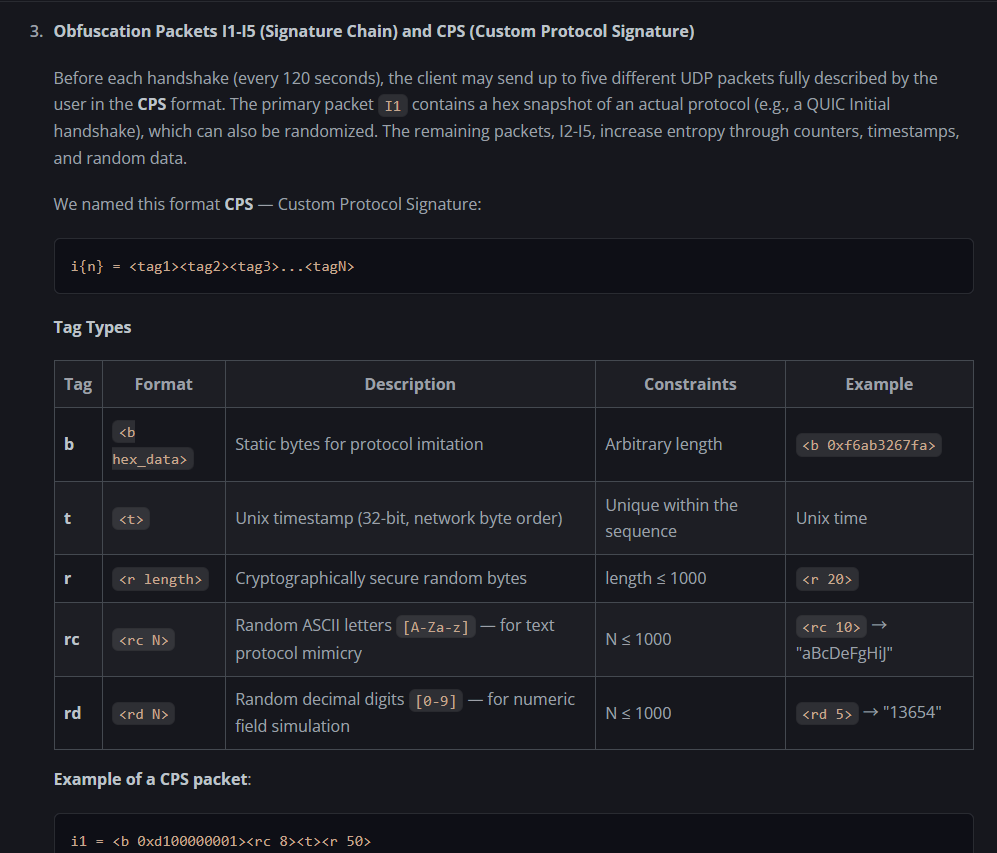
Hi
Yes, there is validation implemented on the frontend.
For I1–I5, valid <tag> annotations are required.
Hi
Based on the logs, it appears that TCP connections between your network and Quad9 are being interrupted.
Please try the following:
Add additional upstream DNS servers from different providers in AdGuard Home and check whether the issue only occurs with Quad9. This will help determine whether the problem is network-related.
Add different Quad9 protocol types, such as DoT and DoQ, to determine whether an upstream firewall or network device is interfering with or blocking a specific protocol used by Quad9.
Hi
The DNS-related configuration on GL.iNet routers is generally not very complicated. You can refer to the following documentation for an explanation of the different options:
In short, when a VPN is enabled:
If "Allow Custom DNS to Override VPN DNS" is enabled, all LAN client DNS requests will be handled by the DNS servers configured under Network → DNS , or by AdGuard Home (if enabled).
If "Allow Custom DNS to Override VPN DNS" is disabled:
DNS queries for traffic routed through the VPN will be handled by the VPN DNS servers specified in the VPN configuration.
DNS queries for traffic routed normally through the WAN will be handled by the DNS servers configured under Network → DNS , or by AdGuard Home (if enabled).
In most cases, we recommend enabling "Allow Custom DNS to Override VPN DNS" , so that only the DNS servers configured under Network → DNS or AdGuard Home (if enabled) are used.
When using "Allow Custom DNS to Override VPN DNS" together with AdGuard Home, if you find that a website is inaccessible or ads are not being filtered correctly, please check AdGuard Home → Dashboard → Query Log to see whether the relevant requests are being incorrectly blocked or missed.
Since AdGuard Home and its filter lists are not maintained by us, we recommend seeking assistance from the relevant community or maintainers when encountering such issues.
One additional point when using VPN together with AdGuard Home:
If you are using VPN Policy Mode with Domain list , please disable "AdGuard Home Handle Client Requests" . Otherwise, the Domain-based policy rules will not work correctly.
Hi
You can install luci-app-chrony and then manage and configure the NTP server via Luci → Services → Chrony.
opkg update && opkg install luci-app-chrony
For the issue where DPI shows “Waiting time synchronization”, please refer to the following thread to see whether it helps:
Hi,
Please check whether Interface Status Track is currently disabled for the WAN interface in use under Admin Panel → Network → Multi-WAN.
[image]
If it is disabled, please go to System → Time Zone and temporarily switch to any other time zone (you can switch it back to the correct one afterward) and see whether that resolves the issue.
[image]
If the issue persists, please temporarily enable the corresponding WAN interface in Multi-WAN, confirm that DPI is working normally, and then dis…
1 Like
Hi
As mentioned earlier, if you want to use VPN Policy Mode with domain lists together with AdGuard Home, you just need to disable “AdGuard Home Handle Client Requests”.
1 Like
xackep
June 2, 2026, 3:08pm
417
For me, the main thing is that firmware updates based on OP are released for my MT3000 and MT6000; whether it’s version OP24 or OP25 makes no difference to me.
Many thanks to glinet for the support, but I’d like to see more new features)
For example, a built-in torrent downloader), since there are powerful processors and USB 3.0
1 Like
meo
June 2, 2026, 4:08pm
418
Will try that, thank you!