Could you provide a detailed list of the filter lists you’ve loaded so we can test locally?
Please note that loading too many lists may cause the device to run out of memory (OOM), which can lead to the AdGuard Home process being terminated.
If you’re currently unable to enable AdGuard Home, you can SSH into the router and run the following commands to check:
# Export the current configuration so we can review it
cat /etc/AdGuardHome/config.yaml

# Then remove all AdGuard Home files and restore it to factory defaults if AdGuard Home could not be enabled normally
rm -rf /etc/AdGuardHome/
cp -rR /rom/etc/AdGuardHome/ /etc/AdGuardHome/
reboot
I have flashed Flint 3 with v4.9.0 a couple of days a go.
In short, I am very impressed with a lot of improvements since 4.8.5. Beta 4.9.0 GUI is very well laid out, helpful in focusing user’s attention to specific functions. Being a Beta version, I’d like to add the following:
Good:
AdGuard function works really well. Tight and quietly drops the offending URL.
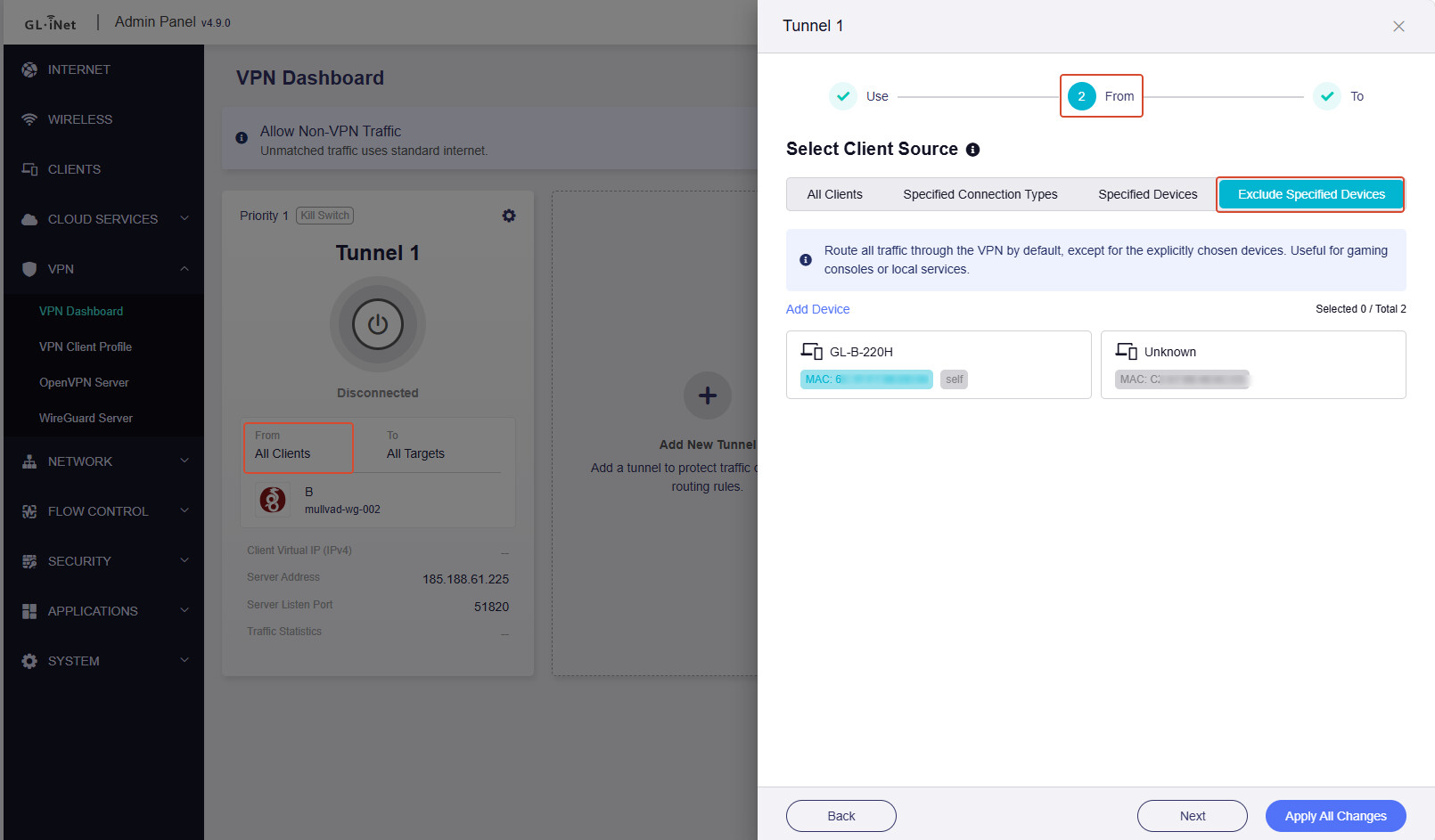
VPN connection with options of selection types & specific exclusions clearly provided*. But no exception, see below (*).*
Fixed:
Guest network is now separated from IoT network. Great. Thank you.
Flint 3 stops filling in the hidden extra port to Flint 3’s URL when entered. I tricked it by nominating a different port, other than 80, for http. Problem solved.
Bugs:
Client connected successfully to WireGuard Server on Flint3. But after disconnecting for sometime, Client is still shown as connected.
(*) Exemption for specific device(s) within the selected type for VPN tunnel should be available for practical; purposes.
While QoS is not yet fully implemented. I think QoS be assigned to specific device(s) via its IP address.
@netcruizer
Are you saying that in this version there is no ability to exclude devices from the VPN tunnel?
Are you in ‘Policy Mode’ under the VPN dashboard? I can’t see how this function could be removed as it’s essential to be able to exclude specific devices from the VPN as needed. Can you please confirm, thanks.
AdGuard Home
AdGuard DNS filter
AdAway Default Blocklist
1Hosts (Lite)
AdGuard DNS filter
AdGuard DNS Popup Hosts filter
AWAvenue Ads Rule
Dan Pollock's List
HaGeZi's Normal Blocklist
HaGeZi's Pro Blocklist
HaGeZi's Pro++ Blocklist
OISD Blocklist Small
OISD Blocklist Big
Peter Lowe's Blocklist
Steven Black's List
Dandelion Sprout's Anti Push Notifications
Dandelion Sprout's Game Console Adblock List
HaGeZi's Gambling Blocklist
HaGeZi's Samsung Tracker Blocklist
HaGeZi's Xiaomi Tracker Blocklist
Perflyst and Dandelion Sprout's Smart-TV Blocklist
ShadowWhisperer's Dating List
HaGeZi's Windows/Office Tracker Blocklist
In my settings, IoT devices are grouped together in a separate network (172.30.124.0/27) other than my Home network (192.168.100.0/27) for easy management purposes such as network monitoring & fault isolation, QoS and VPN.
If I want to exclude device ‘X’ of this group from VPN tunnel. It is not possible under Beta 4.9.0 for Flint 3.
And I can’t simply remove X from IoT group because of X shares other considerations (i.e. QoS, network monitoring) as mentioned above.
The root cause is that Go 1.24+ enables MPTCP (Multipath TCP) by default, which causes AdGuardHome to fail with address already in use on port 3000 during restart.
Can you please try this workaround, SSH into the router and run:
I’m trying to update my Flint 3 from 4.8.4 to 4.9.0 beta 2, but it’s proving impossible.
Once the new firmware starts uploading, the GUI always displays a message telling me to check the connection to the router and refresh the page.
If I continue with the update anyway, the router freezes, the GUI becomes inaccessible, and I have to wait a few minutes before it works again.
I’ve also tried via LuCI, but the result is similar.
Another issue I’ve encountered is that if I try to back up the configuration, the generated .tar.gz file is around 100MB instead of a few KB, and if I try to upload it, the router tells me there’s an error and rejects it.
I should add that after a few minutes (about 5), the GUI becomes unavailable, whilst LuCI remains accessible.
To regain access to the GUI, I have to restart the router by unplugging and plugging it back in.
The bridge interfaces for guest and IoT are created by default, and they do displayed in LuCI.
However, if features like Guest WiFi or IoT WiFi are not enabled in GL GUI, having these two bridge interfaces appears to have no effect, since no physical ports or Wi‑Fi are bound to those bridges.
@netcruizer
I have a flint 2, so we can’t get V4.9.0 until it’s rolled out, but I see ‘Bruce’ has answered it directly now - the facility is there, it’s just handled differently in this version.
Automatic Update check didn’t work on my Slate 7.
Was running Beta1 and no info about Beta2.
Even a manual check while turning off automatic update check gave me no notification.
Beta should check Stable Release first and then Beta channel if a Beta firmware is installed.
Op21 is really really too old (creating an IOT AP in Luci does not work. On op24 it works), you should prioritize op25 or at least a beta ver. 4.9 for op24.
I am talking about the flint2