By disabling the guest network, I’ve had no further issues of any kind. I’ll try enabling it again at some point, but I’m convinced the problem was that the guest network was only active on the 2.4GHz band, meaning the backhaul 5Ghz wasn't active.
In the meantime, I’ve managed to assign a "fixed" IP to the mesh node using an IP reservation. The trick is not to reserve the MAC address shown in the "MESH" section of the graphical interface, but rather the MAC address of the backhaul interface that gets created—which, incidentally, is the same one I used to get the mesh node to restart via a script.
Ok, I send you the requested log and the logread txt.
I admittedly found this thread out of frustration, but appreciate the thorough review. I am out of the country right now (for the next month or so), but saw that the router needed an update. After the update, which went fine remotely, I was poking around and stumbled upon the router/mesh selection screen. I inadvertently misclicked the "mesh" option trying while trying to leave the panel. There was no confirmation and the router instantly went offline. I am currently trying to do recovery while 3k miles away and will likely need to have someone repair or reset the router.
Even more frustratingly, I'm not sure the repair function (hold reset for 4 seconds) while properly revert the settings and reconnect the WAN port. Your post about it being difficult to access the device without reconfiguring the network does not give me hope, but I think highlights a bigger issue with the feature as shipped.
I'm a bit disappointed at the lack of documentation around rollback/repair in general, and am surprised there was not confirmation before the router completely switched.
Hi,
Sorry for the inconvenience.
We’ll submit your suggestion to add a confirmation prompt before switching to Mesh mode for further evaluation.
Regarding the repair function(hold reset for 4 seconds), pressing and holding the reset button to trigger it will exit Mesh mode and restore normal WAN connectivity. You can ask someone with physical access to the router to help with this.
Thank you for your understanding and support.
Thank you for your help—we’ve received the information and will pass it on to our engineering team for further investigation. We’ll post an update here as soon as we have more information.
Hello and thank you.
I had someone assist with the rollback today and it required minimal repair on my end after the 4-second reset. I do think a confirmation would be a good idea, but the repair feature did work as intended.
Appreciate the reply.
Im having issues with the node speed. Using mt3000 and beryl ax as node. Where I reach 100mbit over wifi on my A55 directly on the router, I only reach 3Mbit when connected to the Beryl. I dont have ethernet backhaul (yet) and I dont mind wifi halving to 50Mbit, but 3Mbit is just not workable.
Any idea what I should try? The Beryl is brand new.
Hi,
Just to confirm, are you using two GL-MT3000 (Beryl AX) routers in a wireless Mesh setup, with your phone getting about 3 Mbps when connected to the Mesh node?
Could you please try resetting the Mesh node to factory settings, adding it to the Mesh network again, and retesting the speed?
If the issue persists, could you please try the following tests?
- Connect a computer to the Mesh node’s LAN port with an Ethernet cable, keeping the wireless backhaul, and check the download and upload speeds.
- Move the Mesh node closer to the main router, then test again with your phone near the Mesh node.
Please share the results with us.
Thank you for your understanding and cooperation.
Sorry made a typo. Its a flint2, MT6000 as Main and the Beryl Ax as Node. Resetting the node did not make a difference.
I just need to achieve symmetric speeds for up and down.
The Node shows up as 1 or 2 bars reception while my laptop and phones get 5 bars when connected to the main router (Node turned off) at the same place.
The following tests I did with my laptop:
Connected to LAN on Node:

Connected wireless to Node, Network acceleration set to hardware:

Connected wireless to Node, Network acceleration set to software:

Connected wireless to node, network acceleration turned off:
I also checked 2.4GHz vs 5GHz but it does not seem to make any difference.
Thoughts?
Hi,
Thank you for providing the detailed test results.
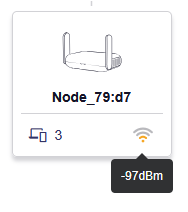
The screenshot shows a Mesh node signal strength of -97 dBm, which is weak and may affect the wireless connection speed between the node and the main router.
Could you please help us with the following information and tests?
-
Please share a simple layout sketch showing the locations of the Flint 2, Beryl AX, and test computer, including the approximate distance and any walls or floors between the two routers. You can send the sketch to us via private message.
-
Please move the Beryl AX into the same room as the Flint 2, about 2–3 meters apart with no obstructions, while keeping the wireless Mesh backhaul.
Connect your computer to the Beryl AX’s LAN port with an Ethernet cable, then test the download and upload speeds using the same speed test server.
Thank you for your help.
How to send private messages: