Flash Beryl ax with Vanilla Openwrt

How to flash gl.inet Beryl ax with Vanilla Openwrt

Ive heard that flashing the gl.inet Beryl ax GL-MT3000 with Vanilla openwrt is a way to ensure that there is more privacy versus whatever the Chinese manufacturer has already installed. Is this true? If so, step by step, what do I need to do to set this up? I have very little networking knowledge. Id really appreciate if there is somebody out there to help explain the process. Im new to this stuff, so please dont judge me.

If I do this, how do I keep the router updated and can I still use a VPN on the router?

https://www.reddit.com/r/GlInet/comments/1nf4km6/questions_about_privacy_with_glinet_equipment/

Not sure what you mean by more privacy. Gl.inet’s firmware works fine and doesn't invade your privacy. So that's untrue.

If you still want to flash to community openwrt for the Beryl AX:

1.download the community openwrt sysupgrade image for the gl-mt3000

2.Login to the gl.inet admin panel at 192.168.8.1

3.Navigate to the system > upgrade > local upgrade

4.upload the .bin and uncheck the “keep settings” to ensure a clean install and avoid any configuration conflicts between the gl.inet fork and community openwrt.

5.after the reboot, access the community openwrt webif at 192.168.1.1

Openwrt has VPN options as package options, you'll have to find those packages, Install them and reconfigure. As far as keeping it updated, there is an option to let you know if there's a new version available, tick that, or manually check openwrt website and look for a new version. They have several different ways of updating, one of the easiest is using owut

If you are new to gl.inet, I would suggest staying with it and learning it best you can before jumping to straight openwrt. You can access luci thru glinet webif and teach yourself openwrt easier this way.

In your case, at least for now, I think this would be a bad idea.

Your privacy will not be invaded using the installed firmware,

I think they talk about the cloud and ad services integrated in GL.inet firmware, and the fact that the used openWRT is….old (23)

ANyway, if you want a clean vanilla OpenWRT install, don’t follow advise above.

(because you can better use Uboot with UBI image to be sure it goes okay.)

DO NOT CONTINUE READING IF LUCI IS COMPLICATED AND YOU CANNOT WORK WITHOUT GL.INET WEBINTERFACE.

Prefer to download the UBI file, not the BIN file.

So search for “GL.inet” or modelname of your router in the 25.12.0rc2 (or 24.10.5 for stable release) section (not snapshot) of the openwrt firmware selector.

Select your device (not all GL.inet routers are supported).

Then download the “FACTORY (FACTORY.UBI)” file.

After downloading go prepare:

1:

Write down(or copy to text file) the exact Wifi Wlan SSID (Network name) for 2.4Ghz and 5GHz Wifi. (sometimes they both have same name), also the Password used by 2.4GHz and 5GHz wlan’s. (can be different, often the same). Write down security type if you know it. Like wpa3 sae security (or wpa2 if you have device with older wifi software)

Because if you configure the same on Openwrt, then you don’t need to reconfigure your wifi devices.

2:

The computer that has the FACTOY.UBI file need to be connected with the GL.inet router with a network cable! Be sure you configure the ethernet connector(rj-45) from the computer with fixed ipv4 settings:

IP 192.168.1.10

Subnetmask 255.255.255.0

Gateway 192.168.1.1

DNS 192.168.1.1

When done. Be sure you want a GL.inet router without GL.inet webinterface (so only Luci).

So no “simple” webinterface for configuration, but Luci webinterface “to configure everything” with a learning curve.

If you want that, then continue :grin:

3:

Remove all cables from GL.inet router that has support for OpenWRT

Connect one ethernet cable to the LAN1 port of the router, and the ethernet/rj-45 connector of the computer that you prepare in step 2 and has the FACTORY.UBI image file.

Get your GL.inet router in Uboot mode, click here.

Then on the computer, open webbrowser and use address 192.168.1.1

The Uboot pge loads, and you can select the FACTORY.UBI file and upload it to the GL.inet router.

When uploading is done you can close webbrowser.

Now wait a few minutes (like 3).

Then reopen webbrowser and goto 192.168.1.1.

And you see that Luci loads from OpenWRT.

Login without password, and after that set a new login password for root.

Then follow this to get wifi configured and on (wifi is off by default), and be sure you use SSID and password taken from step1.

For more questions, goto forum of OpenWRT, and search for your question, because someone has probably already found a solution.
1 Like

The guide I gave is fine, you don't have to use the UBI image with a Beryl AX. You had to with the flint 1 because that's ipq6xxx based and still not fully supported. Beryl AX is mediatek, much different.

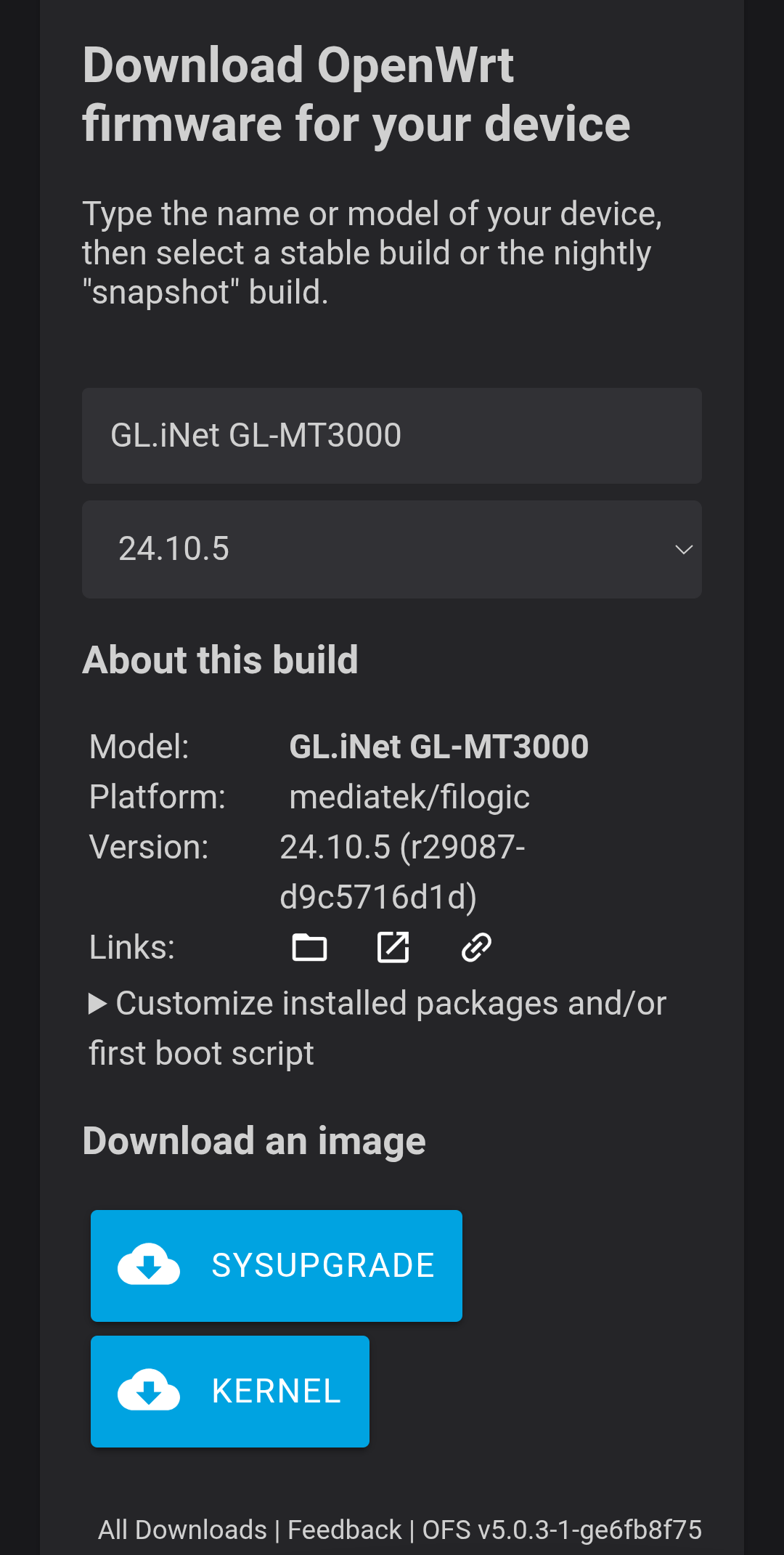
There isn't even a ubi image for the Beryl AX, it only comes in sysupgrade or kernel formats.

This topic is about flashing vanilla openwrt on a gl-mt3000, which has full vanilla openwrt support. 24.10.x is fully supported

If i look at the openwrt firmware selector, then their is no MT3000 in the list of GL.inet devices at fw 25.x and 24.x.

Only at fw 23.x

So what is your source of openwrt 24.x on MT3000?

You can't be talking about this.. right?

1 Like

You right.

I search for GL.inet, then you don’t see it in list.

When search for MT3000 you see it.