@will.qiu appreciate the feedback. I think I’m going to wipe everything and start over. I’ll report my findings.
So I’ve rebuilt my VPN and when connected attempting to go to URL’s I self host I get NSURL errors, direct IP works but reverse DNS does not. So there is something different between the FM vers?
Do we now need to add static routes or DNS changes to the WG server or clients, or both?
If the WireGuard client can already ping devices on the WireGuard server’s LAN, then no static routes are required.
For the DNS/host/reverse DNS issue, please provide the following details so we can investigate further:
- What is the domain name or URL the VPN client is trying to access?
- How is this domain name mapped to the server-side LAN device (for example, via host entry, AdGuard Home, or mDNS)?
- What is the current DNS configuration on both the WireGuard client and server?
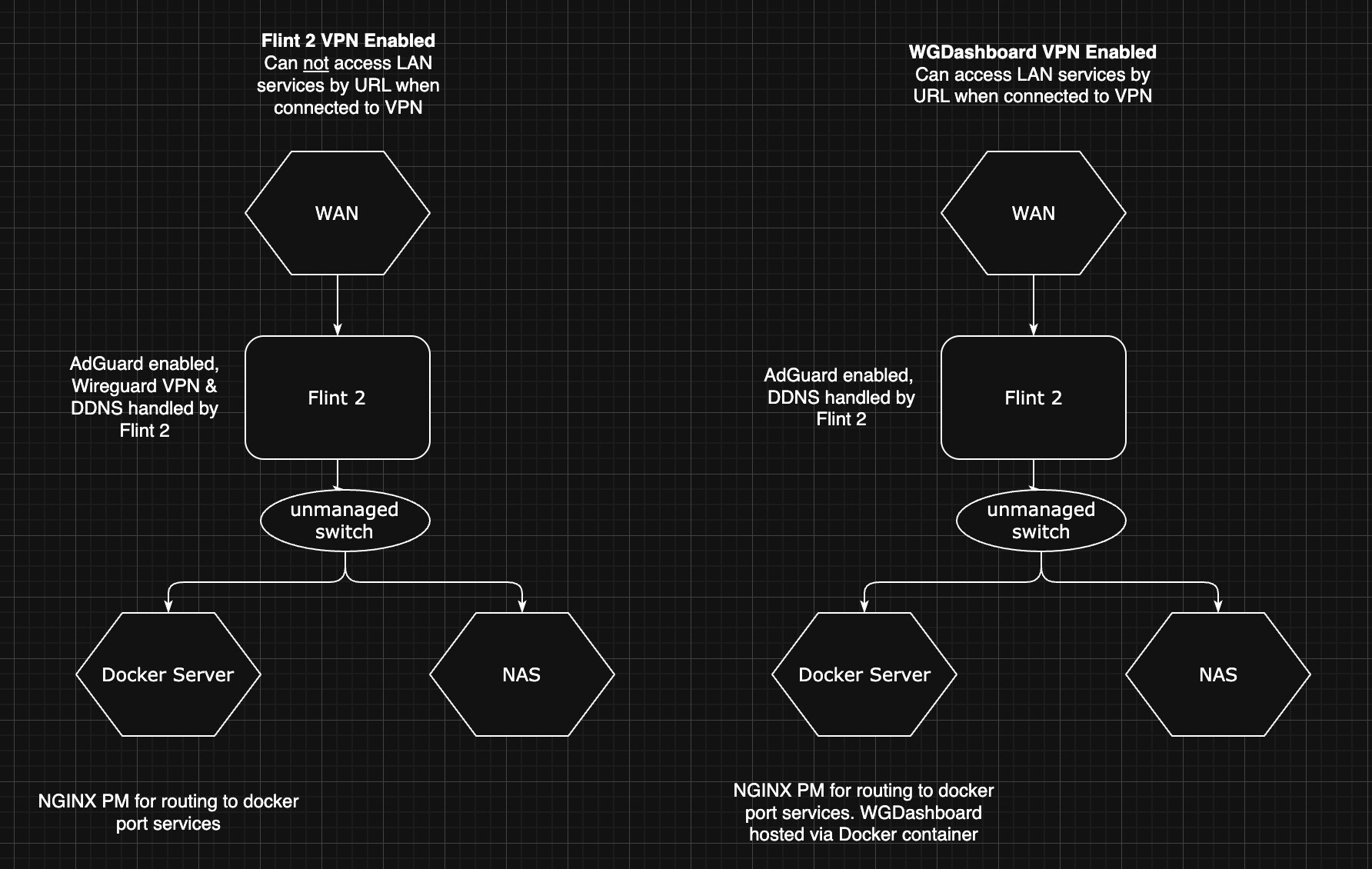
- Could you provide a simple topology diagram of your network setup?
Updated to op24 4.8.3 Fw and still im not able to get ipv6 working. No client via Lan is getting. Wlan clients get ipv6 ip, no issue. Since hakf a year this is broken. Issues with dns and ipv6. Dont know what changed there but really frustrating. Zried with chatgpt to find issues but nothing worked. Im on native ipv6 and there is no problem getting ipv6 connection via pppoe. The router isnt going to give ips to the clients. I dont know what to do more if its firmware issue. Worked with 4.7.7 op21 build like a charm.
Hi
We tested using Flint 2 with firmware version 4.8.3-op24 but were unable to reproduce the issue.
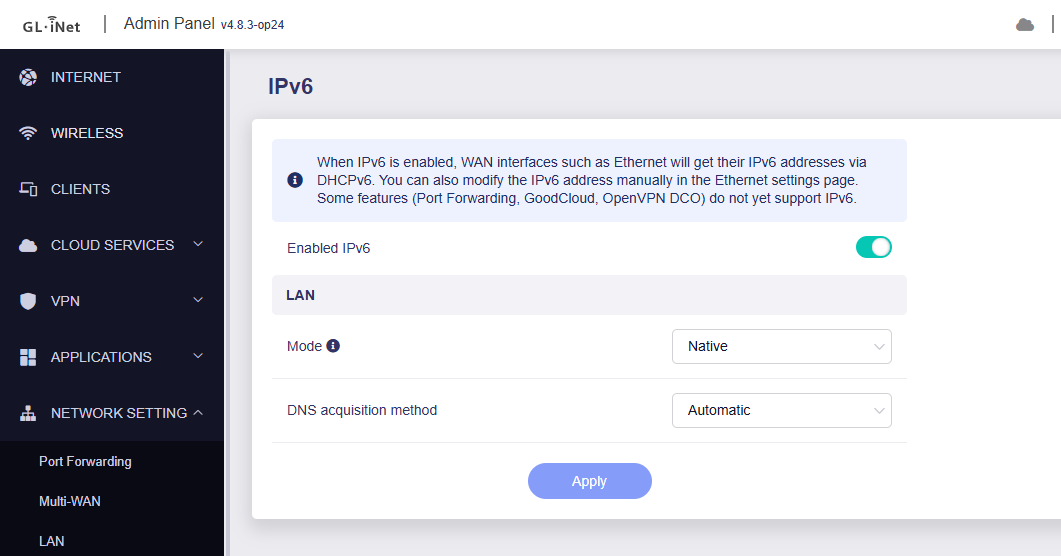
The LAN device successfully obtained an IPv6 address from the WAN IPv6-PD.
IPv6 Settings:
Router & LAN IPv6 address:
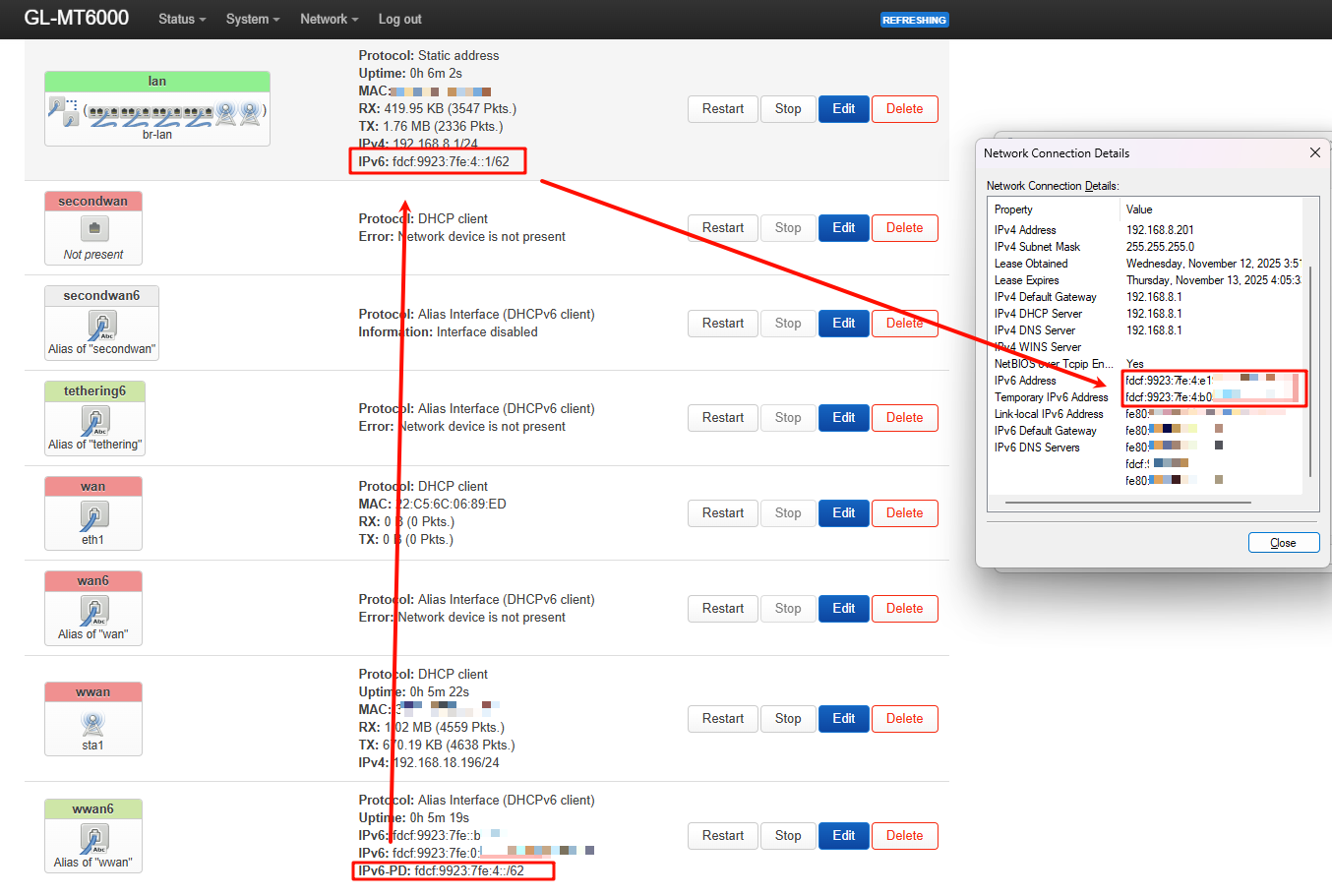
Could you please confirm that IPv6 DHCP is enabled on your LAN device for address assignment?
If possible, please share your Flint 2 with us via GoodCloud by following this guide:
Technical Support via GoodCloud - GL.iNet Router Docs 4
Afterward, please send us the device’s MAC address and WebUI login password via private message so we can perform a remote check.

@will.qiu my issue is that I am hosting internal web services on my LAN. When connect via WG I cn only access those services by IP, not the WAN URL which DDNS back to my LAN. AGH is enabled.
Hosting my own WG server via Docker allows me to access them via IP and WAN URL. But NOT the Flint 2 WG server. Did something change? Do I need to add a static route somewhere.Do I need to add a port forward to the Wireguard LAN in the Flint?
- I tried disabling AGH but it didn’t work.
- DNS is 1.1.1.1 on my Docker WG server that works.
- Domain names are being mapped/routed through Nginx PM also running in Docker.
- I own a FQDN that is DDNS through another 3rd party company
Based on your description, your setup should be like:
- Flint 2 is acting as the WireGuard server.
- Other devices connect to Flint 2 as WireGuard clients without problem.
- A LAN device on Flint 2 is running Docker Nginx and a third-party DDNS service.
- Flint 2 has port forwarding configured to this LAN device.
The reported issue is that when accessing this DDNS URL from devices connected via WireGuard, an NSURL error occurs.
Could you clarify:
- Is our understanding of your setup correct?
- Can devices access the DDNS URL normally when they are not connected through WireGuard?
- When devices are connected through WireGuard, is the DDNS resolved correctly? This can be checked by running the following command:
nslookup <your_ddns_domain>
If possible, please provide a detailed network topology. This will help us better understand the issue and set up a local test environment for verification.
- Correct
- I’ve tried with 3 laptops remotely, all exhibit the same behavior.
- Correct. WG Dashboard works as expected, the Flint 2’s WG server does not, On the DDNS point I have also tried using the Flint 2’s DDNS service as the connection endpoint with same result.
- Correct. I am running WG Dashboard on a different port that the Flint 2 is forwarding to on the LAN device (Docker server).
Clarification points;
- Your understanding is correct.
- Correct
- The DDNS does resolve correctly.
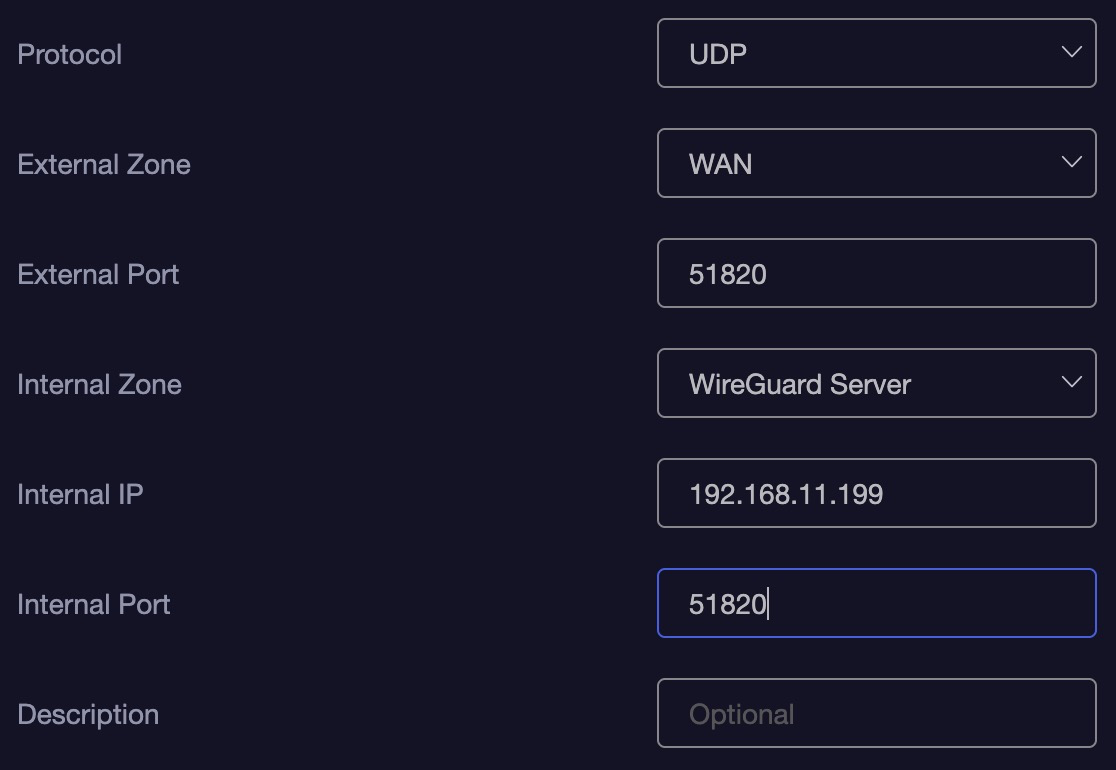
In the past I had a similar issue that was resolved by adding a port forward rule to the Flint’s wireguard internal zone. This ensured when on the VPN I had access to LAN and LAN/WAN services. But I don’t believe this is good practice, but it worked until the FW upgrade.
Here’s an example.
Here’s a topology example
I think you might have misremembered the port forwarding rule.
We conducted the test using Flint v4.8.3.
In your scenario, we will need to add this port forwarding rule for it to take effect for WireGuard clients:
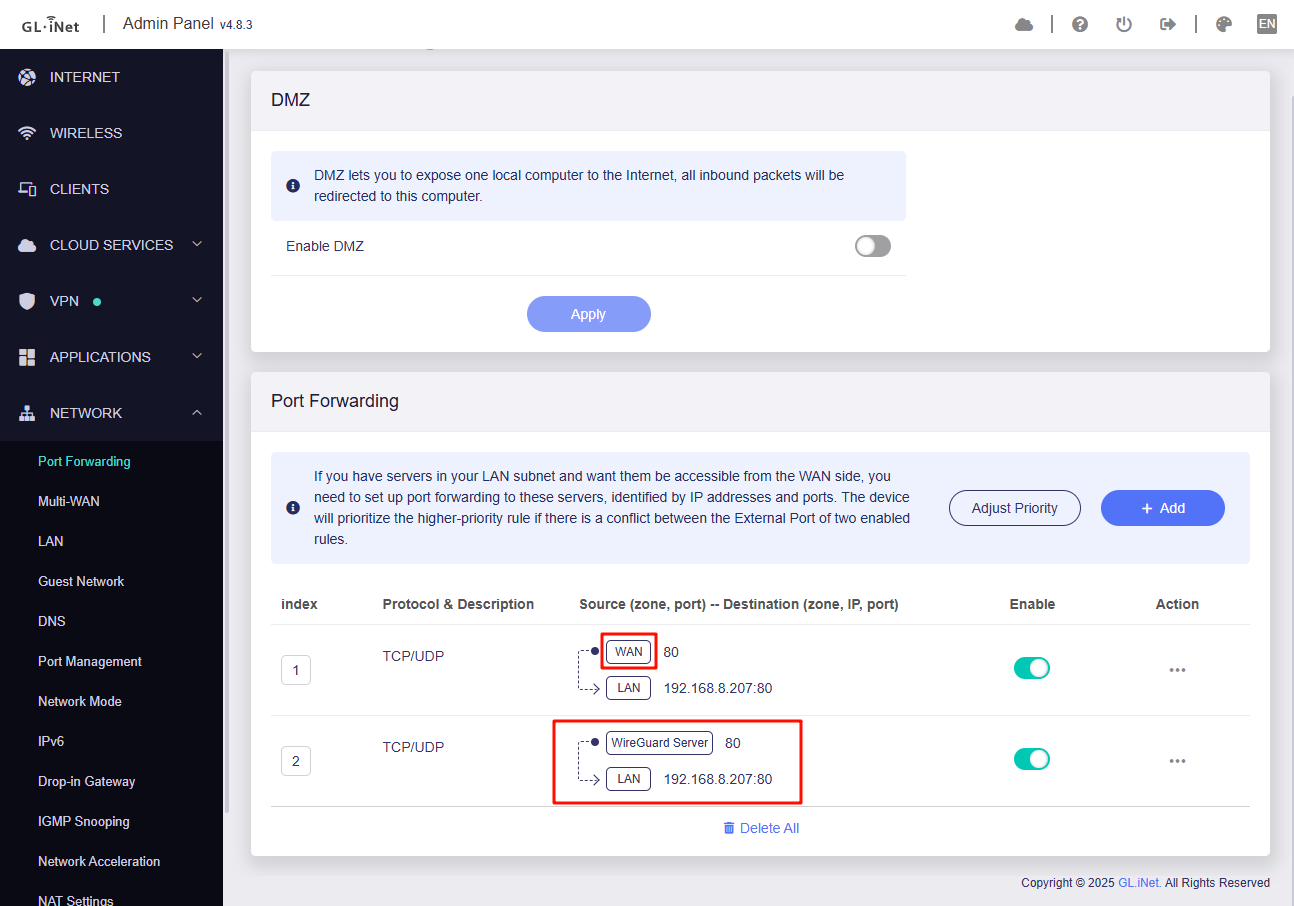
This is because the original port forwarding rule only matches traffic coming in via the WAN zone.
When a WireGuard client connects, its packets arrive on the wgserver interface which belong to WireGuard Server zone, so they don’t match the WAN zone and the forward never triggers.
To fix this we will need to add a port-forward that uses the WireGuard Server source zone.
That’s what I thought, I also on had UDP only. I thought maybe I needed to add a route rule instead.
Routing rules should not be able to assist with DNAT.
Unless routing is added on the WG Client side, allowing traffic destined for Flint 2 WAN to bypass the WG VPN and go directly through the ISP.
I see, but in the case example I provided above the internal IP would be my LAN gateway (example 192.168.11.1) to access the LAN from the WG VPN correct? And also add 443 for SSL?
Or just to forward to the docker server’s IP address?
If you’re referring to the port forwarding rule needed to resolve the issue where the WireGuard client cannot access the DDNS URL while connected, then
- the Internal IP should be the Docker server’s IP address.
- the Internal Port should be the port on which Nginx is listening, typically 80 and 443.
1 Like
@will.qiu this seems to have resolved my issue.
1 Like
This topic was automatically closed 90 days after the last reply. New replies are no longer allowed.