Flint 2 4.9.1 → 4.11: migration of existing custom LuCI/UCI VLANs

I am running a Flint 2 (GL-MT6000) on 4.9.1 with an established multi-VLAN configuration built directly on OpenWrt/UCI.

Current topology includes:

  • VLAN 1 – Management (192.168.100.0/24)
  • VLAN 10 – Servers (192.168.10.0/24)
  • VLAN 20 – Trusted (192.168.20.0/24)
  • VLAN 30 – Cameras
  • VLAN 31 – Cloud cameras
  • VLAN 40 – Media

Each VLAN has its own firewall zone with explicit inter-zone policies. The setup also includes cross-VLAN services such as Omada Controller/AP management, NAS/camera traffic, Google Cast/mDNS, printers and WireGuard.

The configuration is currently exceptionally stable on 4.9.1.

I have therefore held off upgrading to 4.11, particularly after seeing GL.iNet's comments that the new native VLAN implementation may conflict with VLANs previously configured through LuCI, and that VLAN ID 10 is used by the new IoT network.

The latter creates a direct collision: VLAN 10 is already my Servers VLAN.

Renumbering an established VLAN is not an attractive migration strategy. In this case it would involve coordinated changes across the router, switches, AP/controller configuration, firewall policy and potentially statically configured clients — solely to accommodate a VLAN ID introduced by the new firmware.

Before upgrading, I would therefore like to understand the intended migration semantics for existing OpenWrt VLAN configurations:

  1. Is VLAN ID 10 effectively reserved by the 4.11 IoT implementation, or can the IoT VLAN ID be changed?

  2. What happens to existing VLAN devices/interfaces in /etc/config/network during a 4.9.1 → 4.11 upgrade with “Keep Settings” enabled? Are they preserved verbatim, migrated, or modified by GL.iNet's new network configuration layer?

  3. Are existing firewall zones and rules in /etc/config/firewall preserved without reinterpretation?

  4. Does the 4.11 VLAN manager discover/adopt existing UCI-defined VLANs, or does it maintain a separate GL.iNet configuration model?

  5. Can an existing custom UCI/LuCI VLAN configuration simply continue to operate under 4.11 while leaving the new GL.iNet VLAN UI unused?

  6. Most importantly: what is GL.iNet's recommended migration path when VLAN 10 is already in production use?

I have complete pre-upgrade backups and exports of network, firewall, dhcp, route_policy and runtime interface/routing state, so rollback itself is not the concern. The issue is avoiding an unnecessary and potentially disruptive VLAN renumbering or having two configuration layers modify the same OpenWrt network objects.

For an established custom VLAN deployment, native VLAN support in 4.11 is not in itself a reason to migrate: OpenWrt already provides the required functionality. The value of upgrading therefore depends on whether 4.11 can coexist cleanly with an existing UCI configuration.

For now I am staying on 4.9.1, which has been completely stable.

It would be useful if GL.iNet could document the upgrade behaviour for existing LuCI/UCI VLAN deployments, particularly the handling of VLAN IDs 1 and 10.

I would also be interested in reports from anyone who has performed a 4.9.1 → 4.11.x upgrade on a Flint 2 with a comparable multi-VLAN UCI configuration.
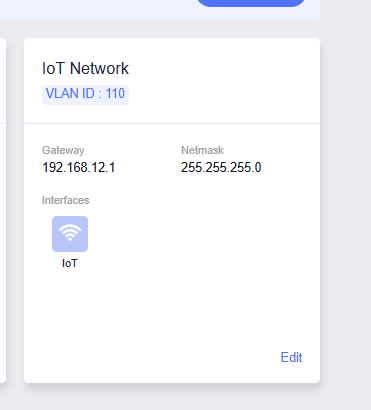
The currently confirmed guidance is that firmware 4.11 uses VLAN ID 10 for the IoT network, and GL.iNet’s new Admin Panel VLAN configuration may conflict with VLANs previously created through LuCI. Staff have therefore recommended reconfiguring VLANs after upgrading rather than assuming that “Keep Settings” provides a clean migration: see the staff responses in this thread.

There is not yet verified public guidance confirming that the IoT VLAN ID can be changed, that existing network and firewall sections remain untouched, or that the 4.11 VLAN manager adopts arbitrary UCI-defined VLANs. Consequently, leaving the new UI unused cannot currently be considered a guaranteed coexistence strategy. Given your production use of VLANs 1 and 10, staying on 4.9.1 is the least disruptive option until GL.iNet staff document those migration semantics or provide a supported way to move the IoT VLAN away from ID 10. “Keep Settings” should not be treated as a guarantee that this configuration will migrate unchanged.

This reply was generated by AI. Please verify its accuracy.

GL.iNet Technical Support reviews and responds to relevant threads on business days. Please allow time for a staff response.

Hi,

Since v4.11 introduces new VLAN management features in the GL.iNet Admin Panel, upgrading with Keep Settings enabled may affect some existing VLAN configurations created through LuCI/UCI.

Regarding your questions:

  1. The IoT network uses VLAN ID 10 by default in v4.11, and this ID can be changed to another unused value.

  2. When upgrading with Keep Settings enabled, existing custom firewall zones and rules are generally preserved.
    However, if the associated network interfaces change during the upgrade, some rules may need to be reviewed or adjusted to ensure they continue working as expected.

  3. The new GL.iNet VLAN management interface may not automatically display VLANs previously configured through LuCI/UCI. However, these configurations can still be managed through LuCI or SSH.

For the potential impact on your existing VLAN configuration and the suggested migration approach, please refer to the following considerations.

  1. Back up your configuration.
  2. If your Main LAN uses a VLAN interface such as br-lan.1 , its device assignment may be changed to br-lan during the upgrade, potentially affecting network connectivity.
    In this case, you may need to restore the original device assignment through LuCI or SSH. We suggest ensuring that you have a way to access the router via SSH, preferably through a separate reachable LAN port or subnet, in case adjustments are needed.
    For example:
uci set network.lan.device='br-lan.1'
uci commit network
/etc/init.d/network reload
  1. VLAN ID 10 and IoT network.
    Since v4.11 uses VLAN ID 10 for the IoT network by default, it may conflict with your existing Servers VLAN 10 configuration.
    We suggest temporarily disabling the IoT network before upgrading. After the upgrade, you can change the IoT VLAN ID to an unused value before enabling it again

Hope this can help you.

Thank you, this is very helpful.

The potential interface changes during the upgrade should be manageable, as I have a complete backup and pre-upgrade UCI/runtime baseline to compare against.

Just one clarification regarding VLAN 10: you suggest temporarily disabling the IoT network before upgrading. Since I am upgrading from 4.9.1, where the new v4.11 IoT/VLAN implementation does not yet exist, how should this be done?

Specifically, will 4.11 detect that VLAN 10 is already in use by my custom Servers VLAN during the upgrade and avoid creating the default IoT VLAN 10?

Best regards