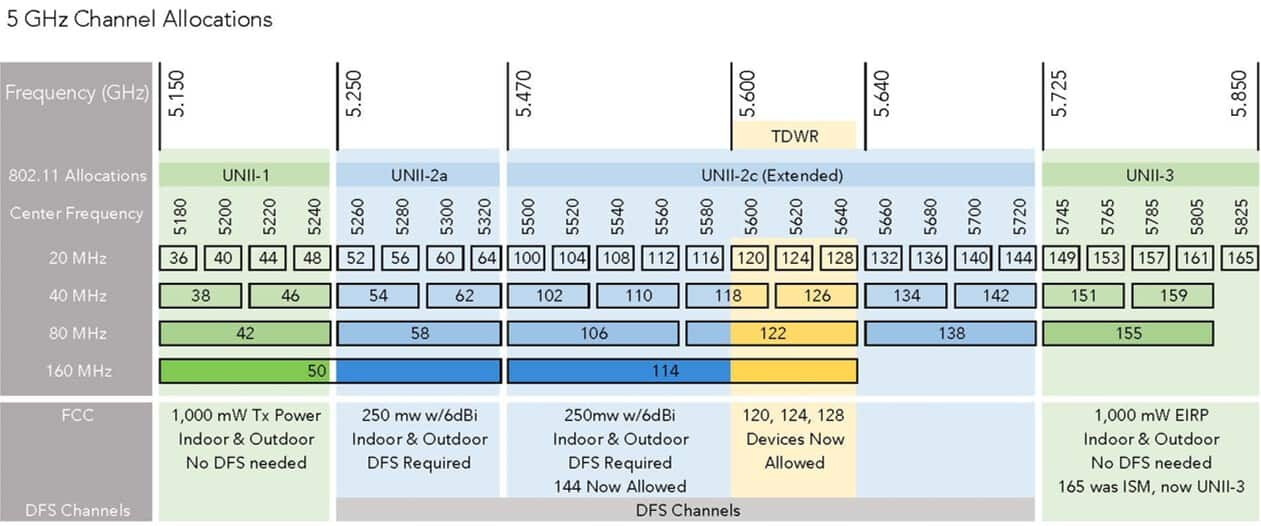
Hi. I’m trying to set up a Flint 2 to make best use of the 5GHz band. I have another WiFi AP that I can move to a different channel (green), and the Flint 2 (blue).
To avoid overlapping with neighbouring WiFi, I’d like to have the Flint 2 (blue) either down between channels 50 and 98, or up over channel 114 (and I’d move the green one down somewhere else).
The problem is that I can’t find any channel setting that gives me the full 160MHz/4800Mbps bandwidth and is in one of those two bands.
Is there some way I can set it up to achieve that?
Thanks. That’s a shame, because both are occupied. Time to wallpaper my house in tinfoil.
Then again I don’t have anything that can use the full 160MHz, so it’s really only for multiple devices. Maybe 80MHz on a free channel would be better. What do you think?
Is it smart enough to select free channels if the client is not capable of the full 160MHz?
Just because there is another Wi-Fi on the same channel does not mean that there is no "full 160 MHz" - it might slow down a bit, but mostly it's fine if we are just talking about neighbors.
Just test what is better and change it if you get into trouble.