Hi everyone,
I have optical connection with 800/200 Mbps speeds, so there is plenty of speed and bandwidth. I have 3 Android IP TV boxes connected to my 3 TV’s in the house. After upgrading from Asus AC-86U to Flint 2 I’m getting occasional 1-2 seconds blank screens on my TV’s. This mainly happens, when loading large files or streaming from my Plex server on my network. I think that Flint 2 is far superior to AC-86U in terms of speed and bandwidth, so why does that keep happening? How can i fix that?
Do you use any of the vpn or dns features?
which firmware?
Older firmware had issues which leaked the vpn dns over the wan when policies where setup.
then the isp blocks it because it still think you use vpn.
Edit:
For plex the situation may be different, I learned with those things (im a jellyfin user), that sometimes it isn't only about the connection, but also bitrate which technically also affects the connection but the device need to be capable to transcode or encode it, some chips on these devices aren't that great and have a weak encoder, lowering the bitrate would help 100% on those, especially 10mbps should work, it is possible you tried to increase this or it did automaticly...
Yes, I use Tailscale and AdGuard features, I use latest official firmware (4.8.3). I think it’s not Plex or Jellyfin issue (I use both, but prefer Plex). I found out that this mainly happens when starting to stream high bitrate files (I don’t use transcoding). Would QOS help with that? As I said, I had quite old router on the same gigabit LAN, and all worked flawlessly. I’m a little disappointed with this router, but I sincerely hope that my lack of knowledge of creating correct QOS is the culprit, not the hardware.
Hello,
Is this TV's situation caused by slow rate?
Is the Plex streaming within the LAN? In other words, the Plex server and TV are both in the Flint 2 LAN?
I think ADG and Tailscale should not affect the traffic transmission of the LAN, but for the convenience of troubleshooting, it is better to disable them first.
Is the TV connected to Flint2 via wired or 5GHz WiFi?
Since Plex is mentioned, I assume your NAS should have a Docker environment. You can prepare to install an OpenSpeedTest server. Open the browser on your TV to access OpenSpeedTest and test to see what the approximate transfer rate from your NAS to TV is and whether it is stable.
If there is not Docker, you can install the OpenSpeedTest server in Flint2:
If the above method does not improve the problem, you can reset the firmware of Flint2 to see if this problem also occurs under the default configuration.
Hi Bruce, thank you for your respond. So, all TV boxes are on Gigabit LAN. I have 2 Plex servers streaming on local LAN only (not at the same time), one is on a Win 11 machine and the other on Proxmox server. Both work flawlessly. I don’t use Docker, well until now when I installed it for Speed test on Proxmox VM. I tested it, and got 747 Mbps down and 345 Mbps up. When I started the test, my wife watched the TV next to me. During download test, the TV worked as it should, but when upload test started, every few seconds TV screen blanked for a sec for multiple times, as long upload test lasted. So, what to do next?
There are a few things:
-
lower bitrate, often a tv box or tv doesn't have the correct powerfull gpu, the bitrate needs lower, especially the encoding and transcoding on mediatek cpu are not that great.
-
you can try to disable hardware acceleration/offloading on the router, in my own test lab on a extremely congested network with 40+ devices, among full 2.5gb streaming moonlight on the flint 2 on lan1, I was forced to use none, software offloading also started to corrupt checksum, when it is disabled the speed will be a bit lower than expected that is normal.
After I did this my moonlight stream was extremely lag free.
I think especially on congested networks, you may want to turn offloading completely off, you may need to check in luci aswell after hw accerelation is disabled if software offloading in the firewall settings is also off.
The logs can also tell signs if a network is failing due to offloading and congestion, bdpu topology changes, errors about its own source address, and very unexplained issues, they can stem from this, and packets can be lost.
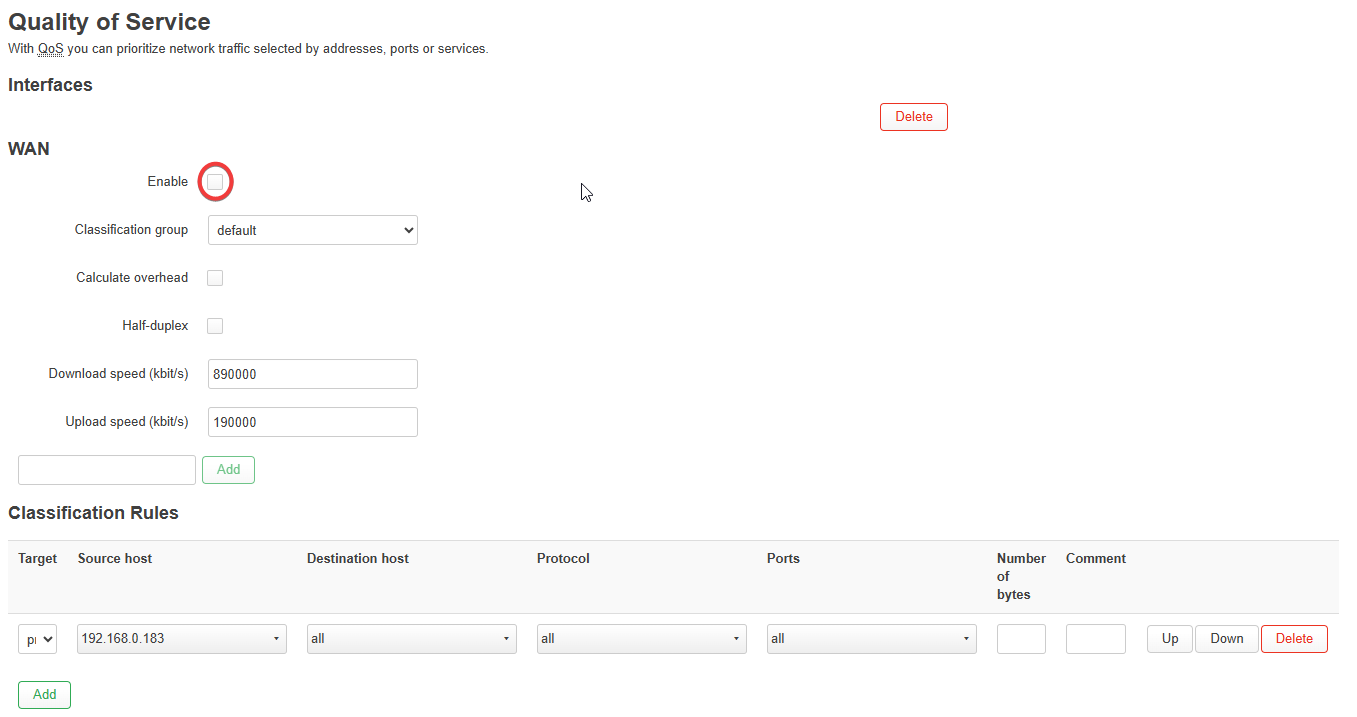
Hi Xize11, thank you for your reply. TV boxes are original ones that were supplied by my cable TV operator (well, should we say optical TV operator nowadays?). All was working flawlessly before changing older Asus AC86U router with Flint 2, that was the only hardware change. I’m pretty sure that Flint 2 has much better hardware than Asus, so I just need to figure out what settings to tweak, to get it fixed. I installed QOS in Luci, but when I clicked on Enable, TV boxes completely stopped working. (also added IP from one of TV boxes, like seen on image below, but to no avail. So, anything else I could do?
Hmm, I wonder in which way the tv boxes communicate.
Just to be clear:
The tv box is not supplied by the isp?, if yes you may need a extra configuration.
If not, maybe you need to look into a few things.
- Does tvbox want ipv6 or ipv6 disabled
- If vpn is used, and you have the tv box set in policies likely you still leak the vpns origin, I have been told you need to update the gl firmware to atleast 4.8.7+ for this leakage not to occur, vpn is a big reason it won't work anyway.
- is multicast and igmp snooping enabled, and also enabled on the downstream network switches in case if they are present?
- watchout using nextdns or adblocking dns, you may choose to sent dhcp option 6 with a different dns to avoid conflicts by the use of dhcp tags i can help with that once you diagnosed if it indeed was dns blocking.
1 Like
This topic was automatically closed 90 days after the last reply. New replies are no longer allowed.