Hello,
There is a workaround way to achieve this requirement which let a specified physical LAN port directly go to WAN/ISP.
Notice, the specified LAN port (the following add a new bridge "bypassVPN") cannot be the same subnet as the "br-lan".
As an example, the following commands uci is changed the LAN5 (the last one physical LAN):
-
Please upgrade to the v4.8.0 beta firmware for Flint2.
-
SSH to the router:
# /etc/config/network
uci del network.cfg030f15.ports
uci add_list network.cfg030f15.ports='lan1'
uci add_list network.cfg030f15.ports='lan2'
uci add_list network.cfg030f15.ports='lan3'
uci add_list network.cfg030f15.ports='lan4'
uci add network device # =cfg1b0f15
uci set network.@device[-1].type='bridge'
uci set network.@device[-1].name='br-passbyVPN'
uci add_list network.@device[-1].ports='lan5'
uci set network.passbyVPN=interface
uci set network.passbyVPN.proto='static'
uci set network.passbyVPN.device='br-passbyVPN'
uci set network.passbyVPN.ipaddr='192.168.15.1'
uci set network.passbyVPN.netmask='255.255.255.0'
# /etc/config/dhcp
uci set dhcp.passbyVPN=dhcp
uci set dhcp.passbyVPN.interface='passbyVPN'
uci set dhcp.passbyVPN.start='100'
uci set dhcp.passbyVPN.limit='150'
uci set dhcp.passbyVPN.leasetime='12h'
uci add_list dhcp.passbyVPN.ra_flags='none'
uci del dhcp.passbyVPN.ra_flags
uci add_list dhcp.passbyVPN.ra_flags='none'
# /etc/config/firewall
uci add firewall zone # =cfg23dc81
uci set firewall.@zone[-1].name='passbyVPN'
uci set firewall.@zone[-1].input='REJECT'
uci set firewall.@zone[-1].output='ACCEPT'
uci set firewall.@zone[-1].forward='REJECT'
uci add_list firewall.@zone[-1].network='passbyVPN'
uci set firewall.cfg01e63d.synflood_protect='1'
uci add firewall forwarding # =cfg25ad58
uci set firewall.@forwarding[-1].src='passbyVPN'
uci set firewall.@forwarding[-1].dest='wan'

uci add firewall rule # =cfg2592bd
uci set firewall.@rule[-1].name='Allow-DNS'
uci set firewall.@rule[-1].src='passbyVPN'
uci set firewall.@rule[-1].dest_port='53'
uci set firewall.@rule[-1].target='ACCEPT'
uci add firewall rule # =cfg2692bd
uci set firewall.@rule[-1].name='Allow-DHCP'
uci add_list firewall.@rule[-1].proto='udp'
uci set firewall.@rule[-1].src='passbyVPN'
uci set firewall.@rule[-1].dest_port='67-78'
uci set firewall.@rule[-1].target='ACCEPT'

uci commit
Now the new bridge "passbyVPN" is added, and the subnet is 192.168.15.0/24.
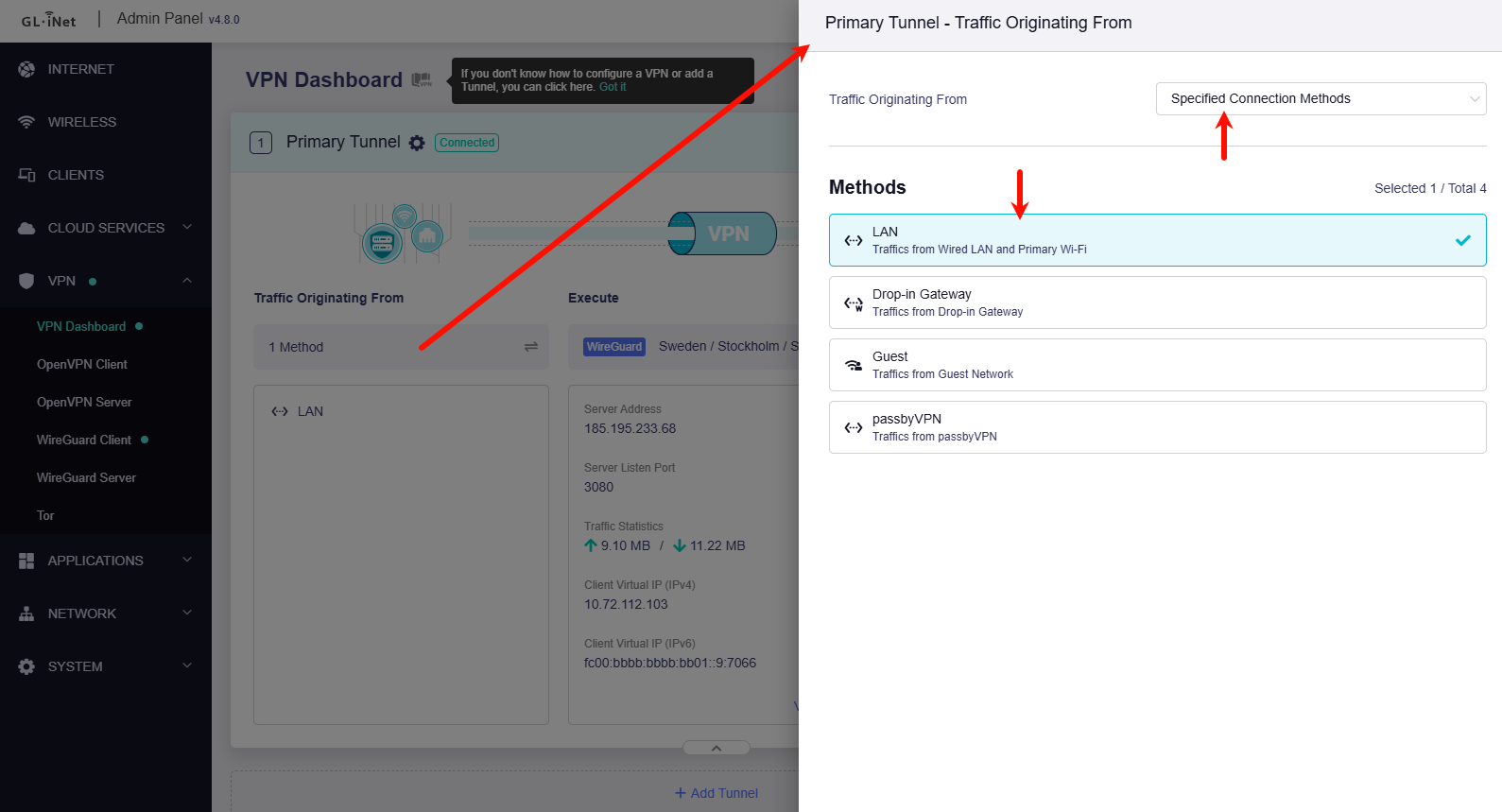
- Go the GL GUI > VPN > VPN Dashboard > (Tunnel 1 >) Traffic Originating from > Specified Connection Methods > Select "LAN", do not select the "passbyVPN".
- SSH to router:
/etc/init.d/firewall restart
/etc/init.d/network restart
# or restart the router in Web UI.