I think the way forward is to release version 4.5.5 release1 which was temporarily stable because I used it for several days and had no problems and a friend of mine also used it for almost 10 days without any problems.
1 Like
I seen that fix last night and yes, it does seem to be a true fix for some problematic devices (mainly Apple), but only when using 802.11ax via the 5GHz radio.
Neither the old patch or the new patch will do anything to improve the 2.4GHz (802.11n at 20/40MHz) radio, which is the main problem with the GL-MT6000. And you can test that for yourself by updating to the latest OpenWrt snapshot and then performing a speed test from an older non-AX device. You won’t get more than 100Mbps, even if you’re stood directly in front of the router.
This ones actually a true 5GHz fix for some devices, since it doesn’t restrict every 802.11ac compatible device to 80MHz.
2 Likes
Having a strange issue with my Flint2, and I’m not sure how to test/diagnose the issue. Twice now it’s like the LAN hardware just stops working. Wifi access works, but anything connected via the ethernet ports loses contact (including the internet which is plugged into the WAN port).
Rebooting each time resolves the issue, but I would like to figure out if it’s a hardware issue or software.
It just happened for the 2nd time, first time was a couple of weeks ago. When it rebooted it prompted to update the firmware, so it was running on whatever the previous version was
1 Like
I think you were missing a part of the command in your post:
Ahh, its the forum, it took the slash out of mine also. I guess you didn’t miss it, sorry.
This should work.
sed -i 's/kmod-4\.5/kmod-4.5.5/g' /etc/opkg/distfeeds.conf
Thanks for bringing that up blackbox, I was going to post this in a separate thread but since staff is watching this and looking to release a new firmware soon I wanted to elaborate on those rules and how broken they are.
I should mention if you don’t fix the protocol and run AdGuard then IPv6 will sneak by and get around AdGuard.
GL.iNet, can you change the start up script for AdGuard to just disable the port forwarding rule and not delete and recreate. Every time you turn off AdGuard it deletes the rules and when you turn it back on it creates the rules with the broken TCPUDP again.
I ended up creating new rules for AdGuard as a work around for now. I think even after I fixed the TCPUDP the IPV6 traffic was still getting by AdGuard. I think this had to do with the “Restrict to Address Family - Automatic” didn’t seem to work. Even trying to change that to “IPV4 and IPV6” was getting by.
So in the end I created the following firewall forwarding rules, with the IPV6 at the top for priority and that seems to stop leaking IPV6 traffic past AdGuard.
FYI: This is just on the Flint2 release, These rules need fixed on the Puli-AX as well.
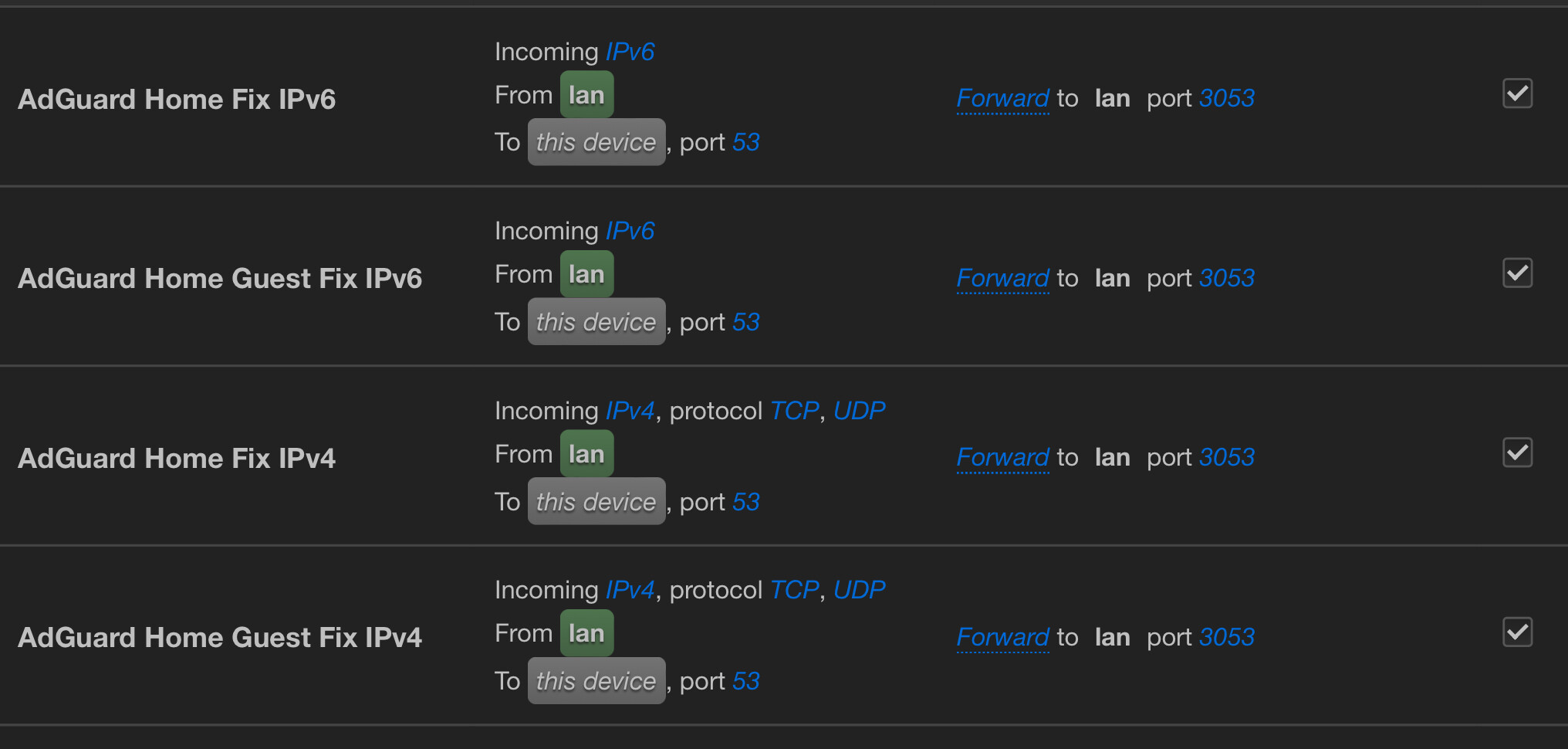

feedback.
4.5.5 release 1 - temporary
4.5.5 release3 beta and stable
In all 3 versions, they have Wi-Fi speed problems, fluctuating, sometimes it drops to 1mb or not even that, difficulty accessing pages on the internet and even accessing the router.
4.5.4, 4.5.3, 4.5.2 all these versions I have disconnections on the wifi and then I can no longer access it.
basically either I go for pure openwrt which I also think must be as bad as the gl.inet version or I remove this mt6000 from my home network and go back to using the mt3000…
Unfortunately I have no other option.
Very good router but unfortunately these problems discourage me from buying it.
1 Like
to fix tcpudp:
just change this line in /etc/init.d/adguardhome from
uci set firewall.adguard_home.proto=‘tcpudp’
to
uci set firewall.adguard_home.proto=‘tcp udp’
and you will have it fixed
3 Likes
I can confirm that there is something odd with 5 GHz when using 160 MHz band. My PC lost connection (like not “really” but some packages get lost and pings are missing) often since I upgraded to 4.5.5
Using Intel(R) Wi-Fi 6 AX201 160MHz
I disabled 160 MHz now and stay with 80 MHz - connection is much more stable now.
I just downgraded to 4.5.4 because of network instability with 4.5.5 and 5 GHz (160 MHz). Things seem to be back to normal now. I’ll hold off until others report that a newer update fixes the issues.
I can confirm that something wrong with 160MHz on Wifi 6 in latest version. My notebook with an ax201 wifi board sometimes has a download speed at maximum 60Mbps, with huge latency when download. Then I just reconnected on wifi, and there’s no more issue. Strange enough it does not happens on “version 4.5.5 alpha” released just here in the forum, happens only on official version
That’s possible, but I also did notice when I had IPv4 and IPv6 in the same rule it was only blocking the IPv4. That’s how I ended up separating them and putting the IPv6 to the top of the list for priority. I’m still getting used to OpenWRT and was reading up on UCI controls. That light be my next step maybe to just disable and enable the rules I created in that asguardhome file.
Thanks
I’ve been using the OpenWrt firmware for weeks without any issues, so I’d recommend giving it a try. Although you won’t be able to download a custom sysupgrade image with LuCI right now because the firmware selector is currently broken.
The OpenWrt snapshots won’t do anything to improve 2.4GHz, but if you’ve noticed slow speed over 5GHz from certain devices then the latest snapshot (r24793 or newer) should fix that.
If you do try an OpenWrt snapshot be sure to follow this guide. That way you’ll download and install a sysupgrade image, configure your WiFi country code correctly and then enable flow offloading and WED to boost performance.
2 Likes
Yes, thank you. I forgot to change two of the to the guest network, That’s ok instead of fixing it /I decided to fix and creat the IPv6 rules in GL iNet script. Then I decided to comment that all out and just add a few lines to enable and disable the rules. I wanted to learn more with UCI anyway.
Nice! I was hoping for this. Then again I;m still getting used to OpenWRT but was hoping to take advantage of the hardware for docker and HA.
So will this still give you access to UBoot if something goes wrong? Do it remove the GL iNet web GI front end, not necessarily a loss since I don’t really use it now.
Would I have to configure the interfaces again, or just edit the WiFi ones and set it back up?
Looking at the backup files I’m assuming I don’t want to restore from a backup except maybe the networking and dhcp files for the IP reservations I put in place.
So it took me a few days to read this whole thread. It started when someone on discord mentioned about WiFi issues on the Flint2 and my idiotic self decided to change some setting to see. It was stable for a month until I changed things. I set it up on the channels I used with the old router, not any DFS and 5Ghz at 80Mhz bandwidth. Since I made changes I have had nothing but trouble with slow downs on the 2.4Ghz (testing with Speedtest and locally with iPerf). And noticed my 5Ghz wasn’t full speed with my ISP. Reverting firmware back to 4.5.2, clean installs, nothing worked. Tried the beta from this thread, at some point my 5Ghz came back to full speed.
Playing with the settings today I turned off the guest 2.4Ghz and disabled AX. I set 2.4Ghz main to 11b/g/n and rebooted. Then put it back to 11g/n/ax and. Turned the guest back on.This seemed to fix the slow down and even survived 3 reboots for testing. I never experienced drop offs like some, just unusable slow speeds. I wanted to share this just case it might help someone. I’ll keep it on these settings until a new confirmed update is released or I decide to do a system upgrade with OpenWRT.
Additional Notes: I’m running 4 wired devices, 103 wireless split over 18 on 5Ghz, 68 on 2.4Hhz, and the rest on 2.4Ghz guest. Using WAP2/WAP3 encryption. Six of my devices are AX but every time I used 160Mhz it would stay until I connected with a AX device and then it wold switch to 80Mhz, my ASUS RT-AX86U does the same thing for some reason. WiFi 5Ghz is on channel 149, no DFS (that’s when my problems began switching to DFS). I discover with all the trouble shooting that my iPad min 6th gen and Pixel 7a will run slow on 2.4Ghz unless I turn off he Bluetooth, but others like the iPad Pro and Lenovo laptop were fine with the Bluetooth on….Some apple devices needed to be restarted and/or network removed/put back before the speed went back to normal. Resetting network settings didn’t help the apple products.
1 Like
Yes. By using an OpenWrt sysupgrade image you’ll keep GL.iNet’s uboot and recovery will be easy.
If you flash a factory image then you’ll make recovery much harder.
You’ll lose GL.iNet’s UI and a few other features, but stability seems to improve and you’ll have access to updated packages.
When installing the OpenWrt snapshot you should select not to keep your current configuration. So yes, you’ll need to configure everything again.
I’d recommend building a custom firmware image, since that’ll come with LuCI and it should make the first time setup easier. And you could even include the luci-app-attendedsysupgrade package, which makes updating OpenWrt snapshots effortless.
Personally I haven’t updated OpenWrt past r24793, since newer versions might currently be buggy. But in a few days that should be fixed and the LED patch for the GL-MT6000 might be applied too.
1 Like
Any news devs? because this stable 4.5.5 is horrible, no one can use it @alex_zheng @alzhao @Dipin @lincoln @JerryZhao
@japa182 We are so sorry about it. The V4.5.5 fixed some wifi issue. Sorry for the new issue. We will check it.
2 Likes
The 160 MHz bandwidth is much more unstable in 4.5.5 than before.
If you need additional information or troubleshooting, just tell me 
1 Like