Not sure what is so funny here. You have said “no new bugs”. Have you tried reaching the internet with no DNS set up for your VPN client and with the router failing to resolve to its own DNS? Do you not consider this to be a major new bug??
Please keep in mind, that every snapshot is also an Alpha Version of the software which means, its not completely tested, contains serious errors and can cause instability.
I know that very well mate. Was just pointing it out to the others that were suggesting that this snapshot has not introduced any new problems. Please read my posts before replying.
No “new” to me 
Take care mate I’m dropping this 
4.5.7 beta or 4.6.0 snapshot? I’m still on 4.5.4 “stable”. It has issues but it’s not as bad as 4.5.6.
4.5.7
4.6.0 introduces an DNS VPN bug so AGH does not work while wireguard VPN is enabled.
1 Like
And again and again: People here use this software, they don’t test it. When people say „No new bugs“ it means always „No new bugs yet“
If you don’t want to participate or if you don’t want bugs despite the known ones, just stick to the version you are currently running.
If all if this fails the best way is to replace the Flint2 until all bugs are fixed.
1 Like
Its 4.6.0.
But im not discussing how bad it is between each version, only what i just noticed😉
4.5.6 in that regard should be threaten as a whole different firmware due the large differences from a checkout from a OpenWrt 23.05 snapshot → mediatek sdk.
So that means alot of the wifi bugs should not be present in the mediatek one, but the regressions are still there because the skin and scripts around it was not made to work with mediatek sdk.
This was probably the only driver issue i found with small impact since it did not happen again😉
1 Like
Seen this way, you are right, but to be honest, marketing a device worldwide the way GL Inet does, with security gaps that are sometimes so serious, is more than questionable. Serious security gaps should be fixed quickly and not in weeks.
This is just my personal opinion.
2 Likes
Can you please confirm which is the very latest stock stable or beta release version that is based on the most up-to date Openwrt base?
Yes, and leave the thorough testing to the so called “BETA TESTERS” who have done an incredible job so far!
1 Like
You give me a hard time to awnser that frankly 
So i gonna catogorize it for you:
-
If you use it for non wifi but the latest kernel is important you go with 4.5.6.
-
for stable wifi i would like to point you to the mediatek sdk but the drawback is the older kernel, and some regressions, snapshot 4.5.7 should be considered ‘ok’, 4.6.0 well i dont know what the environment error means, i guess it functions ‘ok’ but can lead to something more troublesome so i don’t know yet.
^ Also mediatek has extreme limited support to luci, i don’t think that would change though so that might be something you need to consider.
Also i can’t fully fullfill your question because i use the mediatek sdk variant with no firewall and dhcp as a dumbap version so the environment error is normal to me, but since people report it on not that type of setup that can be a indication its less stable, probably its also connected to the vpn issues too, and clients option.
So my guesses point to 4.5.7 for now with a few regressions.
2 Likes
My network is quite work intense with more than 70 wired and wireless clients and IoT devices whilst connected using dual WAN in load balance mode, having VPN client on, running encrypted DNS and with Tailscale connected as well. I have given up on the router’s WiFi to be honest with you and have been using other devices as WiFi Access Points (so far Asus and Xiaomi routers have been good contenders for me).
Your very helpful answer is pretty much consistent with my daily experience finding that stable 4.5.6, although not flawless, has been running the most smooth operation amongst all the other versions I have tried which I can only assume is due to the fact that it is running the most up to date kernel version. I will probably refrain from trying any other firmware with an older kernel version as I find myself spending a lot of time going back and forth in between various versions to try and get optimal performance.
1 Like
Yup, i think for now if im honest with you, i would use either one router for wired the other for wireless, maybe temporary using a replacement or stay with the firmware if it works  .
.
Because the issue is, there is not really a good awnser for a stable version for advanced setups 
Currently what i do is having one MT6000 with OpenWrt snapshot which segments vlans but with wireless disabled because these give trouble, and the other one as dumbap with the more stable wifi firmware which is mediatek sdk based.
Though the issue is, because i already read dual wan, and a few other things in your message, these can be very well a regression in the mediatek one, i haven’t tested this, but possible.
^ edit i remember reading a post 2.5gb does not work and instead is limited to 1gb on mediatek sdk.
The anwser is you just want a stable backbone for your network
2 Likes
It’s funny, I’m doing the opposite, I have a GL-AXT1800 as a gateway with wifi off handling the DNS and DHCP and my GL-MT6000 as an AP with the mediatek SDK and that setup it’s been really stable for me 
1 Like
Sorry if this was covered, didn’t see it.
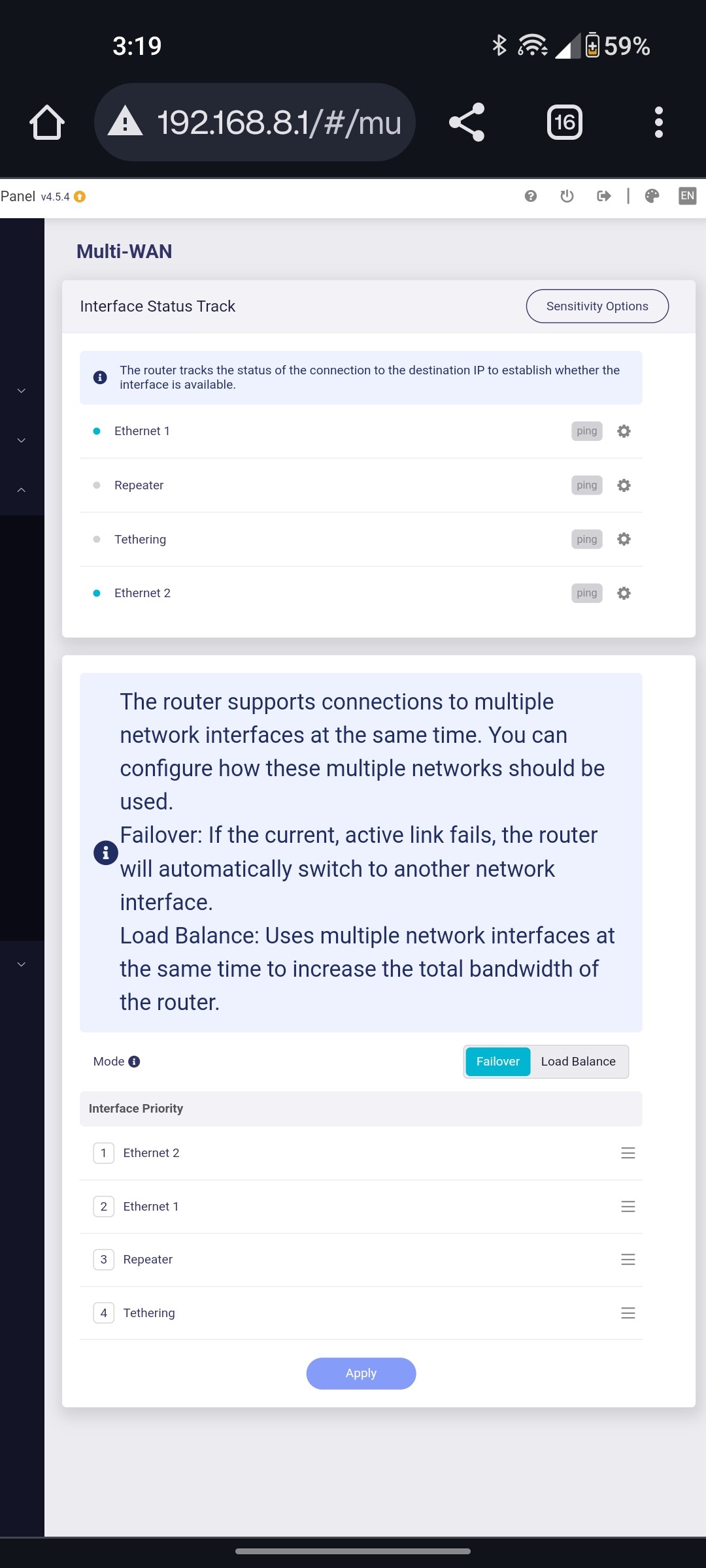
Is Multi Wan Failover not working properly?
Having issues today with main ISP Cox outages, so I set my cellular connection viA ethernet 2 as Primary in Multi Wan failover setup.
Its obviously not working properly as I am getting 800+Mbps speedtests and 20 ping when my cellular connection is maybe Half that speed and double the ping. So its obviously using my Cox ISP even though its set to failover. Any way to fix this. Trying to see of the cellular connection is good enough to eventually drop Cox.
Thanks. I’ll stick with 4.5.4 for now, even though that one seems to crash every 5 days resulting in worse performance. A reboot fixes it.
I’m going to try to be patient and wait for GL.iNet to work out the firmware issues.
2 Likes
I’m on the latest beta 4.5.7
3 days up and no issues so far
1 Like
Are you using AdGuard Home with it?
What Beta version of 4.5.7 are you running? The latest Beta is dated 3/1/24. Is that the version you are running?