Flint 2 (GL-MT6000) firmware 4.9.1 – mDNS/multicast not working correctly on the new IoT network

Hi,

I believe I may have found an mDNS/multicast issue with the new IoT network in firmware 4.9.x on the GL-MT6000 (Flint 2).

I have already spent a significant amount of time troubleshooting this issue. I tested different network configurations, checked routing and firewall rules, captured traffic with tcpdump on both the router and the Proxmox host, verified Wi-Fi client association, and tested individual ESPHome devices.

Unfortunately, despite all these troubleshooting efforts, I have not been able to get mDNS working correctly on the IoT network.

At this point, my tests seem to indicate that the issue is specifically related to the IoT network or its Wi-Fi/multicast handling rather than ESPHome, Home Assistant, or basic IP routing.

Router / firmware

  • Router: GL-MT6000 / Flint 2

  • GL.iNet firmware: 4.9.1

  • OpenWrt: 21.02-SNAPSHOT

  • Revision: r15812+1092-46b6ee7ffc

  • Target: mediatek/mt7986

  • Architecture: aarch64_cortex-a53

Network setup

  • Main LAN: 192.168.50.0/24

  • IoT network: 192.168.107.0/24

  • IoT gateway: 192.168.107.1

  • IoT SSID: IDIoT

  • IoT Wi-Fi: 2.4 GHz

  • IoT bridge: br-iot

  • "Isolate Clients": disabled

  • IGMP snooping: disabled

  • Multicast support on br-iot: enabled

I have several ESPHome devices connected to the IoT SSID. Normal IP/unicast communication works correctly, but mDNS communication between Wi-Fi clients on this IoT SSID does not appear to work correctly.

One of the Wi-Fi clients is my Proxmox server:

192.168.107.162

One of the ESPHome devices (esp-ble1) is:

192.168.107.232

The Proxmox client sends an mDNS query for esp-ble1.local to 224.0.0.251:5353.

When running tcpdump directly on the GL-MT6000 br-iot interface, I can see the query from Proxmox and the response from the ESPHome device:

192.168.107.162.5353 > 224.0.0.251.5353:

A (QM)? esp-ble1.local

192.168.107.232.5353 > 224.0.0.251.5353:

A 192.168.107.232

The ESPHome device also correctly advertises its _esphomelib._tcp.local service on br-iot.

However, when I capture the same traffic directly on the Proxmox Wi-Fi interface:

tcpdump -ni wlp3s0 udp port 5353 and src 192.168.107.232

I receive:

0 packets captured

So the router itself can see the mDNS response from the ESPHome device on br-iot, but the response does not reach the other Wi-Fi client.

At the same time, normal unicast communication between exactly the same two Wi-Fi clients works correctly.

For example, ESPHome API traffic on TCP port 6053 successfully reaches the Proxmox client. I can see traffic such as:

192.168.107.232.6053 > 192.168.107.162.xxxxx

Ping between the devices also works.

I also verified that both clients are associated with the same Wi-Fi AP/radio (ra2). iwinfo ra2 assoclist shows both the Proxmox Wi-Fi MAC and the ESPHome device MAC connected to the same AP.

Therefore, this does not appear to be a basic routing or connectivity issue.

A/B test with the same ESPHome device

I then performed another test using an ESP8266 ESPHome device called watermeter.

Initially, watermeter was connected to the new IoT SSID and received an address in:

192.168.107.0/24

While connected to the IoT network:

  • the device itself was reachable,

  • Home Assistant could communicate with it,

  • normal IP communication worked,

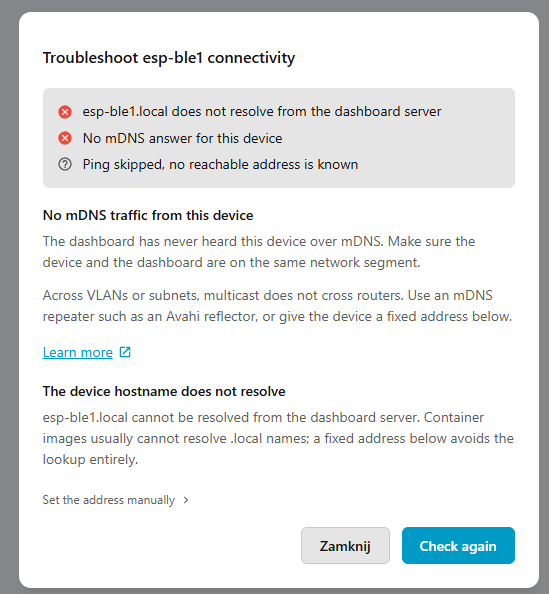
  • but ESPHome Device Builder could not resolve the device using mDNS / .local.

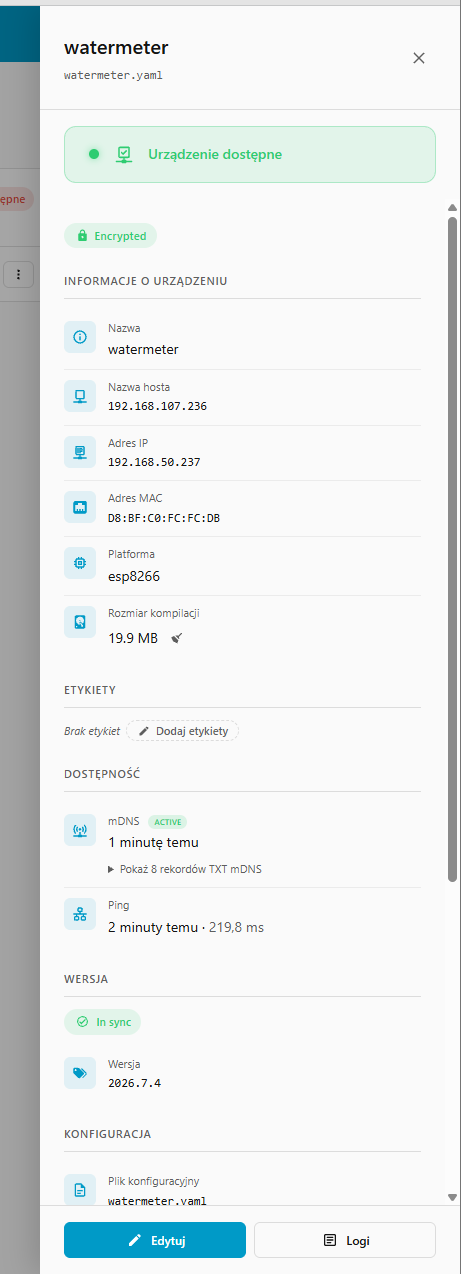
I then changed only the Wi-Fi network used by this device and moved the same ESP8266 from the IoT SSID to my normal Main SSID.

It received:

192.168.50.237

After moving it to the Main network, without changing the ESPHome application functionality:

  • mDNS immediately started working,

  • ESPHome Device Builder reports mDNS ACTIVE,

  • the device is shown as available,

  • hostname discovery works correctly,

  • ESPHome communication works normally.

So I can reproduce the following A/B result:

Same ESPHome device on IoT network (192.168.107.x):

Unicast/IP communication: OK

Home Assistant communication: OK

mDNS: FAIL
Same ESPHome device on Main network (192.168.50.x):

Unicast/IP communication: OK

Home Assistant communication: OK

mDNS: OK
This makes me suspect that multicast frames originating from one Wi-Fi station on the new IoT SSID are reaching br-iot, but are not being forwarded back over Wi-Fi to other stations associated with the same IoT AP.

I also checked the wireless UCI configuration. There is no obvious multicast setting present, and client isolation is not enabled.

For example:

wireless.iot2g.ssid='IDIoT'

and the LuCI interface confirms that Isolate Clients is disabled.

Since the IoT Network functionality is relatively new in the 4.9.x firmware, I am wondering whether this could be related to the implementation of the new IoT network, the bridge configuration, or the MediaTek Wi-Fi driver used by the standard GL.iNet firmware.

Could you please advise whether this is expected behavior?

In particular:

  1. Should mDNS/multicast traffic work between two Wi-Fi clients connected to the same IoT SSID?

  2. Is there any additional multicast/client-to-client setting used internally by the new IoT Network feature?

  3. Could this be a firmware 4.9.1 or MediaTek driver issue?

  4. Would you recommend testing the Native OpenWrt/OP24 firmware to determine whether this is specific to the MediaTek SDK Wi-Fi driver?

I can provide the complete tcpdump captures, UCI configuration, firewall configuration, screenshots, or perform additional tests if required.

I would really appreciate any guidance, as I have already spent a lot of time troubleshooting this and have not been able to find a configuration issue that explains the behavior.

Thanks!

Hi,

Thank you for the detailed report.

Could you please SSH into the router and check the following?

uci -q get gl-black_white_list.iot.ap_isolate
uci -q get wireless.iot2g.isolate
cat /sys/class/net/ra2/brport/hairpin_mode
cat /sys/class/net/ra2/brport/multicast_to_unicast

If hairpin_mode does not return 1, please try:

ip link set dev ra2 type bridge_slave hairpin on

Then check whether mDNS starts working properly again.

I have the same issue. Summary (apologies for AI text… easiest way to summarize):

Flint 2 (GL-MT6000) 4.9.1 – mDNS/AirPrint does not cross IoT network

I’m having an mDNS/Bonjour discovery problem with the built-in IoT network on Flint 2 firmware 4.9.1.

Network setup

  • Trusted/LAN: 192.168.54.0/24 — gateway 192.168.54.1

  • IoT: 192.168.10.0/24 — gateway 192.168.10.1

  • iPhone: 192.168.54.155 (Trusted)

  • Brother printer: 192.168.10.130 (IoT)

  • AP Isolation: ON

  • Block WAN Subnets: ON

  • IPv6: disabled

  • Printer works normally when the iPhone is connected directly to the IoT SSID.

I added a Flint ACL allowing Trusted/LAN → 192.168.10.130. After doing so, normal IP connectivity works:

  • TCP 80: works

  • TCP 631 (IPP): works

  • TCP 9100: works

  • ICMP/ping: works

So this does not appear to be an IP routing/firewall problem.

Avahi/mDNS configuration

Avahi 0.8 is running on the Flint 2.

I enabled:

[reflector]
enable-reflector=yes

I also tested:

allow-interfaces=br-lan,br-iot

but it made no difference, so I removed it.

Current relevant configuration is simply:

[server]
use-ipv4=yes
use-ipv6=yes

[reflector]
enable-reflector=yes
reflect-ipv=no

Avahi successfully starts and joins both:

br-lan.IPv4
br-iot.IPv4

mDNS packet captures

I captured mDNS traffic with tcpdump on both bridges.

On br-iot, the Brother printer is clearly advertising its services, including:

_ipp._tcp.local
_ipps._tcp.local

and its address 192.168.10.130.

The IoT gateway (192.168.10.1) is also generating mDNS queries.

On br-lan, the iPhone (192.168.54.155) is generating the expected AirPrint/Bonjour queries, including:

_ipp
_ipps
_airplay
_raop

However, no Brother response is reflected from br-iot onto br-lan.

I also ran:

tcpdump -ni any 'udp port 5353 and (host 192.168.54.155 or host 192.168.10.130)'

This showed the iPhone's mDNS queries and the printer's mDNS advertisements, but no packet sourced from either router interface (192.168.54.1 or 192.168.10.1) representing reflected mDNS traffic.

Other tests

I tested the bridge multicast settings:

ra2/brport/multicast_to_unicast = 1
ra2/brport/hairpin_mode = 0

I temporarily changed:

echo 0 > /sys/class/net/ra2/brport/multicast_to_unicast

with no change.

I also temporarily enabled hairpin mode:

ip link set dev ra2 type bridge_slave hairpin on

with no change.

Both settings were restored to their original values afterward.

I also removed the whole line allow-interfaces=temporarily due to a bug reported in another thread but that did not help.

I also ran Avahi in foreground debug mode. It starts normally, enumerates both bridges, and registers:

192.168.10.1
192.168.54.1

There are no obvious Avahi reflector errors. There is an nss-mdns warning, but installing/configuring NSS was not pursued because the issue is mDNS packet reflection rather than hostname resolution.

Important observation

If I connect the iPhone to the IoT SSID, it immediately discovers the Brother printer via AirPrint.

If I connect the iPhone to the Trusted SSID, it can reach the printer directly by IP and all tested printer ports work, but AirPrint/Bonjour discovery fails.

So the problem appears specifically to be mDNS/multicast reflection between br-iot and br-lan, rather than the printer, AirPrint itself, or normal inter-subnet routing.

Has anyone reproduced this with Flint 2 / GL-MT6000 firmware 4.9.1? Is there a known issue with Avahi reflection or multicast handling on the built-in IoT network in this firmware?

Hi,

Thanks for the detailed tests. It seems like that IP connectivity can work while mDNS traffic to Avahi is still blocked.

Could you please check the following:

  1. Check mDNS access to the router itself. The firewall needs to allow UDP port 5353, destination 224.0.0.251, from both IoT and LAN to the router (INPUT). The LAN-to-printer forwarding rule does not cover this. If blocked, add the corresponding INPUT rule and retry AirPrint from the Trusted SSID.

  2. If discovery still fails, capture on both bridges simultaneously in separate SSH sessions, then search for the printer again:

    tcpdump -ni br-iot -vv 'udp port 5353'
    
    tcpdump -ni br-lan -vv 'udp port 5353'
    

    Your previous host filter excludes reflected multicast packets sourced from the router, so please omit it.

Please let us know whether allowing mDNS INPUT resolves the issue. If not, check whether the printer’s _ipp._tcp.local or _ipps._tcp.local records appear on br-lan.

I have added these firewall rules at the top of the chain but it has not changed the behavior at all.

iptables -I zone_lan_input 1 -p udp -d 224.0.0.251 --dport 5353 -j ACCEPT
iptables -I zone_iot_input 1 -p udp -d 224.0.0.251 --dport 5353 -j ACCEPT

I also disabled AP Isolation and Block WAN Subnets on top of this for testing, and saw the same behavior.

Regardless, some new info I see in the tcpdumps is that reflection appears to work, but only one-way. While the iPhone was searching for the Brother printer, I captured:

br-lan:
192.168.54.155.5353 > 224.0.0.251.5353

with queries for the Brother printer. On br-iot, the router sent corresponding mDNS queries:

192.168.10.1.5353 > 224.0.0.251.5353:
SRV (QM)? Brother HL-L2460DW._ipps._tcp.local.
TXT (QM)? Brother HL-L2460DW._ipps._tcp.local.

Then the Brother printer responded on br-iot with its _ipp._tcp / _ipps._tcp records. So Trusted/LAN → IoT reflection appears to work.

However I did not see the printer's response appear on br-lan, so the issue appears to be IoT not reflecting to Trusted/LAN

I also tested with a Roku on 192.168.10.137, which advertises _airplay._tcp.local and _spotify-connect._tcp.local.

A capture on br-iot showed numerous Roku mDNS advertisements, including:

Roku 2  4A6527098195._airplay._tcp.local.

with its SRV/TXT records and address 192.168.10.137.

However, a simultaneous/overlapping capture on br-lan showed no packets from 192.168.10.137.

I also observed other IoT devices generating mDNS queries on br-iot (for example _hue._tcp.local and _d2d._tcp.local), but these were not seen on br-lan.

The reflected queries on br-iot show that Avahi is handling LAN → IoT traffic. The next useful check is whether incoming IoT mDNS packets actually reach your new ACCEPT rule: seeing them in tcpdump does not establish that they pass the router’s INPUT firewall.

Run this before and immediately after triggering another printer discovery attempt, without restarting the firewall between checks:

iptables -vnL zone_iot_input --line-numbers

Please share only the packet/byte counters for the UDP 5353 ACCEPT rule you added. If those counters increase while the printer replies, we can investigate why Avahi is not reflecting accepted traffic back to LAN. If they remain unchanged despite replies appearing on br-iot, the next step is to trace the firewall path into that chain rather than change more multicast settings.

This reply was generated by AI. Please verify its accuracy.

GL.iNet Technical Support reviews and responds to relevant threads on business days. Please allow time for a staff response.

We tested this on a Flint 2 running firmware 4.9.1 with virtual LAN and IoT clients. With mDNS INPUT allowed, reflection worked in both directions even with LAN ↔ IoT forwarding blocked.

Since the INPUT rules did not resolve your issue, please trace Avahi during another discovery attempt:

  1. Install strace and find Avahi’s process ID:

    opkg update
    opkg install strace
    pidof avahi-daemon
    
  2. Start tracing, replacing <PID> with that process ID:

    strace -f -tt -s 512 -e trace=recvmsg,sendmsg -p <PID> -o /tmp/avahi-mdns.trace
    
  3. Capture on both bridges in separate SSH sessions, then search for the printer from the iPhone on the Trusted SSID:

    tcpdump -p -ni br-iot -s 0 -w /tmp/mdns-iot.pcap 'udp port 5353'
    
    tcpdump -p -ni br-lan -s 0 -w /tmp/mdns-lan.pcap 'udp port 5353'
    

    After the attempt, press Ctrl+C in each session. Avahi will continue running.

To read the captures:

tcpdump -nn -tttt -vvv -r /tmp/mdns-iot.pcap
tcpdump -nn -tttt -vvv -r /tmp/mdns-lan.pcap

Look for the Brother service records on both sides. On LAN, reflected responses normally come from 192.168.54.1, not the printer’s IP.

In /tmp/avahi-mdns.trace, match the same time and service records:

  • A successful recvmsg from 192.168.10.130 on br-iot confirms Avahi received the printer’s reply.
  • A corresponding sendmsg using br-lan shows Avahi attempted to reflect it. A positive return value means the send succeeded at the socket level; check the LAN capture too.
  • sendmsg returning -1 EPERM points to a local sending restriction, such as an OUTPUT firewall rule. We observed this when deliberately blocking OUTPUT in our test.

If the IoT capture contains the reply but Avahi has no matching recvmsg, investigate the incoming path. If Avahi receives it but makes no corresponding LAN send, investigate Avahi’s processing.

Please send the trace and both captures via forum private message if you would like us to review them.