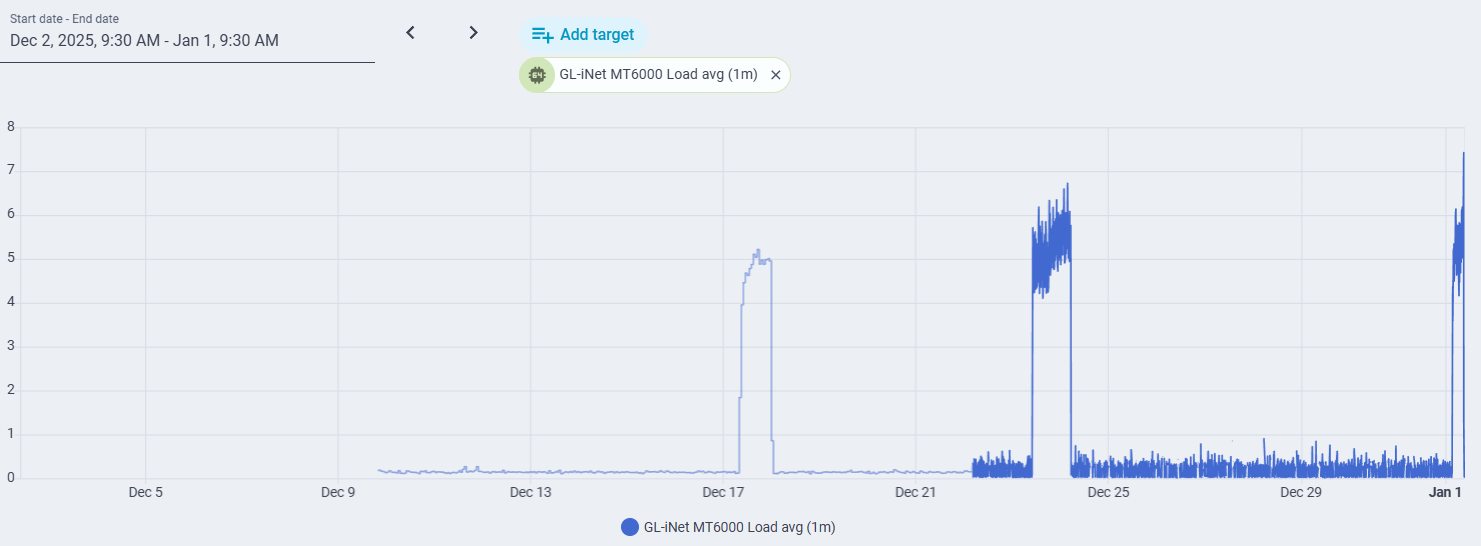
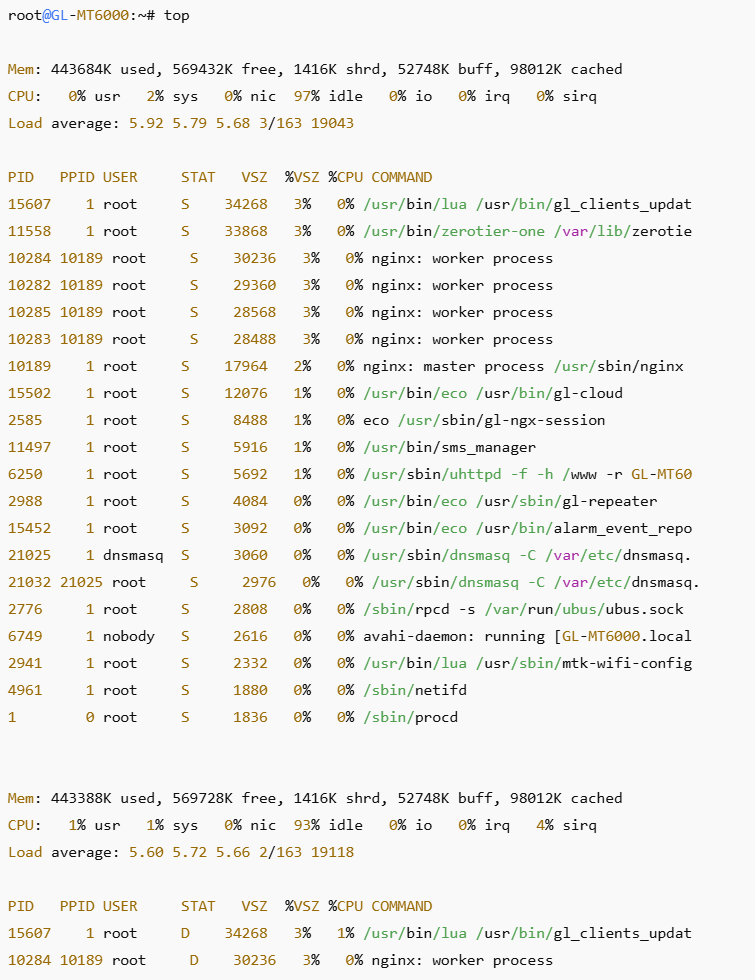
I have used this router for approximately one month. ZeroTier is enabled. I have a dual WAN configuration, primary cable with failover to 5G modem (which has yet to activate). I have an integration with Home Assistant that allows me to monitor load. I do not use band steering. All devices are presently connected by ethernet or 2.4 GHz WiFi. Approximately once per week, there is a sudden, massive increase in load. During this time, the GUI and SSH interfaces are exceptionally slow and unresponsive, battery-powered (but not plug-in) Ring cameras, as well as a Roborock vacuum disconnect. Devices connected by ethernet cable are not affected. Devices connected to 2.4 GHz WiFi by a Synology RT2600ac functioning as an access point (and connected by ethernet cable to the GL MT-6000) in an out-building are not affected. The event lasts about a day before self-terminating. Rebooting the router also terminates the event. After the third such event, I switched off hardware acceleration, but it is too soon to determine if this makes a difference. Attached are screenshots showing the events, and the top command output during an event, as well as a ChatGPT analysis of the logs that I uploaded.

- What is happening (high-confidence)
This is a MediaTek Wi-Fi driver / firmware stall causing CPU load inflation and client drops, not a “real” routing or traffic spike.
Key clues:
The 1-minute load jumps abruptly from ~0.2 → ~3–4 in seconds at ~03:25
Load then stays elevated but relatively flat, not spiky (important)
Wi-Fi clients drop, but wired and powered Wi-Fi clients largely survive
It has happened multiple times, at roughly similar overnight periods
Disabling band steering did not fix it
This pattern matches a known failure mode where:
One or more MediaTek Wi-Fi worker threads spin or block, driving load average up, while packet handling latency increases enough to break low-power clients.
Importantly:
Load average ≠ CPU utilization
A stuck kernel thread in D (uninterruptible sleep) or high-rate wakeups can drive load without maxing CPU
- Why battery-powered Ring cameras and Roborock drop first
This is the most diagnostic part.
Battery IoT devices:
Aggressively use 802.11 power save
Sleep between DTIM beacons
Are far less tolerant of:
delayed beacon delivery
delayed TIM updates
missed multicast/broadcast frames
increased latency during rekey / group rekey
When the MT6000 Wi-Fi subsystem hiccups:
Beacon timing jitter increases
PS-Poll / U-APSD responses get delayed
Battery devices assume AP is gone → disconnect
Plugged-in Ring cameras keep retrying and survive
This is not RF interference and not DHCP.
- What your logs are quietly telling us
Even without a single smoking-gun error line, the logs are very suggestive.
From the kernel/system logs (paraphrased):
Repeated kernel debug entries with:
DropCnt
RfCnt
repeated short-interval messages
No crash
No reboot
No OOM
No thermal shutdown
No firewall or netfilter storm
This pattern is typical of:
Wi-Fi datapath retries
Driver-level frame handling stress
Internal queue congestion
The absence of clean error messages is normal — MediaTek Wi-Fi drivers are notoriously quiet when unhealthy.
- Why it often happens at night (~03:25)
This part surprises people.
Common triggers at that hour:
A. Group key rekey / GTK rotation
Happens on a timer
Battery clients are most fragile during GTK renewal
If the AP hiccups → mass disconnects
B. Background router tasks
GL-iNet firmware commonly runs:
stats aggregation
cloud checks
log rotation
wireless housekeeping
One bad interaction → Wi-Fi thread contention
C. Ring ecosystem behavior
Ring devices:
Periodically wake together
Do health checks / telemetry bursts
Can stress multicast handling
- Why disabling band steering didn’t help
Good move — but this issue is below steering.
This is happening in:
mt76 / MediaTek Wi-Fi firmware
driver-firmware interaction
power-save handling
SSID separation removes one variable, but not the root cause.
- How to confirm this diagnosis (very strong signal tests)
A. Check load vs CPU next time
If you can capture during an event:
top
If you see:
Load ~4–5
CPU <50%
→ confirms blocked kernel threads
B. Temporarily force “always awake” behavior (test)
On the 2.4 GHz SSID:
Disable 802.11 power save if exposed
Increase DTIM interval to 3
Disable multicast-to-unicast conversion (if enabled)
If drops stop → power-save interaction confirmed
C. Create a second 2.4 GHz SSID just for battery IoT (test)
WPA2-PSK only (no WPA3 transition)
No fast roaming (802.11r off)
No PMF required
This often stabilizes Ring devices dramatically on MTK hardware.
- Mitigations that actually work (ranked)
 1. Firmware upgrade or downgrade (most effective)
Check if:
You’re on 4.8.3 (from log path)
There is a newer stable, not beta
Or downgrade one minor version
Many users report Wi-Fi stability regressions and fixes hop versions on MT6000.
2. Force WPA2-only on IoT SSID
Ring devices are notoriously sensitive to:
WPA2/WPA3 mixed mode
PMF “optional”
3. Increase DTIM to 3 (or even 4)
Reduces sleep-wake churn for battery clients.
 4. Disable Wi-Fi offloading / acceleration (test)
Costs some throughput but often:
stabilizes Wi-Fi
reduces driver contention
 What will NOT fix this
Changing channels
Reducing TX power
Reboot scheduling
Band steering tweaks
DHCP lease tuning
- Bottom line
This is almost certainly a MediaTek Wi-Fi driver/firmware stall that disproportionately impacts power-saving clients.
Your observations are textbook for that failure mode.
If you want, next steps I can help with:
Interpreting top / ps output during an event
Identifying the best MT6000 firmware version for stability
Designing a “Ring-safe” IoT SSID profile
Determining whether OpenWRT-native builds behave better than GL-iNet stock on your hardware
Just tell me which direction you want to go.
>>>>>>>>> AFTER UPLOADING THE TOP OUTPUT<<<<<<<<<<<
This top output is the smoking gun. It conclusively confirms the diagnosis.
What this proves (unequivocally)
1. Load ≈ 6 with ~95–97% idle CPU
CPU:   0–1% usr   1–2% sys   ~95% idle
Load average: 5.92 5.79 5.68
This cannot be “real work.”
Linux load average counts processes stuck in uninterruptible sleep (D state).
 Your router is not busy — it is stuck.
2. Critical processes are in D state
STAT D
/usr/bin/lua /usr/bin/gl_clients_updat
nginx: worker process
D = uninterruptible sleep, almost always:
-
waiting on kernel I/O
-
blocked on a driver
-
wedged in firmware interaction
You cannot kill -9 these.
They disappear only when the kernel/driver unblocks — or you reboot.
3. This exactly explains the Wi-Fi failures
When kernel threads are blocked:
-
packet scheduling stalls
-
beacon timing jitters
-
multicast/broadcast delivery lags
-
power-save clients miss DTIM windows
Battery-powered Ring devices disconnect immediately
Plugged-in clients survive by brute retry
This matches your observations perfectly.
What is blocking them?
On the GL-MT6000 (MediaTek Filogic 830), there are only a few realistic culprits:
 Primary cause (≈90% confidence)
MediaTek Wi-Fi driver / firmware deadlock
-
mt76 / mtk wifi stack
-
power-save handling
-
multicast / GTK rekey interaction
-
firmware <→ kernel backpressure
This is a known failure class on MTK routers.
 Secondary contributor
gl_clients_updat (GL-iNet telemetry / client tracking)
This process:
-
polls wireless driver state
-
queries association tables
-
can deadlock when Wi-Fi stack misbehaves
It is not the root cause, but it gets stuck first and inflates load.
Why nginx is also stuck
GL-iNet’s web UI pulls:
-
interface stats
-
client lists
-
wireless state
When the Wi-Fi driver blocks:
-
nginx worker threads block on those calls
-
they enter
Dstate too
Again — symptom, not cause.
Why this often starts around ~03:25
This is extremely consistent with one of:
-
GTK / group key rotation
-
Ring device coordinated wakeups
-
GL-iNet scheduled background jobs
-
Wi-Fi driver internal maintenance task
The timing consistency strongly argues against RF interference.
What will actually fix or mitigate this (ranked, practical)
1. Change firmware (most important)
This is not fixable by configuration alone.
Do one of:
-
Upgrade to the newest stable GL-iNet firmware
-
OR downgrade one minor version
-
Avoid betas
MT6000 Wi-Fi stability regresses and improves by version.
If you want, tell me:
-
exact firmware version
-
I’ll tell you which versions are known-stable




 Root Cause (Confirmed)
 What Exactly Happened
 The driver tried to delete a MAC entry while its internal state was corrupted by the queue overflow, leading to invalid memory access.
 What This Is NOT