I am having a frustrating issue with Private Internet Access (PIA) WireGuard on my **GL-MT6000 (Flint 2)**running firmware v4.11.0.
My internet connection is completely fine, and my phone connects to all PIA servers perfectly on the same network. However, on the router, only the Singapore server connects. Every other country profile (Turkey, Morocco, Argentina, Los Angeles, etc.) gets stuck in an infinite "Connecting" loop. This is a very recent change, within the last week or two. Before that everything worked fine.
My Setup & What I've Tried:
Topology: Fibre Modem -> TP-Link Router -> GL-MT6000 (connected via screened Cat6). The GL-MT6000 is in the TP-Link's DMZ. I also tested the GL-MT6000 plugged directly into the modem and on a mobile broadband router—same exact issue.
Factory reset the GL-MT6000.
Purged PIA credentials and re-fetched the server profiles using the built-in API.
Switched Multi-WAN to Load Balance.
Configured Manual DNS (1.1.1.1 / 8.8.8.8) applied directly to the router and VPN tunnels, which cleared initial dnsmasq errors.
Lowered the MTU to 1280.
The Error Log:
Whenever I try to connect to any server other than Singapore, it hits a 30-second timeout, fails over, and complains about a missing state file:
daemon.notice netifd: Interface 'wgclient2' is setting up now user.notice vpn-failover-watcher: action=trigger iface=wgclient2 source=setup-timeout reason=startup-connecting-timeout elapsed=30 user.notice vpn-failover-trigger: action=schedule iface=wgclient2 source=setup-timeout reason=startup-connecting-timeout tunnel_id=9453 delay=0s pid=21384 user.info tunnel_id_9453: (tunnel-switch.sh:21) interface wgclient2 still down after 8s, proceeding with failover daemon.notice netifd: wgclient2 (21912): rm: can't remove '/tmp/wireguard/wgclient2_state': No such file or directory daemon.notice netifd: Interface 'wgclient2' is now down
Is this a known firmware issue with the WireGuard state script/routing table configuration in v4.11.0, or is there a recent API protocol change on PIA's side causing this?
For the past 2–3 months, I've also been having issues with PIA and the WireGuard client setup.
Sometimes the VPN suddenly stops working, and I have to switch servers or reconnect. Lately, the only thing that seems to fix it is reloading/updating the server list.
BUT today, things got even worse. I couldn't connect anymore, even though PIA works perfectly fine on my iPad and iPhone. Not even VPN hopping worked anymore.
So I decided to update the server list again.
And now all my settings are gone. I can still select servers, and it starts loading something, but then the entire list becomes empty.
Now my failback is OpenVpn, also with PIA - that is working.
Under Log there is not even a line about this.
(I’m on an older FW, which is perfect for me, and which was working the past 1.5 years.)
That’s very similar to what happened to me, very recently. I usually like to have several profiles set up so I can connect to servers in different places with one click. Now, I only can find one server that works for me - Singapore. I don’t know why that is different. But you could give that one a go too… I think that is a real server, rather than a virtual server that many of the others are. Is it my imagination, or are more of PIA’s servers now virtual? (where they have an IP of a specific country, but they are based in a server farm elsewhere) I notice that many that I often connect to (Algeria, Morocco, and several Eastern European or Western Asian countries) are now virtual, with many of them based in Germany.
Since only Singapore connects and your phone works fine on the same servers, I'd suspect the built-in PIA profiles rather than your setup. Have you tried generating a WireGuard config manually from PIA's site and importing it? That would rule out a bad server entry.
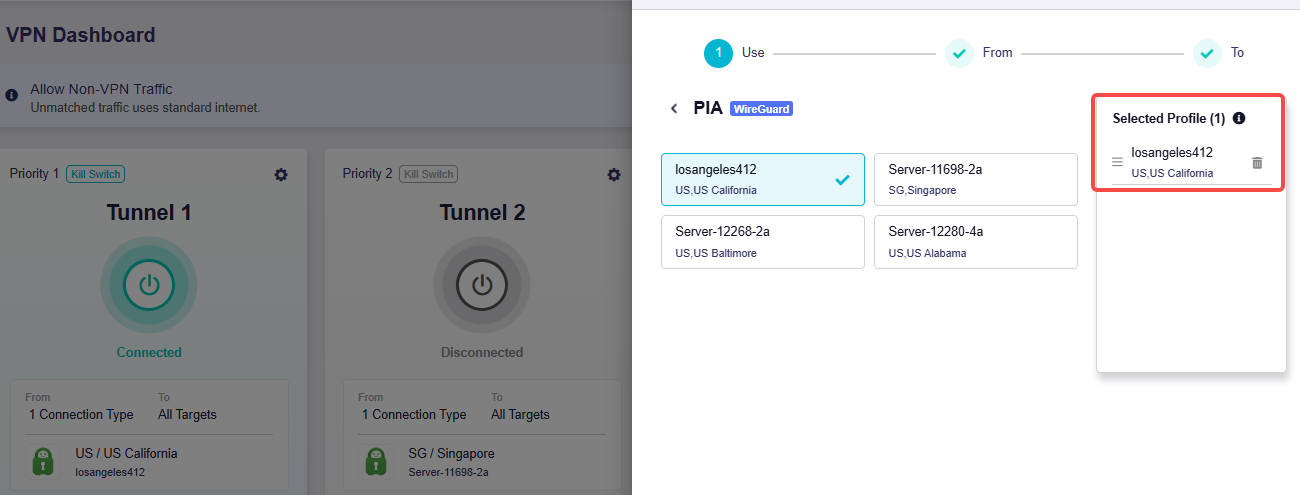
Could you please temporarily stop the affected Tunnel, then, edit this Tunnel or create a new Tunnel, and select only one PIA profile. Please select one of the non-Singapore profiles that failed, and check whether it can connect and remain connected.
If the connection still times out, could you switch the router to a different upstream network, such as connecting it to a mobile hotspot in Repeater mode, and test the same profile again?
I am sorry it's been a few days. Work has been hectic. The connection still has difficulties. I think some of the PIA servers had changed, and Singapore disappeared (which was the only one I could connect to), so I refreshed the server list from PIA, and now even Singapore won't connect, so I have none that can connect. I have a mobile-broadband router, and I tried plugging the Flint 2 router directly into that by ethernet, and still the same issues. I have tried several times to delete all tunnels, delete totally my PIA details from the router, re-login and re-download the profiles from PIA, set up new tunnels, but nothing seems to work. I even tried resetting the router to factory settings, which is when the Singapore server started working before. I don't know why this has only started happening recently. I have had the router for about a year, and never had any issues at all until very recently. So perhaps a change with the way PIA handles things? Or a firmware update for the router causing this?
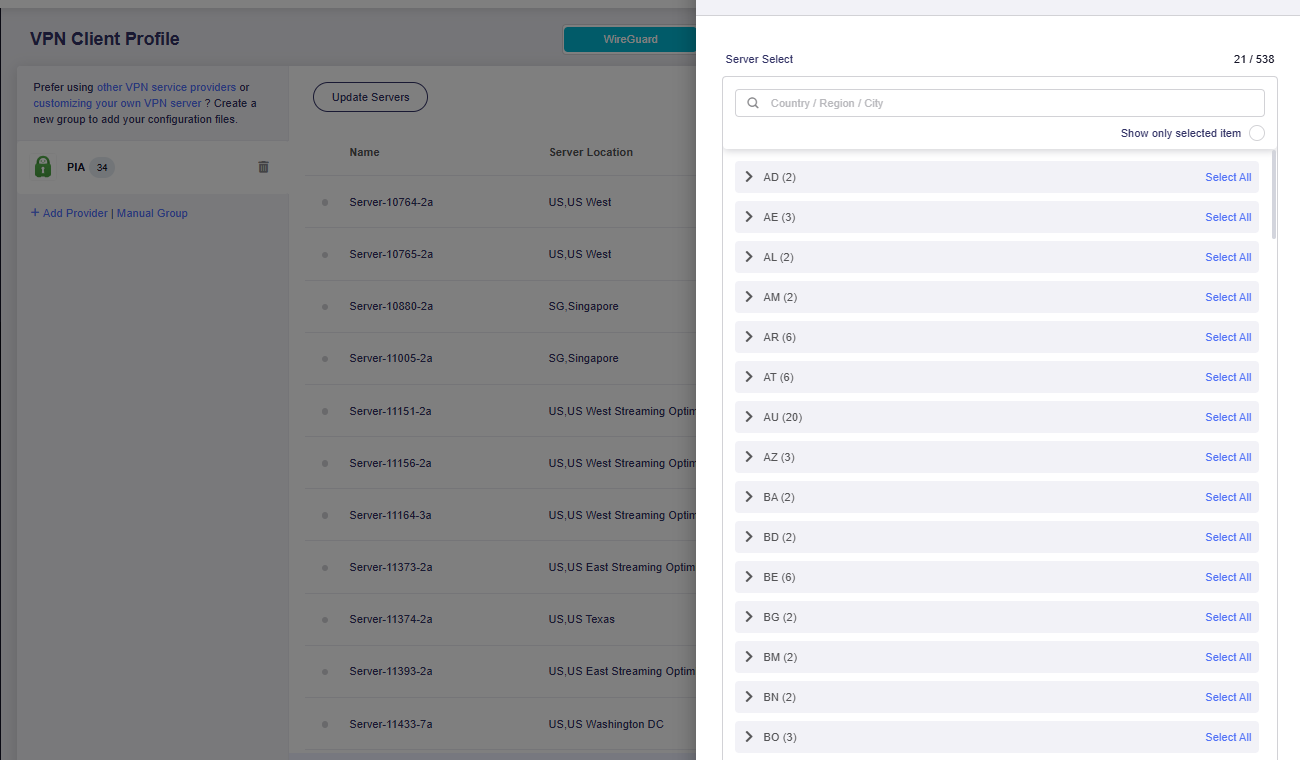
PIA appears to have a newer server-list API endpoint. Could you try the attached Lua file to refresh the PIA server list, then check whether the locations can connect?
We tested this patch on a GL-MT6000 running firmware v4.11.0, and the PIA server list showed 538 entries.
After the router restarts, open the PIA server list and click Update Servers. Our current test showed 537 entries; the count may vary as PIA updates its server list.
Hi, I have done exactly as you asked. I use a Mac, so slightly different. I scp'd the file into the /tmp directory of the router, then ran the commands in the terminal, and after the router rebooted, I checked, and in the root directory is the .bak file, so everything worked. When I updated the servers (I deleted my PIA wireguard details from the router first and then added it again, just to be sure) I got 538 servers, same as you, but it did vary between 536 and 540 servers as I refreshed. Then I added the servers I want to use, all went well. However, when I then tried to connect, I couldn't connect to any of them. Just to be sure, I checked with my phone using the same internet connection, and I can connect to the PIA servers no problem. I am running v4.11.0 firmware. I tried rebooting the router, but no change.
Hi, thank you for testing the patch and sharing the results.
Could you follow this guide to share your Flint 2 with GL.iNet Technical Support through GoodCloud?
After sharing your Flint 2 with GL.iNet Technical Support, please send us the router’s MAC address and a temporary Admin Panel password via private message. We will check the connection process on your router to investigate why the VPN still fails to connect.
Recently this seems to have resolved itself. I wonder if PIA changes its settings often, but right now most servers are working fine. But I will message again if it gets the problems again. Thank you.
Thank you for the update. We’re glad to hear that most servers are working again.
PIA does update its server network and regularly rotate IP addresses. We currently have limited information about the PIA configurations your router retrieved and the connection process at the time, so the exact cause still needs further investigation.
If the issue happens again, please follow the instructions in our previous post to share your router with us through GoodCloud and contact us via private message.