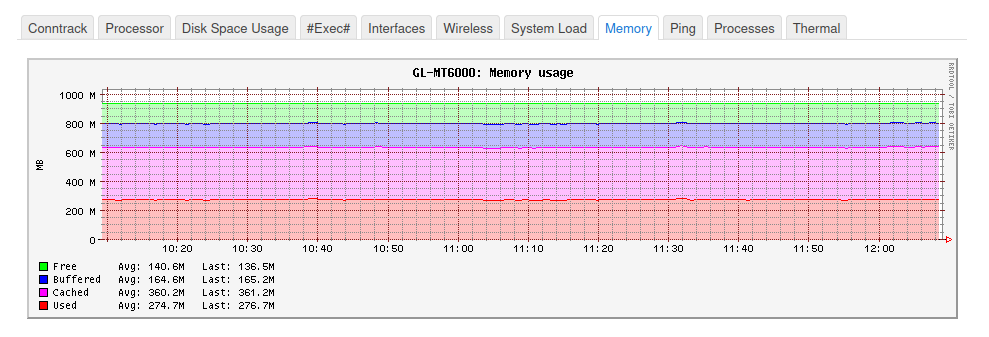
I see many error out of memory, i have always free memory on router (v4.8.3-op24),
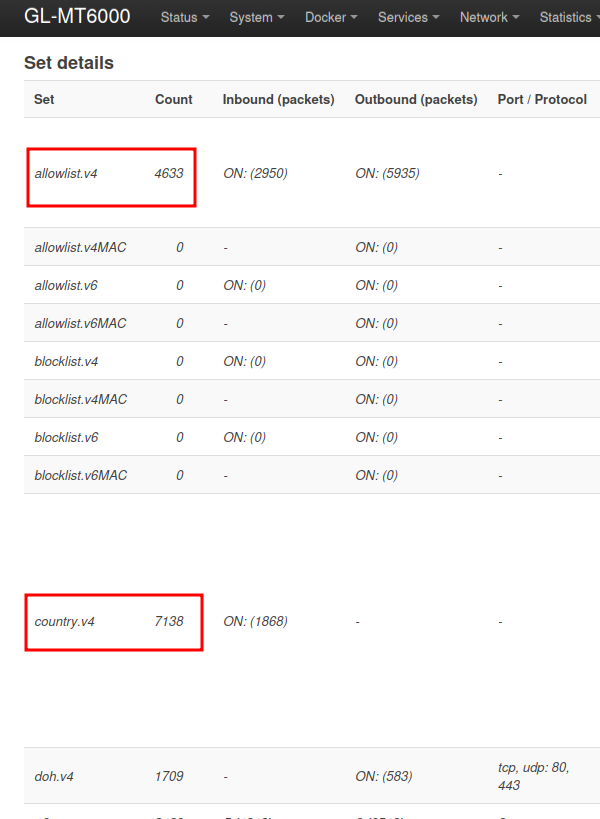
I use banip, all world is blocked only my country is whitelisted
Thu Nov 27 10:47:22 2025 daemon.err nlbwmon[7533]: Netlink receive failure: Out of memory
Thu Nov 27 10:47:22 2025 daemon.err nlbwmon[7533]: Unable to dump conntrack: No buffer space available
Thu Nov 27 10:57:22 2025 daemon.err nlbwmon[7533]: Netlink receive failure: Out of memory
Thu Nov 27 10:57:22 2025 daemon.err nlbwmon[7533]: Unable to dump conntrack: No buffer space available
Thu Nov 27 11:07:22 2025 daemon.err nlbwmon[7533]: Netlink receive failure: Out of memory
Thu Nov 27 11:07:22 2025 daemon.err nlbwmon[7533]: Unable to dump conntrack: No buffer space available
Thu Nov 27 11:17:22 2025 daemon.err nlbwmon[7533]: Netlink receive failure: Out of memory
Thu Nov 27 11:17:22 2025 daemon.err nlbwmon[7533]: Unable to dump conntrack: No buffer space available
Thu Nov 27 11:27:22 2025 daemon.err nlbwmon[7533]: Netlink receive failure: Out of memory
Thu Nov 27 11:27:22 2025 daemon.err nlbwmon[7533]: Unable to dump conntrack: No buffer space available
Thu Nov 27 11:37:22 2025 daemon.err nlbwmon[7533]: Netlink receive failure: Out of memory
Thu Nov 27 11:37:22 2025 daemon.err nlbwmon[7533]: Unable to dump conntrack: No buffer space available
Thu Nov 27 11:47:22 2025 daemon.err nlbwmon[7533]: Netlink receive failure: Out of memory
Thu Nov 27 11:47:22 2025 daemon.err nlbwmon[7533]: Unable to dump conntrack: No buffer space available
Thu Nov 27 11:57:22 2025 daemon.err nlbwmon[7533]: Netlink receive failure: Out of memory
Thu Nov 27 11:57:22 2025 daemon.err nlbwmon[7533]: Unable to dump conntrack: No buffer space available
Thu Nov 27 12:07:22 2025 daemon.err nlbwmon[7533]: Netlink receive failure: Out of memory
Thu Nov 27 12:07:22 2025 daemon.err nlbwmon[7533]: Unable to dump conntrack: No buffer space available