To update.. The errors have returned and are plentiful in the system log if you guys wanted to take a look.
Entire log is flooded with this error currently. Noticing some lag in game that isn't usually there. Unsure if it is related or not, or perhaps just placebo. But again, log is flooded now with the error, from begin to end report.
Sat Oct 25 04:53:24 2025 user.notice AdGuardHome[4064]: 2025/10/25 09:53:24.744923 [error] dnsproxy: response received upstream_type=local addr=127.0.0.1:53 proto=udp status="exchanging with 127.0.0.1:53 over udp: read udp 127.0.0.1:43558->127.0.0.1:53: i/o timeout"
Sat Oct 25 04:53:24 2025 user.notice AdGuardHome[4064]: 2025/10/25 09:53:24.744923 [error] dnsproxy: response received upstream_type=local addr=127.0.0.1:53 proto=udp status="exchanging with 127.0.0.1:53 over udp: read udp 127.0.0.1:37080->127.0.0.1:53: i/o timeout"
Sat Oct 25 04:53:24 2025 user.notice AdGuardHome[4064]: 2025/10/25 09:53:24.745469 [error] dnsproxy: response received upstream_type=local addr=127.0.0.1:53 proto=udp status="exchanging with 127.0.0.1:53 over udp: read udp 127.0.0.1:34039->127.0.0.1:53: i/o timeout"
If it’s causing a lot of bother I would just reset the router to factory and see how that goes. Obviously something not right so a reset is what I would do 
I've done that recently already. And did a firmware and adguard update to latest stable.
And it shouldn't be happening so it is a bother and a malfunction from either a bug in the firmware or something set inappropriately, etc so it is causing a bother too, yes. I imagine it would for most people here, as it also renders the system logs useless if something else needed to be looked at I won't have a log to refer to.
4.8.3 doesn’t have this problem.
It does on mine. Which is puzzling and why I am working with their team to figure it out.
Fresh factory reset and flash to 4.8.3; ADH also up to date.
This appears as though the router is talking with itself and timing out? These are the latest entries.
Sat Oct 25 11:23:18 2025 user.notice AdGuardHome[4064]: 2025/10/25 16:23:18.736222 [error] dnsproxy: response received upstream_type=local addr=127.0.0.1:53 proto=udp status="exchanging with 127.0.0.1:53 over udp: read udp 127.0.0.1:37461->127.0.0.1:53: i/o timeout"
Sat Oct 25 11:23:18 2025 user.notice AdGuardHome[4064]: 2025/10/25 16:23:18.736222 [error] dnsproxy: response received upstream_type=local addr=127.0.0.1:53 proto=udp status="exchanging with 127.0.0.1:53 over udp: read udp 127.0.0.1:54156->127.0.0.1:53: i/o timeout"
Sat Oct 25 11:23:18 2025 user.notice AdGuardHome[4064]: 2025/10/25 16:23:18.736772 [error] dnsproxy: response received upstream_type=local addr=127.0.0.1:53 proto=udp status="exchanging with 127.0.0.1:53 over udp: read udp 127.0.0.1:48135->127.0.0.1:53: i/o timeout"
Sat Oct 25 11:23:18 2025 user.notice AdGuardHome[4064]: 2025/10/25 16:23:18.736772 [error] dnsproxy: response received upstream_type=local addr=127.0.0.1:53 proto=udp status="exchanging with 127.0.0.1:53 over udp: read udp 127.0.0.1:52091->127.0.0.1:53: i/o timeout"
Edit: And this is coming from ADH as I wanted to check the query list (I typically do at least once or twice daily) and found this entry for a couple hours running in the log.
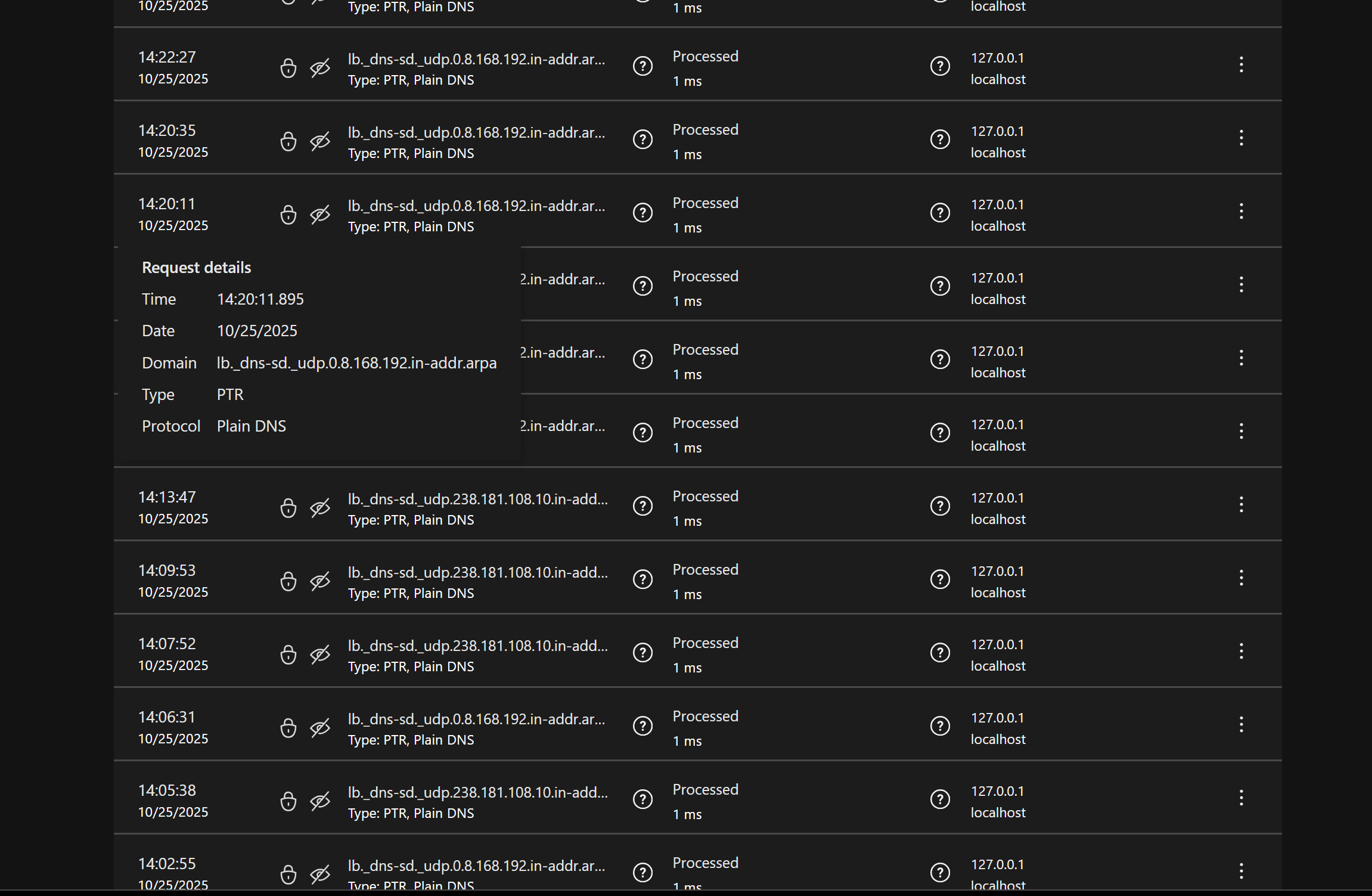
I only have until the 28th to get it returned or exchanged by Amazon as they extended the time for me. Was hoping to get this figured out by then as you can understand.
What are the next steps?
It appears that your GoodCloud share has expired.
Could you please share it with us again so that we can see which devices are sending these?
Ok well now the router seems to be showing my public IP address and this is all beyond my technical abilities. I may just end up getting it swapped on Amazon as I have 1 day left to do it.
You guys even remotely logged into the device and didn't see anything (of course it was quiet while you were monitoring, ugh) but now it is spewing out more concerning log entries and I don't feel confident with browsing the internet even. Removed my actual IP in the pasted log portion here, but it was displaying this repeatedly earlier. Now it is back to using the internal IP address, same error with itself actually. 127.0.01:53 exchanging with 127.0.0.1:
Sun Oct 26 15:11:19 2025 user.notice AdGuardHome[20554]: 2025/10/26 20:11:19.445442 [error] dnsproxy: response received upstream_type=main addr:53=p0.freedns.controld.com proto=udp status="exchanging with p0.freedns.controld.com:53 over udp: read udp PUBLIC ADDRESS:50159->76.76.2.11:53: i/o timeout"
Edit: Yes I will re-open the GoodCloud. Thank you just give me a few minutes and I'll confirm here.
Ok GoodCloud is up and sharing enabled.
This indicates a DNS communication timeout between the router and Control D, most likely due to temporary network fluctuations.
If these log entries appear only occasionally or in small numbers, there is no need for concern.
As shown in ADG Home, these requests originate from iPhones, as previously suspected.
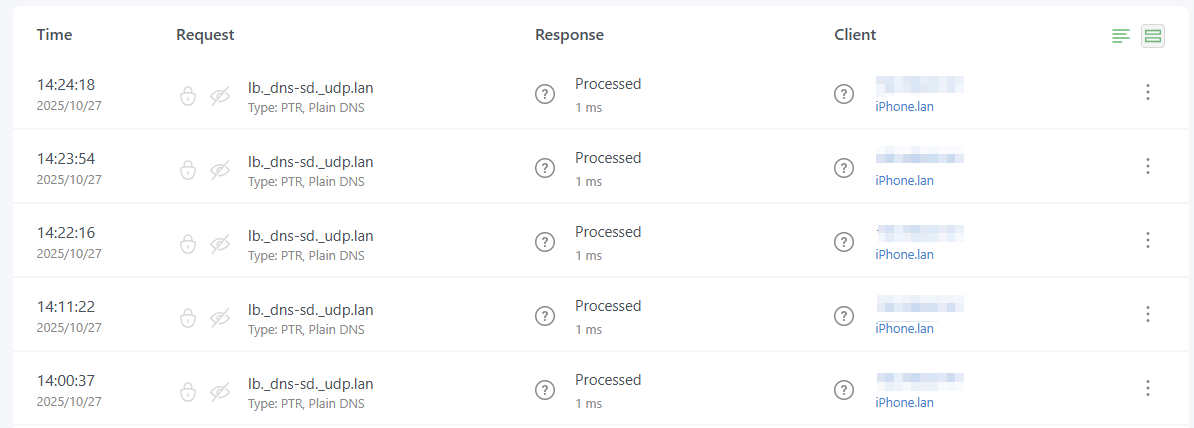

They are purely for local service discovery, and AdGuard Home correctly responded with “NXDOMAIN.”
Therefore, these logs are harmless and can be safely ignored.
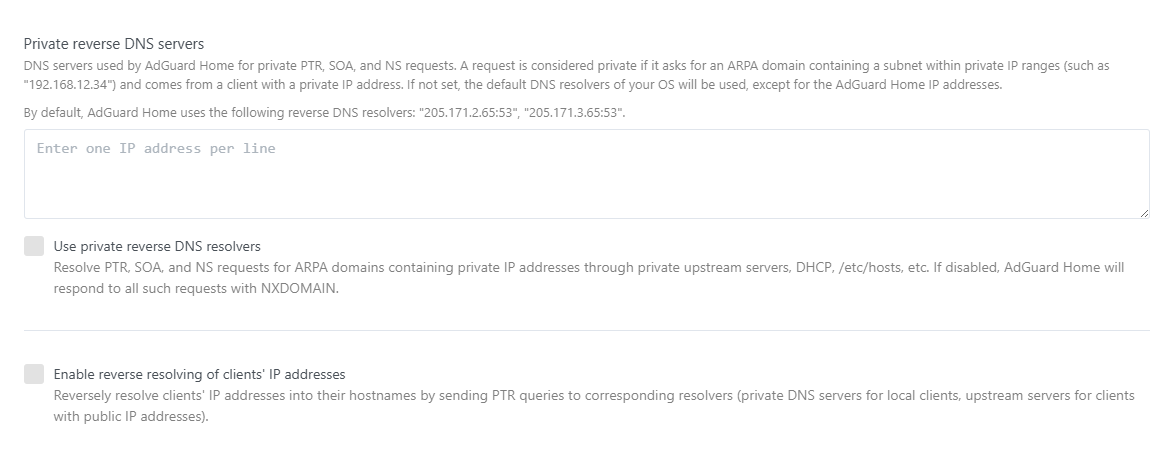
Alternatively, you may disable the corresponding features directly within AdGuard Home if you prefer not to see such entries.
The 127 local ip error is being caused by an Apple device? My neighbor only has the one iPhone. Why would the router be throwing so many i/o errors over one Apple phone, or rather why is this normal?
And lastly, if I disable those features in AdGuard won't I lose the ability to see the identity of which device made a query in the log / statistics shown?
Edit: If I enabled the guest network and put his device(s) strictly to run only there, would that resolve this from happening too?
Requests ending with .lan and .arpa are treated as reverse DNS queries and are forwarded to other DNS servers according to AdGuard Home’s configuration.
In this case, since the configured DNS server is 127.0.0.1, the source address of the forwarded request will also be 127.0.0.1.
As mentioned earlier:
This configuration may result in a loopback (I/O timeout).
No, it won’t affect this.
The only difference is that AdGuard Home might not be able to resolve requests that contain only a hostname, such as:
nslookup iPhone
Not necessarily. DNS requests from the guest network can still reach AdGuard Home, so the issue would likely persist.
2 Likes
Thank you for all your time and help with this matter. It seems to be working without generating those errors and flooding the log now. I'll be hanging onto the Flint 2, you kept me here.
Take care, marking this as solved.
1 Like