Flint 2 router unknown error message in LOG

Can someone help me with this? I updated to the newest stable firmware and it went well this time. Got everything running, adguard home, port forwards for gaming, etc.

Today I am noticing this error has completely filled my System Logs, and gaming online is absolutely HORRIBLE. Doing network tests show subpar performance and some packet loss..

What is this error as I tried to google it and could not find anything..

Mon Oct 20 21:13:52 2025 kern.warn kernel: [12262.777443] Unknown case of dp, iif=b --> ra0
Mon Oct 20 21:45:30 2025 kern.warn kernel: [14160.357119] skb_to_hnat_info: 51 callbacks suppressed
Mon Oct 20 21:13:52 2025 kern.warn kernel: [12262.777443] Unknown case of dp, iif=b --> ra0

This fills my entire system log. I've tried a reboot which did not work in resolving it. And connecting my device directly to the ONT which yields no problems on my ISP's end for once.

My return / exchange window with Amazon of course JUST expired with Amazon. I'm thinking this model has something wrong with it but no idea as I'm at a loss here.. Please help.

Hi

Could you please provide:

  1. The specific firmware version number

  2. Send us the device logs via private message
    How to export logs:


    How to send a private message:

  3. Please try disabling hardware acceleration to see if it helps
    Network Acceleration - GL.iNet Router Docs 4

1 Like

You can also send your log files to Google Gemini and it will give some helpful information. AI is pretty good at these sort of things.

1 Like

Thank you for your reply. Here's the full firmware version information. I just updated to the latest stable.

OpenWrt 21.02-SNAPSHOT / LuCI openwrt-21.02 branch git-22.335.71649-0ecaf74

I unfortunately don't have the full logs anymore as ended up unplugging the device and allowing it to sit for about an hour before reconnecting and it seems whatever was causing the mass errors in the logs stopped and hasn't returned. However I did end up disabling hardware acceleration as I by mistake left that enabled when using SQM.

It appears though that the routers functionality has returned to normal, sqm is operating normally as is adguard home, and gaming. Has me a bit puzzled as I don't know what caused this to happen. I'm glad it's working. The only plug-in I have installed is Luci SQM nothing else extra.

Sent you a private message with the current logs I have now if it'll help any.

Getting a few of these in the log, doesn't look as concerning but not sure how to resolve. The router is getting i/o timeouts while talking with adguard for some reason.

Thank you for looking into this. I hope the router remains stable and doesn't go down again. Learning a little bit more though all the time.

user.notice AdGuardHome[15743]: 2025/10/21 17:39:48.841040 ERROR response received addr=192.168.8.1:53 proto=udp status="exchanging with 192.168.8.1:53 over udp: read udp 192.168.8.1:40305->192.168.8.1:53: i/o timeout"
Tue Oct 21 12:39:48 2025 user.notice AdGuardHome[15743]: 2025/10/21 17:39:48.841205 ERROR response received addr=192.168.8.1:53 proto=udp status="exchanging with 192.168.8.1:53 over udp: read udp 192.168.8.1:57566->192.168.8.1:53: i/o timeout"
Tue Oct 21 12:39:48 2025 user.notice AdGuardHome[15743]: 2025/10/21 17:39:48.842741 ERROR response received addr=192.168.8.1:53 proto=udp status="exchanging with 192.168.8.1:53 over udp: read udp 192.168.8.1:58923->192.168.8.1:53: i/o timeout"
Tue Oct 21 12:39:48 2025 user.notice AdGuardHome[15743]: 2025/10/21 17:39:48.842741 ERROR response received addr=192.168.8.1:53 proto=udp status="exchanging with 192.168.8.1:53 over udp: read udp 192.168.8.1:42444->192.168.8.1:53: i/o timeout"
Tue Oct 21 12:43:10 2025 user.notice AdGuardHome[15743]: 2025/10/21 17:43:10.127931 ERROR response received addr=192.168.8.1:53 proto=udp status="exchanging with 192.168.8.1:53 over udp: read udp 192.168.8.1:36323->192.168.8.1:53: i/o timeout"
Tue Oct 21 12:43:10 2025 user.notice AdGuardHome[15743]: 2025/10/21 17:43:10.127931 ERROR response received addr=192.168.8.1:53 proto=udp status="exchanging with 192.168.8.1:53 over udp: read udp 192.168.8.1:59611->192.168.8.1:53: i/o timeout"
Tue Oct 21 12:43:10 2025 user.notice AdGuardHome[15743]: 2025/10/21 17:43:10.129596 ERROR response received addr=192.168.8.1:53 proto=udp status="exchanging with 192.168.8.1:53 over udp: read udp 192.168.8.1:53686->192.168.8.1:53: i/o timeout"
Tue Oct 21 12:43:10 2025 user.notice AdGuardHome[15743]: 2025/10/21 17:43:10.129596 ERROR response received addr=192.168.8.1:53 proto=udp status="exchanging with 192.168.8.1:53 over udp: read udp 192.168.8.1:42608->192.168.8.1:53: i/o timeout"
Tue Oct 21 12:44:32 2025 kern.err kernel: [49978.949791] WiFi@C15L1,RTMPDeletePMKIDCache() 1311: IF(0), del PMKID CacheIdx=0
Tue Oct 21 12:52:33 2025 daemon.notice netifd: wan (11010): udhcpc: sending renew to 71.36.253.2
Tue Oct 21 12:52:34 2025 daemon.notice netifd: wan (11010): udhcpc: lease of 70.57.91.44 obtained, lease time 1800
Tue Oct 21 12:52:34 2025 user.notice kmwan: config json str={ "op": 6, "data": { } }

ADG Home appears to be timing out while communicating with the upstream DNS server at 192.168.8.1:53.
Is dnsmasq still running and listening on port 53?

Yes it is, I haven't changed that. Should I adjust it?

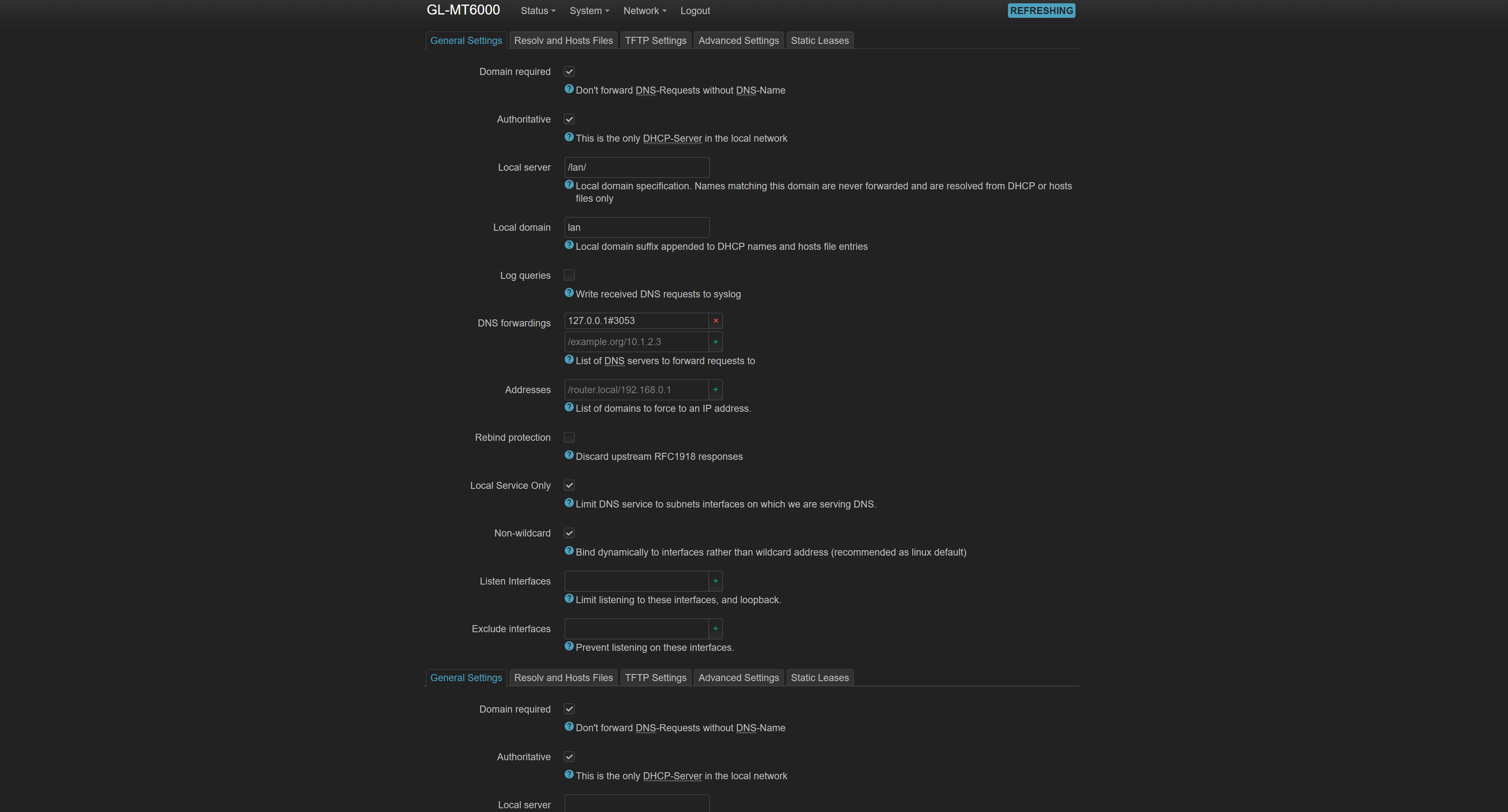
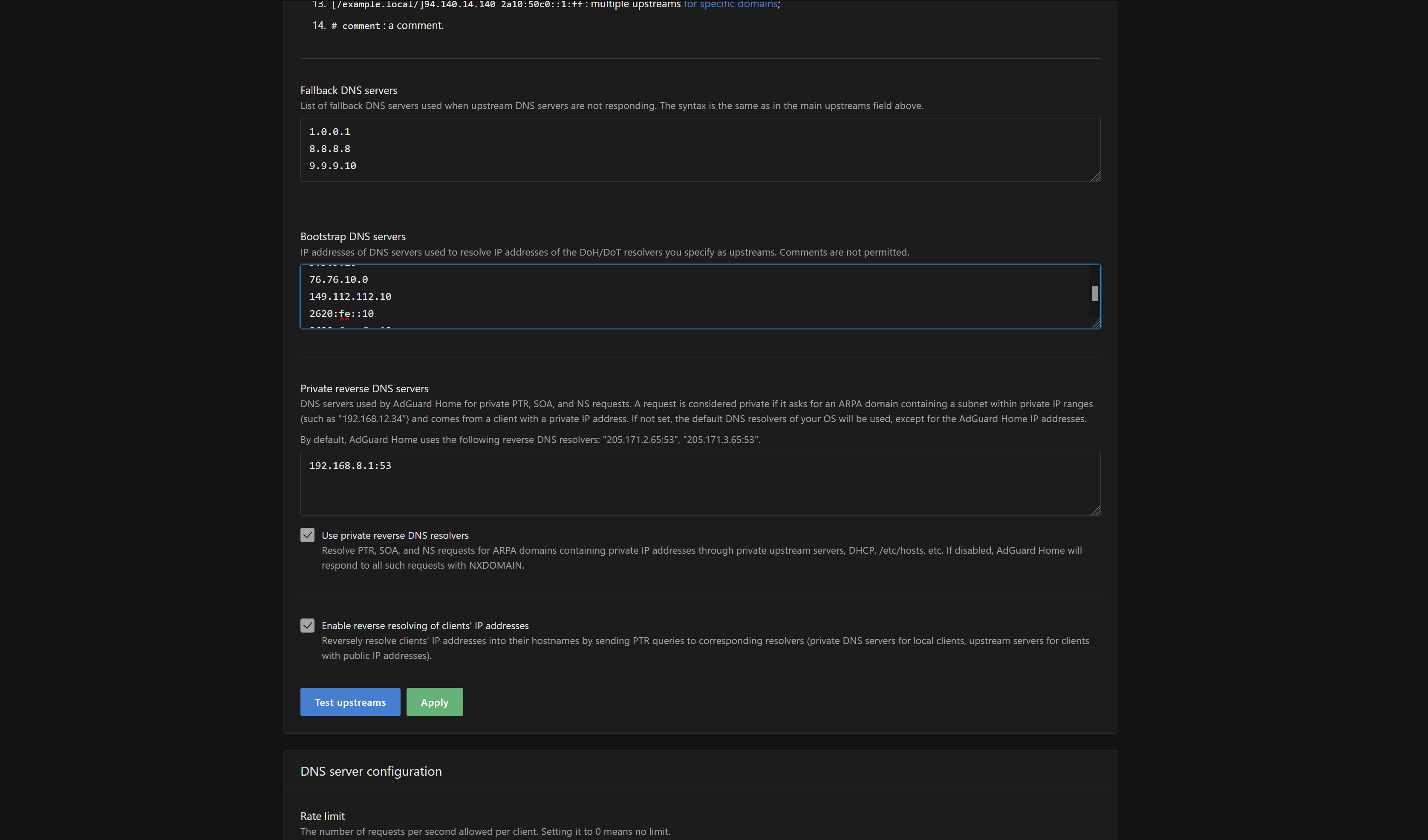
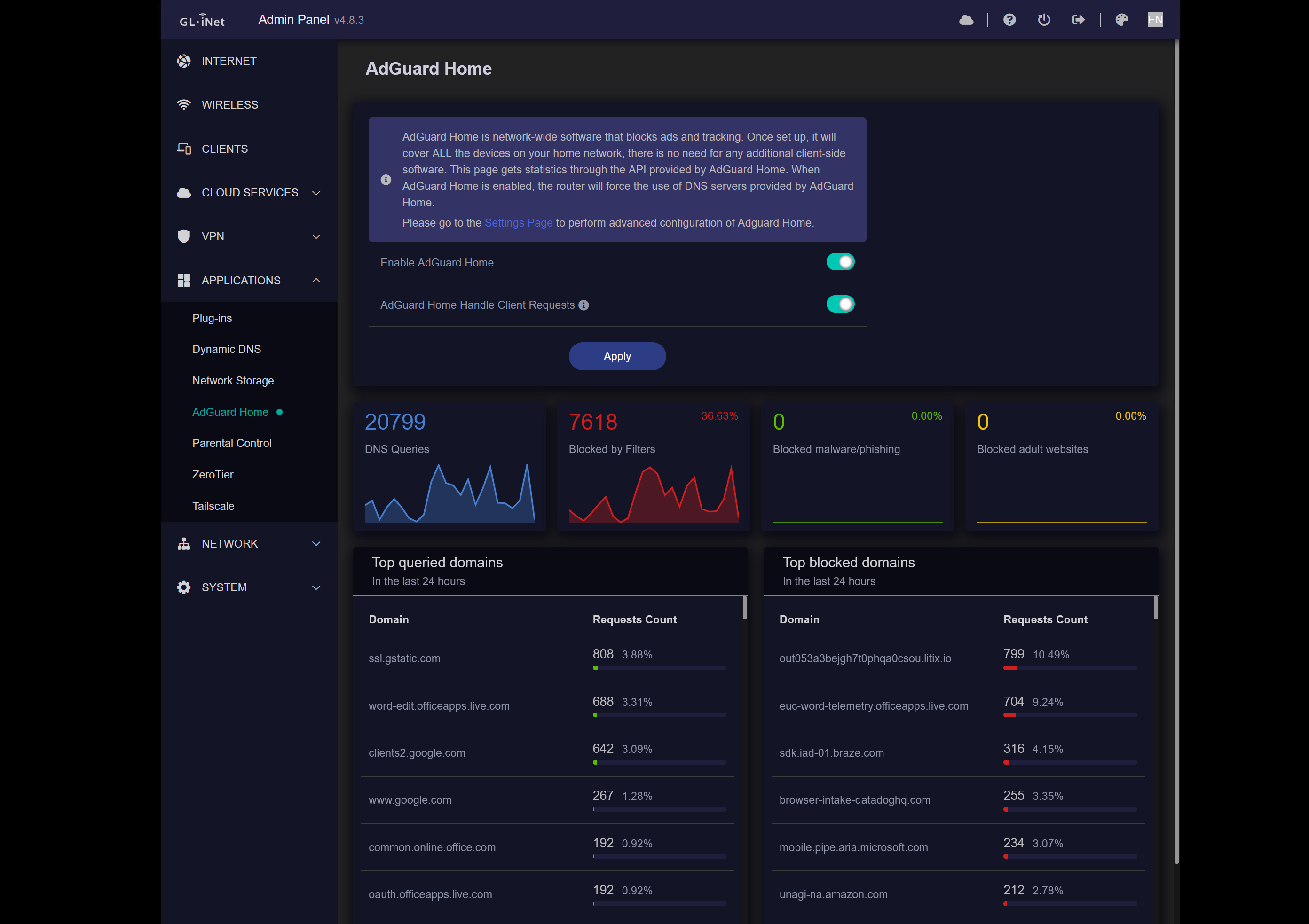
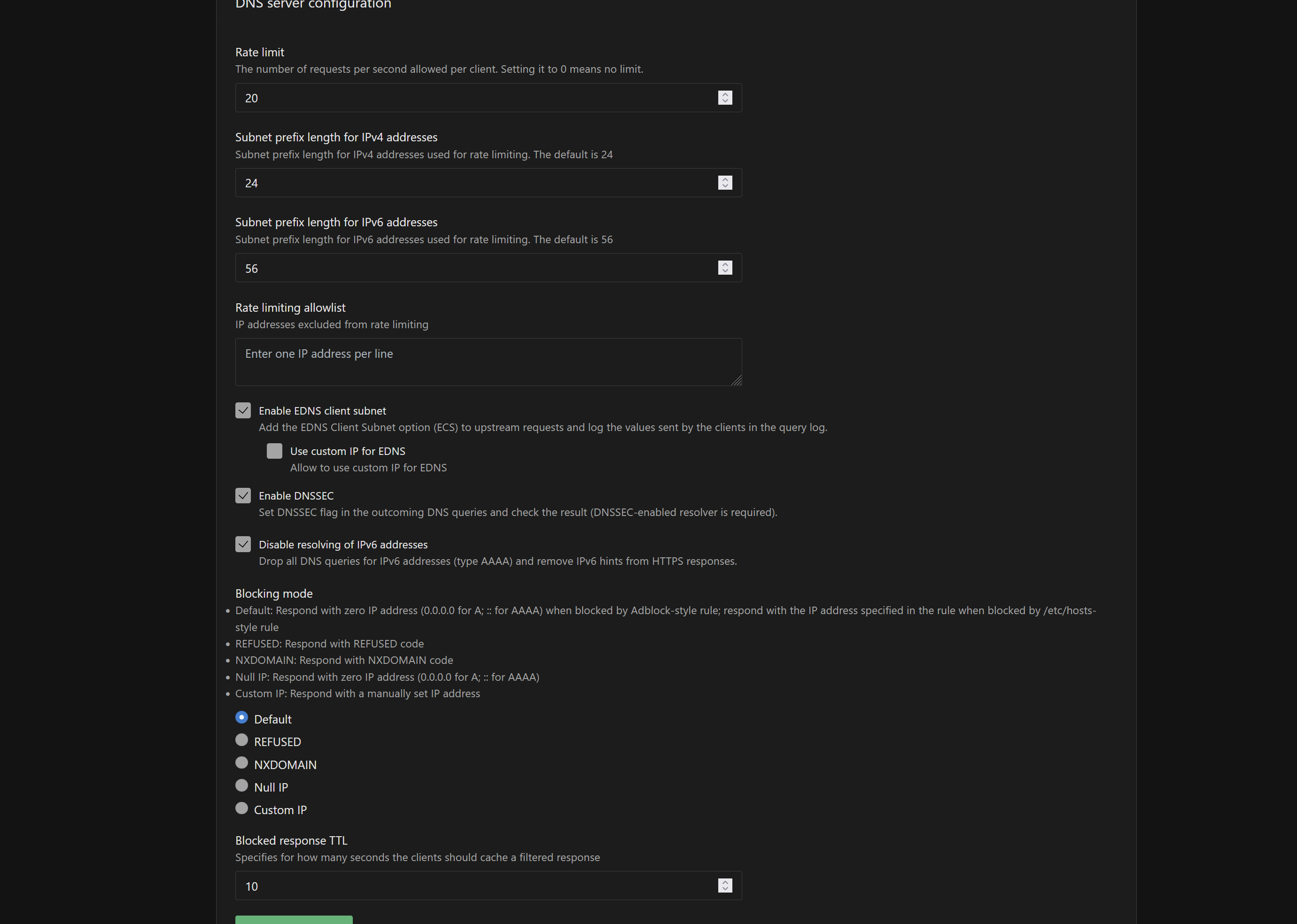
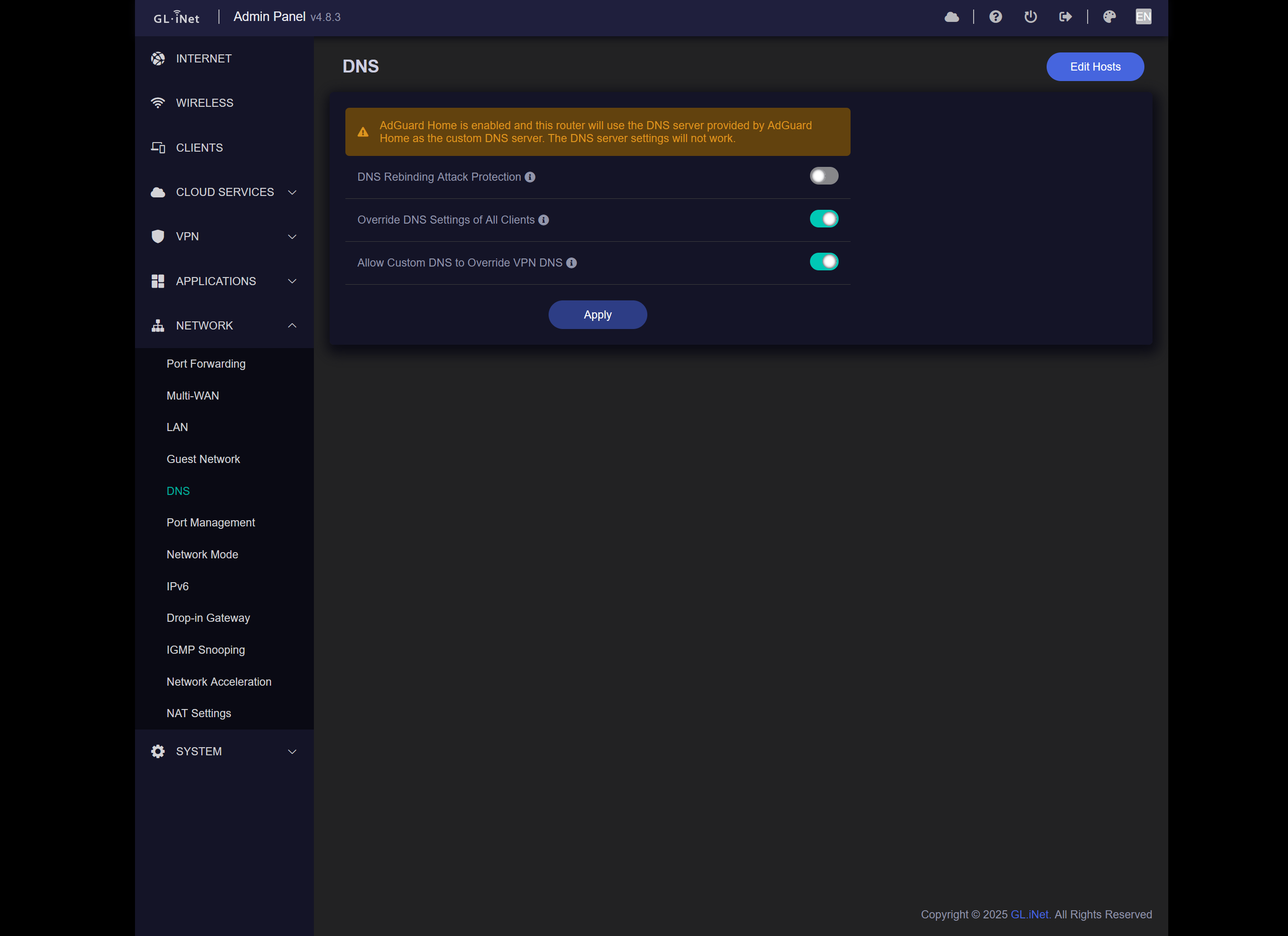
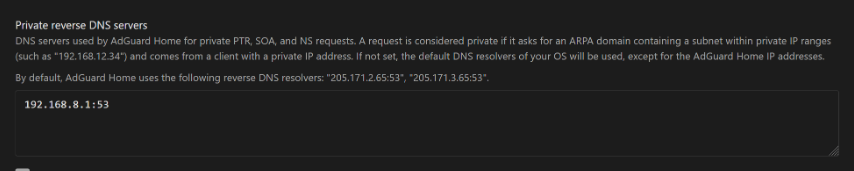
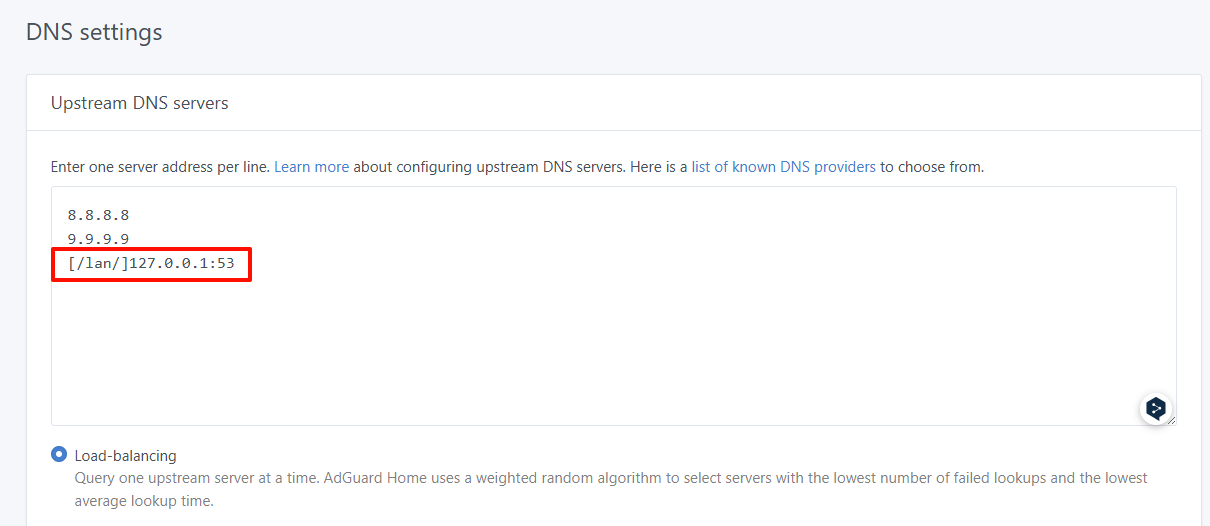
Could you please share some screenshots of your Admin Panel - Network - DNS settings and AdGuard Home upstream DNS settings?

By default, once AdGuard Home is enabled, the upstream DNS for dnsmasq will be set to localhost:3053 (the AdGuard Home listen address).
If you also add 192.168.8.1:53 (the dnsmasq listen address) as an upstream DNS server in AdGuard Home, it may create a loopback issue.

1 Like

Sure here they are.


Getting a significant amount more of those port 53 timeouts in my log file..

Is there something I should change or edit to correct this?

I also just updated adguard home using the script here to the latest release. Didn't resolve the errors / timeouts.

Is there anything you see in the screenshots I shared that would need to be changed? And the original error message / debug log, is there anything you could think of that would have caused that to happen?

Thanks for any assistance you can provide.

Did SQM select the correct interface?
Please note that Flint 2’s WAN interface is eth1, not eth0.

If you’ve confirmed that eth1 was selected, try changing the ADG Home configuration to use 127.0.0.1:53.

Yes confirmed it is on the correct interface eth1 and not eth0.

And I took the initiative earlier today and did switch to address 127.0.0.1:53

However after updating Adguard and changing the address I am still seeing this in the log.

Wed Oct 22 22:40:59 2025 user.notice AdGuardHome[20787]: 2025/10/23 03:40:59.867950 [error] dnsproxy: response received upstream_type=local addr=127.0.0.1:53 proto=udp status="exchanging with 127.0.0.1:53 over udp: read udp 127.0.0.1:60807->127.0.0.1:53: i/o timeout"
Wed Oct 22 22:41:06 2025 kern.err kernel: [ 652.334988] WiFi@C15L1,RTMPDeletePMKIDCache() 1311: IF(0), del PMKID CacheIdx=0
Wed Oct 22 22:41:20 2025 kern.err kernel: [ 666.906907] WiFi@C15L1,RTMPDeletePMKIDCache() 1311: IF(0), del PMKID CacheIdx=1
Wed Oct 22 22:42:27 2025 kern.err kernel: [ 733.592116] 7986@C15L1,PMF_PerformRxFrameAction() 1492: [PMF] : NOT_ROBUST_UNICAST_FRAME, FC->SubType=12 (wcid=2)
Wed Oct 22 22:42:27 2025 kern.err kernel: [ 733.934115] 7986@C15L1,PMF_MlmeSAQueryReq() 140: [PMF] -- SAQueryTimer
Wed Oct 22 22:42:28 2025 kern.warn kernel: [ 734.946286] 7986@C01L2,wifi_sys_disconn_act() 1002: wdev_idx=0
Wed Oct 22 22:42:28 2025 kern.notice kernel: [ 734.952462] 7986@C08L3,hw_ctrl_flow_v2_disconnt_act() 172: wdev_idx=0
Wed Oct 22 22:42:28 2025 kern.warn kernel: [ 734.959812] 7986@C13L2,MacTableDeleteEntry() 1938: Del Sta:a4:97:b1:79:da:67
Wed Oct 22 22:42:30 2025 kern.debug kernel: [ 737.158759] entrytb_aid_aquire(): found non-occupied aid:5, allocated from:4
Wed Oct 22 22:42:30 2025 kern.warn kernel: [ 737.165821] 7986@C13L2,MacTableInsertEntry() 1577: New Sta:a4:97:b1:79:da:67
Wed Oct 22 22:42:30 2025 kern.notice kernel: [ 737.271992] 7986@C08L3,ap_cmm_peer_assoc_req_action() 1714: Recv Assoc from STA - a4:97:b1:79:da:67
Wed Oct 22 22:42:30 2025 kern.err kernel: [ 737.281163] 7986@C08L1,APBuildAssociation() 745: invalid status code(53) !!!
Wed Oct 22 22:42:30 2025 kern.notice kernel: [ 737.288206] 7986@C08L3,ap_cmm_peer_assoc_req_action() 2241: ReASSOC Send ReASSOC response (Status=53)...
Wed Oct 22 22:42:31 2025 kern.notice kernel: [ 737.673097] 7986@C08L3,ap_cmm_peer_assoc_req_action() 1714: Recv Assoc from STA - a4:97:b1:79:da:67
Wed Oct 22 22:42:31 2025 kern.notice kernel: [ 737.682342] 7986@C08L3,ap_cmm_peer_assoc_req_action() 2241: ASSOC Send ASSOC response (Status=0)...
Wed Oct 22 22:42:31 2025 kern.notice kernel: [ 737.691416] 7986@C01L3,wifi_sys_conn_act() 1115: wdev idx = 0
Wed Oct 22 22:42:31 2025 kern.notice kernel: [ 737.697409] 7986@C08L3,hw_ctrl_flow_v2_connt_act() 215: wdev_idx=0
Wed Oct 22 22:42:31 2025 kern.notice kernel: [ 737.826654] 7986@C15L3,WPABuildPairMsg1() 5310: <=== send Msg1 of 4-way
Wed Oct 22 22:42:31 2025 kern.notice kernel: [ 737.833266] 7986@C15L3,PeerPairMsg2Action() 6303: ===>Receive msg 2
Wed Oct 22 22:42:31 2025 kern.notice kernel: [ 737.840052] 7986@C15L3,WPABuildPairMsg3() 5595: <=== send Msg3 of 4-way
Wed Oct 22 22:42:31 2025 kern.notice kernel: [ 737.846661] 7986@C15L3,PeerPairMsg4Action() 6734: ===>Receive msg 4
Wed Oct 22 22:42:31 2025 daemon.info dnsmasq-dhcp[20044]: DHCPREQUEST(br-lan) 192.168.8.130 a4:97:b1:79:da:67
Wed Oct 22 22:42:31 2025 daemon.info dnsmasq-dhcp[20044]: DHCPACK(br-lan) 192.168.8.130 a4:97:b1:79:da:67
Wed Oct 22 22:42:31 2025 kern.warn kernel: [ 737.858149] 7986@C15L2,PeerPairMsg4Action() 7098: AP SETKEYS DONE(ra0) - AKMMap=WPA3PSK, PairwiseCipher=AES, GroupCipher=AES, wcid=2 from a4:97:b1:79:da:67
Wed Oct 22 22:42:31 2025 kern.warn kernel: [ 737.858149]
Wed Oct 22 22:42:49 2025 kern.err kernel: [ 755.338426] WiFi@C15L1,RTMPDeletePMKIDCache() 1311: IF(2), del PMKID CacheIdx=2
Wed Oct 22 22:42:51 2025 kern.err kernel: [ 757.422372] WiFi@C15L1,RTMPDeletePMKIDCache() 1311: IF(2), del PMKID CacheIdx=3
Wed Oct 22 22:45:55 2025 daemon.notice netifd: wan (11616): udhcpc: sending renew to 71.36.253.2
Wed Oct 22 22:45:55 2025 daemon.notice netifd: wan (11616): udhcpc: lease of 70.57.91.44 obtained, lease time 1800
Wed Oct 22 22:45:55 2025 user.notice kmwan: config json str={ "op": 6, "data": { } }
Wed Oct 22 22:52:09 2025 kern.info kernel: [ 1315.946120] nf_conntrack: default automatic helper assignment has been turned off for security reasons and CT-based firewall rule not found. Use the iptables CT target to attach helpers instead.

Thu Oct 23 02:11:47 2025 user.notice AdGuardHome[20787]: 2025/10/23 07:11:47.876896 [error] dnsproxy: response received upstream_type=local addr=127.0.0.1:53 proto=udp status="exchanging with 127.0.0.1:53 over udp: read udp 127.0.0.1:50210->127.0.0.1:53: i/o timeout"
Thu Oct 23 02:13:48 2025 user.notice AdGuardHome[20787]: 2025/10/23 07:13:48.992333 [error] dnsproxy: response received upstream_type=local addr=127.0.0.1:53 proto=udp status="exchanging with 127.0.0.1:53 over udp: read udp 127.0.0.1:43538->127.0.0.1:53: i/o timeout"
Thu Oct 23 02:13:48 2025 user.notice AdGuardHome[20787]: 2025/10/23 07:13:48.992341 [error] dnsproxy: response received upstream_type=local addr=127.0.0.1:53 proto=udp status="exchanging with 127.0.0.1:53 over udp: read udp 127.0.0.1:44583->127.0.0.1:53: i/o timeout"
Thu Oct 23 02:13:48 2025 user.notice AdGuardHome[20787]: 2025/10/23 07:13:48.994022 [error] dnsproxy: response received upstream_type=local addr=127.0.0.1:53 proto=udp status="exchanging with 127.0.0.1:53 over udp: read udp 127.0.0.1:36615->127.0.0.1:53: i/o timeout"
Thu Oct 23 02:13:48 2025 user.notice AdGuardHome[20787]: 2025/10/23 07:13:48.994026 [error] dnsproxy: response received upstream_type=local addr=127.0.0.1:53 proto=udp status="exchanging with 127.0.0.1:53 over udp: read udp 127.0.0.1:40095->127.0.0.1:53: i/o timeout"
Thu Oct 23 02:15:49 2025 user.notice AdGuardHome[20787]: 2025/10/23 07:15:49.971522 [error] dnsproxy: response received upstream_type=local addr=127.0.0.1:53 proto=udp status="exchanging with 127.0.0.1:53 over udp: read udp 127.0.0.1:59816->127.0.0.1:53: i/o timeout"
Thu Oct 23 02:15:49 2025 user.notice AdGuardHome[20787]: 2025/10/23 07:15:49.971522 [error] dnsproxy: response received upstream_type=local addr=127.0.0.1:53 proto=udp status="exchanging with 127.0.0.1:53 over udp: read udp 127.0.0.1:55575->127.0.0.1:53: i/o timeout"
Thu Oct 23 02:15:49 2025 user.notice AdGuardHome[20787]: 2025/10/23 07:15:49.973166 [error] dnsproxy: response received upstream_type=local addr=127.0.0.1:53 proto=udp status="exchanging with 127.0.0.1:53 over udp: read udp 127.0.0.1:36132->127.0.0.1:53: i/o timeout"
Thu Oct 23 02:15:49 2025 user.notice AdGuardHome[20787]: 2025/10/23 07:15:49.973166 [error] dnsproxy: response received upstream_type=local addr=127.0.0.1:53 proto=udp status="exchanging with 127.0.0.1:53 over udp: read udp 127.0.0.1:44700->127.0.0.1:53: i/o timeout"
Thu Oct 23 02:16:01 2025 daemon.notice netifd: wan (11616): udhcpc: sending renew to 71.36.253.2
Thu Oct 23 02:16:01 2025 daemon.notice netifd: wan (11616): udhcpc: lease of 70.57.91.44 obtained, lease time 1800
Thu Oct 23 02:16:01 2025 user.notice kmwan: config json str={ "op": 6, "data": { } }
Thu Oct 23 02:18:19 2025 user.notice AdGuardHome[20787]: 2025/10/23 07:18:19.448188 [error] dnsproxy: response received upstream_type=local addr=127.0.0.1:53 proto=udp status="exchanging with 127.0.0.1:53 over udp: read udp 127.0.0.1:35327->127.0.0.1:53: i/o timeout"

It is almost flooding the log unfortunately now.. and that's odd as it is late at night and not much traffic. My neighbor next door I share my connection / wifi with and he just uses it for basic stuff like email, online browsing, youtube, etc. Only device active right now is my main PC I built which I am typing to you on, and my smartphone.

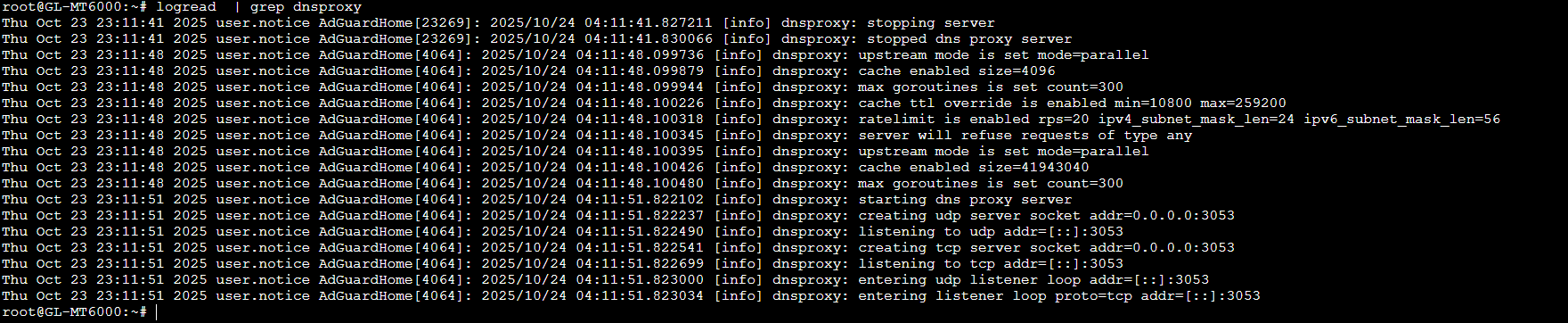
I would like it to work correctly, this router enjoys making me stress lol. When it works though it does a good job, but these errors / abundance of log entries is troubling. I sent you a message with the router debug / logs current.


Based on the logs, it appears that approximately every 10 minutes, a device sends a large volume of private reverse DNS requests.

Please try adding one more to the upstream DNS settings in ADH Home:

[/lan/]127.0.0.1:53

If this still doesn't help, please connect the Flint 2 to the GoodCloud and share it with us.
So that we can further remotely check.
Technical Support via GoodCloud - GL.iNet Router Docs 4

Alright I will add that right now to the upstream DNS servers list and update you after a bit. If necessary we can remotely connect. Thank you.

Looks like the issue still persists. I have enabled goodcloud and made an account. I have enabled your team to privately look into the router. Please update me when you can.

Thank you.

Could you send me the MAC address of device and the WebUI login password via private message?
This will allow us to locate it in our list, access it, and troubleshoot the issue.

Done, sent both over to you via PM

We observed for about two hours, and it appears no similar messages have reappeared in the logs.

We may need to wait longer or for a device to become active again.
Perhaps we'll check again when we return next week.

Based on current observations from the ADG Home logs, this seems to be behavior from Apple devices.

lb._dns-sd._udp.lan
lb._dns-sd._udp.0.8.168.192.in-addr.arpa
1 Like

Alright makes sense as it was late evening when I got you approved to monitor and been overnight since then with only my main PC running with traffic.

My neighbor will be up in the morning for work tomorrow and he has a friend stay with him too that has an Apple device. Is that the culprit possibly?