Flint 2, speed cap at 1 Gbps after update

Hello, I have a Flint 2, and since I installed the v4.8.2 update no client on the network exceeds 1 Gbps speed, whether wired or wireless.
I have restarted several times, and I don't understand what happened. On the devices where I performed the test, I used to easily reach +2 Gbps, but now I can't.
Is there a setting I need to change?

Thank you!

Hello,

  1. If downgraded to firmware v4.7.7, will the speed return to 2Gbps?
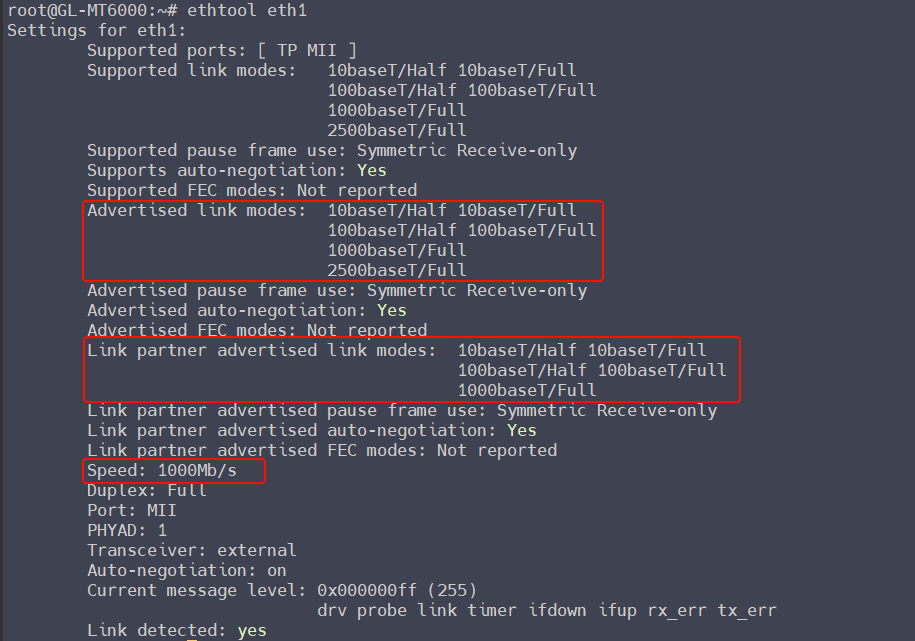
  2. It's possible that the WAN port negotiation speed is not 2.5Gbps but 1Gbps. You can check the speed in Port Management.
  3. If it's a port negotiation speed issue, please try changing the Ethernet cable and try unplugging and plugging the port multiple times.

Hello,

  1. Yes, but it works only after a factory reset
  2. I can’t check anymore(rolled back to 4.7.7)
  3. Tried everything with no success.

Thank you

You can SSH to the router and check the "negotiated speed" using the command ethtool eth1 on any firmware version.

Updated to 4.8.3, same issue… Speed limited to 1Gbps…

root@GL-MT6000:~# ethtool eth1
Settings for eth1:
	Supported ports: [ TP MII ]
	Supported link modes:   10baseT/Half 10baseT/Full 
	                        100baseT/Half 100baseT/Full 
	                        1000baseT/Full 
	                        2500baseT/Full 
	Supported pause frame use: Symmetric Receive-only
	Supports auto-negotiation: Yes
	Supported FEC modes: Not reported
	Advertised link modes:  10baseT/Half 10baseT/Full 
	                        100baseT/Half 100baseT/Full 
	                        1000baseT/Full 
	                        2500baseT/Full 
	Advertised pause frame use: Symmetric Receive-only
	Advertised auto-negotiation: Yes
	Advertised FEC modes: Not reported
	Link partner advertised link modes:  10baseT/Half 10baseT/Full 
	                                     100baseT/Half 100baseT/Full 
	                                     1000baseT/Full 
	                                     2500baseT/Full 
	Link partner advertised pause frame use: No
	Link partner advertised auto-negotiation: Yes
	Link partner advertised FEC modes: Not reported
	Speed: 2500Mb/s
	Duplex: Full
	Port: MII
	PHYAD: 1
	Transceiver: external
	Auto-negotiation: on
	Current message level: 0x000000ff (255)
			       drv probe link timer ifdown ifup rx_err tx_err
	Link detected: yes

The issue is coming from the WAN port, I’ve done an iperf3 in the LAN and the speed is ok… Is something related to the connection:

   Speedtest by Ookla

      Server: Aruba S.p.A. - Arezzo (id: 40515)
         ISP: Aruba Broadband
Idle Latency:    19.97 ms   (jitter: 0.11ms, low: 19.84ms, high: 20.09ms)
    Download:  1036.96 Mbps (data used: 1.2 GB)                                                   
                170.52 ms   (jitter: 64.38ms, low: 19.68ms, high: 994.31ms)
      Upload:   477.29 Mbps (data used: 836.0 MB)                                                   
                 23.65 ms   (jitter: 4.91ms, low: 19.65ms, high: 163.38ms)
 Packet Loss:     0.0%

I think that I’ll roll back to 4.7.7, forever at this point…

Hello,

May I know how about if upgrade to the v4.8.3 firmware?

I think a bit strange, 2.5Gbps was negotiated from the WAN, and it was LAN iperf3 test speed was normal.

If no luck, please share your router with us via GoodCloud, I would like to remote check your router.

Please PM me your router MAC address and the Admin Panel password.

The last message was entirely related to 4.8.3. Now I rolled back to the fabulous 4.7.7.

I don't know what the problem is, but with the same external tests I can't exceed 1.1Gbps (same servers, settings, etc.), even after restarting the router.
Unfortunately, I didn't save them, but there were logs with errors related to the kernel or crashes. Yet it was installed via a downloaded file, flashed by LuCI, and then factory reset to defaults.

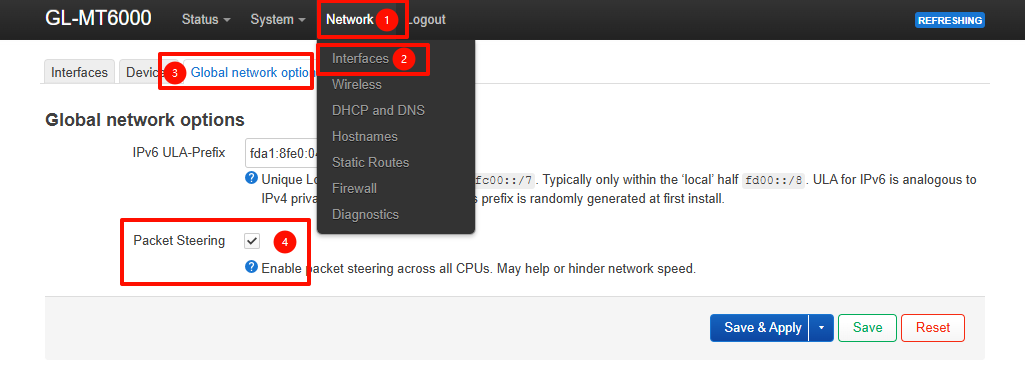
Please try to enable the "Packet Steering" on Luci - Network - Interface - Global network options and see if it helps or not.

Additionally, is hardware acceleration enabled?
Network Acceleration - GL.iNet Router Docs 4

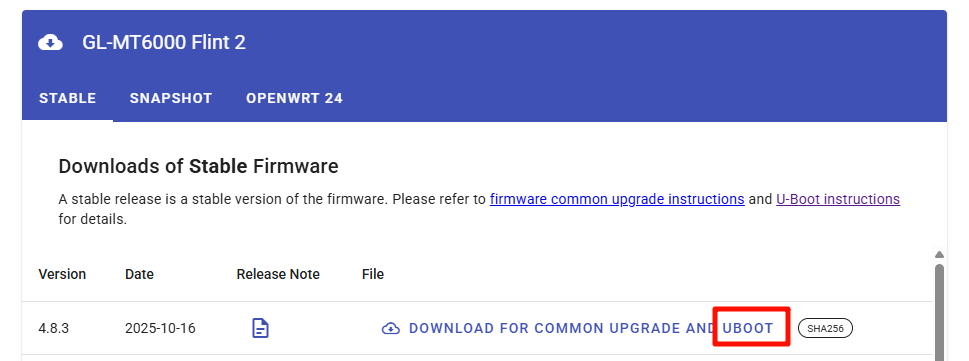
I rolled back to the best stable 4.7.7 . I may try to update to 4.8.3, do you have the U-Boot version? So I’ll flash it to start to a very deep clean firmware.

Thank you

You can download here.
GL.iNet download center

There is the sysupgrade version, is this compatible for the U-boot flash? Thank you!

Hi Will,

I have the exact same problem as the OP, but I'm on 4.8.2-op24 and I have both the hardware acceleration option and packet steering active on all CPUs, yet in pppoe I don't exceed 1.2Gbps with load on only 1 core, while in ipoe it works without problems

1 Like

If you rolled back to 4.7.7, why do you need the u-boot flash image for 4.8.3? Just curious.

1 Like

To try to install a very clean 4.8.3 and see if it’s ok…

That image is really only useful if you are converting between openwrt variations. It shouldn’t be any different than upgrading without keeping settings. But…it won’t hurt to do it. Do what makes you feel good.

I agree with you, but if I install 4.8.3 and still encounter that problem even after performing a factory reset... if it doesn't happen to others, perhaps there is something that isn't being cleaned up.

The classic sysupgrade doesn't recreate a clean situation like flashing uboot.

However, I don't know if I should use the same bin as the sysupgrade.

The firmware is compatible with both sysupgrade and uboot.

Therefore, you can use it on uboot, it should work fine.

1 Like

Hi

Could you help test the following:

  1. Reduce the MTU of the PPPoE interface to 1492, 1480, or even lower, and see if this improves performance.
  2. Test hardware acceleration, software acceleration, and disabling acceleration separately to determine which mode provides the best throughput.
  3. Have you tested the following firmware versions: 4.8.3 (no-op), 4.7.7 (no-op), or 4.7.5-op? Does anyone of version function normally without any specify settings?

sorry will, unfortunally I cannot test what you ask

right now I’m on dhcp and if I want to try PPPoE I have to ask my ISP to change protocol once again

I didn't get a chance to try 4.7.7. As soon as I received the Flint, 4.8.2 was already available, and when I heard about the problems, I immediately flashed op24.
I’ll test all of these asap. I’ll update you