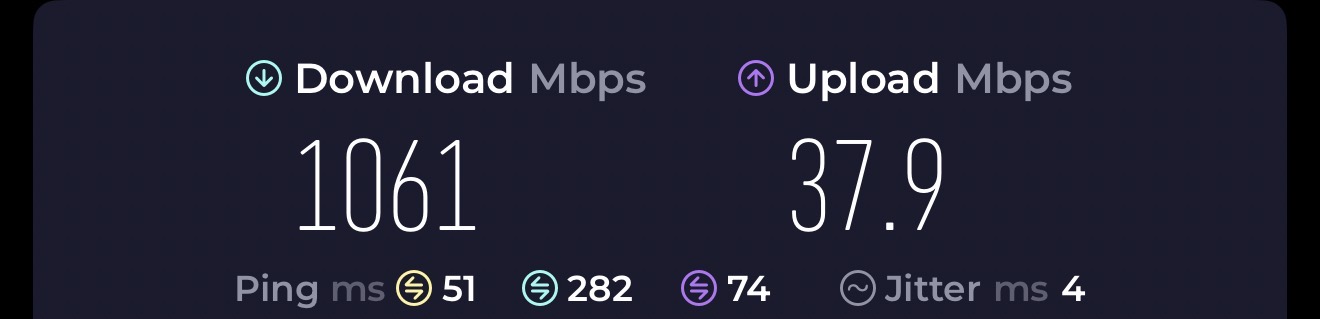
Since I purchased my Flint 2 earlier this week, I’ve been tweaking settings to squeeze as much as I could out of the router to prevent as much of a bottleneck as I can when using SurfSharks WireGuard VPN on my 1.2Gig connection. Here’s what I’ve come up with if anyone else wants to give it a go. I went from about 800-900Mbps on the “stock” settings to over 1Gig.
#!/bin/sh

# Flint 2 Ultimate WireGuard + Surfshark DNS + Firewall Config

# Copy-paste into LuCI -> System -> Startup

# Reboot after applying

###########################################

# Variables

###########################################
SURFSHARK_PRIMARY=162.252.172.57
SURFSHARK_SECONDARY=149.154.159.92
LAN_SUBNET=192.168.8.0/24 # Adjust if your LAN is different
WG_INTERFACE=wg0 # Your WireGuard interface name
WG_MTU=1420

###########################################

# 1. Set CPU governor to performance

###########################################
echo performance > /sys/devices/system/cpu/cpu0/cpufreq/scaling_governor
echo performance > /sys/devices/system/cpu/cpu1/cpufreq/scaling_governor
echo performance > /sys/devices/system/cpu/cpu2/cpufreq/scaling_governor
echo performance > /sys/devices/system/cpu/cpu3/cpufreq/scaling_governor

###########################################

# 2. Enable software flow offloading for NAT

###########################################

# Already enabled via LuCI (keep this for reference)

###########################################

# 3. Force Surfshark DNS for all external queries

###########################################

# Allow LAN to reach router DNS

iptables -I INPUT -s $LAN_SUBNET -p udp --dport 53 -j ACCEPT
iptables -I INPUT -s $LAN_SUBNET -p tcp --dport 53 -j ACCEPT

# Redirect all other external DNS queries to Surfshark

iptables -t nat -A PREROUTING -p udp --dport 53 -s !$LAN_SUBNET -j DNAT --to-destination $SURFSHARK_PRIMARY
iptables -t nat -A PREROUTING -p tcp --dport 53 -s !$LAN_SUBNET -j DNAT --to-destination $SURFSHARK_PRIMARY
iptables -t nat -A PREROUTING -p udp --dport 53 -s !$LAN_SUBNET -j DNAT --to-destination $SURFSHARK_SECONDARY
iptables -t nat -A PREROUTING -p tcp --dport 53 -s !$LAN_SUBNET -j DNAT --to-destination $SURFSHARK_SECONDARY

# Allow router itself to query Surfshark DNS

iptables -I OUTPUT -d $SURFSHARK_PRIMARY -p udp --dport 53 -j ACCEPT
iptables -I OUTPUT -d $SURFSHARK_PRIMARY -p tcp --dport 53 -j ACCEPT
iptables -I OUTPUT -d $SURFSHARK_SECONDARY -p udp --dport 53 -j ACCEPT
iptables -I OUTPUT -d $SURFSHARK_SECONDARY -p tcp --dport 53 -j ACCEPT

# Block any other outbound DNS (prevents leaks)

iptables -A OUTPUT -p udp --dport 53 -j REJECT
iptables -A OUTPUT -p tcp --dport 53 -j REJECT

###########################################

# 4. Block IPv6 DNS and traffic

###########################################
ip6tables -A OUTPUT -p udp --dport 53 -j REJECT
ip6tables -A OUTPUT -p tcp --dport 53 -j REJECT
ip6tables -P INPUT DROP
ip6tables -P FORWARD DROP
ip6tables -P OUTPUT DROP

###########################################

# 5. Optional: Block DoH / DoT bypass

###########################################
iptables -A OUTPUT -p tcp --dport 853 -j REJECT

# Add additional DoH IP blocks on port 443 if desired

###########################################

# 6. WireGuard MTU

###########################################
ip link set dev $WG_INTERFACE mtu $WG_MTU

###########################################

# 7. Flow offload / NAT acceleration

###########################################

# Already recommended to enable via LuCI -> Network -> Firewall

###########################################

# 8. IPv4 forwarding

###########################################
sysctl -w net.ipv4.ip_forward=1

###########################################

# End of configuration

###########################################
exit 0