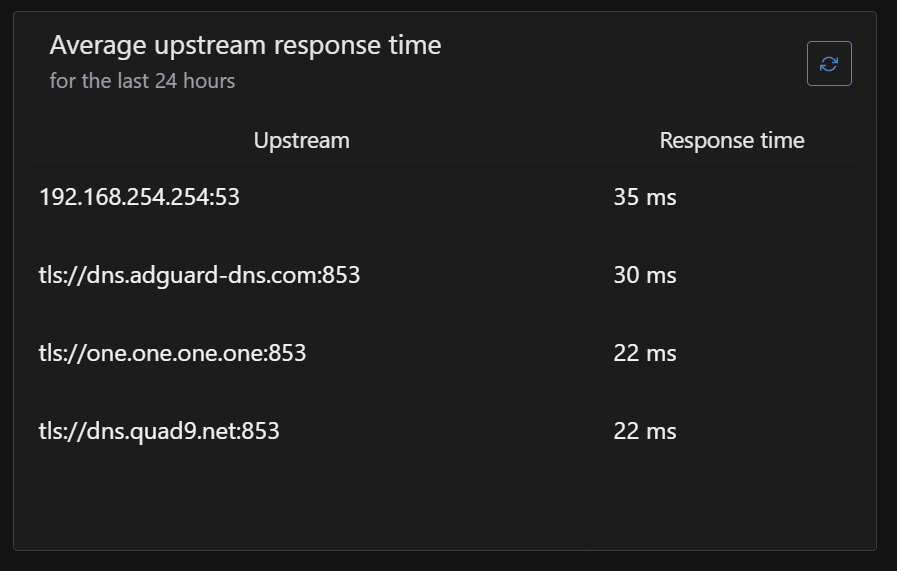
So my situation is very simple.
I was successfully using ADGH—everything was working—and then it suddenly stopped. DNS responses are so slow that it's practically impossible to use the internet.
When I disable ADGH, everything returns to normal.
My DNS servers are:
tls://dns.quad9.net
tls://dns.adguard-dns.com
tls://one.one.one.one
..but this is how it works in real life:
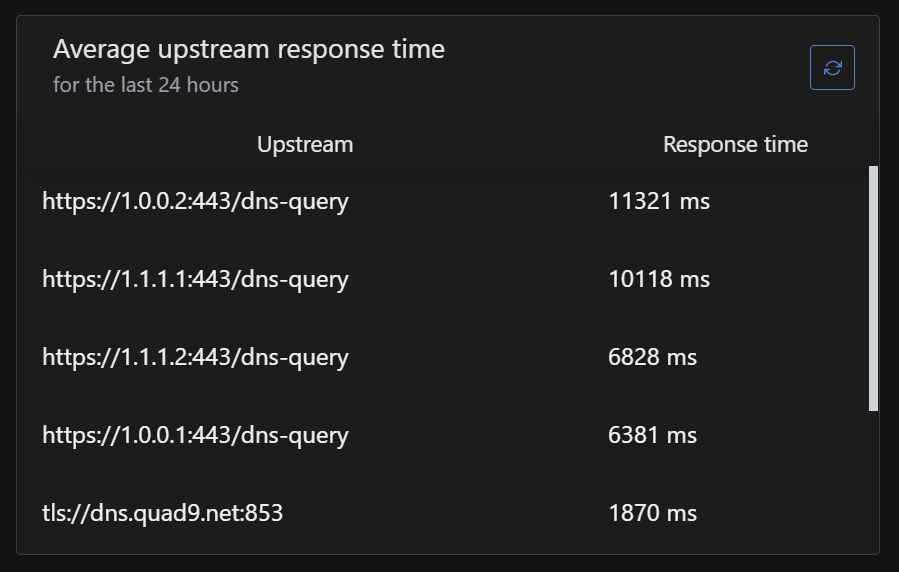
…and my logs looks like this
—–
Sun Nov 2 08:03:19 2025 user.notice AdGuardHome[18973]: 2025/11/02 07:03:19.578741 ERROR response received addr=149.112.112.10:53 proto=udp status="exchanging with 149.112.112.10:53 over udp: read udp 192.168.254.100:42978->149.112.112.10:53: i/o timeout" Sun Nov 2 08:03:19 2025 user.notice AdGuardHome[18973]: 2025/11/02 07:03:19.578741 ERROR response received addr=149.112.112.10:53 proto=udp status="exchanging with 149.112.112.10:53 over udp: read udp 192.168.254.100:59480->149.112.112.10:53: i/o timeout" Sun Nov 2 08:03:19 2025 user.notice AdGuardHome[18973]: 2025/11/02 07:03:19.650221 ERROR response received addr=149.112.112.10:53 proto=udp status="exchanging with 149.112.112.10:53 over udp: read udp 192.168.254.100:55708->149.112.112.10:53: i/o timeout" Sun Nov 2 08:03:23 2025 user.notice AdGuardHome[18973]: 2025/11/02 07:03:23.408002 ERROR response received addr=149.112.112.10:53 proto=udp status="exchanging with 149.112.112.10:53 over udp: read udp 192.168.254.100:52821->149.112.112.10:53: i/o timeout" Sun Nov 2 08:03:23 2025 user.notice AdGuardHome[18973]: 2025/11/02 07:03:23.408002 ERROR response received addr=149.112.112.10:53 proto=udp status="exchanging with 149.112.112.10:53 over udp: read udp 192.168.254.100:41863->149.112.112.10:53: i/o timeout" Sun Nov 2 08:03:27 2025 user.notice AdGuardHome[18973]: 2025/11/02 07:03:27.236558 ERROR response received addr=149.112.112.10:53 proto=udp status="exchanging with 149.112.112.10:53 over udp: read udp 192.168.254.100:45319->149.112.112.10:53: i/o timeout" Sun Nov 2 08:03:27 2025 user.notice AdGuardHome[18973]: 2025/11/02 07:03:27.236558 ERROR response received addr=149.112.112.10:53 proto=udp status="exchanging with 149.112.112.10:53 over udp: read udp 192.168.254.100:36428->149.112.112.10:53: i/o timeout" Sun Nov 2 08:03:30 2025 user.notice AdGuardHome[18973]: 2025/11/02 07:03:30.475642 ERROR response received addr=149.112.112.10:53 proto=udp status="exchanging with 149.112.112.10:53 over udp: read udp 192.168.254.100:38191->149.112.112.10:53: i/o timeout" Sun Nov 2 08:03:30 2025 user.notice AdGuardHome[18973]: 2025/11/02 07:03:30.475642 ERROR response received addr=149.112.112.10:53 proto=udp status="exchanging with 149.112.112.10:53 over udp: read udp 192.168.254.100:37826->149.112.112.10:53: i/o timeout" Sun Nov 2 08:03:33 2025 user.notice AdGuardHome[18973]: 2025/11/02 07:03:33.380748 ERROR response received addr=149.112.112.10:53 proto=udp status="exchanging with 149.112.112.10:53 over udp: read udp 192.168.254.100:39110->149.112.112.10:53: i/o timeout" Sun Nov 2 08:03:33 2025 user.notice AdGuardHome[18973]: 2025/11/02 07:03:33.380748 ERROR response received addr=149.112.112.10:53 proto=udp status="exchanging with 149.112.112.10:53 over udp: read udp 192.168.254.100:54871->149.112.112.10:53: i/o timeout" Sun Nov 2 08:03:44 2025 user.notice AdGuardHome[18973]: 2025/11/02 07:03:44.752618 ERROR response received addr=149.112.112.10:53 proto=udp status="exchanging with 149.112.112.10:53 over udp: read udp 192.168.254.100:41227->149.112.112.10:53: i/o timeout"
What ive tried:
- Restart Flint2
- Restart ADGH
- FW upgrade (right now im on actual stable)
- IGMP Snooping (on/off - since it was my last change in setup before the problem occur)
**I heard there are some cyber attacks going on - but is that actually related?
Is there anything more what i can do?**
— EDIT —
Funny thing - the forum site works perfect - as normal. No other europe-based sites works as normal…
— EDIT 2 —
Sun Nov 2 08:26:56 2025 daemon.warn dnsmasq[13386]: possible DNS-rebind attack detected: ``nlb-o15yovwgajdxn1mzb2.cn-shanghai.nlb.aliyuncsslb.com`` Sun Nov 2 08:30:24 2025 daemon.info dnsmasq-dhcp[13386]: DHCPREQUEST(br-lan) 192.168.1.207 00:09:b0:61:53:f4 Sun Nov 2 08:30:24 2025 daemon.info dnsmasq-dhcp[13386]: DHCPACK(br-lan) 192.168.1.207 00:09:b0:61:53:f4 Onkyo-TX-RZ50-6153F4
Looks like some DNS-rebind attack is going…
— EDIT 3 —
…after modem and ruter restart everything looks normal… so what could be the solution for this in future? External network problem?

 , then keep it that way and see if the situation is fixed.