From posts in this thread, this was intentional. It was pulled due to DoH - confirmed in another thread.
I know that already, I was stating what 2 issues I and others are aware of in that update. It matters!
Looks like 4.8.4 has been promoted to ‘stable’ again.
The thread on Reddit doesn’t fill me with confidence!
2 Likes
think 4.8.5 beta has the best wifi speed for the firmwares so far.
But if they’re reducing power due to regulations/compliance, presumably 4.8.5 would have to have the same changes eventually? Assuming it doesn’t so far?
No chance I’m installing that, you’re welcome to though. Let us know how long it took to go back to a previous version 
I don’t see any security patches identified since 4/2025. Have any security patches been incorporated since 4.7.4?
In my case I will have to hold out until V4.9x is released as I need IoT & Segregation on Primary and secondary Flint 2 (in AP mode), of which v4.9x is supposed to have native IoT at the GL GUI level. As I currently have to rely on the primary router for Wi-Fi coverage to my exterior cameras, (as second Flint 2 will not segregate, but only pass connection back to main network on Primary), the signal is not strong enough with firmware V4.8.4 applied with the lower Wi-Fi power). So I had to downgrade back to 4.8.3. So even if they maintain lower Wi-Fi power output on later firmware versions, at least my cameras will be able to utilise the second Flint 2 when IoT segregation is working.
which channels are affected by the downgrade?
I tried the 4.8.4 last week just before it was pulled. Yes the WiFi signal strength was worse but the throughput on WiFi was the killer for me. In my bedroom I went from a solid 600mbps to 40mbps.
I’m staying on 4.8.3 unless the throughput of future firmwares matches it.
Was only able to upgrade to Fibre this month and that firmware made me instantly go back to copper line speeds through WIFI.
Performed a uBoot flash of 4.8.3:
- Performed initial setup without a WAN connection
- In LuCI, wireless country seems to default to ‘DE’ (Germany)
- Max transmit power drop-down shows 20dBm (100mW)
- Even if changing to ‘US’ country code, the-max-Max transmit power drop-down stays at 20dBm.
- No option to select higher than 20dBM.
- Same for 5Ghz and 2.4Ghz
- Rebooted the device after changing country code to ‘US’ still remains the same as the above.
Upgraded to 4.8.4 (from 4.8.3) via the online update:
- No obvious changes to the 4.8.3 uBoot config/defaults for wireless in LuCI
- Max is still 20dBM, even when set to US
- No option to select higher than 20dBM
- Changing to a known lower regulatory power level, i.e EU county and back to US, still max 20dBM (100mw) can be selected.
- What ever the changes made in 4.8.4, they don’t appear to be exposed in the LuCI Wireless settings?
Performed a uBoot flash of 4.8.4 Release 2:
- Again, performed initial setup without a WAN connection
- In LuCI, wireless country (still) seems to default to ‘DE’ (Germany)
- Max transmit power drop-down (still) shows 20dBm (100mW)
- Even if changing to ‘US’ country code, the-max-Max transmit power drop-down (still) stays at 20dBm.
- No option to select higher than 20dBM (still)
- Same for 5Ghz and 2.4Ghz (still)
- Rebooted the device after changing country code to ‘US’ still remains the same as the above.
What ever the changes GL made, they don’t seem to be obviously exposed in LuCI - assuming they haven’t also rolled these changes back to the latest published 4.8.3 firmware on the download site.
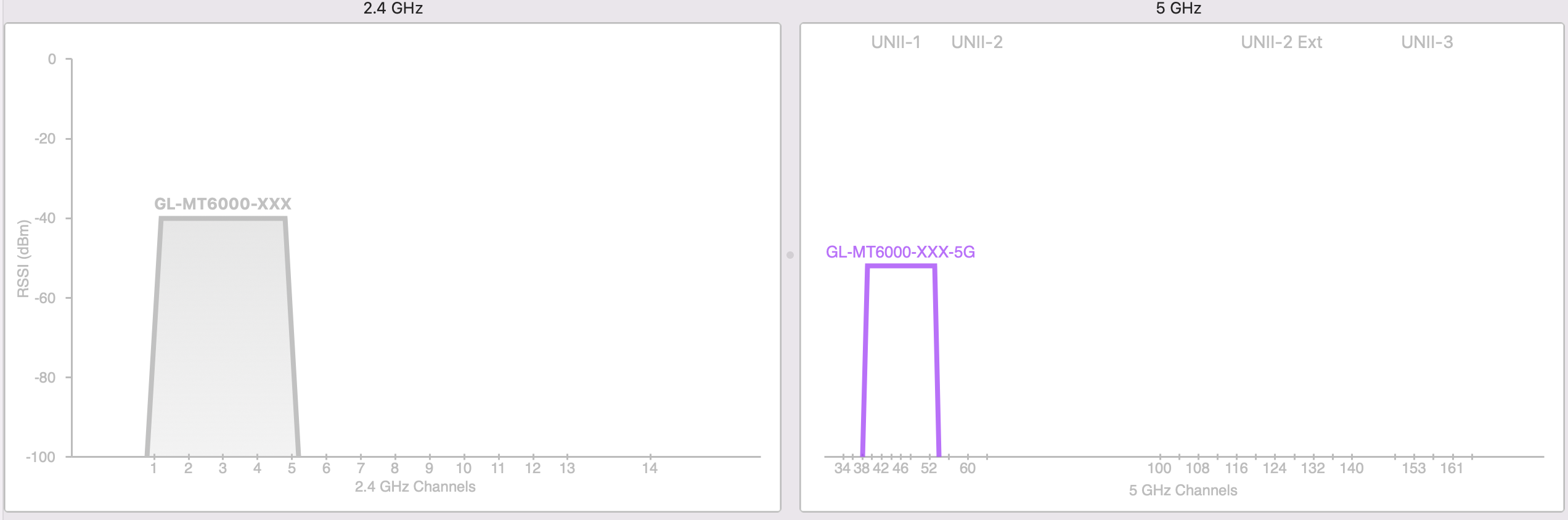
4.8.3:
Same room (around -30 dBm)
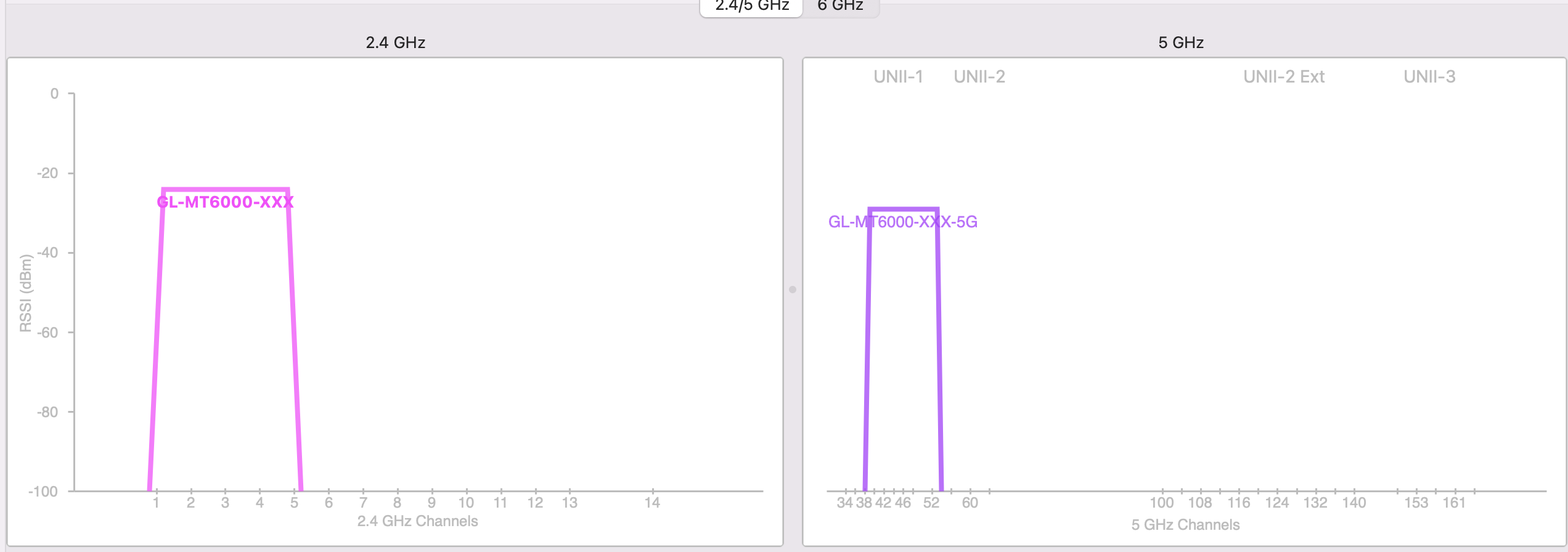
Next room over, hallway in between, doors shut (around -55 dBm 5Ghz)
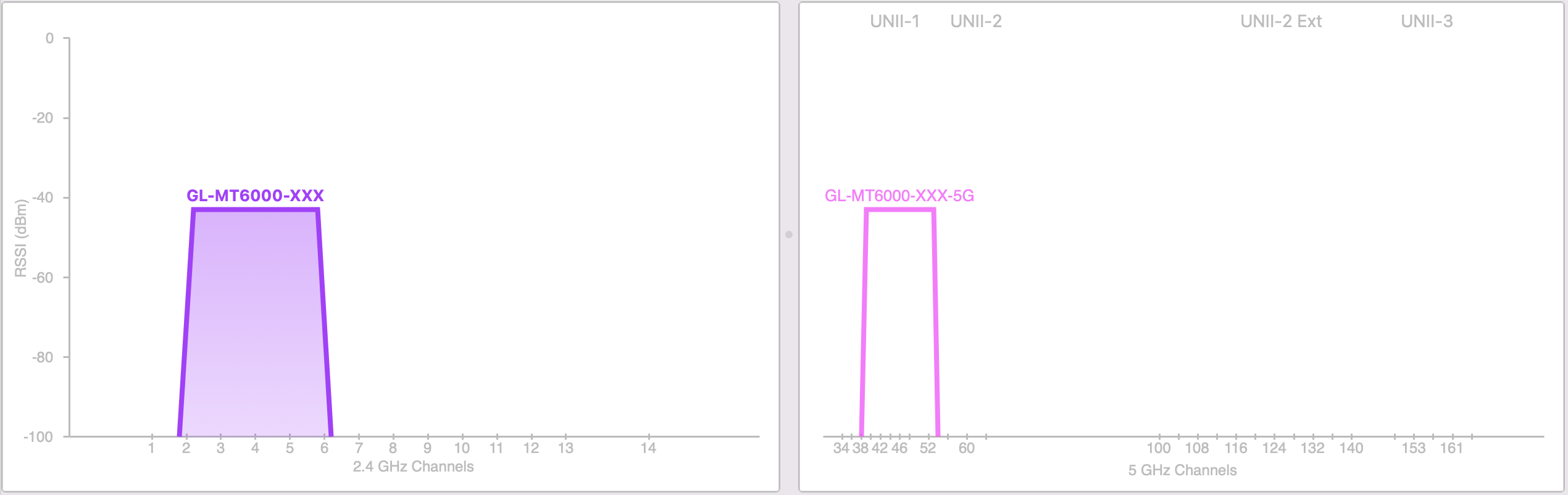
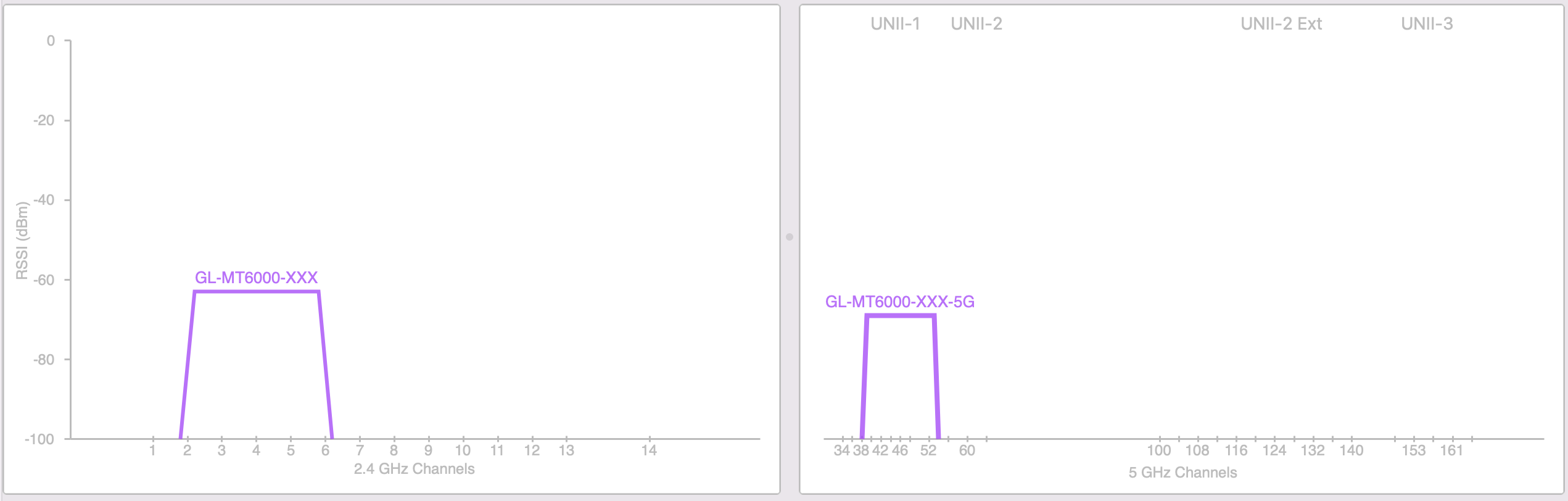
4.8.4:
Same room (around -40dBm)
Next room over, hallway in between, doors shut (around -70 dBm 5Ghz)
1 Like
4.8.4
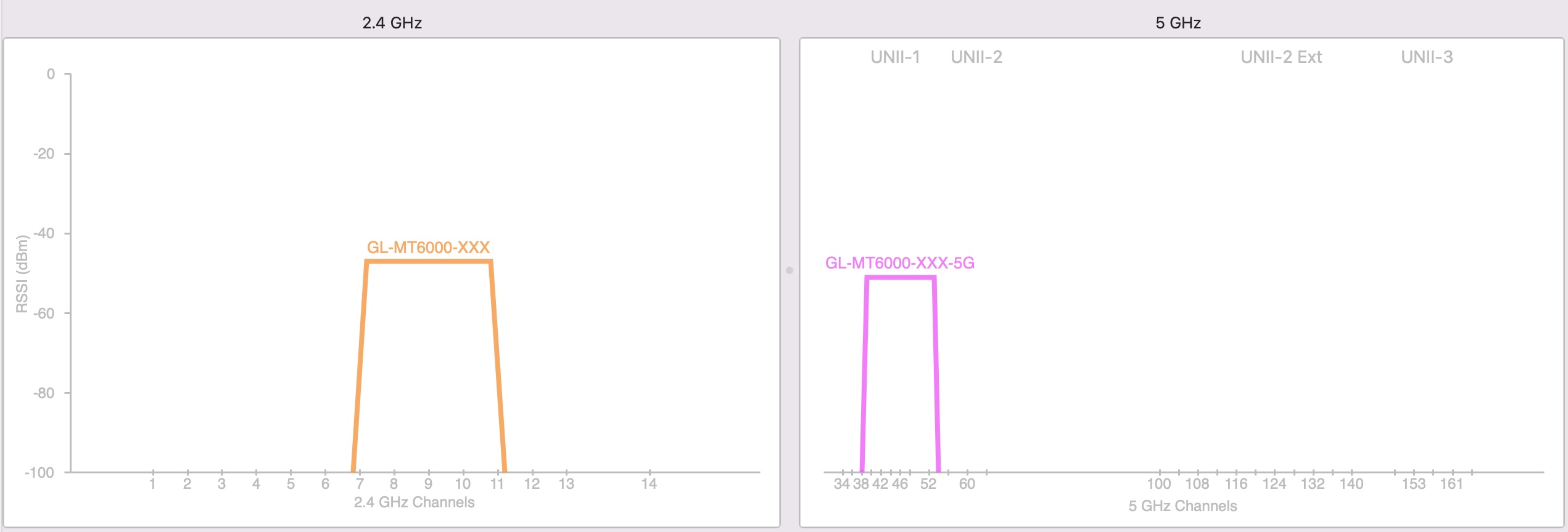
US Wireless Country - reboot after changing - next room over, hallway in between, doors shut:
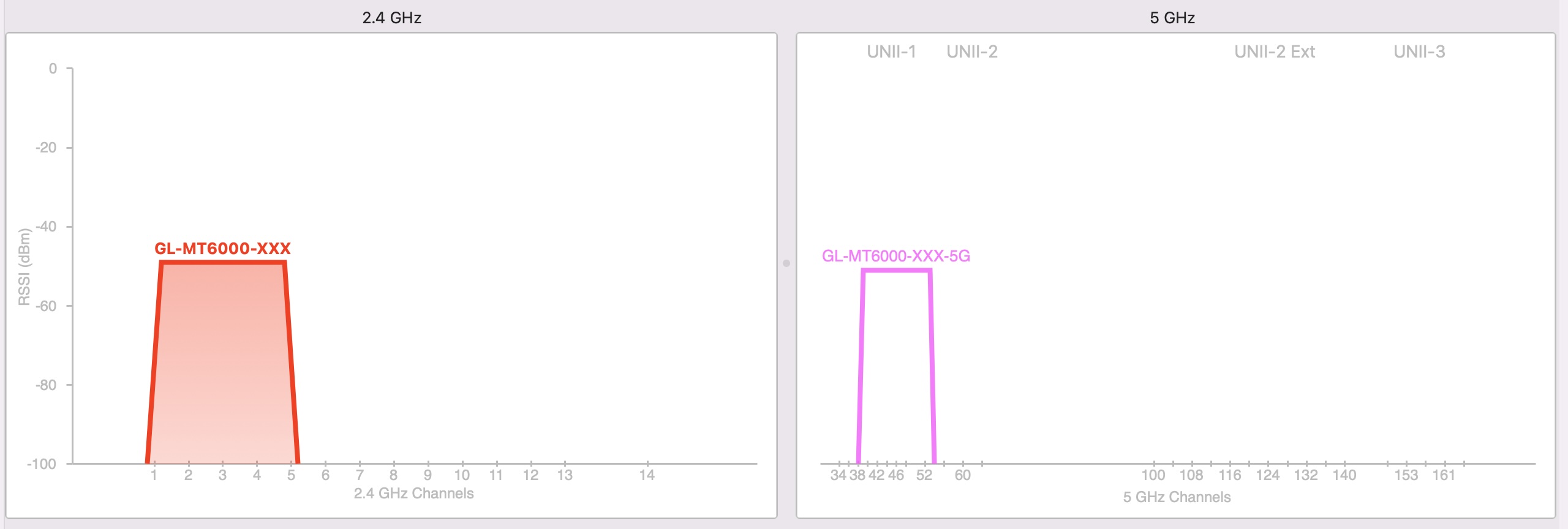
UK Wireless Country - reboot after changing - next room over, hallway in between, doors shut:
DE Wireless Country - reboot after changing - next room over, hallway in between, doors shut:
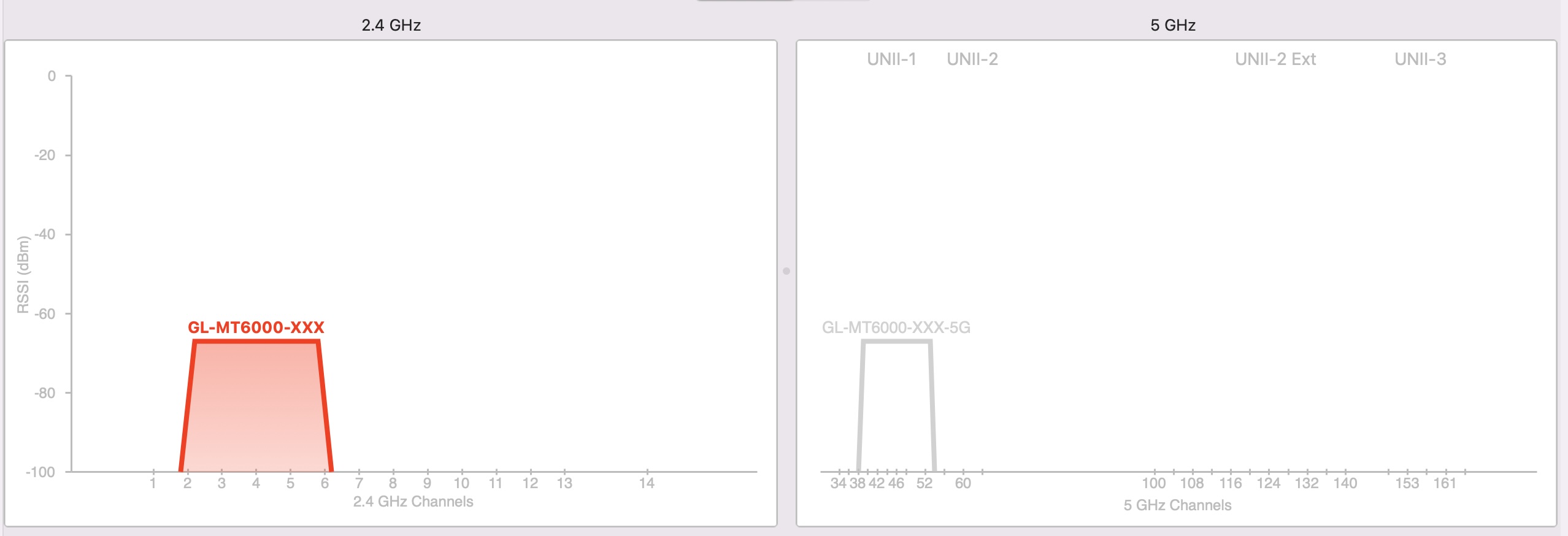
US & UK seem comparable, but the factory default seems to be ‘DE’ - whenever this is set, either left as the default or set again after, wireless performance/coverage suffers.
Given that there doesn’t appear to be a way to set wireless country in the GL UI (?) only in LuCI and if DE is the factory default, presumably most/many (certainly non-techy-fiddly-users) will default to DE.
No matter which country code you set for wireless, the max transmit power drop-down in LuCi always remains at 20dBm.
I’d assume that EU and UK countries would be more or less aligned in terms of regulations, need to research this further.
Possible bug then:
Wireless country code defaults to DE - even when the user is not in Germany - 4.8.4 out of the box/factory reset, lower power seems to apply to (at least) DE country code. But not UK nor US, if set/changed in LuCI.
If you leave it as the default, DE, and flash 4.8.3 over the top (keeping settings) WiFi coverage/power is restored.
Problems seem to relate only to DE (not UK, nor US) which seems to be the factory default wireless country code (even on a fresh-flash of 4.8.3) but only problematic when on 4.8.4 with the DE country code set (as it is by default).
EDIT: Setting France/FR and rebooting, data is comparable to that of US and UK. Not conclusive, but seems DE specific - which just so happens to be the out-of-the-box default.
- Why do devices default to DE?
- Were the Wireless power changes supposed to be DE focused?
- How is GL.iNet going to fix this moving forward?
It’s fair to say that ‘less techy’ users are not going to go into LuCI and change the Wireless country.
Which means they’re going to be stuck on DE, the default, unless GL.iNet steps in and changes it in an update - users on the DE default are going to see terrible WiFi performance, assuming most are NOT in Germany, when they don’t need to?!
3 Likes
What about AU?
Excellent bit of research there, thanks for pointing this out. I’ve just updated mine to UK from DE on all affected interfaces. Will be waiting for Will’s response regarding these defaults going forward.
Interesting that with the default DE country codes set as default (before you pointed this out), restoring to 4.8.3 gave me another Wi-Fi signal bar showing on my camera App, whereas it lost one on 4.8.4. Not very scientific I know, but just saying.
1 Like
How do you change the country in LUCI?
I dont seem to see the option in 4.8.3
1 Like
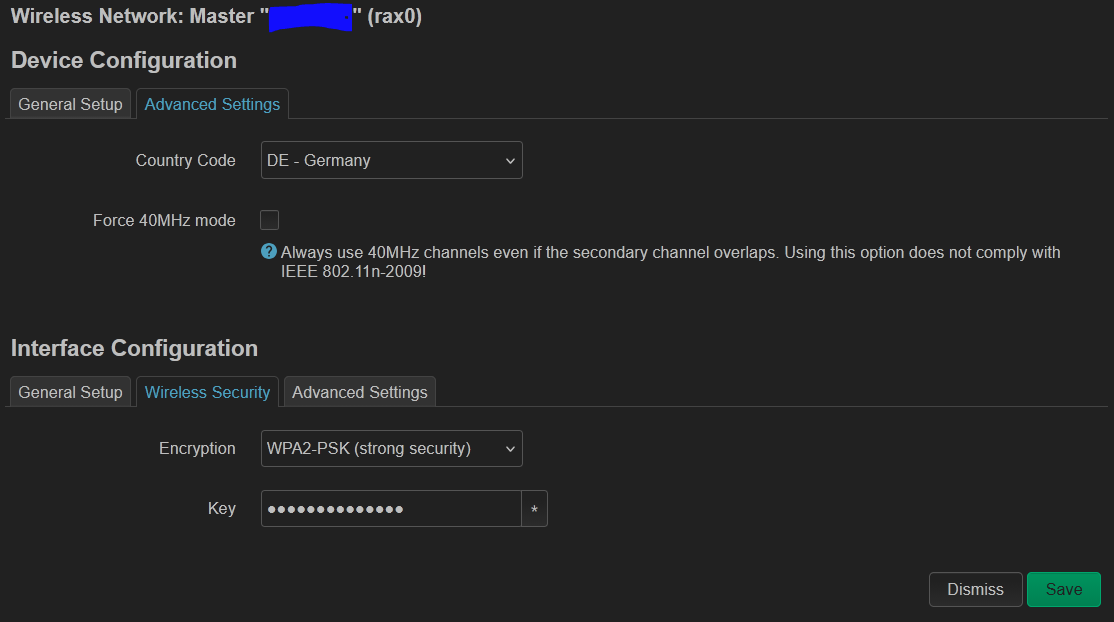
- Go to 'system' on the left hand menu, select 'Advanced Settings', this will take you to the LuCI page or ask you to install it if it's not already there.
- Press 'Go to LuCI' button.
- Enter 'root' as the username and your router password in the password field.
- From top menu, select 'Network’, then 'Wireless'.
- For each of the wireless SSIDs listed with an EDIT button available, press 'Edit' on the first one, then select the 'Advanced Settings' tab.
- From here select your Country code from the first drop down box.
- Press 'Save' at the end of the page.
- This will return you to the previous page.
- Repeat this for each SSID with an 'EDIT' option.
- Make sure when you are finished, to press the 'SAVE & APPLY' to save all changes.
1 Like
mine is set to US under 4.8.3. My router time zone is AU.
I’m no longer using GL.iNet firmware (I was already thinking of switching to vanilla OpenWrt and this update finally made me do it), but after reading the comments I was wondering: have you guys tried switching the Wi-Fi to higher (DFS) channels to see if it improves coverage? The guy from GL.iNet suggested it but I haven’t seem anyone talking about it.
Personally, I haven’t, no.
Primarily because on the “Automatic” channels I was testing on, which are the default, it will not use DFS on its own when set to Automatic. When compared to other devices, GL.iNet is now terrible by comparison.