I have a brand new Flint 3 router with fw 4.9 just set up today. Using it with Comcast/Xfinity 1 Gbps cable internet. I was getting around 980 Mbps download speeds with wired Ethernet but only around 700 Mbps on the 6 Ghz wifi band.
I found info online that suggested changing rps_cpus as follows. The previous value before the change was '“8”. This changes the number of CPU cores used for packet routing from 1 to all 4.
echo f > /sys/class/net/pppoe-wan/queues/rx-0/rps_cpus
I did this and my wifi download speeds are now increased also to around 980 Mbps.
Is there a better way to solve this problem? I would hope there would a function in the Admin panel or Luci for this type of change.
Hi
Thank you for the feedback.
We will discuss this with the development team to see whether this configuration can be improved in a future release.
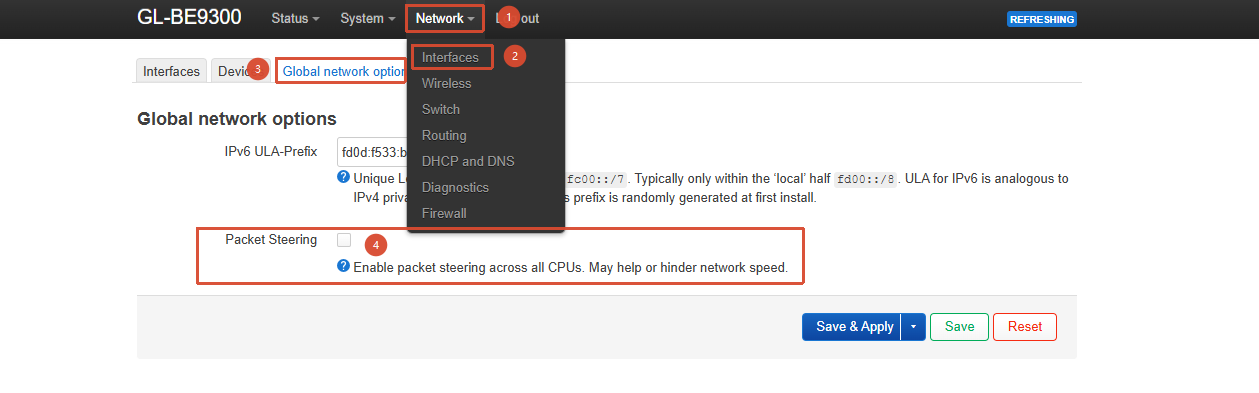
You can also try enabling Packet Steering under LuCI → Network → Interfaces → Global Network Options.
This setting adjusts the rps_cpus value for the underlying physical network interfaces (eth0/eth1), so it may also help with this issue.
Hi Will
I have more information that will hopefully help your developers:
- I remembered that when I initially set up my Flint 3 yesterday, I was getting fast download speeds, then when I checked later in the day, downloads had slowed down. The most significant change I had made during the day was setting up AmneziaWG from the Wireguard admin panel. This morning, I stopped and then started the Wireguard server from the admin panel, and sure enough, rps_cpus had changed from “f” back to “8”. Perhaps this is done deliberately to dedicate more CPU cores to wireguard processing? If so, there should be a configuration option in the Wireguard panel to allow the user to prioritize either routing or Wireguard performance.
- I enabled Packet Steering in Luci, and that did successfully change the “8” back to “f”.
- The good news is that after a reboot, the Packet Steering setting appears to take precedence over Wireguard, and the “f” setting remains in place.
Thank you so much for your assistance!
1 Like