Hey Everyone, I'm having an issue with my Flint 3 on 4.7.14. I was able to capture a log right after it happened today. But in short I my devices will suddenly report no internet access, and a fail over does not seem to then take place to my other 2 WANs. I am able during the no internet time to connect to the flint and manually force a change to WAN 2 or WAN 3 once I do so I get internet back. I'm trying to figure out why the fail over is not happening though. I've already changed the sensitivity level to High but the issue has repeated itself a few times now. The online line I have focused on in the log is: "`fetch ca fail: resolve "gslb-eu.goodcloud.xyz" fail: sendto "::1:53" fail: Network unreachable" as this suggests the router itself lost internet connectivity, but did not switch to the backup WAN.
This appears to be a DNS issue.
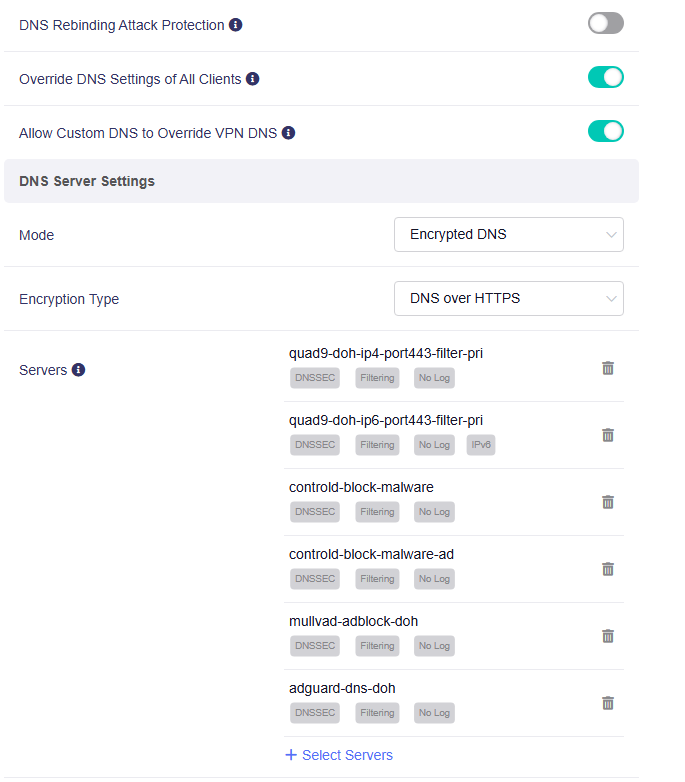
Please try manually configuring DNS by following the steps in the tutorial below to see if it resolves the problem: DNS Configuration – GL.iNet Docs
If the problem persists, please SSH into the Flint 3 and run the following command:
echo 3 > /proc/gl-kmwan/debug; logread -f
Note the exact time when the issue occurs, then export the log and share it with us for further analysis.
. I was able to dump the log via GUI yesterday it happened approximately Thu Aug 14 13:08:37 2025. How should I send it as it does contain my IP's and such.
We’ve reviewed the logs but unfortunately didn’t find much useful information this time.
To help us investigate further, could you please run the command mentioned earlier to enable verbose logging? This will give us more detailed insights into why Flint 3 is not failing over.
After running the command, please wait for the issue to happen again and let us know the exact time when the issue occurs and then export the log so we can analyze it.
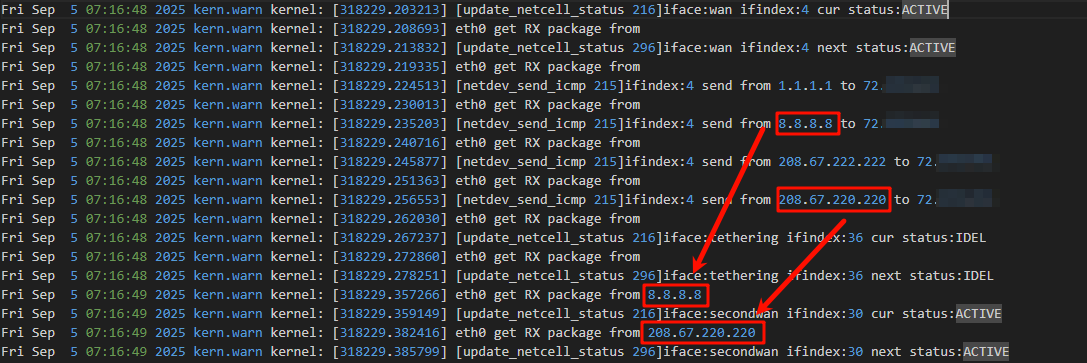
Sent over an SSH dump and the log dump again. The echo 3 > /proc/gl-kmwan/debug; logread -f command really bogs down the flint 3 when i try to leave it running making network almost useless. Today I woke up to the scenario started the log and when I did I wanted it happen a few times while running the log.
So I have 3 wans: Ethernet 1, Tether, Ethernet 2 set in fail over in that order. I notice the issue as nothing needing LAN loads, pages stop, teams drops the call, outlook reports no internet, videos stop playing etc… I login to the Flint 3 and see “The interface is connected, but the Internet can't be accessed” for Ethernet 1 and it seems to not reliably switch to the fail overs some times.
If your LAN devices can access to Internet without problem, you don’t need to worry about the alert “The interface is connected, but the Internet can't be accessed.”
This is likely a false positive caused by overly sensitive detection.
However, if the LAN device's network is experiencing issues but failover has not occurred, it may be necessary to switch its mode to Strict Mode in Multi WAN - Ethernet 1 to only reference the ICMP results.
Please refer to the following documentation to adjust the Multi-WAN configuration and see if any improve.