I previously set up vlans on the ethernet side (port-based and tagged) via LuCi and cli. Everything was working well under v4.8. I took the change and upgraded to v4.10 and kept settings and it actually preserved the VLANs perfectly. I was happily surprised by this.
Now I know you can set up VLANs in the GL gui and I am wonder a few things.
- None of my VLANs are showing up in the gui. Since I did not use it, it is not surprising to me.
- Can I reset my router and then build the VLANs using the GL gui?
- Can I add more than 2 WAN connections this way and will additional WAN connections be configurable in kmwan3?
Thanks for any information. Worst case I will back it up, wipe it, and see what happens, but wondered if there would be some guidance here first.
Hi,
Regarding your questions:
- VLANs created manually through LuCI or the CLI generally do not automatically appear in the GL.iNet Admin Panel.
- Yes, you can reset the router and create your VLAN networks through NETWORK → Subnet, then configure the Ethernet port assignments under NETWORK → Ethernet Port.
Please back up your current configuration before resetting, and refer to these guides:
- You can refer to the following methods to add a third wired WAN.
The following example uses physical LAN1 as the second WAN and physical LAN2 as the third WAN, with IPv4 failover priority WAN → Second WAN → WAN3.
-
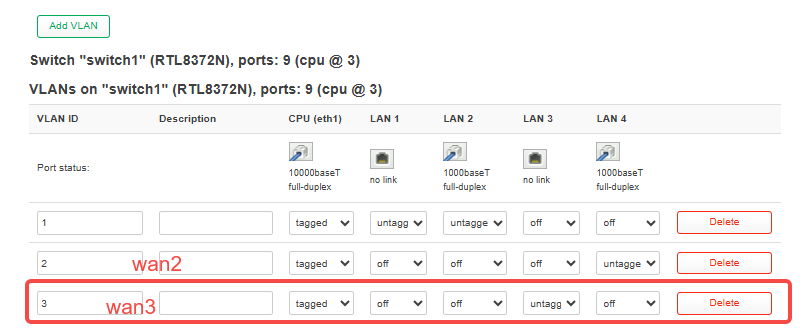
Step A: Separate the port in LuCI.
Go to Network → Switch and configure switch1 as shown below.
On the Flint 3 switch page shown here, the LAN labels are reversed relative to the physical ports: LuCI LAN3 corresponds to physical LAN2, and LuCI LAN4 corresponds to physical LAN1.
-
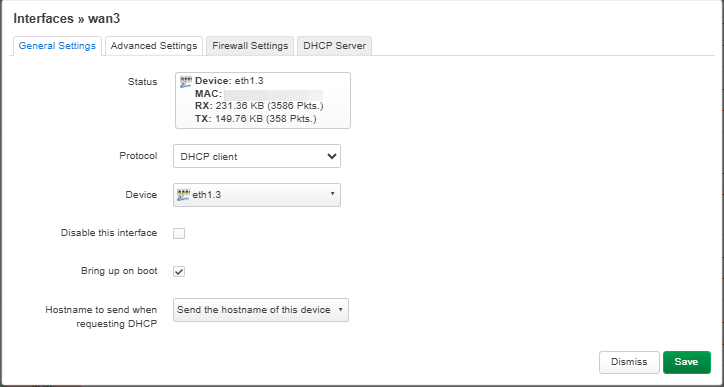
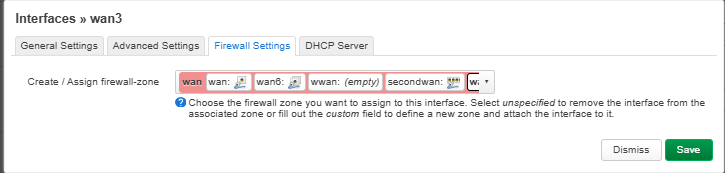
Step B: Create the WAN3 interface.
Go to Network → Interfaces → Add new interface, name it wan3, select device eth1.3, and choose DHCP client if the upstream connection assigns an IP address automatically.
-
Step C: Register WAN3 in kmwan.
Run the following commands over SSH to add wan3 and set the wired failover priority.
cp /etc/config/kmwan "/etc/config/kmwan.bak.$(date +%Y%m%d-%H%M%S)"

uci set kmwan.global.enable='1'
uci set kmwan.global.mode='failover'

uci set kmwan.wan.metric='2'
uci set kmwan.secondwan.metric='3'

uci set kmwan.wan3='member'
uci set kmwan.wan3.interface='wan3'
uci set kmwan.wan3.addr_type='4'
uci set kmwan.wan3.track_mode='force'
uci set kmwan.wan3.weight='1'
uci set kmwan.wan3.disabled='0'
uci set kmwan.wan3.check='1'
uci set kmwan.wan3.metric='4'

uci -q delete kmwan.wan3.tracks
uci add_list kmwan.wan3.tracks='ping,1.1.1.1'
uci add_list kmwan.wan3.tracks='ping,8.8.8.8'
uci add_list kmwan.wan3.tracks='ping,208.67.222.222'
uci add_list kmwan.wan3.tracks='ping,208.67.220.220'

uci commit kmwan
/etc/init.d/kmwan restart
The interface='wan3' setting must match the interface name in LuCI exactly.
Once this configuration is complete, the router will set the wired priority as follows: WAN → SecondWAN → WAN3.
Regarding the display of LAN2 (wan3), the Multi-WAN page will show it as another “Ethernet 1” entry because the page assigns this label to interface names beginning with wan.