Can anyone help me solve this problem?
For some time now, I've been getting the following kernel error:
kern.err kernel: [2923153.141078] edma_tx_complete[139]:Error 0x2 observed in tx complete 11 ring
I don't think it's related to the Wi-Fi network, as it's automatically disabled at night, yet it still generates this error...
The only device that works at night is an ASUSTOR NAS server, which is running torrent seeding.
Has anyone experienced a similar issue?
[2923153.141078] edma_tx_complete[139]:Error 0x2 observed in tx complete 11 ring
[2923281.140059] edma_tx_complete[139]:Error 0x2 observed in tx complete 11 ring
[2923409.139017] edma_tx_complete[139]:Error 0x2 observed in tx complete 11 ring
[2923537.138011] edma_tx_complete[139]:Error 0x2 observed in tx complete 11 ring
[2923665.136969] edma_tx_complete[139]:Error 0x2 observed in tx complete 11 ring
[2923793.135954] edma_tx_complete[139]:Error 0x2 observed in tx complete 11 ring
…. etc…
on average, an error occurs every two minutes.
Hi,
Please try the following:
-
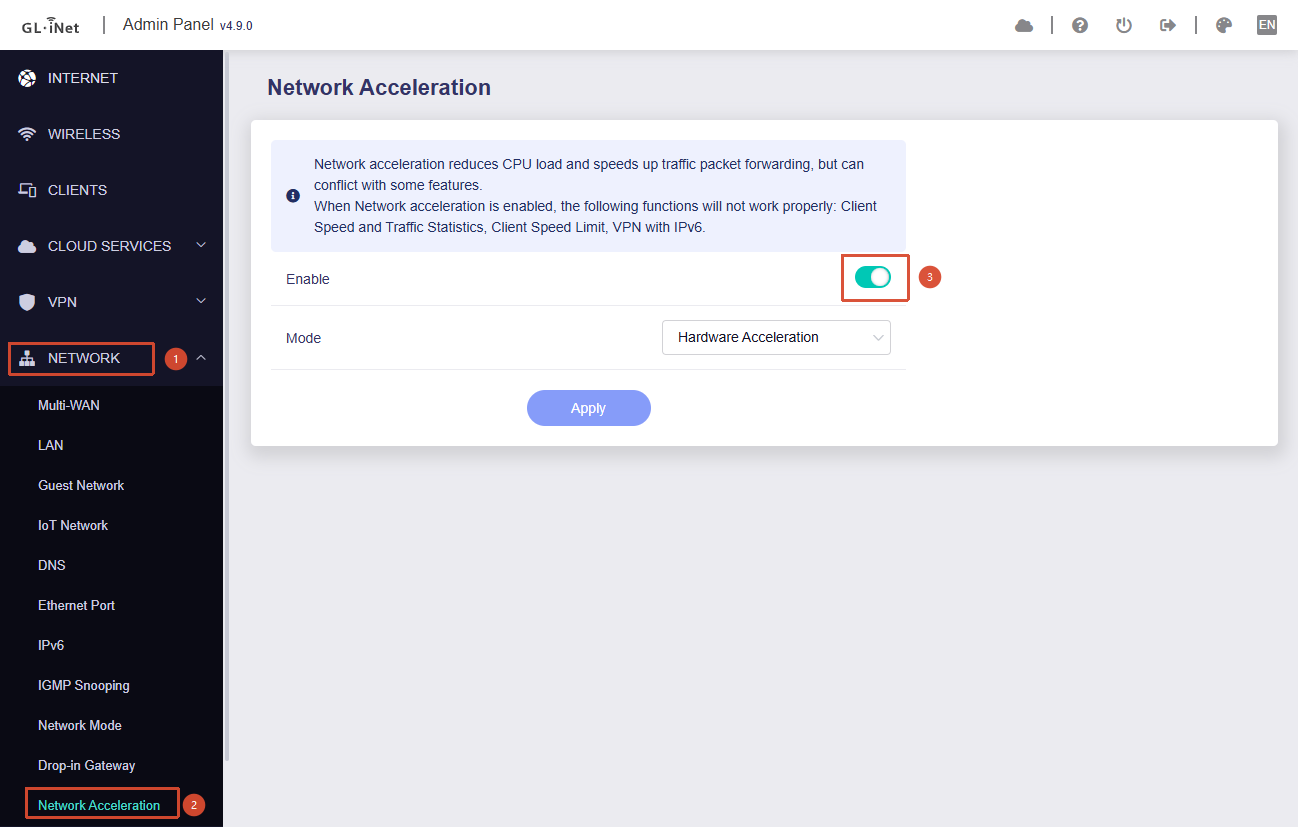
Go to Admin Panel → Network → Network Acceleration and disable Network Acceleration to see whether it helps:
-
If the issue persists, try disabling some Ethernet offloading features and see whether that makes a difference:
for dev in eth0 eth1 br-lan; do
    [ -d "/sys/class/net/$dev" ] || continue
    echo "disable offload on $dev"
    ethtool -K "$dev" tso off gso off gro off sg off tx off 2>/dev/null
done
(Please note that these changes are not persistent and will be lost after a reboot. You will need to run the commands again if the router is restarted.)
- In addition, could you clarify whether these error messages are actually causing any issues, or are they simply being printed continuously in the logs while your home network continues to function normally?
@will.qiu
Hi,
I must say that the second method helped (disable Ethernet offloading features).
I ran the code you sent and the problem disappeared.
I had already disabled network acceleration, so the first step didn't apply to me.
I'm just worried, you know, this isn't the final solution to the problem because now the processor has something to do...
It would be nice to have Ethernet offloading enabled, though.
I should mention that this problem didn't occur in the previous firmware version (I currently have the latest one).
So, I think it's a problem with the latest firmware.
@will.qiu
Ps.
I'd say that despite this error message, the network was operating normally... Although I can't comment on stability or packet loss, as I haven't done any detailed testing.
Thank you for the update.
The Network Acceleration setting in Step 1 and the Ethernet interface tuning commands provided in Step 2 are, to some extent, independent of each other.
Therefore, you can try re-enabling Network Acceleration and see whether the issue remains resolved.
In addition, if possible, could you please follow the guide below and share your device with us via GoodCloud so that we can investigate remotely?
Kindly note to send us the MAC address and the router password via private message so we can access it
Just want to check with you would it be possible for you to provide remote access via GoodCloud so that we can investigate this issue?
At the moment, we have been unable to reproduce the problem in our local testing environment. As a result, if we want to identify the root cause and potentially integrate a fix into a future firmware release, we may need to examine the issue directly in your environment through remote access.