Problem:
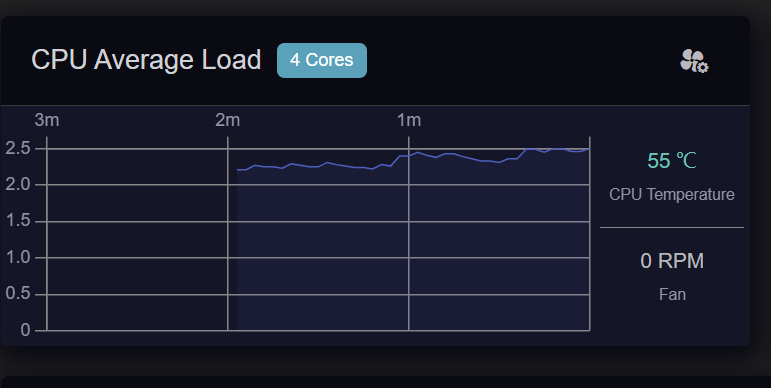
The router shows a persistent load average around 2.3 although the CPU is mostly idle. Rebooting does not solve it: after only 6 minutes uptime, load was already:
19:16:00 up 6 min, load average: 2.42, 2.11, 2.10
CPU at the time was approximately:
2% user, 2% system, 93% idle, 0% iowait.
Before reboot, two kernel threads were repeatedly visible in D state:
[wed_task0]
[wed_task1]
The router also logs this MT7990 driver error repeatedly (over 2600 occurrences during about 5.5 hours uptime):
The error continues after reboot. It appears to be triggered while processing an ADDBA response from a connected Wi-Fi station. However, the log does not include the peer MAC/WCID, so it is impossible to identify the client.
Environment:
Active 2.4 GHz clients, including several TP-Link L530 bulbs, an air conditioner, Xiaomi fan, and a Xiaomi phone.
Active Wi-Fi 7 MLO clients across 2.4/5/6 GHz, including Xiaomi, OnePlus, and ASUS devices.
The issue persists immediately after reboot.
Expected:
Low load average when CPU is idle, and no persistent D-state WED threads caused by malformed or unsupported client BA negotiation.
We are aware of the D state issue and will fix it in the next firmware release.
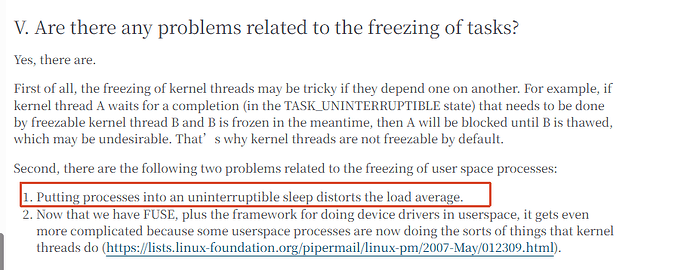
BTW, the elevated load average occurs because the WED kernel threads enter the D state and are therefore included in Linux’s load average calculation. This does not indicate high CPU usage—the CPU can remain mostly idle despite the reported load average.
Regarding the ADDBA messages, do you have an Apple Watch or any other IoT devices on your network? These messages are often caused by devices with less robust Wi-Fi implementations. You could try disabling Wi-Fi or powering off each device one at a time to identify the source.
Since these messages normally do not cause any actual issues, we will discuss with our product and R&D teams whether they can be suppressed or logged less frequently in a future firmware release.
I have 4 Tapo light bulbs and 1 Xiaomi fan that connect to Wi-Fi, but I disabled 2.4Ghz band fully and still got this high Load Average. Other devices are using MLO, but i disabled 2.4Ghz on MLO too, and still got the same result.
I’ll try switching the devices one by one later and tell if anything changes and if I find a particular one that cause it.
Nope. Nothing connected except network devices.
And GL.iNet Staff already confirmed the bug not related to pripherals, but to IoT devices or other Wi-Fi devices.
Just to clarify, we think these are two separate issues.
For the repeated ADDBA error messages, we may still need to identify which Wi-Fi client or condition triggers them. If possible, please continue disabling the Wi-Fi clients one at a time and let us know whether the messages stop.
The elevated load average is a driver issue related to the WED threads entering the D state. It is not currently attributed to the ADDBA messages or an IoT device, and it will be fixed in the next firmware release.
Well it’s worth asking the question, as the Flint 3 has an rare issue that when a USB hard disk is attached via the USB, that it can cause the CPU’s to go into a high usage status when the HDD idle script gets stuck and doesn’t idle the disk properly, hence why I asked.
The trigger is the Wi-Fi module in my Haier AS35RBAHRA-PL air conditioner.
Reproducible result:
I powered off the Xiaomi fan: the errors continued.
I powered off the Haier air conditioner: the ADDBA errors stopped completely.
I powered the Haier air conditioner back on: the errors resumed immediately, about every 1–2 seconds.
The air conditioner is a 2.4 GHz 802.11b/g/n device. The issue is therefore reproducibly triggered by its ADDBA response, while the router driver logs:
Wed Sep 2 20:09:28 2026 kern.err kernel: [176425.692088] 7990@ERROR.PROTO,BN0,PeerAddBARspActionSanity() 324: illegal BA buffer size = 0 && addba_ext_bufsize = 0
Please use this model/condition to investigate the MT7990 driver handling. Could you also advise the supported per-SSID workaround to disable HT/AMPDU/automatic Block Ack only for this IoT client until the driver fix is released?
Thank you for isolating the device and sharing the detailed test results.
Could you please confirm whether these ADDBA errors affect your ability to control the air conditioner over Wi-Fi—for example, by causing delays, disconnections, or failed commands—or whether it continues to operate normally?
Unfortunately I can’t be sure. The control of the A/C was slow even on Flint 2, but I haven’t checked for the logs/errors at that time, and I already sold it. I would say that there’s no difference between Flint 2 and 4 in terms of controlling the A/C. It doesn’t disconnect and I don’t see failed commands. So I would probably say that it operates as usual.