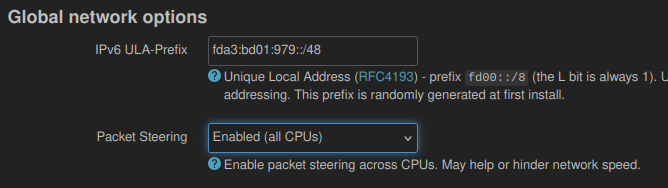
Hi everyone.Speedtest by Ookla - The Global Broadband Speed Test .
My connection is rated for 2.5GB, and everything worked fine with the previous firmware.
ethtool eth0
Settings for eth0:
        Supported ports: [ TP ]
        Supported link modes:   10baseT/Half 10baseT/Full
                                100baseT/Half 100baseT/Full
                                1000baseT/Full
                                2500baseT/Full
        Supported pause frame use: Symmetric Receive-only
        Supports auto-negotiation: Yes
        Supported FEC modes: Not reported
        Advertised link modes:  10baseT/Half 10baseT/Full
                                100baseT/Half 100baseT/Full
                                1000baseT/Full
                                2500baseT/Full
        Advertised pause frame use: Symmetric Receive-only
        Advertised auto-negotiation: Yes
        Advertised FEC modes: Not reported
        Link partner advertised link modes:  10baseT/Half 10baseT/Full
                                             100baseT/Half 100baseT/Full
                                             1000baseT/Full
                                             2500baseT/Full
        Link partner advertised pause frame use: No
        Link partner advertised auto-negotiation: Yes
        Link partner advertised FEC modes: Not reported
        Speed: 2500Mb/s
        Duplex: Full
        Port: Twisted Pair
        PHYAD: 1
        Transceiver: external
        Auto-negotiation: on
        MDI-X: Unknown
        Current message level: 0x000000ff (255)
                               drv probe link timer ifdown ifup rx_err tx_err
        Link detected: yes
Is there anything I can check?
Thanks.
Hi
Could you please let us know:
What was the version of the previous firmware that worked fine?
Did you also run the Ookla speed test directly on the router with the previous firmware?
If you connect a PC to the 2.5Gbps LAN port and run the Ookla speed test, what speed do you get?
Hi,
4.7.7
Yes, I ran the Ookla speed test on the previous version as well, and it was about 2GB.
If I run the test from my PC, it works fine.
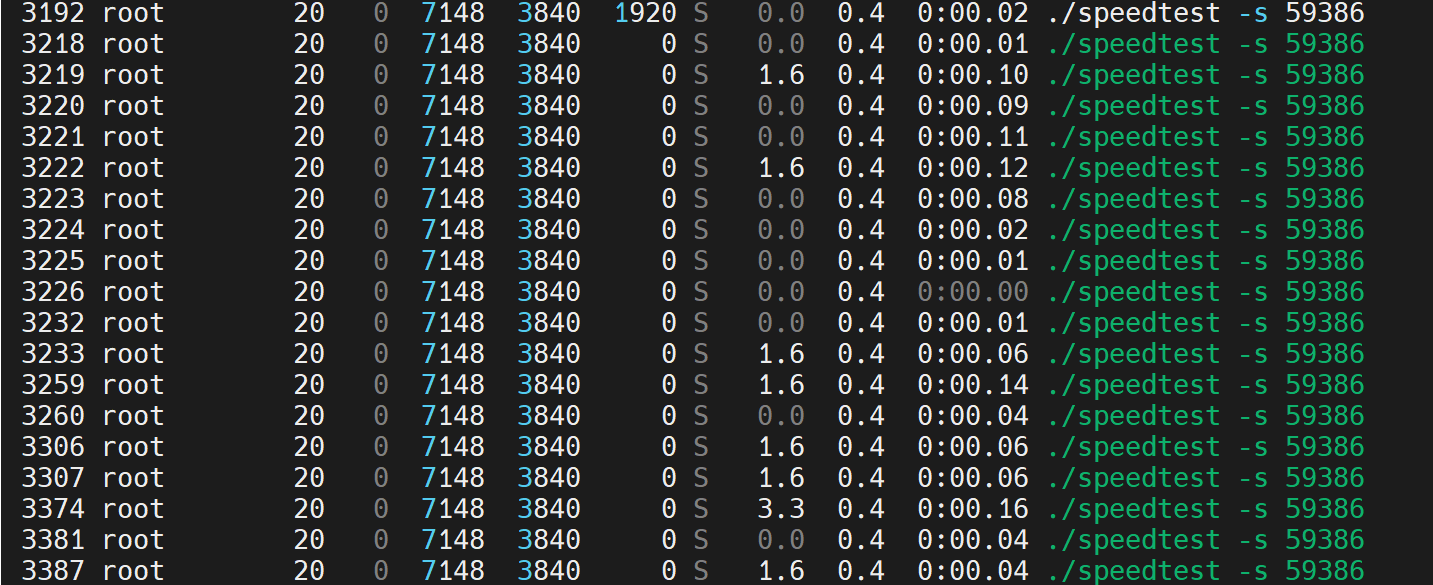
The strange thing is the CPU usage:
Test from the router:
Test from the PC:
Thanks
It seems that speedtest is consuming too much performance.
Which speedtest client are you using?
speedtest-cli in python from opkg?
speedtest in C++ from Ookla website?
If it is the former, it may be that updates to python or speedtest-cli have caused them to consume more performance.
Please try the official version from Ookla.
wget https://install.speedtest.net/app/cli/ookla-speedtest-1.2.0-linux-aarch64.tgz
tar -xvzf ookla-speedtest-1.2.0-linux-aarch64.tgz
chmod +x speedtest
./speedtest
This is the version I'm using
2 Likes
We also ran some tests using Flint2 + 4.8.0-op24.
The Ookla speedtest on your side seems to behave strangely.
Since our office only has 1Gbps network access, we switched to iperf3 to compare 4.7.7 and 4.8.0-op24.
Both can reach speeds of over 2.3Gbps, and the CPU load is relatively low.
4.7.7
4.8.0-op24
If you manually select a Speedtest server and try testing with a few different ones, are you able to achieve a better speed result?
# List Speedtest servers
.\speedtest -L

# Run Speedtest using a specific server (replace 12345 with the server ID)
.\speedtest -s 12345
1 Like
Sorry for the late reply,
I need to get some equipment for iperf3, I've never installed it. Do you have a guide?
Thanks
To install and use iPerf3 on Flint2, please follow the steps below.
opkg update
opkg install iperf3
Single-threaded upload test
iperf3 -c server_address
Single-threaded download test
iperf3 -c server_address -R
Four-thread download test
iperf3 -c server_address -R -P 4
You can find a list of available public servers here:
A list of public iPerf3 servers...
If you would like to test within your home network, you can start an iPerf3 server with the following command on other devices:
iperf3 -s
Further details are available in the official documentation:
iperf3: A TCP, UDP, and SCTP network bandwidth measurement tool
gives me this error:
ing 217.61.40.96
PING 217.61.40.96 (217.61.40.96): 56 data bytes
64 bytes from 217.61.40.96: seq=0 ttl=54 time=14.057 ms
64 bytes from 217.61.40.96: seq=1 ttl=54 time=13.336 ms
64 bytes from 217.61.40.96: seq=2 ttl=54 time=13.417 ms
^C
--- 217.61.40.96 ping statistics ---
3 packets transmitted, 3 packets received, 0% packet loss
round-trip min/avg/max = 13.336/13.603/14.057 ms

root@GL-MT6000:~# iperf3 -c 217.61.40.96
Usage: iperf3 [-s|-c host] [options]
Try `iperf3 --help' for more information.

root@GL-MT6000:~# iperf3 -v
iperf 3.10.1 (cJSON 1.7.13)
Linux GL-MT6000 6.6.93 #0 SMP Mon Jun 23 20:40:36 2025 aarch64
Optional features available: CPU affinity setting, IPv6 flow label, TCP congestion algorithm setting, sendfile / zerocopy, socket pacing, bind to device, support IPv4 don't fragment
Even on different servers.
It's a little strange. Everything is working normally on our side.
root@GL-MT6000:~# iperf3 -c 217.61.40.96
Connecting to host 217.61.40.96, port 5201
[  5] local 192.168.8.127 port 44518 connected to 217.61.40.96 port 5201
[ ID] Interval           Transfer     Bitrate         Retr  Cwnd
[  5]   0.00-1.00   sec   102 KBytes   833 Kbits/sec   16   11.4 KBytes
[  5]   1.00-2.00   sec  57.6 KBytes   472 Kbits/sec    0   12.7 KBytes
[  5]   2.00-3.00   sec  52.0 KBytes   426 Kbits/sec    0   15.2 KBytes
[  5]   3.00-4.00   sec  88.7 KBytes   727 Kbits/sec    0   17.7 KBytes
[  5]   4.00-5.00   sec  88.7 KBytes   727 Kbits/sec    0   20.3 KBytes
[  5]   5.00-6.00   sec   177 KBytes  1.45 Mbits/sec    0   30.4 KBytes
[  5]   6.00-7.00   sec   250 KBytes  2.05 Mbits/sec    1   41.8 KBytes
[  5]   7.00-8.00   sec   127 KBytes  1.04 Mbits/sec    0   45.6 KBytes
[  5]   8.00-9.00   sec   254 KBytes  2.08 Mbits/sec    0   49.4 KBytes
[  5]   9.00-10.00  sec   444 KBytes  3.64 Mbits/sec    0   62.1 KBytes
- - - - - - - - - - - - - - - - - - - - - - - - -
[ ID] Interval           Transfer     Bitrate         Retr
[  5]   0.00-10.00  sec  1.60 MBytes  1.34 Mbits/sec   17             sender
[  5]   0.00-10.00  sec  1.24 MBytes  1.04 Mbits/sec                  receiver

iperf Done.
root@GL-MT6000:~# iperf3 -v
iperf 3.10.1 (cJSON 1.7.13)
Linux GL-MT6000 6.6.93 #0 SMP Mon Jun 23 20:40:36 2025 aarch64
Optional features available: CPU affinity setting, IPv6 flow label, TCP congestion algorithm setting, sendfile / zerocopy, socket pacing, bind to device, support IPv4 don't fragment
root@GL-MT6000:~# cat /etc/glversion
4.8.0-op24
misuzu
August 23, 2025, 10:27am
13
I assume then that the 4.8.0 OP24 doesnt have the bug that plagues OpenWRT where the device only uses single core resulting to poor speed and performance? I'm planning to update from my 4.7.5 Op24 so I just want to make sure. Thanks!
I had to update the package: libiperf3
iperf3 -c it1.speedtest.aruba.it  -R -P 4
Connecting to host it1.speedtest.aruba.it, port 5201
Reverse mode, remote host it1.speedtest.aruba.it is sending
[  5] local 79.46.219.163 port 60468 connected to 31.14.130.68 port 5201
[  7] local 79.46.219.163 port 60470 connected to 31.14.130.68 port 5201
[  9] local 79.46.219.163 port 60480 connected to 31.14.130.68 port 5201
[ 11] local 79.46.219.163 port 60482 connected to 31.14.130.68 port 5201
[ ID] Interval           Transfer     Bitrate
[  5]   0.00-1.00   sec  25.2 MBytes   212 Mbits/sec
[  7]   0.00-1.00   sec  17.8 MBytes   149 Mbits/sec
[  9]   0.00-1.00   sec  20.6 MBytes   173 Mbits/sec
[ 11]   0.00-1.00   sec  42.5 MBytes   356 Mbits/sec
[SUM]   0.00-1.00   sec   106 MBytes   889 Mbits/sec
- - - - - - - - - - - - - - - - - - - - - - - - -
[  5]   1.00-2.00   sec  26.9 MBytes   225 Mbits/sec
[  7]   1.00-2.00   sec  20.0 MBytes   168 Mbits/sec
[  9]   1.00-2.00   sec  23.2 MBytes   195 Mbits/sec
[ 11]   1.00-2.00   sec  63.5 MBytes   533 Mbits/sec
[SUM]   1.00-2.00   sec   134 MBytes  1.12 Gbits/sec
- - - - - - - - - - - - - - - - - - - - - - - - -
[  5]   2.00-3.00   sec  31.8 MBytes   266 Mbits/sec
[  7]   2.00-3.00   sec  20.4 MBytes   171 Mbits/sec
[  9]   2.00-3.00   sec  25.9 MBytes   217 Mbits/sec
[ 11]   2.00-3.00   sec  46.8 MBytes   392 Mbits/sec
[SUM]   2.00-3.00   sec   125 MBytes  1.05 Gbits/sec
- - - - - - - - - - - - - - - - - - - - - - - - -
[  5]   3.00-4.00   sec  33.8 MBytes   283 Mbits/sec
[  7]   3.00-4.00   sec  23.1 MBytes   194 Mbits/sec
[  9]   3.00-4.00   sec  27.0 MBytes   227 Mbits/sec
[ 11]   3.00-4.00   sec  40.0 MBytes   336 Mbits/sec
[SUM]   3.00-4.00   sec   124 MBytes  1.04 Gbits/sec
- - - - - - - - - - - - - - - - - - - - - - - - -
[  5]   4.00-5.00   sec  33.6 MBytes   282 Mbits/sec
[  7]   4.00-5.00   sec  25.4 MBytes   213 Mbits/sec
[  9]   4.00-5.00   sec  23.8 MBytes   199 Mbits/sec
[ 11]   4.00-5.00   sec  41.0 MBytes   344 Mbits/sec
[SUM]   4.00-5.00   sec   124 MBytes  1.04 Gbits/sec
- - - - - - - - - - - - - - - - - - - - - - - - -
[  5]   5.00-6.00   sec  34.5 MBytes   289 Mbits/sec
[  7]   5.00-6.00   sec  25.8 MBytes   216 Mbits/sec
[  9]   5.00-6.00   sec  24.2 MBytes   203 Mbits/sec
[ 11]   5.00-6.00   sec  37.9 MBytes   318 Mbits/sec
[SUM]   5.00-6.00   sec   122 MBytes  1.03 Gbits/sec
- - - - - - - - - - - - - - - - - - - - - - - - -
[  5]   6.00-7.00   sec  32.9 MBytes   276 Mbits/sec
[  7]   6.00-7.00   sec  23.6 MBytes   198 Mbits/sec
[  9]   6.00-7.00   sec  24.9 MBytes   209 Mbits/sec
[ 11]   6.00-7.00   sec  39.4 MBytes   330 Mbits/sec
[SUM]   6.00-7.00   sec   121 MBytes  1.01 Gbits/sec
- - - - - - - - - - - - - - - - - - - - - - - - -
[  5]   7.00-8.00   sec  34.5 MBytes   289 Mbits/sec
[  7]   7.00-8.00   sec  22.8 MBytes   191 Mbits/sec
[  9]   7.00-8.00   sec  26.1 MBytes   219 Mbits/sec
[ 11]   7.00-8.00   sec  40.0 MBytes   336 Mbits/sec
[SUM]   7.00-8.00   sec   123 MBytes  1.03 Gbits/sec
- - - - - - - - - - - - - - - - - - - - - - - - -
[  5]   8.00-9.00   sec  35.1 MBytes   295 Mbits/sec
[  7]   8.00-9.01   sec  24.6 MBytes   205 Mbits/sec
[  9]   8.00-9.01   sec  25.8 MBytes   214 Mbits/sec
[ 11]   8.00-9.01   sec  38.9 MBytes   324 Mbits/sec
[SUM]   8.00-9.00   sec   124 MBytes  1.04 Gbits/sec
- - - - - - - - - - - - - - - - - - - - - - - - -
[  5]   9.00-10.00  sec  37.2 MBytes   312 Mbits/sec
[  7]   9.01-10.00  sec  25.0 MBytes   211 Mbits/sec
[  9]   9.01-10.00  sec  22.4 MBytes   189 Mbits/sec
[ 11]   9.01-10.00  sec  38.4 MBytes   324 Mbits/sec
[SUM]   9.00-10.00  sec   123 MBytes  1.03 Gbits/sec
- - - - - - - - - - - - - - - - - - - - - - - - -
[ ID] Interval           Transfer     Bitrate         Retr
[  5]   0.00-10.00  sec   348 MBytes   292 Mbits/sec  12971             sender
[  5]   0.00-10.00  sec   326 MBytes   273 Mbits/sec                  receiver
[  7]   0.00-10.00  sec   243 MBytes   204 Mbits/sec  8462             sender
[  7]   0.00-10.00  sec   228 MBytes   192 Mbits/sec                  receiver
[  9]   0.00-10.00  sec   261 MBytes   219 Mbits/sec  9349             sender
[  9]   0.00-10.00  sec   244 MBytes   205 Mbits/sec                  receiver
[ 11]   0.00-10.00  sec   456 MBytes   383 Mbits/sec  16710             sender
[ 11]   0.00-10.00  sec   428 MBytes   359 Mbits/sec                  receiver
[SUM]   0.00-10.00  sec  1.28 GBytes  1.10 Gbits/sec  47492             sender
[SUM]   0.00-10.00  sec  1.20 GBytes  1.03 Gbits/sec                  receiver

iperf Done.
Thanks
Could you please confirm if there are any other programs running that might be consuming or limiting CPU performance, such as VPN, AdGuard Home, or luci-app-cpufreq?
At the moment, I am not certain why Core 2 shows nearly 100% usage during your testing.
I would suggest enabling display of kernel threads in htop (F2 to open settings) since it may being hiding the real process using the CPU. Also note that the user is probably using a PPPoE connection and I'm not sure if that may affect the performance.
@TheNewHEROBRINE @will.qiu
This is the test I did.
Thanks
Solved.
iperf3 -c it1.speedtest.aruba.it  -R -P 4
Connecting to host it1.speedtest.aruba.it, port 5201
Reverse mode, remote host it1.speedtest.aruba.it is sending
[  5] local 79.46.219.163 port 39500 connected to 31.14.130.68 port 5201
[  7] local 79.46.219.163 port 39512 connected to 31.14.130.68 port 5201
[  9] local 79.46.219.163 port 39514 connected to 31.14.130.68 port 5201
[ 11] local 79.46.219.163 port 39518 connected to 31.14.130.68 port 5201
[ ID] Interval           Transfer     Bitrate
[  5]   0.00-1.00   sec  48.6 MBytes   407 Mbits/sec
[  7]   0.00-1.00   sec  51.8 MBytes   434 Mbits/sec
[  9]   0.00-1.00   sec  42.6 MBytes   357 Mbits/sec
[ 11]   0.00-1.00   sec  50.2 MBytes   421 Mbits/sec
[SUM]   0.00-1.00   sec   193 MBytes  1.62 Gbits/sec
- - - - - - - - - - - - - - - - - - - - - - - - -
[  5]   1.00-2.00   sec  49.8 MBytes   417 Mbits/sec
[  7]   1.00-2.00   sec  48.1 MBytes   404 Mbits/sec
[  9]   1.00-2.00   sec  52.1 MBytes   437 Mbits/sec
[ 11]   1.00-2.00   sec  50.8 MBytes   426 Mbits/sec
[SUM]   1.00-2.00   sec   201 MBytes  1.68 Gbits/sec
- - - - - - - - - - - - - - - - - - - - - - - - -
[  5]   2.00-3.00   sec  52.1 MBytes   437 Mbits/sec
[  7]   2.00-3.00   sec  46.5 MBytes   390 Mbits/sec
[  9]   2.00-3.00   sec  47.6 MBytes   399 Mbits/sec
[ 11]   2.00-3.00   sec  54.8 MBytes   459 Mbits/sec
[SUM]   2.00-3.00   sec   201 MBytes  1.69 Gbits/sec
- - - - - - - - - - - - - - - - - - - - - - - - -
[  5]   3.00-4.00   sec  48.5 MBytes   406 Mbits/sec
[  7]   3.00-4.01   sec  45.8 MBytes   382 Mbits/sec
[  9]   3.00-4.01   sec  45.4 MBytes   379 Mbits/sec
[ 11]   3.00-4.01   sec  52.1 MBytes   436 Mbits/sec
[SUM]   3.00-4.00   sec   192 MBytes  1.60 Gbits/sec
- - - - - - - - - - - - - - - - - - - - - - - - -
[  5]   4.00-5.00   sec  49.1 MBytes   414 Mbits/sec
[  7]   4.01-5.00   sec  44.6 MBytes   376 Mbits/sec
[  9]   4.01-5.00   sec  42.6 MBytes   359 Mbits/sec
[ 11]   4.01-5.00   sec  50.0 MBytes   421 Mbits/sec
[SUM]   4.00-5.00   sec   186 MBytes  1.57 Gbits/sec
- - - - - - - - - - - - - - - - - - - - - - - - -
[  5]   5.00-6.00   sec  49.9 MBytes   418 Mbits/sec
[  7]   5.00-6.00   sec  43.6 MBytes   366 Mbits/sec
[  9]   5.00-6.00   sec  44.6 MBytes   374 Mbits/sec
[ 11]   5.00-6.00   sec  49.6 MBytes   416 Mbits/sec
[SUM]   5.00-6.00   sec   188 MBytes  1.57 Gbits/sec
- - - - - - - - - - - - - - - - - - - - - - - - -
[  5]   6.00-7.00   sec  52.8 MBytes   443 Mbits/sec
[  7]   6.00-7.00   sec  48.8 MBytes   409 Mbits/sec
[  9]   6.00-7.00   sec  44.6 MBytes   374 Mbits/sec
[ 11]   6.00-7.00   sec  49.4 MBytes   414 Mbits/sec
[SUM]   6.00-7.00   sec   196 MBytes  1.64 Gbits/sec
- - - - - - - - - - - - - - - - - - - - - - - - -
[  5]   7.00-8.00   sec  47.6 MBytes   399 Mbits/sec
[  7]   7.00-8.00   sec  48.6 MBytes   407 Mbits/sec
[  9]   7.00-8.00   sec  43.9 MBytes   368 Mbits/sec
[ 11]   7.00-8.00   sec  49.4 MBytes   414 Mbits/sec
[SUM]   7.00-8.00   sec   190 MBytes  1.59 Gbits/sec
- - - - - - - - - - - - - - - - - - - - - - - - -
[  5]   8.00-9.00   sec  46.9 MBytes   393 Mbits/sec
[  7]   8.00-9.00   sec  47.5 MBytes   399 Mbits/sec
[  9]   8.00-9.00   sec  47.1 MBytes   396 Mbits/sec
[ 11]   8.00-9.00   sec  49.2 MBytes   414 Mbits/sec
[SUM]   8.00-9.00   sec   191 MBytes  1.60 Gbits/sec
- - - - - - - - - - - - - - - - - - - - - - - - -
[  5]   9.00-10.00  sec  50.9 MBytes   427 Mbits/sec
[  7]   9.00-10.00  sec  46.9 MBytes   393 Mbits/sec
[  9]   9.00-10.00  sec  45.4 MBytes   381 Mbits/sec
[ 11]   9.00-10.00  sec  50.1 MBytes   420 Mbits/sec
[SUM]   9.00-10.00  sec   193 MBytes  1.62 Gbits/sec
- - - - - - - - - - - - - - - - - - - - - - - - -
[ ID] Interval           Transfer     Bitrate         Retr
[  5]   0.00-10.00  sec   524 MBytes   440 Mbits/sec  10658             sender
[  5]   0.00-10.00  sec   496 MBytes   416 Mbits/sec                  receiver
[  7]   0.00-10.00  sec   504 MBytes   423 Mbits/sec  9915             sender
[  7]   0.00-10.00  sec   472 MBytes   396 Mbits/sec                  receiver
[  9]   0.00-10.00  sec   485 MBytes   407 Mbits/sec  10644             sender
[  9]   0.00-10.00  sec   456 MBytes   382 Mbits/sec                  receiver
[ 11]   0.00-10.00  sec   534 MBytes   448 Mbits/sec  10722             sender
[ 11]   0.00-10.00  sec   506 MBytes   424 Mbits/sec                  receiver
[SUM]   0.00-10.00  sec  2.00 GBytes  1.72 Gbits/sec  41939             sender
[SUM]   0.00-10.00  sec  1.89 GBytes  1.62 Gbits/sec                  receiver

iperf Done.
Thanks
3 Likes
system
September 23, 2025, 10:19am
19
This topic was automatically closed 30 days after the last reply. New replies are no longer allowed.