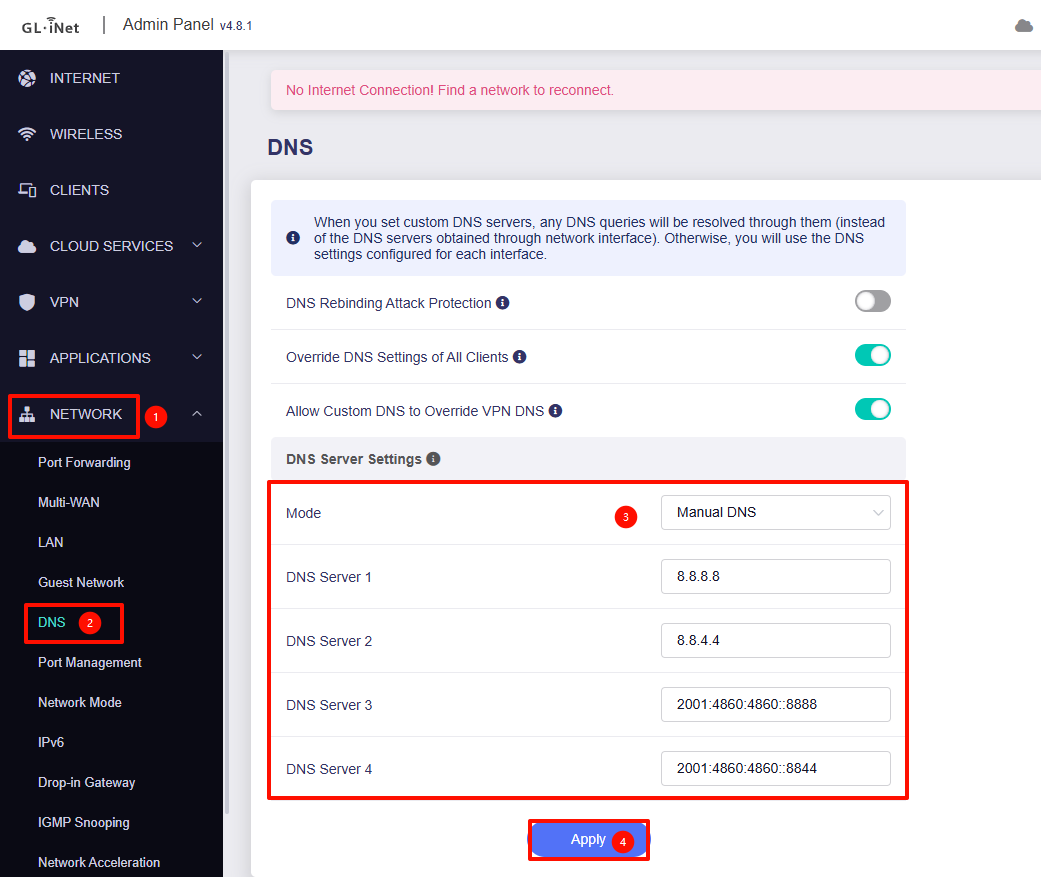
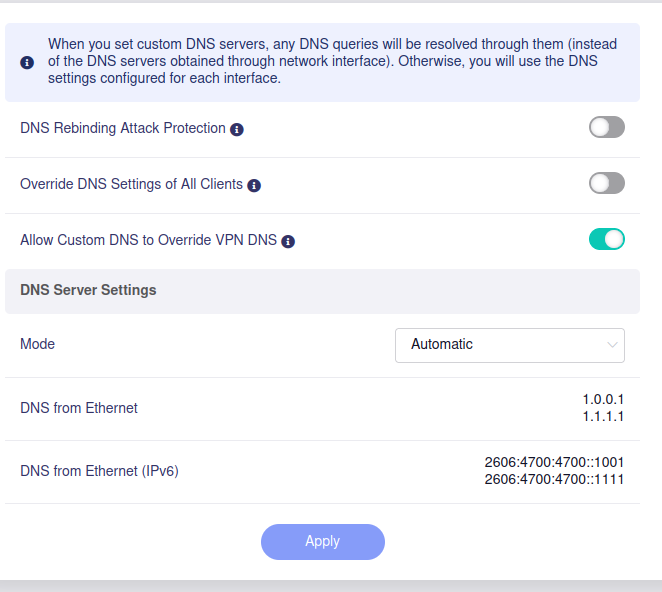
However, for most websites and services the connection fails at first try (or it loads forever) and then it works immediately on refresh. For example on some apps I get ‘Server or proxy hostname lookup failed’ first, and then it connects. So I think there’s still something configured in the wrong way. I changed the DNS to use Cloudfare for both IPv6 and IPv4 through LuCi, but it still hasn’t improved.
I also have a homeserver and the torrent connection is not working very well (in my previous place it was working perfect), as well as Overseerr having hostname issues connecting to tmdb.
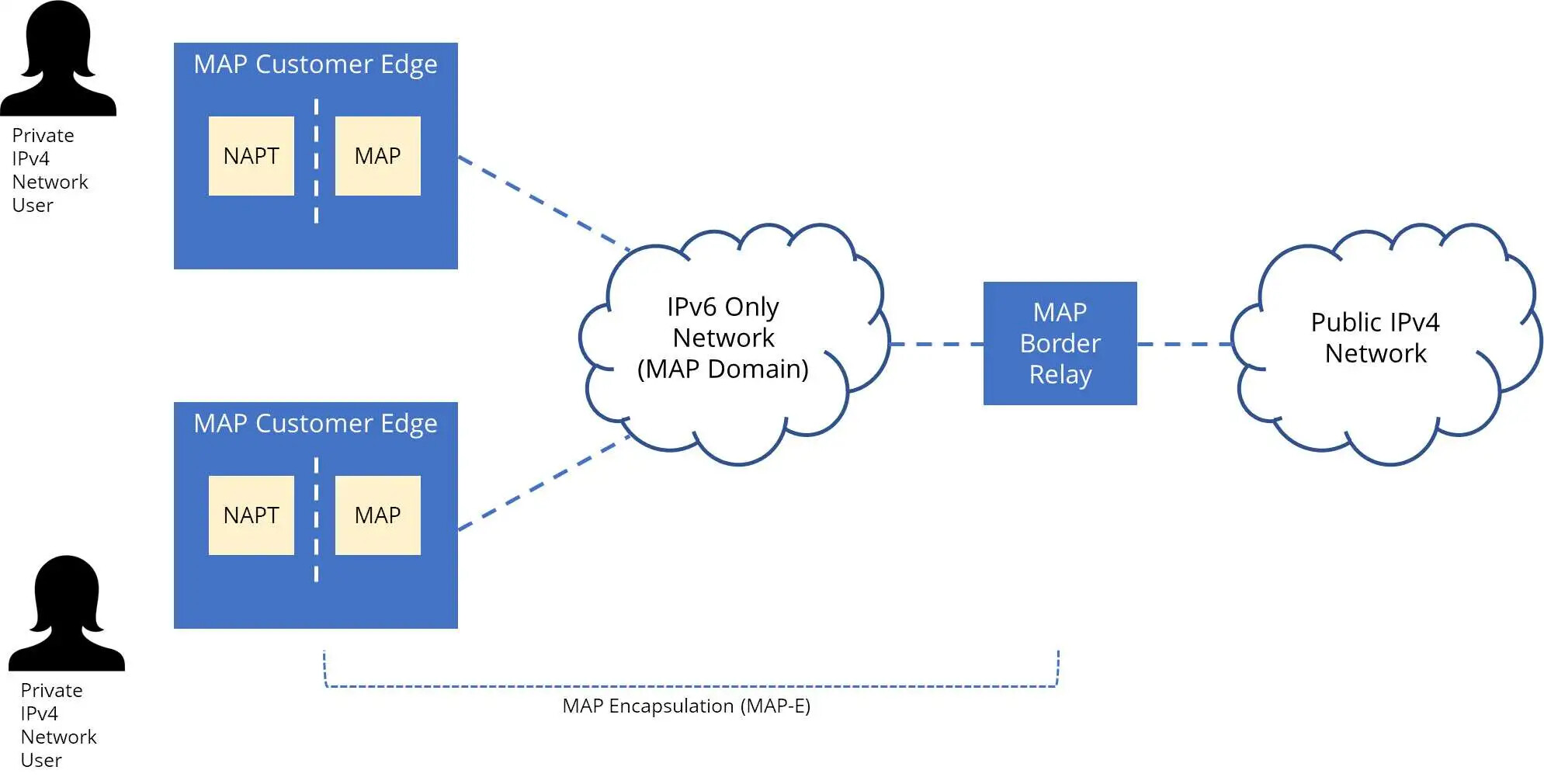
My setup is pretty simple, with the router connected directly to the ONT on WAN, and then some devices connected through WiFi (directly or through APs) and others such as the server, tv, consoles connected through ethernet. See the schematic (at first I thought it was an issue with the server configuration, thus it has extra information that might not be relevant but now that I am having issues with other devices I think it has to be somewhere else).
Apart from this slow response that affects some services more negatively than others, all pings and so on work normally. I tried checking firewall or other configuration issues but I am not that well versed in networking so I haven’t been able to narrow down exactly what is going on. I can provide logs and other configuration parameters if more specifics are needed, please direct me to the appropriate place for that.
Based on your description, it appears to be a DNS resolution issue.
This is because on the first visit a timeout error such as 'Server or proxy hostname lookup failed' may only occur , or it may take a long time to load.
Please try specifying a working DNS server manually in 'Network - DNS'.
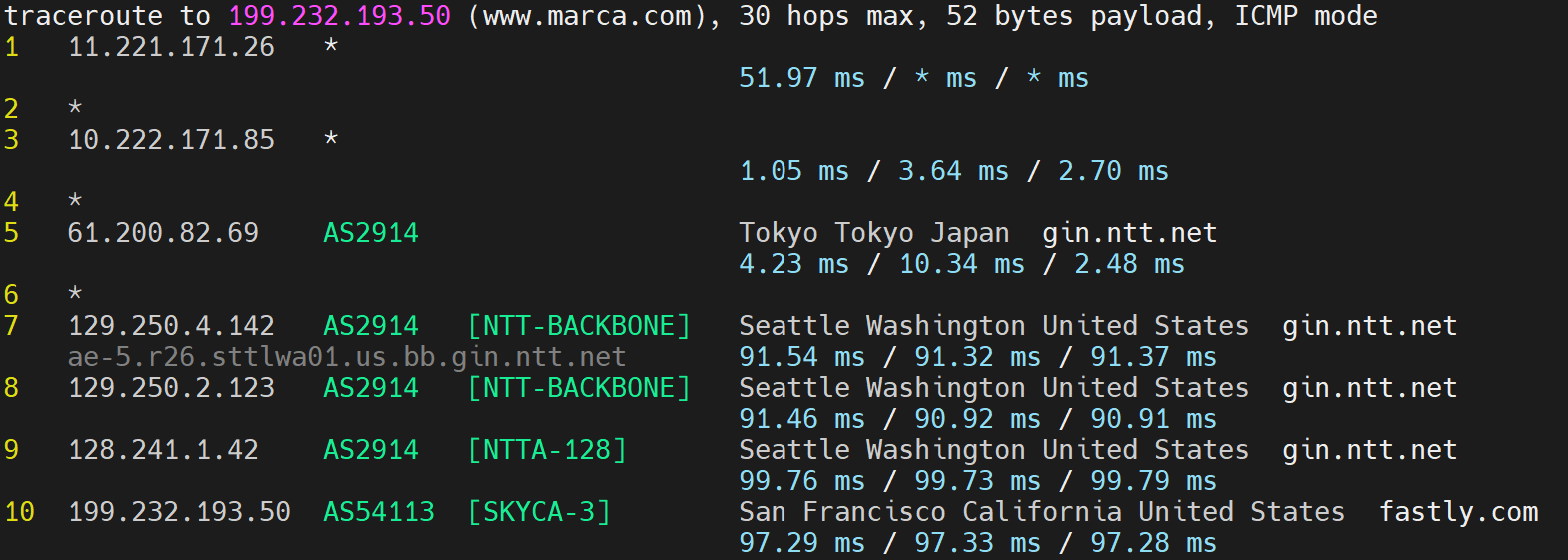
I restarted the dnsmasq on the router and ran the command on marca.com , a spanish sports newspaper that before was working well (and also while using mobile connection on my phone) but with the new setup it always hangs on the first try, and loads quickly on refresh. I ran it a couple times on Firefox on my linux computer and the results are:
Could you please try a few more times to establish whether these refer to average values or are just due to network fluctuations?
Please run the following commands to test the resolution time for different websites directly and observe the 'query time' in the results.
# Check both IPv4 and IPv6 DNS
dig @1.1.1.1 google.com
dig @1.0.0.1 google.com
dig @2606:4700:4700::1111 google.com
dig @2606:4700:4700::1001 google.com

# Check the latency to the DNS server.
ping 1.1.1.1
ping 1.0.0.1
ping 2606:4700:4700::1111
ping 2606:4700:4700::1001
Could you also confirm if your previous provider was NTT and if it utilized an IPoE + MAP-E configuration?
If you use the router provided by the carrier, does the same issue occur?
Thanks for the reply. Sorry for the weird link formatting but otherwise it doesn’t allow me to post.
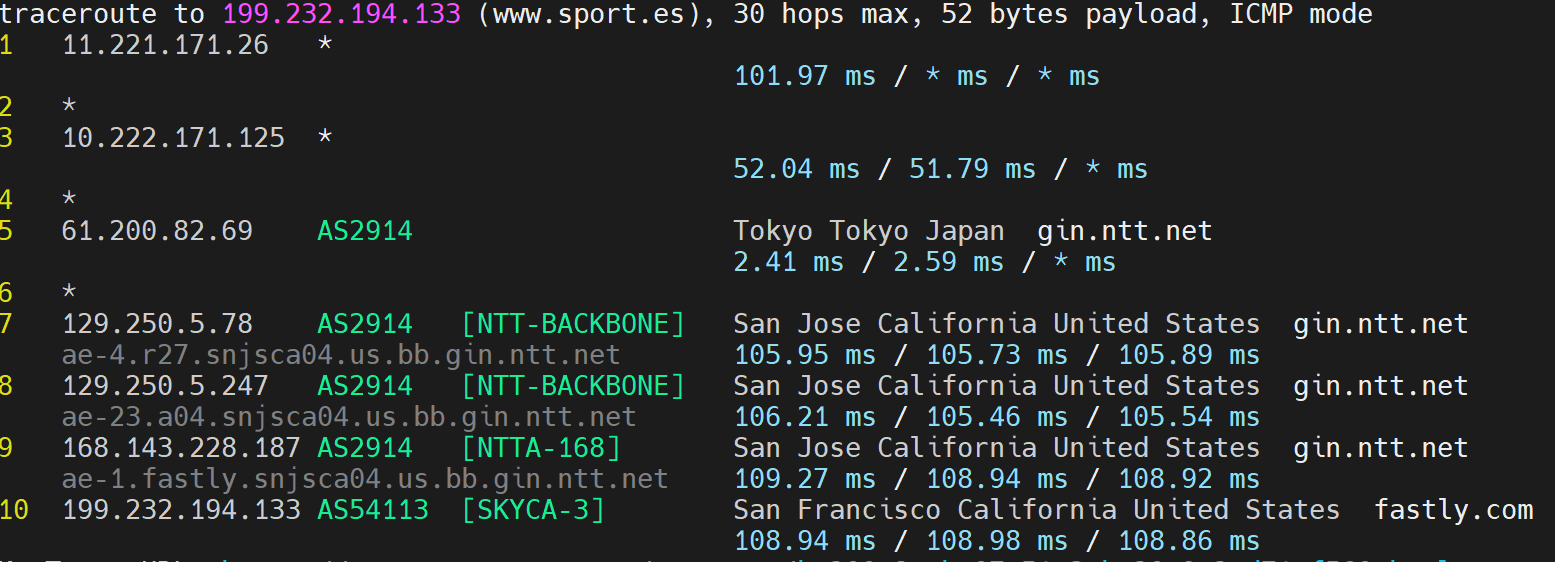
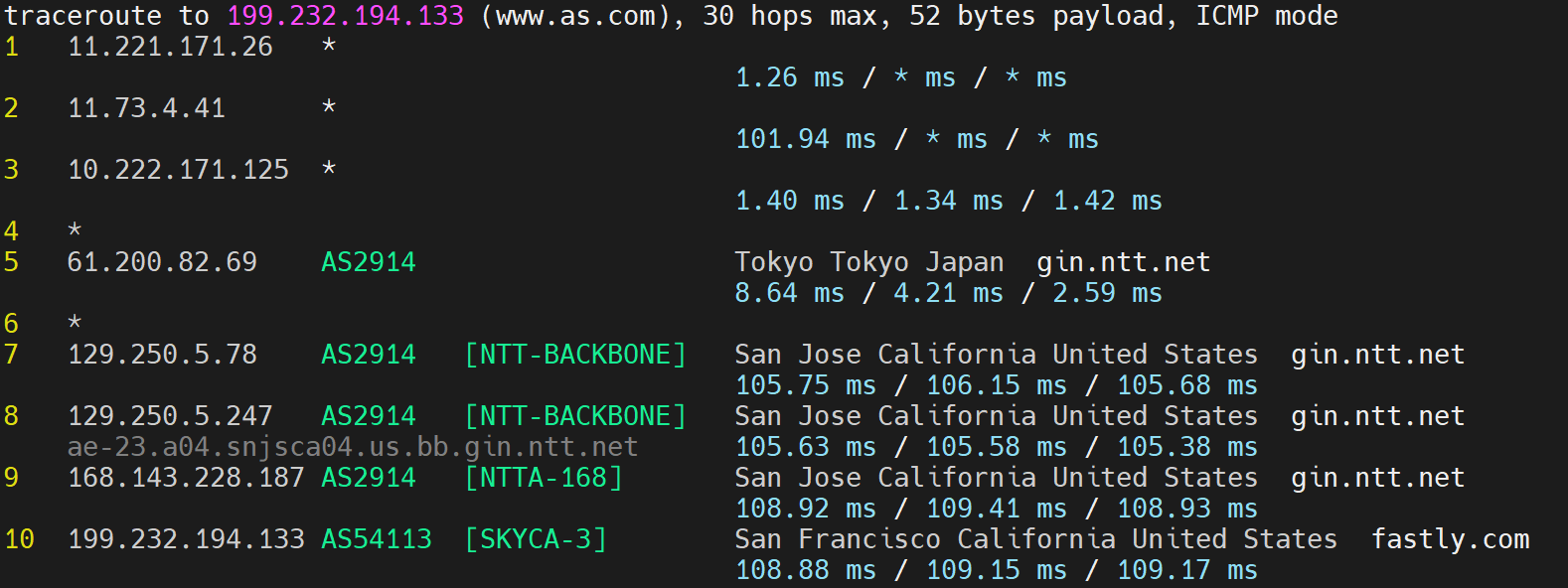
The command actually hangs quite regularly, especially when I tried ‘new’ websites (I tried more Spanish newspapers, for example www(dot)as(dot)com hanged: when I cancelled and ran again I got time_namelookup: 0.005460s, for www(dot)mundodeportivo(dot)com I got time_namelookup: 0.015235s on the first try without hanging and for www(dot)sport(dot)es time_namelookup: 0.333187s also without hanging.
When I tried www(dot)marca(dot)com again today I got time_namelookup: 0.022758s the first try and then time_namelookup: 0.008091s. Note that I didn’t flush the cache on the router or pc (if there is one) so there might still be something cached from the tests yesterday.
For 2 I get for Query time:
dig @1.1.1.1 google.com: 17 msec
dig @1.0.0.1 google.com: 5 msec
dig @2606:4700:4700::1111 google.com: 6 msec
dig @2606:4700:4700::1001 google.com: 5 msec
For latency:
ping 1.1.1.1: mostly between 5-5.6 ms, one at 11.1 ms
ping 1.0.0.1: mostly ~5.5 ms, a couple lower and a couple around 7 ms
ping 2606:4700:4700::1111: mostly 5.5 - 6.5 ms a couple lower and some up to 9 ms
ping 2606:4700:4700::1001: mostly 5.5 - 6.5 ms a couple lower and some up to 9-10 ms
Please note that google, netflix and some of these more global websites do not behave that badly and load more consistently.
This is a new installation and in my previous place internet was provided by the management company so I am not sure which provider was used nor I had access to the router and its configuration. It was most likely not IPv6 though, and in Japan the norm for Ipv4 connections is PPoE so I assume it was that.
There is no router provided by the carrier sorry, they only provided the ONT. I have a TP-link that I used in previous places being used as an AP now, but it’s the tp-link Archer C1200 Archer C1200 のコンテンツ | TP-Link 日本 which I don’t think supports IPoE for IPv6 and this specific version cannot be flashed with openwrt. The ISP provider recommends some routers that are common in Japan (buffalo, NEC, IO-data, Elecom) here otegal(dot)jp/price/ipv6.html but I am not sure I can get any easily without just buying it which I would like to avoid since it defeats the purpose…
Based on the DNS test results, Cloudflare DNS appears to be working normally.
We checked several of the websites you mentioned. Aside from mundodeportivo, none of them have servers or CDN nodes deployed locally in Japan. As a result, accessing them requires traversing international routes (Japan → US).
Considering that globally high-traffic services such as Google and Netflix — both of which operate servers/CDNs within Japan — are accessible without issues, the problem is likely related to congestion on your ISP (NTT)’s international backbone.
A useful way to confirm this is to compare behavior:
Websites/services with servers/CDNs inside Japan → generally stable
Websites/services requiring transoceanic access → intermittent issues, often worse during evening peak hours
The location you were previously at may have been served by a different ISP, or if the plan had higher priority (e.g., business/commercial service), that would explain why you did not experience the same issue before.
Thanks for all the investigation. This might be a possibility, but I find it a bit strange because it is nearly unusable, something I haven't regularly experienced in any other connection here in years. I also haven't heard people commenting similarly, and NTT is the largest (almost the only one) provider in the country. Moreover, even with my work computer, when I connect to the work VPN with AWS client on a Japan -based AWS landing zone the connection first hangs before refreshing and then connecting… Reddit and other global services are also extremely slow.
I also tried using VPN (NordVPN) connecting to a Vietnam entry point and then all problems seem to go away. All the previous websites load normally, reddit loads threads and comments directly, etc …
Have you had a chance to discuss this issue with your ISP?
Based on both the direct ping tests and the results obtained when using a VPN, the router’s forwarding function appears to be operating normally.
It is still unclear whether this behavior is related to MAP-E.
Under MAP-E, all IPv4 traffic is sent to the ISP’s relay server before being forwarded to the destination, so any issues within that relay path could affect performance.
To further validate whether MAP-E is involved, you may consider:
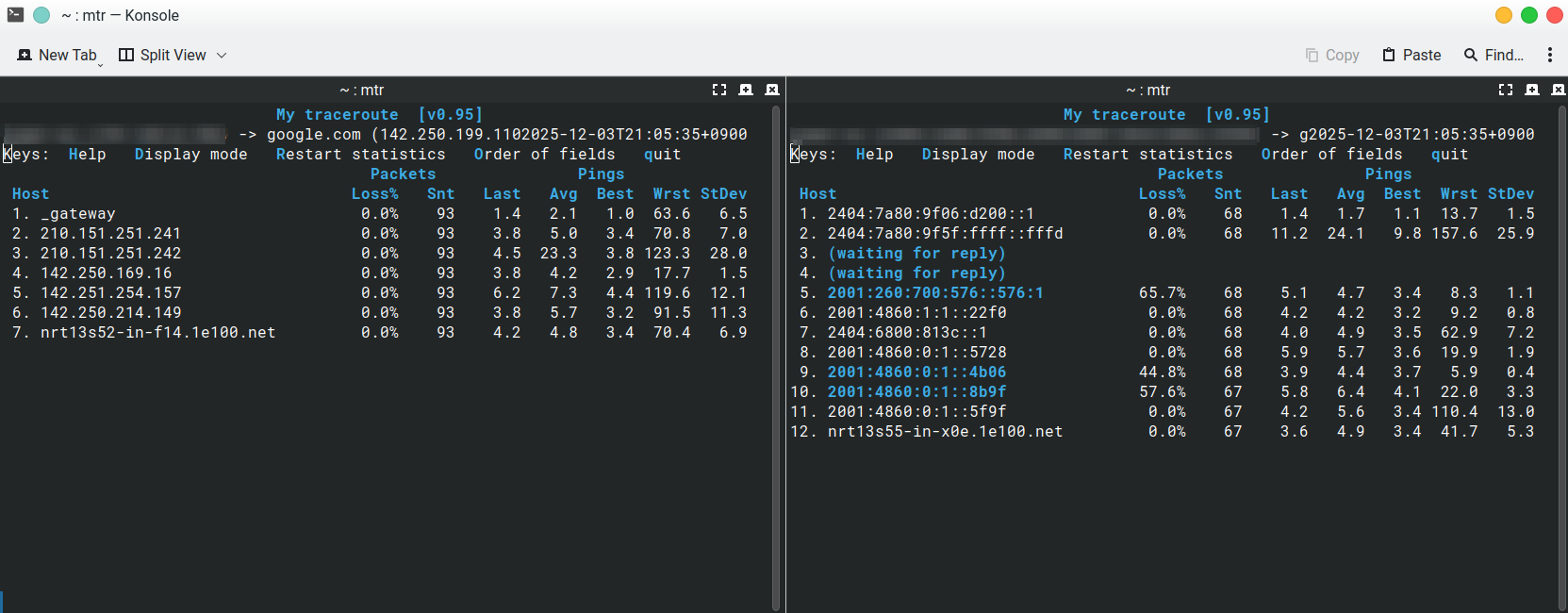
Running both IPv4 and IPv6 traceroute/MTR tests to the same destination to identify where latency diverges.
# On Linux
mtr -4 google.com
mtr -6 google.com
Checking with your ISP for any known issues on their MAP-E relay or upstream transit links.
If available, temporarily switching to an alternative WAN mode (such as PPPoE-only) to confirm whether the performance issue persists outside the MAP-E path.
I am not sure if by chance, the connection got better shortly after. However, it’s still not working well with some slow loading and plenty of hostname resolution issues in my torrent app (through a VPN) and I cannot connect to my workplace’s VPN. Again not sure if that made any change or it was just a coincidence since in the beginning I also couldn’t access my work VPN and it suddenly started working…
I ran the above commands from my computer with the following results (left is ipv4, right is ipv6 both running in parallel)
I am checking with the ISP but I am not having a lot of luck with them yet. One main roadblock is that they don’t consider GL-inet routers as ‘recommended’ or ‘supported’ and their suggestion is to get a different one. I will insist a bit more but otherwise I might have to get one of those at least temporarily after new year to troubleshoot and have a comparison point. As of now they also don’t provide me with an alternative PPPoE entry point yet…
At this stage, there does not appear to be any additional diagnostic steps available.
It may be necessary to wait and see whether the carrier can provide PPPoE dial-up, or conduct comparison tests with other equipment after the New Year.
If possible, you could also check with neighbors who are using NTT + IPoE + MAP-E to determine whether they observe similar behavior.