tags: extroot alternative, extalt, extroot, storage expansion, stor expansion, liblink, script, shell, certa, gl-ar750, limited flash space, limited storage space, opkg destination, usb drive, usb stick, flash card, usdhc card, sd card
So the basis of opkg install $packageHere -d $targetStorageHere seems to work as expected once the proper $PATH, libraries & xterm dependencies are set. You'd have to run liblink.sh after every firmware upgrade but it's easier to do that than risk extroot which may cause an unbootable system if the flash dies/corrupts.
Caveats
- The installed packages do not show as installed in LuCI -> System -> Software.
- Use
opkg list-installed | grep '$somePackageNameHere' to see what's already installed.
liblink.sh should be executed every time a package installs a dependent library to keep the symlinks in sync.
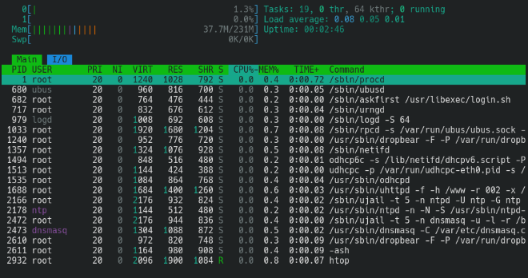
Here's what it looks like when setting up htop to run off /mnt/sdb1:
root@002:~# df -h
Filesystem                Size      Used Available Use% Mounted on
/dev/root                 4.3M      4.3M         0 100% /rom
tmpfs                   115.7M   1008.0K    114.7M   1% /tmp
/dev/loop0               88.1M      2.3M     78.8M   3% /overlay
overlayfs:/overlay       88.1M      2.3M     78.8M   3% /
/dev/sda1                15.7M      5.5M      9.9M  36% /boot
/dev/sda1                15.7M      5.5M      9.9M  36% /boot
tmpfs                   512.0K         0    512.0K   0% /dev
/dev/sdb1               124.0M     41.1M     82.9M  33% /mnt/sdb1
root@002:~# cat /etc/opkg.conf
dest root /
dest ram /tmp
lists_dir ext /var/opkg-lists
option overlay_root /overlay
option check_signature
dest opt /mnt/sdb1
root@002:~# head -n 1 /root/.profile
PATH="${PATH}:/root/.bin:/mnt/sdb1/usr/bin:/mnt/sdb1/usr/sbin"
opkg update && opkg install htop -d opt
root@002:~# which htop
/mnt/sdb1/usr/bin/htop
Before symlinks are in place:
root@002:~# htop
Error loading shared library libncursesw.so.6: No such file or directory (needed by /mnt/sdb1/usr/bin/htop)
Error relocating /mnt/sdb1/usr/bin/htop: mousemask: symbol not found
Error relocating /mnt/sdb1/usr/bin/htop: start_color: symbol not found
< snip >
Error relocating /mnt/sdb1/usr/bin/htop: COLORS: symbol not found
Error relocating /mnt/sdb1/usr/bin/htop: stdscr: symbol not found
Error relocating /mnt/sdb1/usr/bin/htop: COLS: symbol not found
After:
The script:
/root/.bin/liblink.sh
#!/bin/sh

# set the mount point of the usb drive or usdhc card here
STOR='/mnt/sdb1/'

# functions for var sanitization
lstrip() {
	printf '%s\n' "${1##"$2"}"
}

rstrip(){
	printf '%s\n' "${1%%"$2"}"
}

# sanitize the vars
STOR="$(lstrip "${STOR}" '/')"
STOR="$(rstrip "${STOR}" '/')"

# create the libraries symlinks if dirs are present
if [ -d /"${STOR}"/usr/lib ]; then
	for link in $(find /"${STOR}"/usr/lib -maxdepth '1' -type 'l' -print0 | grep -o '[^/]*$'); do
		[ -h /usr/lib/"${link}" ] || ln -s /"${STOR}"/usr/lib/"${link}" /usr/lib/"${link}"
	done
else
	logger -p notice -t liblink "Failed to link /${STOR}/usr/lib libraries within /usr/lib [✘]"
	exit 1
fi

# link any init sh to be within /etc/init.d/
# don't expect these to exec on boot if the stor isn't mounted
if [ -d /"${STOR}"/etc/init.d ]; then
	for link in $(find /"${STOR}"/etc/init.d -maxdepth '1' -print0 | grep -o '[^/]*$' | grep -v 'init.d'); do
		[ -h /etc/init.d/"${link}" ] || ln -s /"${STOR}"/etc/init.d/"${link}" /etc/init.d/"${link}"
	done
else
	logger -p notice -t liblink "Failed to link /${STOR}/etc/init.d/${link} within /etc/init.d [✘]"
	exit 1
fi

# ensure the xterm symlinks are present
if [ ! -h /usr/share/terminfo ]; then
	ln -s /"${STOR}"/usr/share/terminfo /usr/share/terminfo
else
	logger -p notice -t liblink "Failed to link /${STOR}/usr/share/terminfo within /usr/share [✘]"
	exit 1
fi

exit 0
Tested with htop & nano in a 23.05.0 x86_64 VM & a Certa (GL-AR750) v4.3.25-release1. YMMV.
root@002:~# grep -m '1' 'PRETTY_NAME' /etc/os-release && grep -m '1' 'OPENWRT_ARCH' /etc/os-release && now
PRETTY_NAME="OpenWrt 23.05.0"
OPENWRT_ARCH="x86_64"
20250817T032423UTC
root@certa:~# cat /etc/glversion && grep -m '1' 'PRETTY_NAME' /etc/os-release && now
4.3.25
PRETTY_NAME="OpenWrt 22.03.4"
20250822T022949UTC