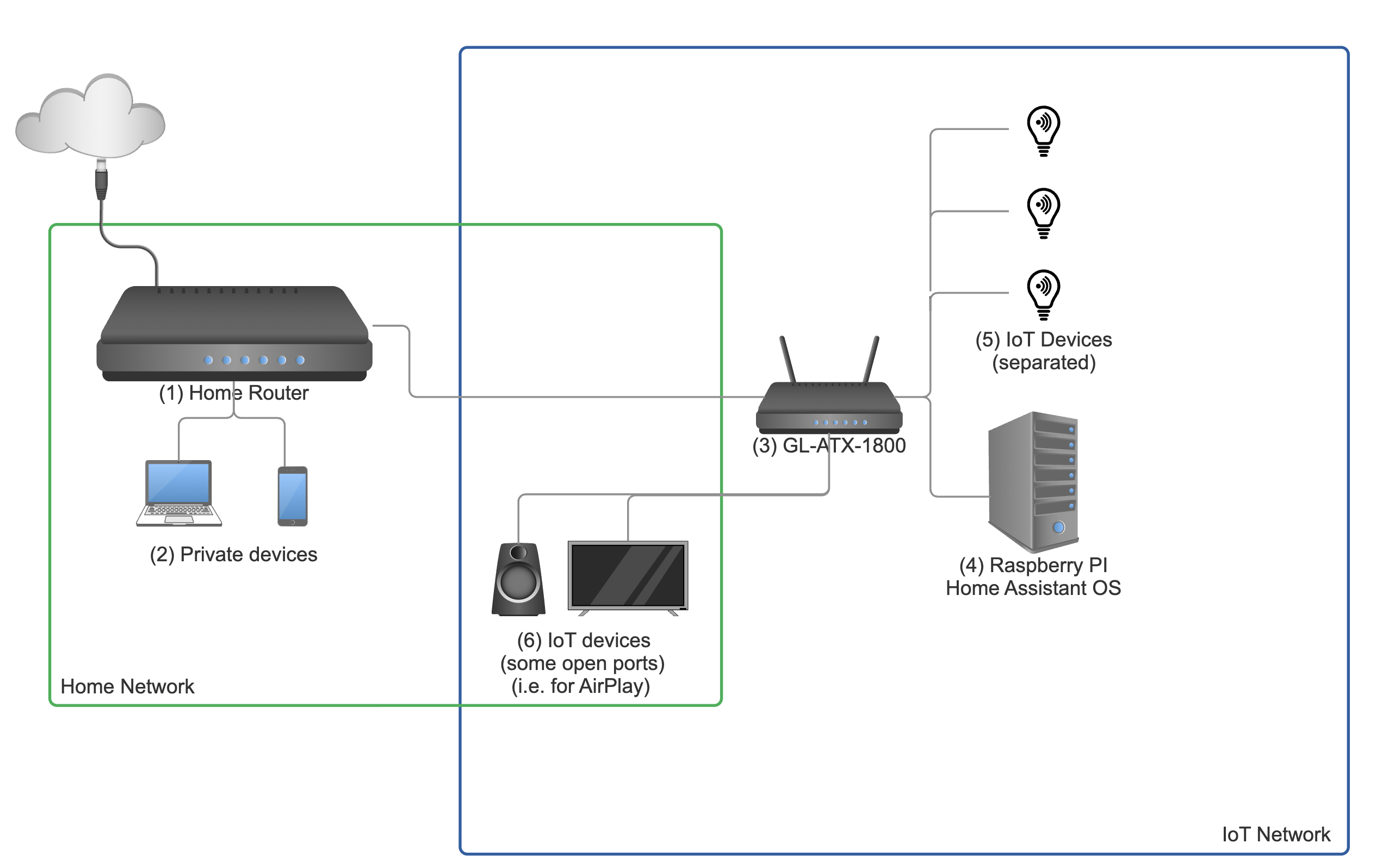
GL-ATX1800 Slate (updated to the newest fw, v4.8.2)
My goal is to use the Slate, connected to my main home router, as a separate network for IoT devices, which won’t have access to devices on my home network. I didn’t want to use the guest network, so I set up firewall rules to block all traffic from the IoT network to the main network. But I also want to achieve the following:
- Open some ports so I can use AirPlay/Miracast/Chromecast/SmartView, etc., from devices on my home network to devices on my IoT network (TVs, speakers, etc.).
But, for now, the traffic rules only give me the network separation, the easy part. Before I start poking holes in the firewall to let the specific ports used by those protocols through - is that even the correct approach? Is this as simple as setting a bunch of firewall rules, opening a few ports, and that’s all, or is there more? And is that setup even secure, or am I being naive here?
I know those protocols use mDNS/Bonjour, streaming, and maybe some more stuff I’m not aware of. I could open the traffic completely for specific devices (Samsung TV ok, random lightbulbs not ok), but that seems lame.
Am I going in the right direction, or should I read more about something before I proceed? I have a strong feeling that I’m reinventing the wheel, but I’m not knowledgeable enough to ask the right questions.