I have a new GL-AXT1800 v4.8.2 and it will not tether to a ZTE M833N dongle .
It tries to connect to eth3 but never does. The ZTE will connect to GL-A1300 v4.5.22 Slate however.
A Huawei E3372h-320 connects to the slate AX. I cannot use this one because the ip address conflicts with another on the system and i am unable to change either despite technical attempts.
I got the Huawei E3372h-320 from amazon though i am not convinced it is genuine, it froze and crashed my pc when directly plugged in, the check for updates shows no traffic.
Essentially I don’t want a “HiLink/QMI”? just a modem style, though amazon.co.uk does not have anything? If modem isn’t available just anything!
Can anyone help with a fix to the above or suggest a dongle/modem i can buy?
Connecting an Android phone appears as usb0 (Android)
I am coming to the conclusion that USB dongle modems are ‘old tech’ ? and to probably tether a phone possibly even with 5g.
The location is off grid with solar so there are power limitations, so the modem option seemed to make sense. I have to test if an android phone maintains a link when power cycling. With developer options on a rooted pixel 3 xl tethering start automatically following restart. Rebooting a GL-A1300 tether does not start till un-plugged and re-plugged (which I can’t do remotely).
This does alter the power on the usb tethered phone and made the tether work!
#power off the usb port then on again echo 0 > /sys/class/gpio/usb_power/value sleep 3 echo 1 > /sys/class/gpio/usb_power/value
It will need to be scripted during bootup somehow. After sometime trying crontab -e and a script which I forgot to chmod. I added the commands to the LuCI System >Local Startup (/etc/rc.local)
A GL-SFT1200 v4.7.2, currently in use at my remote site, does not have these specific commands. The newer GL-AXT1800 v4.8.2 does though it needs more power (at the usb side idle it is about 1A 4.9V with a dongle).
I am returning the GL-AXT1800 and getting another GL-A1300.
For android tethering I will need to restart the phone remotely, so I'm considering the app Termux (terminal emulator) on the rooted phone it runs a su -c 'reboot'
In order to need to reboot the phone (because of no internet) a script would need to login to the phones ssh installed in Temux pkg install openssh with username determined from console whoami and password set passwd ssh u0_a225@192.168.4.239 -p 8022
The dead end is that the screen has to be set to wakelock
Plugged into the pixel 3xl and under mobile hotspot and tethering > ethernet tethering can be enabled
On the router it appears as ethernet as you would expect eg
Protocol DHCP
IP Address 10.81.119.50
Gateway 10.81.119.46
DNS Server 10.81.119.46
Importantly it survives a router reboot, so the power off/on script above would not be needed, so it would work with my remote GL-SFT1200 Opal.
Ethernet Tethering does not stay on following a phone restart, despite developer option.
There is a possibility to use ethernet tethering, i would not want to keep the screen on to ssh and restart anyway and the phones 4g maybe stable enough.
If i were to buy another i would get one with the usb power c input charging.
Another substitute for a dongle or tether i am trying a TP-Link TL-MR105
It provides a WIFI(2.4GHz) that can be turned off, has a nano sim card slot and a reset button and you can add 2x 4G LTE Antenna SMA Aerial. Claims 150 Mbps on 4G
On its interface it also has Data used and Signal Strength. I don’t use anywhere near my monthly allowance but it is nice to be able to see how much i have used.
I want to use a GL router because of openwrt and most importantly the VPN WireGuard Client.
I am on the fence, regarding this over the dongles because of the increased power use. It uses a 9v 1A supply, but power is very limited.
Please try considering a GL router with its own cellular module, I think its experience will be better than any external tethering.
If tethering cannot be kept on, I remember you mentioned above that you have a rooted phone, which can be set through some scripts or APPs: after the phone is restarted, the hotspot is turned on again, so that the hotspot is always on, and the router repeater is connected to the phone's hotspot, so that the router's Internet can be maintained after restarting.
Connect E3372h-320 to PC (previously disconnect LAN/wifi)
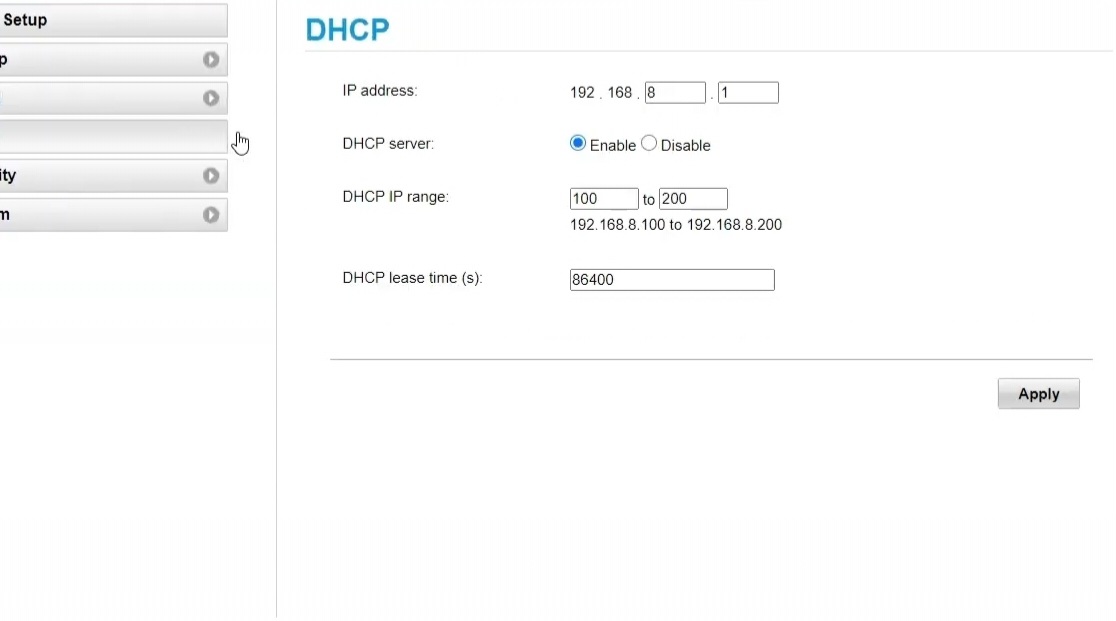
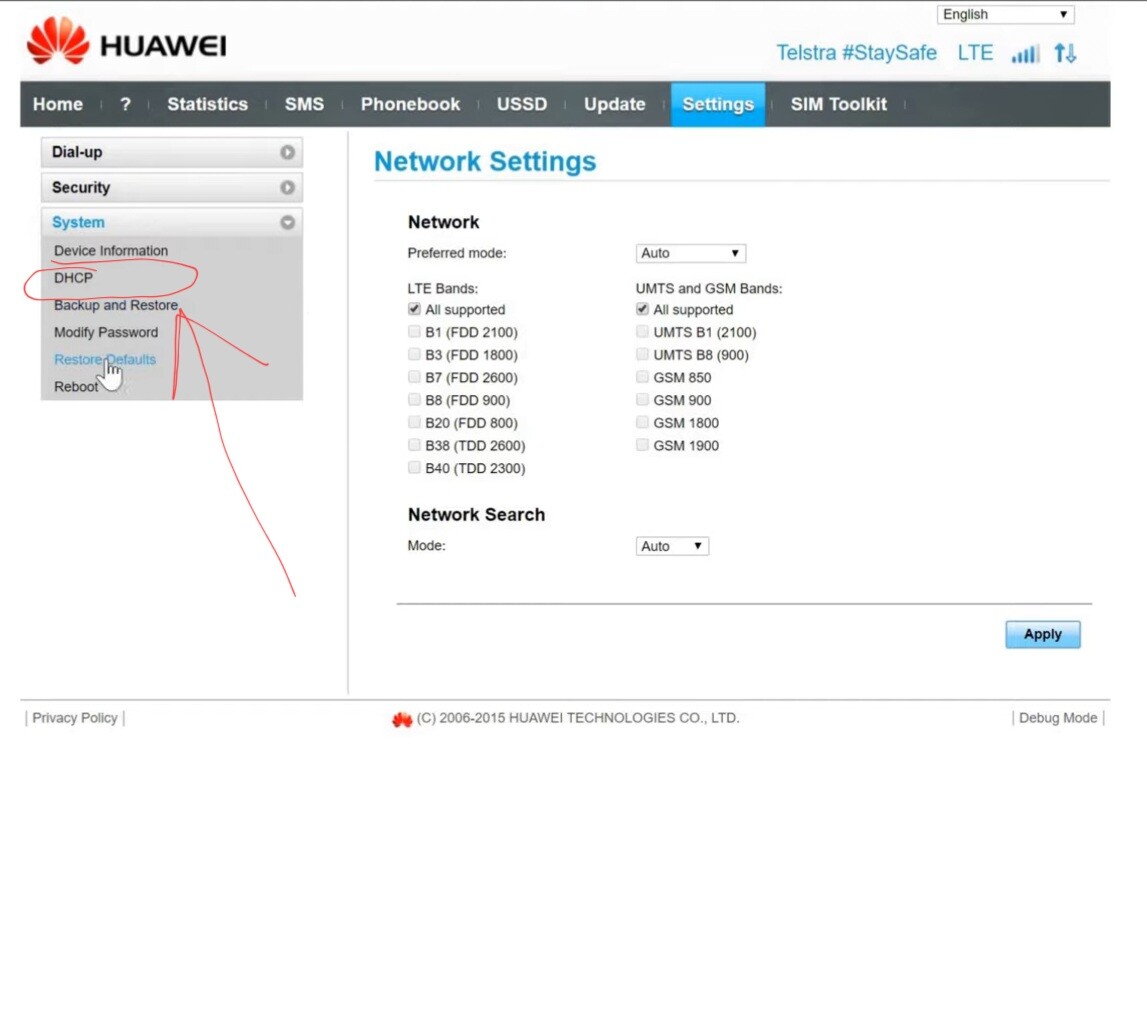
Go to 192.168.8.1 (admin panel of Huawei stick). In its settings change DHCP (DO NOT TURN ANYTHING OFF!) local IP to anything different of 192.168.8.1. For example 192.168.120.1
Apply changes and disconnect stick from PC.
Now connect your PC to Slate AX (no modem inserted!)
Go to 192.168.8.1 (GL admin panel)
Then go to LAN menu
Change LAN IP to anything different of 192.168.8.1. For example 192.168.16.1 (yeah! IP MUST be changed twice)
Apply changes and TURN OFF router
Plug E3372h-320 to Slate AX and turn router ON.
Connect to 192.168.8.1 (GL admin panel)
Then toggle on tethering on main page
Done.
If your E3372h-320 not HiLink firmware this will NOT work. Only HiLink (most of them are HiLink) will work