Geetings fellow techies 
I have a Galaxy A15 5G Model# SM-A156U1/DS cell phone.
It’s Running Android 15. I brought the GL-BE3600 (Slate7) to take with me on my MSC cruise. I must say, as a techie, I brought 3 different routers to take on the cruise. I heard how hard it was to get working on MSC boats, so I wanted to have a few options. Long story, I’ll post on the appropriate thread. But I couldn’t get any of them working. But I chose the GL-BE3600 (Slate7) purely on price. I figured I’d get more bang for my buck.
I also brought the TP-Link Ultra-Portable Wi-Fi 6 AX1500 Travel Router TL-WR1502X and the TP-Link AC750 Wireless Portable Nano Travel Router(TL-WR902AC). Again, long story, I couldn’t get any of them working on the ship.
Now that I’m home with these new toys. I was forced to break them out when the genius tree cutters across the way knocked out my internet. I couldn’t get USB tethering to work for all types of reasons, I’ll explain. I just ended up sharing my phone screen to the TV until the internet was back on.
My first challenge was that none of the USB cables that I had were working. At least with the TP-Link Ultra-Portable. The GL-BE3600 is much more flexible with cheapo cables. I did not know this while attempting to USB tether. I started with the TP-Link and gave up, and just mirrored my screen. But I invested in a $50 Tether Pro. cable {This is way too much cable.LOL} Then I had the wrong USB adapter plugs. Didn’t think that mattered. (Voltage Watts Matters)  See what I just did?
  So, I corrected that. Tinkered with the phone settings and got the TP-Link AC750 working.
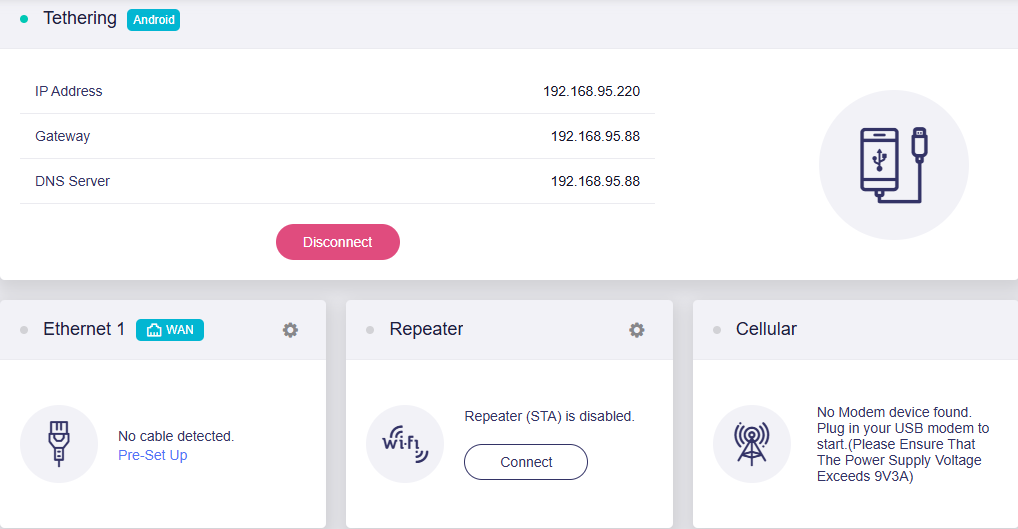
Figured I might as well break out the GL-BE3600 (Slate7) and get familiar with it. Since I’m here posting, you’ve guessed I haven’t gotten it working. Everything on the phone says that I’m connected to the router. The tether option is on both the phone and the router. But it says “Can’t Provide Internet” when selecting the router’s network.
There was a yellow warning sign above the tether tab on the GL-Inet app. But I read a post that said to turn that option off. When I did the router tether display turned green, like all was well. I’m using my tablet to adjust the settings. The app also says that the router is online, but there’s no internet. “Can’t Provide Internet” is all I see when I attempt to connect devices to the router.
Hi
Could you please share with us some more details about this?
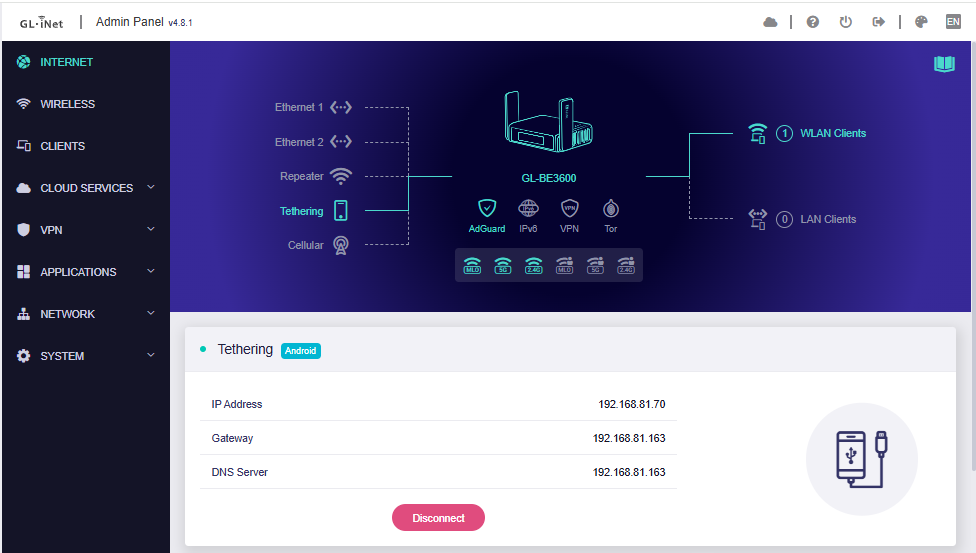
- The screenshot of Tethering page on the Slate 7.
- SSH into the router and run the following commands.
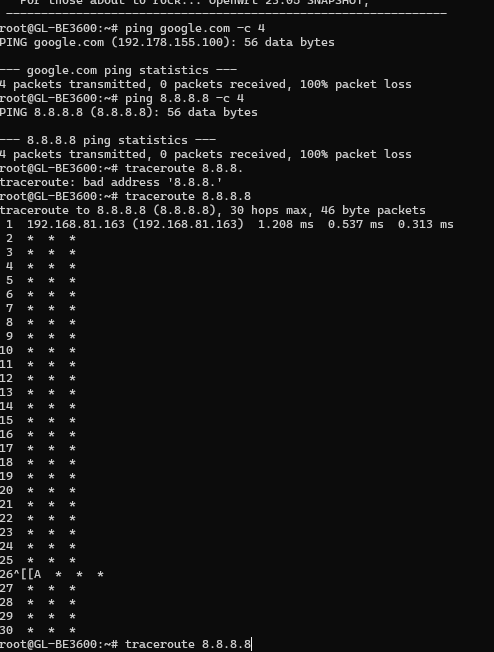
ping google.com -c 4

ping 8.8.8.8 -c 4

traceroute 8.8.8.8
When I SSH into the router, should I have the router set up in USB Tether mode, with the phone connected to the router, and then run the commands?
Yes, right.
Please run the commands after setting up router in USB Tether mode with the phone connected to the router.
So, I have been playing around with the router and have gotten it to work in USB tethering mode, but only with my Metropcs phone connected to my WiFi. It works flawlessly. But that defeats the purpose. I'm now convinced that my carrier is the culprit. I have read countless articles about how MetroPCS has this blocked in order to get you to pay extra for this hots pot service. I have even turned on my phones hotspot, connected my router to the phones hotspot and still get the same no Internet message. I have been doing extensive research on Metropcs and USB tethering. This problem has many work arounds. The work around that I have chosen is using an app called Easy Tether. So now I need to know about flashing my router with an Easy Tether file. Can you explain this process please? This problem is wide spread with Metropcs.
The Easy Tether application has been discontinued for some time and is not compatible with modern routers like the BE3600.
However, other users have reported success by modifying the TTL/HL settings for tethering on T-Mobile.
We recommend trying to set the TTL and HL to 65 or 64.
How do I get to that page? I'm not seeing an option to change the TTL.
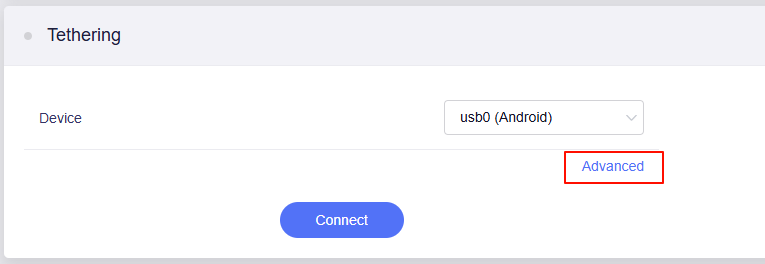
Please click the Disconnect - Advanced.
If the "Advanced" button not show, please try to upgrade the BE3600 to the latest stable firmware 4.8.1.
Download Link: GL.iNet download center
Upgrade Guide: Upgrade - GL.iNet Router Docs 4
OK, I tried changing the TTL value on the router. That didn’t work either. As I said, I believe it is MetroPCS that is blocking somehow. I don’t have a hotspot plan. Didn’t think I needed one. I thought this router would just share my phone’s 5G’’ I’m really considering rooting my phone. But before I take that step, I SSH into the router and ran the commands you provided in earlier post. I’m in Tether mode, phone's Wi-Fi is off, strictly connected to Metropcs data, and the router says everything is fine far as being connected to the phone. Is that how tethering works or should the phones Wifi be connected to the router and in hotspot mode?
Funny thing, I was not able to SSH into the router using 192.168.8.1. I tried the IP address that was showing on the tether display on the router. And that got me into the router.
It was running for so long I thought something was wrong. At 26, I pressed the up key. Not sure if that matters.
Clearly says I’m connected. But still no internet.
Yes, you are correct.
The traceroute shows that the traffic stops at the phone and does not pass through to the ISP.
This likely indicates that your carrier is enforcing restrictions on tethering or hotspot traffic and changed TTL will not work as well.