GL-BE9300 (Flint 3) Bug Report: RTL8372 Link Instability Firmwar 4.8.99

Device Information

  • Model: GL-BE9300 (Flint 3)
  • Firmware: 4.8.99 (Beta)
  • Issue: RTL8372 Switch - Link Instability / Auto-Negotiation Problems

Problem Summary

Multiple LAN ports experience link instability issues:

Port Connected Device Expected Speed Problem
lan1 Linux PC (RTL8125 2.5GbE) 2500 Mbit/s Auto-negotiation starts at 100Mbit, then re-negotiates
lan2 Xbox Series X 1000 Mbit/s Severe link flapping (connection drops every few minutes)
lan3 Smart TV 100 Mbit/s Frequent disconnects/reconnects

Detailed Symptoms

lan1 - Auto-Negotiation Failure (2.5G Port)

Symptom: When connecting a 2.5GbE device, the link always starts at 100Mbit, goes down after ~18 seconds, then re-negotiates correctly at 2500Mbit.

Evidence from dmesg:

[1506591.157186] rtl8372-mdio 90000.mdio:1d: lan1 link up, speed 100
[1506609.876788] rtl8372-mdio 90000.mdio:1d: lan1 link down
[1506615.076795] rtl8372-mdio 90000.mdio:1d: lan1 link up, speed 2500

Root Cause Found: Energy Efficient Ethernet (EEE) mismatch between client and Flint 3.

Workaround: Disabling EEE on the client fixes this issue:

# On Linux client
sudo ethtool --set-eee enp7s0 eee off

After disabling EEE, the link negotiates directly at 2500Mbit:

[1534689.767596] rtl8372-mdio 90000.mdio:1d: lan1 link up, speed 2500
[1534832.246977] rtl8372-mdio 90000.mdio:1d: lan1 link down    # cable unplugged
[1534840.567031] rtl8372-mdio 90000.mdio:1d: lan1 link up, speed 2500

Note: The Flint 3 does not advertise EEE support to link partners:

Link partner advertised EEE link modes: Not reported

This causes negotiation problems with EEE-enabled clients.


lan2 - Link Flapping (Xbox)

Symptom: Xbox connection drops every few minutes, making online gaming impossible.

Evidence from dmesg:

[1504284.444683] rtl8372-mdio 90000.mdio:1d: lan2 link up, speed 1000
[1504290.684589] rtl8372-mdio 90000.mdio:1d: lan2 link down      # 6 seconds later
[1504293.804593] rtl8372-mdio 90000.mdio:1d: lan2 link up, speed 1000
[1504549.643736] rtl8372-mdio 90000.mdio:1d: lan2 link down      # 4 minutes later

Workaround: None found. Rebooting the router temporarily helps but problem recurs.


lan3 - Frequent Reconnects (TV)

Symptom: Smart TV frequently loses connection and reconnects.

Evidence from dmesg:

[1532471.455288] rtl8372-mdio 90000.mdio:1d: lan3 link down
[1532474.575593] rtl8372-mdio 90000.mdio:1d: lan3 link up, speed 100

What I Tested

  1. :white_check_mark: Different Ethernet cables (Cat6) - problem persists
  2. :white_check_mark: Different devices on same ports - problem persists
  3. :white_check_mark: Router reboot - temporarily fixes, then recurs
  4. :white_check_mark: Disabled EEE on Linux client - fixes lan1 issue
  5. :cross_mark: lan2 and lan3 still have issues regardless of above

Monitoring Setup

I have monitoring scripts running to capture link events:

eth_monitor.sh (runs every 5 minutes via cron):

#!/bin/sh
LOGFILE="/root/eth_debug.log"
TS=$(date "+%Y-%m-%d %H:%M:%S")
echo "=== $TS ===" >> $LOGFILE
echo "[LINK]" >> $LOGFILE
swconfig dev switch0 show 2>/dev/null | grep -E "Port |link:" >> $LOGFILE
echo "[TEMP] $(cat /sys/class/thermal/thermal_zone*/temp | tr '\n' ' ')" >> $LOGFILE
echo "[LOAD] $(cat /proc/loadavg)" >> $LOGFILE
echo "[MEM] $(free | grep Mem | awk '{print $3"/"$2}')" >> $LOGFILE
dmesg | grep "rtl8372" | tail -3 >> $LOGFILE
echo "" >> $LOGFILE

Feature Request

Please consider:

  1. Adding EEE configuration option in the web interface to enable/disable EEE per port
  2. Investigating RTL8372 driver stability for lan2/lan3 link flapping
  3. Improving auto-negotiation behavior for 2.5GbE connections

System Information

Firmware: 4.8.99 (Beta)
Switch Chip: RTL8372
Driver: rtl8372-mdio

Port Status (swconfig):
- Port 0: link:up speed:10000baseT full-duplex (internal)
- Port 1: link:up speed:10000baseT full-duplex (internal)
- Port 2: link:down

Full debug logs available upon request

Hi,

Thank you for the detailed report.

Regarding issue 1, you can try SSHing into the router and disabling ETH EEE with the following command:

echo "w 7 60 0" > /sys/kernel/debug/rtl8221/phy_reg

Then see whether this resolves the issue and whether it also helps with issues 2 and 3.

For issues 2 and 3, could you try placing a dumb/unmanaged switch between the Flint 3 and those devices to see if that helps?
Also, do you have another router available for comparison testing, to rule out the possibility that the problem is caused by in-wall cabling or wall jacks (if any) not working well?

Hi,

I tested the EEE fix:
echo "w 7 60 0" > /sys/kernel/debug/rtl8221/phy_reg

Results:

  • lan1 (2.5GbE Linux client): IMPROVED - no more 100→2500 renegotiation
  • lan3 (100M TV): BROKEN - could not obtain DHCP, no data transfer
    (Link showed "up, speed 100" but streaming failed)

After rebooting WITHOUT the EEE fix, lan3 works again.

It seems the fix affects all ports, not just 2.5GbE.
Is there a port-specific EEE disable command?

Current port assignment:

  • lan1: Linux PC (2.5GbE NIC)
  • lan2: Xbox (1GbE)
  • lan3: TV (100M)

Sorry i don’t have a dum/unmanaged switch.

Update - Dual Boot Test:

I tested the same PC with dual boot on lan1 (same cable, same port):

  1. Windows 11:

    • Connects directly at 2500 Mbit
    • Stable connection, no link flaps
  2. Linux (CachyOS):

    • Initially connects at 100 Mbit
    • Link goes down after few seconds
    • Reconnects at 2500 Mbit
    • Pattern repeats occasionally

This suggests a compatibility issue between the RTL8372
and Linux r8125/r8169 drivers during auto-negotiation.

Well, it seems this might be an issue with the r8125/r8169 drivers on Linux, since everything works fine on Windows.

Have you tried using the driver provided by Realtek instead of the automatically installed kmod-r8169 for r8125 on Linux?

You are absolutely right. The issue is indeed tied to how the Linux in-tree r8169 driver handles the RTL8125B chipset, specifically regarding Energy Efficient Ethernet (EEE) management, which seems to be more robust in the Windows driver.

To address this, I have been in contact with the CachyOS (Arch Linux) kernel maintainers. They have acknowledged that the r8169 driver is problematic for this specific chip revision (rev 05).

Here is the current status:

  • The maintainers are currently working on a kernel-level patch to explicitly move the RTL8125B from the r8169 driver to the official r8125 Realtek vendor driver.
  • This is being done because the standard kernel driver (kmod-r8169) fails to maintain a stable 2.5G link when power-saving features are involved, leading to the "Link Down" events I described.

While I am waiting for this kernel update on my workstation, I still believe there is room for optimization on the Flint 3 side. If the router's negotiation is very aggressive, it triggers these driver bugs on Linux more easily.

Once the new driver is deployed on my system, I will provide an update if the stability issues with the Flint 3 are fully resolved!

RESOLVED: The issue was the Linux r8169 driver incorrectly
handling RTL8125B NICs during auto-negotiation.

Solution: CachyOS integrated the native r8125 driver (v9.016.01)
into kernel 6.19.0-3 only for testing. Now lan1 connects directly at 2500 Mbit
without the 100→2500 renegotiation pattern.

This confirms the router (RTL8372 switch) is working correctly.
The problem was on the Linux client side.

1 Like

The CachyOS kernel team has officially patched the kernel to bypass the faulty r8169 driver for the RTL8125B (rev 05) and integrated the r8125 vendor driver directly into the kernel source. You can see the specific implementation here:

Hello, I’m currently running v4.8.4. I’ve seen some intermittent issues with LAN1 speeds for my Windows Machine. I’ve tried the following:

  • Updated RealTek Drivers to be current
  • Replaced Cable with a KGB (known good cable)
  • Rebooted Modem
  • Rebooted Router
  • Disabled Network Acceleration
  • Disabled AdGuard
  • Disabled VPN services
  • Run echo "w 7 60 0" > /sys/kernel/debug/rtl8221/phy_reg through ssh
  • Run Wireshark test to see any retransmissions or packet drops but received none

I’m still getting bottlenecked. Any suggestions? I’ve ordered a new NIC for the PC but I really don’t think this is the issue.

Hi

Could you please clarify or try the following:

  1. What is the model of the Realtek network adapter on your Windows machine?
  2. Realtek provides four different driver variants on Windows (NetAdapterCx / NDIS with power saving enabled/disabled). Have you tried all of them? Please make sure to fully uninstall the driver before reinstalling
  3. After the issue occurs, please export the device logs and send them to us via private message for analysis
  4. If you place a dumb/unmanaged switch between the Windows machine and the Flint 3, does it make any difference?
  5. Do the other LAN ports, besides LAN1, also experience the issue?

How to export logs:

How to send private messages:

I have spent the last 2 weeks fighting with this. I finally managed to catch it in the logs and search for rtl8372-mdio 90000.mdio:1d: lan1 link down which lead me here. To make matters worse, when this occurs my guest network goes into a disabled state and never comes back (until I manually cycle the port)! This is ultimately what has been giving me huge frustration over the past 2 weeks, having the guest network go offline at what feels like randomly.

:38:14 daemon.notice netifd: VLAN 'eth1.10' link is down
:38:14 kern.info kernel: [90489.064906] rtl8372-mdio 90000.mdio:1d: lan1 link down
:38:14 kern.info kernel: [90489.065452] br-guest: port 1(eth1.10) entered disabled state
:38:15 kern.info kernel: [90490.104937] rtl8372-mdio 90000.mdio:1d: lan1 link up, speed 10
:38:15 kern.info kernel: [90490.105178] br-guest: port 1(eth1.10) entered blocking state
:38:15 kern.info kernel: [90490.109663] br-guest: port 1(eth1.10) entered forwarding state
:38:15 daemon.notice netifd: VLAN 'eth1.10' link is up
:38:26 daemon.notice netifd: VLAN 'eth1.10' link is down
:38:26 kern.info kernel: [90500.504790] rtl8372-mdio 90000.mdio:1d: lan1 link down
:38:26 kern.info kernel: [90500.505064] br-guest: port 1(eth1.10) entered disabled state

I’m not nearly as experienced as the OP at troubleshooting. I can stumble my way through linux but most of my troubleshooting so far has been shuffling AI suggestions into an SSH session and feeding results back to it, so I would really appreciate if someone can offer suggestions both on how to figure out what is causing the problem.

More importantly, any help figuring out why my guest network is going offline when this happens. I have multiple WiFi routers, so br-guest traffic (VLAN 10) is tagged on all ports so that downstream routers can serve the guest network. I have all ports tagged because cables sometimes get unplugged and don’t plug them back in the same order.

I believe the thing connected to lan1 in my case is a Windows desktop computer. It is possible that when this particular event occurred was when that computer was being shutdown (lan1 link up is not seen in the logs again and the computer is still off and the timing lines up, suggesting that this all happened because the device went offline).

I believe other devices have caused the same problem, as that computer was off for a weeks but I was still getting this problem during that week.

Hi

Based on the current logs, it appears that lan1 going down is also causing br-guest to go down.

Could you confirm whether the issue is always related to the Windows PC connected to LAN 1?
It might be helpful to observe a few more instances after the issue occurs to see whether the two events are consistently correlated.

You can also export the logs and send them to us via private message for further analysis.

If confirm the issue is always related to the Windows PC, please try the following to see if it helps:

  1. Disable the WOL (Wake-on-LAN) feature in the PC’s BIOS
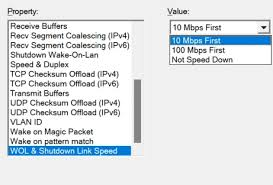
  2. Adjust the network adapter settings and set “WOL & Link Shutdown Speed” to “Not Speed Down”

I have a lot of devices on my network, and I cannot rely on them all behaving correctly. I would like to get to the bottom of why routing breaks on the router when a device on the network misbehaves, rather than trying to get every one of 20+ devices to behave properly (some of which are obscure IoT devices that can't be tuned/adjusted). My hope would be that the GL.iNet router is robust against misbehaving clients (within reason).

I just tested, and hibernating the computer in question reliably causes this to happen, and bizarrely turning the computer back on fixes the problem.

<computer hibernated>
:58:59 daemon.notice netifd: VLAN 'eth1.10' link is down
:58:59 kern.info kernel: [154001.634755] rtl8372-mdio 90000.mdio:1d: lan1 link down
:58:59 kern.info kernel: [154001.635007] br-guest: port 1(eth1.10) entered disabled state
:59:01 kern.info kernel: [154003.714642] rtl8372-mdio 90000.mdio:1d: lan1 link up, speed 10
:59:01 kern.info kernel: [154003.714757] br-guest: port 1(eth1.10) entered blocking state
:59:01 kern.info kernel: [154003.719376] br-guest: port 1(eth1.10) entered forwarding state
:59:01 daemon.notice netifd: VLAN 'eth1.10' link is up
:59:11 daemon.notice netifd: VLAN 'eth1.10' link is down
:59:11 kern.info kernel: [154014.114761] rtl8372-mdio 90000.mdio:1d: lan1 link down
:59:11 kern.info kernel: [154014.114937] br-guest: port 1(eth1.10) entered disabled state
<computer turned on>
:00:32 kern.info kernel: [154095.234235] rtl8372-mdio 90000.mdio:1d: lan1 link up, speed 1000
:00:32 kern.info kernel: [154095.234344] br-guest: port 1(eth1.10) entered blocking state
:00:32 kern.info kernel: [154095.239310] br-guest: port 1(eth1.10) entered forwarding state
:00:32 daemon.notice netifd: VLAN 'eth1.10' link is up
:00:35 daemon.notice netifd: VLAN 'eth1.10' link is down
:00:35 kern.info kernel: [154098.354299] rtl8372-mdio 90000.mdio:1d: lan1 link down
:00:35 kern.info kernel: [154098.354497] br-guest: port 1(eth1.10) entered disabled state
:00:38 kern.info kernel: [154101.474295] rtl8372-mdio 90000.mdio:1d: lan1 link up, speed 1000
:00:38 kern.info kernel: [154101.474426] br-guest: port 1(eth1.10) entered blocking state
:00:38 kern.info kernel: [154101.479366] br-guest: port 1(eth1.10) entered forwarding state
:00:38 daemon.notice netifd: VLAN 'eth1.10' link is up
:00:41 daemon.info dnsmasq-dhcp[1]: DHCPDISCOVER(br-guest) dc:72:9b:d6:dd:56
:00:41 daemon.info dnsmasq-dhcp[1]: DHCPOFFER(br-guest) 192.168.51.154 dc:72:9b:d6:dd:56
:00:41 daemon.info dnsmasq-dhcp[1]: DHCPREQUEST(br-guest) 192.168.51.154 dc:72:9b:d6:dd:56
:00:41 daemon.info dnsmasq-dhcp[1]: DHCPACK(br-guest) 192.168.51.154 dc:72:9b:d6:dd:56
:00:42 daemon.notice netifd: VLAN 'eth1.10' link is down
:00:42 kern.info kernel: [154104.594229] rtl8372-mdio 90000.mdio:1d: lan1 link down
:00:42 kern.info kernel: [154104.594402] br-guest: port 1(eth1.10) entered disabled state
:00:45 kern.info kernel: [154107.714199] rtl8372-mdio 90000.mdio:1d: lan1 link up, speed 1000
:00:45 kern.info kernel: [154107.714306] br-guest: port 1(eth1.10) entered blocking state
:00:45 kern.info kernel: [154107.719275] br-guest: port 1(eth1.10) entered forwarding state
:00:45 daemon.notice netifd: VLAN 'eth1.10' link is up
:00:46 daemon.info dnsmasq-dhcp[1]: DHCPREQUEST(br-lan) 192.168.50.101 d8:bb:c1:93:5d:c4
:00:46 daemon.info dnsmasq-dhcp[1]: DHCPACK(br-lan) 192.168.50.101 d8:bb:c1:93:5d:c4
:00:46 daemon.info dnsmasq-dhcp[1]: DHCPREQUEST(br-guest) 192.168.51.183 be:7b:cf:10:01:50
:00:46 daemon.info dnsmasq-dhcp[1]: DHCPACK(br-guest) 192.168.51.183 be:7b:cf:10:01:50
:00:48 daemon.info dnsmasq-dhcp[1]: DHCPDISCOVER(br-guest) be:7b:cf:10:01:50
:00:48 daemon.info dnsmasq-dhcp[1]: DHCPOFFER(br-guest) 192.168.51.183 be:7b:cf:10:01:50
:00:48 daemon.info dnsmasq-dhcp[1]: DHCPREQUEST(br-guest) 192.168.51.183 be:7b:cf:10:01:50
:00:48 daemon.info dnsmasq-dhcp[1]: DHCPACK(br-guest) 192.168.51.183 be:7b:cf:10:01:50

The above test is after I disabled br-guest tagging on the port that computer is plugged into, so that computer should not be interacting with the br-guest network in any way, yet it going offline seems to take down the entire guest network.

It is possible other devices on the network going offline also cause this issue. With this one I just got lucky catching the log at the time of the outage and was able to make the connection to the device, plus it is an easy device to test with. Most of the outages I have been suffering have not been uncorrelated with any specific household event, so I don't know if it is only this device that causes the problem.

Have you tried our previous suggestion to disable WOL or adjust its settings? Did it help?