root@GL-E5800:~# opkg list |grep cellular
cellular-device-manager - 1-1
cellular-device-manager-demo - 1-1
gl-sdk4-cellular - git-2026.226.24056-e0e76e8-1
gl-sdk4-ui-cellular-detail - git-2026.212.27178-ae6e4a1-1
libcellular-device-manager - 1-1
Hi, We've tested it on our end but not reproduce the issue.Could you share device to support so that we can investigate further:
- Please follow the instructions here to bind your device to Goodcloud, and share it to GL.iNet Technical Support.
Technical Support via GoodCloud - GL.iNet Router Docs 4 - After sharing the device, kindly send us the MAC address and the admin password via private message for remote troubleshooting
Thanks!
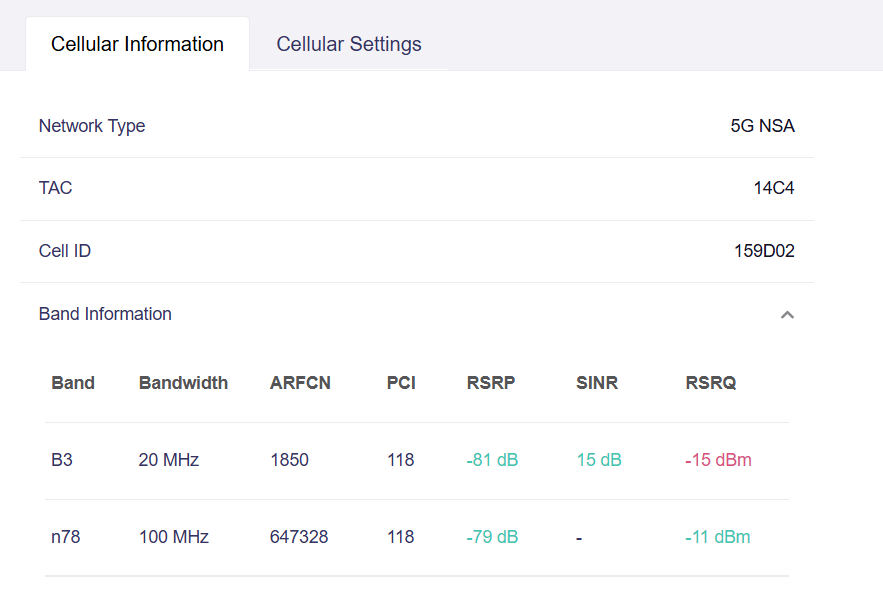
In 4.10 beta (2 and 4) I also experience that it has difficulty switching to 5G.
4.8.5 switched to 5G much faster when I traveled from an area with only 4G coverage into an area with 5G coverage.
At home there is only 4G, at my workplace there is 5G.
With the 4.10 beta version it doesn’t really switch to 5G by itself. Only turning airplane mode on and off helps.
Network mode is set to Auto (interestingly, even if I set it to 5G, it still stays on 4G).
I couldn't reproduce the issue. Could you keep that problem environment for us to take a look?
Yes, I can reproduce it.
If you can run commands, then I’ll run them.
The next time I’ll be working is on Monday 08.24, then I can reproduce it (I’m on vacation...).
Okay. If you can reproduce the issue, please assist us by obtaining the cellular logs following these steps:
- When the problem recurs, enter the following command in the ssh terminal to start the debug logging, and wait for 3 minutes:
Cellular_debug.sh 1 - Disable the cellular connection via the admin panel or the screen board, then re-enable it to check if it connects to 5G
- Turn on and off airplane mode to see if it will connect to 5G.
- Enter the following command in the SSH terminal to stop the debug logging:
Cellular_debug.sh 0 - Export the /etc/cellular_manager.log via scp from the router and share it with us.
Thank you very much!
1 Like
I was on beta 2 so far and I didn't even realize that there is already a beta 4 available. Is there any way to subscribe to some notifications?
Also the firmware download page does not really point out the beta version (only if you check the download link?). I only realized that there is a new version after reading this thread 
2 Likes
Found the bug! It might be related to the battery charge level that it doesn’t connect to 5G.
I was searching for this for a very long time until I finally figured it out.
Here are my test cases. The battery was at 20%.
I’ve attached the log.
MUDI7 Beta4
Battery 20%
1: 6:59
Cellular_debug.sh 1
4g+
B3
B1
speedtest: 184/91
2: 7:02
Disable the cellular connection, and re-enable
4g+
B3
B1
B20
speedtest: 141/72
3: 7:05
Turn on and off airplane mode to
4g+
B3
B1
B20
speedtest: 157/81
4: 7:08
I put the MUD7 on charge!!!
Turn on and off airplane mode to
5G NSA
B3
B1
N78
speedtest: 761/113
5: 7:10
Cellular_debug.sh 0
The log was not at /etc/cellular_manager.log, but at /tmp/cellular_manager.log.
cellular_manager.zip (774.1 KB)strong text
I exported 2 logs from the web interface, maybe this will help as well.
kernel_log.tar (560 KB)
system_log.tar (559.5 KB)