Just got over the weekend the EV750 V2 with fw version 4.3.28. Website latest stable fw version 4.3.26 was released over a year ago and there is a beta version 4.8.5 released just this 25 May 2026.
1/ My SimpoYo esim card is yet to arrive, however i noticed that Applications/ has no eSim Management tab. Is this normal and will magically appear once an esim card is inserted in the slot? Do I have to keep factory version 4.3.28 or need to upgrade to beta 4.8.5 as the beta is the latest. I understand 4.3.28 has no functional changes and hence the same as 4.3.26.
2/ Connecting to 192.168.8.1 thru WiFi Mudi V2 to computer disconnects every now and then. The Mudi V2 is USB-tethered to a cellphone to give internet connection to the computer. Seems not normal for the router to disconnect every now and then.
3/ Booting the Mudi V2 takes about 4 minutes! Is it because there are 425 installed packages? Is there any thing to remove that will make the booting shorter?
Hi,
Thank you for your detailed information.
-
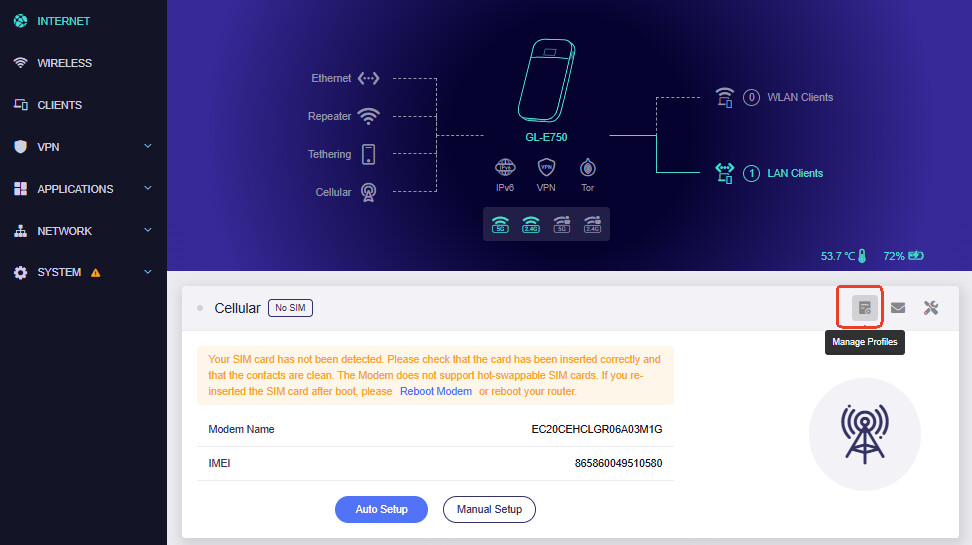
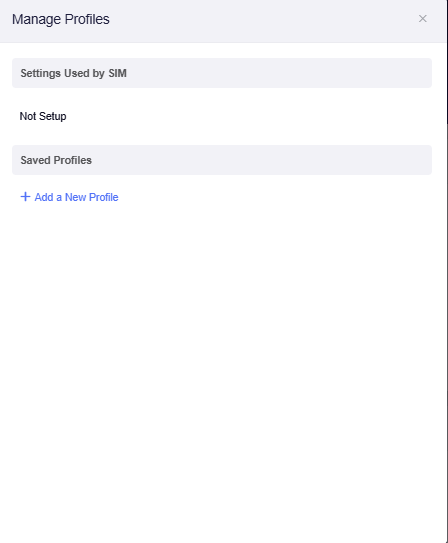
Regarding the eSIM Management function, on GL-E750V2(v4.3.26/4.3.28), the eSIM profile management is integrated into the Cellular page. You can access it by going to INTERNET → Cellular → Manage Profiles (SIM card icon in the top right corner).
-
For the WiFi disconnection issue, could you please clarify the exact behavior? Does the computer remain connected to the Mudi WiFi but lose Internet access, or does the WiFi connection itself disconnect and require reconnecting?
-
Regarding the long boot time, E750V2 is an older hardware platform, and newer firmware versions include more functions and services, which may affect startup time. We do not recommend removing system packages manually, as this may cause unexpected issues with existing functions.
Hi! Thanks for your assistance.
Item 1, well noted and found the Sim management. But do you recommend to update to v4.8.5 beta (2026/05/25) from the stable v4.3.28 (2025/06/26) considering the list of bug fixes includes upstream CVE fixes and newer update which is now over 2 months as beta.
Item 2, <<Does the computer remain connected to the Mudi WiFi but lose Internet access, or does the WiFi connection itself disconnect and require reconnecting?>> the WiFi connection itself disconnects and (required reconnecting as I did not configure it to auto-connect). Reduced modem power yesterday from default Max to Med. I will observe this setup for a few more days.
3/ item 3, noted - I can live with that 
Hi,
Thank you for your update.
Regarding the firmware upgrade
The v4.8.5 firmware includes newer improvements and security updates. However, as a newer firmware version, it may also introduce changes compared with the stable version.
If your Mudi V2 is currently working normally, you may continue using the current stable firmware. If you would like to try the new features and security improvements in v4.8.5, we recommend backing up your current settings before upgrading. The choice depends on your current usage requirements.
Regarding the WiFi disconnection issue
If the issue happens again, could you please let us know the approximate time when it occurred, the WiFi band being used at that moment (2.4GHz or 5GHz), whether the router was connected to the Cellular network, and send the system log to us via private message for further analysis?
Thank you again for your patience and cooperation.
1 Like
Hi and thanks for the quick reply!
Well noted.
I will run the current version and make further observations.
Will revert if any in due time.
1 Like