GL-MT3000 and Prolink DL-7211 tethering not working

Hello,

In my previous Mobile Router + GL-MT3000 combo setup, I'm using TP-Link M7200, its USB tethering is plug and play and no further configuration needed in the GL-MT3000, same with android devices. Then the M7200 battery dies so I bought the Prolink DL-7211 for better connectivity and for future proofing.

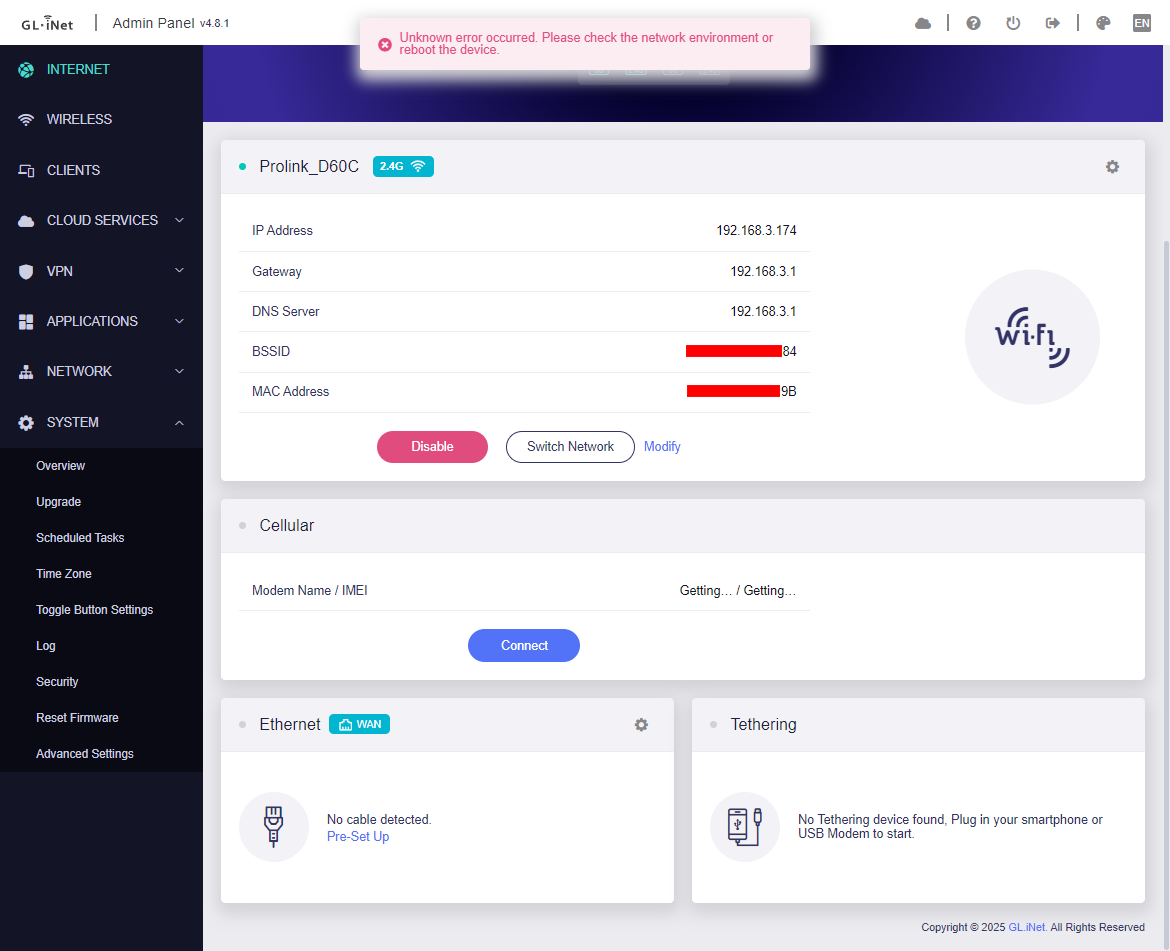
The Prolink DL-7211 has a RNDIS feature, when I connect it to Windows 11 via USB cable, it shows a new network adapter that uses RNDIS protocol, same with the TP-Link M7200, but when I connect it to GL-MT3000, it is detected as Cellular and gives repeated unknown error notification every few seconds.

How can I make the USB tethering work? My temporary solution for now is to set it to Repeater mode.

Error screenshot:
System Log:

Sun Feb 15 02:45:02 2026 kern.info kernel: [ 1111.121678] usb 1-1: new high-speed USB device number 5 using xhci-mtk
Sun Feb 15 02:45:03 2026 kern.info kernel: [ 1112.348518] usb 1-1: USB disconnect, device number 5
Sun Feb 15 02:45:03 2026 kern.info kernel: [ 1113.053202] usb 1-1: new high-speed USB device number 6 using xhci-mtk
Sun Feb 15 02:45:04 2026 kern.info kernel: [ 1113.727335] rndis_host 1-1:1.0 simonet: register 'rndis_host' at usb-11200000.xhci-1, RNDIS device, xx:xx:xx:xx:xx:e9
Sun Feb 15 02:46:05 2026 kern.err kernel: [ 1174.795339] WiFi@C15L1,RTMPDeletePMKIDCache() 1311: IF(2), del PMKID CacheIdx=2

Kernel Log:

[ 1111.121678] usb 1-1: new high-speed USB device number 5 using xhci-mtk
[ 1112.348518] usb 1-1: USB disconnect, device number 5
[ 1113.053202] usb 1-1: new high-speed USB device number 6 using xhci-mtk
[ 1113.727335] rndis_host 1-1:1.0 simonet: register 'rndis_host' at usb-11200000.xhci-1, RNDIS device, xx:xx:xx:xx:xx:e9
[ 1174.795339] WiFi@C15L1,RTMPDeletePMKIDCache() 1311: IF(2), del PMKID CacheIdx=2

GL-MT3000 Firmware version: 4.8.1 Stable

Product Links:
TP-Link M7200 : https://www.tp-link.com/en/home-networking/mifi/m7200/

Prolink DL-7211: https://prolink2u.com/products/dl-7211

Here's the solution for someone that will encounter the similar issue.

First, check the system logs

Sun Feb 15 02:45:02 2026 kern.info kernel: [ 1111.121678] usb 1-1: new high-speed USB device number 5 using xhci-mtk
Sun Feb 15 02:45:03 2026 kern.info kernel: [ 1112.348518] usb 1-1: USB disconnect, device number 5
Sun Feb 15 02:45:03 2026 kern.info kernel: [ 1113.053202] usb 1-1: new high-speed USB device number 6 using xhci-mtk
Sun Feb 15 02:45:04 2026 kern.info kernel: [ 1113.727335] rndis_host 1-1:1.0 simonet: register 'rndis_host' at usb-11200000.xhci-1, RNDIS device, xx:xx:xx:xx:xx:e9

Make sure that there's a log like this (last line),

rndis_host 1-1:1.0 simonet: register 'rndis_host'

This indicates that the router successfully detects 4G/5G device but it didn't know what to do with it.

The simonet is the device name, the name may be different if you're using another device, in the following commands, replace it with your device name if it's different.

Then run this command:

ifconfig simonet

Make sure it has an output similar to this:

simonet   Link encap:Ethernet  HWaddr xx:xx:xx:xx:xx:EC
          BROADCAST MULTICAST  MTU:1500  Metric:1
          RX packets:0 errors:0 dropped:0 overruns:0 frame:0
          TX packets:0 errors:0 dropped:0 overruns:0 carrier:0
          collisions:0 txqueuelen:1000
          RX bytes:0 (0.0 B)  TX bytes:0 (0.0 B)

Then this command to poke the 4G/5G device to give the GL router an IP.

ifconfig simonet up && udhcpc -i simonet

It should have a similar output like this,

udhcpc: started, v1.33.2
udhcpc: sending discover
udhcpc: sending select for 192.168.2.252
udhcpc: lease of 192.168.2.252 obtained, lease time 3600
udhcpc: ip addr add 192.168.2.252/255.255.255.0 broadcast 192.168.2.255 dev simonet
udhcpc: setting default routers: 192.168.2.1

Then this command to create an interface for it and set its firewall, replace the my_device with the name you like,

uci set network.my_device=interface
uci set network.my_device.device='simonet'
uci set network.my_device.proto='dhcp'
uci commit network

uci add_list firewall.@zone[1].network='my_device'
uci commit firewall

Note: @zone[1] is almost always the 'wan' zone on GL routers

Then this command to fully apply no reboot needed,

/etc/init.d/network restart
/etc/init.d/firewall restart

Now it's done, it will not be displayed as Tethering in GL GUI and will continue to give the same error similar to my screenshot, just ignore it.

This is a one-time configuration, it will still continue to work after reboot, it will only fail when it's already working then you unplug and re-plug the USB, just reboot the GL router to fix it.

Hey, I’m under the same boat. I’ve done your instructions to the letter and the Prolink DL-7211 is still recognized as cellular and gives “unknown errors” every few seconds.

Here are my logs, I’m not really tech-savvy enough to figure out what the problem is.

System Logs:

Sat Apr 11 19:43:00 2026 daemon.notice netifd: Network device 'simonet' link is down
Sat Apr 11 19:43:00 2026 daemon.notice netifd: Interface 'my_device' has link connectivity loss
Sat Apr 11 19:43:00 2026 daemon.info avahi-daemon[6262]: Interface simonet.IPv4 no longer relevant for mDNS.
Sat Apr 11 19:43:00 2026 daemon.info avahi-daemon[6262]: Leaving mDNS multicast group on interface simonet.IPv4 with address 192.168.2.217.
Sat Apr 11 19:43:00 2026 daemon.info avahi-daemon[6262]: Withdrawing address record for 192.168.2.217 on simonet.
Sat Apr 11 19:43:00 2026 daemon.notice netifd: my_device (13867): udhcpc: SIOCGIFINDEX: No such device
Sat Apr 11 19:43:00 2026 daemon.notice netifd: my_device (13867): udhcpc: received SIGTERM
Sat Apr 11 19:43:00 2026 daemon.notice netifd: my_device (13867): udhcpc: unicasting a release of 192.168.2.217 to 192.168.2.1
Sat Apr 11 19:43:00 2026 daemon.notice netifd: my_device (13867): udhcpc: sending release
Sat Apr 11 19:43:00 2026 daemon.notice netifd: my_device (13867): udhcpc: can't bind to interface simonet: No such device
Sat Apr 11 19:43:00 2026 daemon.notice netifd: my_device (13867): udhcpc: bindtodevice: No such device
Sat Apr 11 19:43:00 2026 daemon.notice netifd: my_device (13867): udhcpc: entering released state
Sat Apr 11 19:43:00 2026 daemon.notice netifd: my_device (13867): Command failed: Permission denied
Sat Apr 11 19:43:00 2026 user.notice kmwan: config json str={ "op": 6, "data": { } }
Sat Apr 11 19:43:00 2026 daemon.notice netifd: Interface 'my_device' is now down
Sat Apr 11 19:43:00 2026 daemon.notice netifd: Interface 'my_device' is disabled
Sat Apr 11 19:43:00 2026 user.notice firewall: Reloading firewall due to ifdown of my_device ()
Sat Apr 11 19:43:10 2026 daemon.info gl-repeater[2607]: (repeater.lua:1741) interface wwan status offline
Sat Apr 11 19:43:16 2026 daemon.info gl-repeater[2607]: (repeater.lua:1741) interface wwan status online
Sat Apr 11 19:43:22 2026 daemon.info gl-repeater[2607]: (repeater.lua:1741) interface wwan status offline
Sat Apr 11 19:43:25 2026 daemon.info gl-repeater[2607]: (repeater.lua:1741) interface wwan status online
Sat Apr 11 19:43:28 2026 daemon.info gl-repeater[2607]: (repeater.lua:1741) interface wwan status offline
Sat Apr 11 19:43:31 2026 daemon.info gl-repeater[2607]: (repeater.lua:1741) interface wwan status online
Sat Apr 11 19:43:32 2026 user.notice AdGuardHome[10979]: 2026/04/11 19:43:32.602885 ERROR response received addr=quic://x-hagezi-pro.freedns.controld.com:853 proto=udp status="opening stream: failed to open a QUIC stream: timeout: no recent network activity"
Sat Apr 11 19:43:38 2026 user.notice AdGuardHome[10979]: 2026/04/11 19:43:38.557354 ERROR response received addr=quic://dns.adguard-dns.com:853 proto=udp status="reading response from quic://dns.adguard-dns.com:853: timeout: no recent network activity"
Sat Apr 11 19:43:42 2026 user.notice AdGuardHome[10979]: 2026/04/11 19:43:42.607310 ERROR response received addr=tls://dns.quad9.net:853 proto=tcp status="reading response from tls://dns.quad9.net:853: read tcp 192.168.2.217:59602->9.9.9.9:853: i/o timeout"
Sat Apr 11 19:43:42 2026 user.notice AdGuardHome[10979]: 2026/04/11 19:43:42.607311 ERROR response received addr=tls://dns.adguard-dns.com:853 proto=tcp status="reading response from tls://dns.adguard-dns.com:853: read tcp 192.168.2.217:60796->94.140.14.14:853: i/o timeout"
Sat Apr 11 19:44:05 2026 daemon.info gl-repeater[2607]: (repeater.lua:1741) interface wwan status offline
Sat Apr 11 19:44:08 2026 daemon.info gl-repeater[2607]: (repeater.lua:1741) interface wwan status online
Sat Apr 11 19:44:17 2026 daemon.info gl-repeater[2607]: (repeater.lua:1741) interface wwan status offline
Sat Apr 11 19:44:20 2026 daemon.info gl-repeater[2607]: (repeater.lua:1741) interface wwan status online
Sat Apr 11 19:44:33 2026 daemon.info gl-repeater[2607]: (repeater.lua:1741) interface wwan status offline
Sat Apr 11 19:44:36 2026 daemon.info gl-repeater[2607]: (repeater.lua:1741) interface wwan status online
Sat Apr 11 19:44:42 2026 daemon.info gl-repeater[2607]: (repeater.lua:1741) interface wwan status offline
Sat Apr 11 19:44:54 2026 daemon.info gl-repeater[2607]: (repeater.lua:1741) interface wwan status online
Sat Apr 11 19:44:57 2026 daemon.info gl-repeater[2607]: (repeater.lua:1741) interface wwan status offline
Sat Apr 11 19:45:09 2026 daemon.info gl-repeater[2607]: (repeater.lua:1741) interface wwan status online

Based on your logs, I think you already made a lot of custom configuration in your GL device, my device is mostly on default settings when I did it. Also put the logs in a code block next time so it will be easier to read.

Try this, backup your current configuration, it’s in advanced section then there’s a link to Luci, it’s the OpenWRT main GUI, login with root with the same password then go to System > Backup, then click Generate archive, that downloaded archive is the backup of your configurations that you can restore later but I’m not sure if it will also backup all the GL GUI related configuration, I’m not familiar as I mostly do stuff in Luci, or take a screenshot of each configuration you remember.

Then factory reset your device, connect your PC/Laptop directly to GL device using ethernet cable on LAN port, the network setup should be like this,

[Prolink (Internet)] ——USB——► [GL-MT3000] ——Ethernet——► [Your PC/Laptop]

Then open a command prompt that continuously pings Google or any public IP so you immediately know if it’s working already, be sure that the Prolink already has a working internet.

ping 8.8.8.8 -t

At start, it will continuously output “Request timed out.” then once the solution is working, it will now outputs “Reply from …”. Now start applying my solution, once it’s fully working and you already receiving replies from ping, just ignore the unknown error in GL GUI then backup again the working configuration as a checkpoint then slowly apply one by one your custom configuration, if it breaks, just restore the checkpoint and try to find a solution to that conflicting configuration.