GL-MT6000 - Custom network wifi guest

Hello everyone, and happy holidays!

I’m new to the GL.iNet ecosystem and I’ve just received a GL-MT6000 (Flint 2).

I’am running the firmware 4.8.3. I need to create an additional 2.4 GHz Wi-Fi guest network for IoT devices with the following requirements:

LAN → IoT: YES (devices on the main LAN must be able to reach IoT devices)

IoT → WAN: YES (IoT devices must have Internet access)

IoT → LAN: NO (IoT devices must not be able to access the main LAN)

I configured the network following this scheme, the devices connect successfully to the Wi-Fi (but i am not sure whether the devices are correctly obtaining an IP address in the 192.168.10.x range.), they cannot access the Internet.

Where am I making a mistake?

Thanks a lot.

uci add network device
uci set network.@device[-1].type='bridge'
uci set network.@device[-1].name='br-iot'
uci set network.iot=interface
uci set network.iot.proto='static'
uci set network.iot.device='br-iot'
uci set network.iot.ipaddr='192.168.10.1'
uci set network.iot.netmask='255.255.255.0'

uci set dhcp.iot=dhcp
uci set dhcp.iot.interface='iot'
uci set dhcp.iot.start='100'
uci set dhcp.iot.limit='150'
uci set dhcp.iot.leasetime='12h'
uci add_list dhcp.iot.ra_flags='none'

uci add firewall zone
uci set firewall.@zone[-1].name='iot'
uci set firewall.@zone[-1].input='REJECT'
uci set firewall.@zone[-1].output='ACCEPT'
uci set firewall.@zone[-1].forward='REJECT'
uci add_list firewall.@zone[-1].network='iot'

uci add firewall forwarding
uci set firewall.@forwarding[-1].src='iot'
uci set firewall.@forwarding[-1].dest='wan'

uci add firewall forwarding
uci set firewall.@forwarding[-1].src='lan'
uci set firewall.@forwarding[-1].dest='iot'

uci del wireless.mt798611.disabled
uci set wireless.wifinet5=wifi-iface
uci set wireless.wifinet5.device='mt798611'
uci set wireless.wifinet5.mode='ap'
uci set wireless.wifinet5.ssid='GL Router-IoT-2.4G'
uci set wireless.wifinet5.encryption='psk2'
uci set wireless.wifinet5.key='goodlife'
uci set wireless.wifinet5.network='iot'
uci set wireless.wifinet5.ifname='ra2'
Hi

You have blocked access from the IoT network to the router. In this case, devices cannot obtain IP addresses via DHCP.
Please change this to ACCEPT, or create corresponding firewall rules to allow DHCP traffic, and typically DNS traffic as well.

uci set firewall.@zone[-1].input='ACCEPT'


# OR
uci add firewall rule
uci set firewall.@rule[-1].name='Allow-IoT-DHCP'
uci set firewall.@rule[-1].src='iot'
uci set firewall.@rule[-1].target='ACCEPT'
uci set firewall.@rule[-1].proto='udp'
uci set firewall.@rule[-1].dest_port='67-68'

uci add firewall rule
uci set firewall.@rule[-1].name='Allow-IoT-DNS'
uci set firewall.@rule[-1].src='iot'
uci set firewall.@rule[-1].target='ACCEPT'
uci set firewall.@rule[-1].proto='tcp udp'
uci set firewall.@rule[-1].dest_port='53'

uci commit firewall
/etc/init.d/firewall restart

Hi, thanks for fast reply.

The IoT network is now working correctly and has access to the internet, but the IoT network can access the main LAN.

What I need instead is that only the main LAN can access the IoT network, and not the other way around.

How can I fix this?

Thanks again

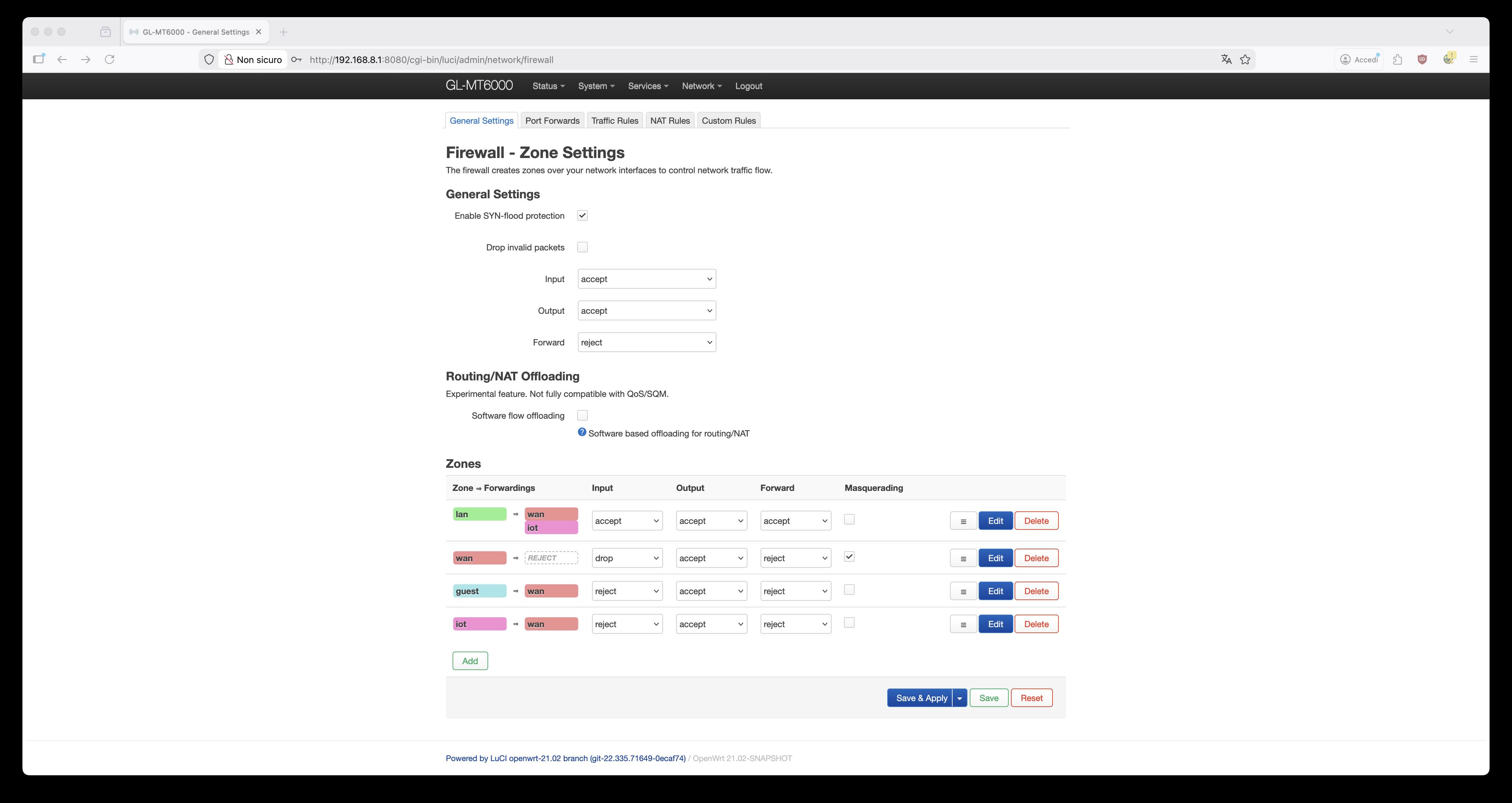
Firewall zone forwarding appears to be configured correctly.

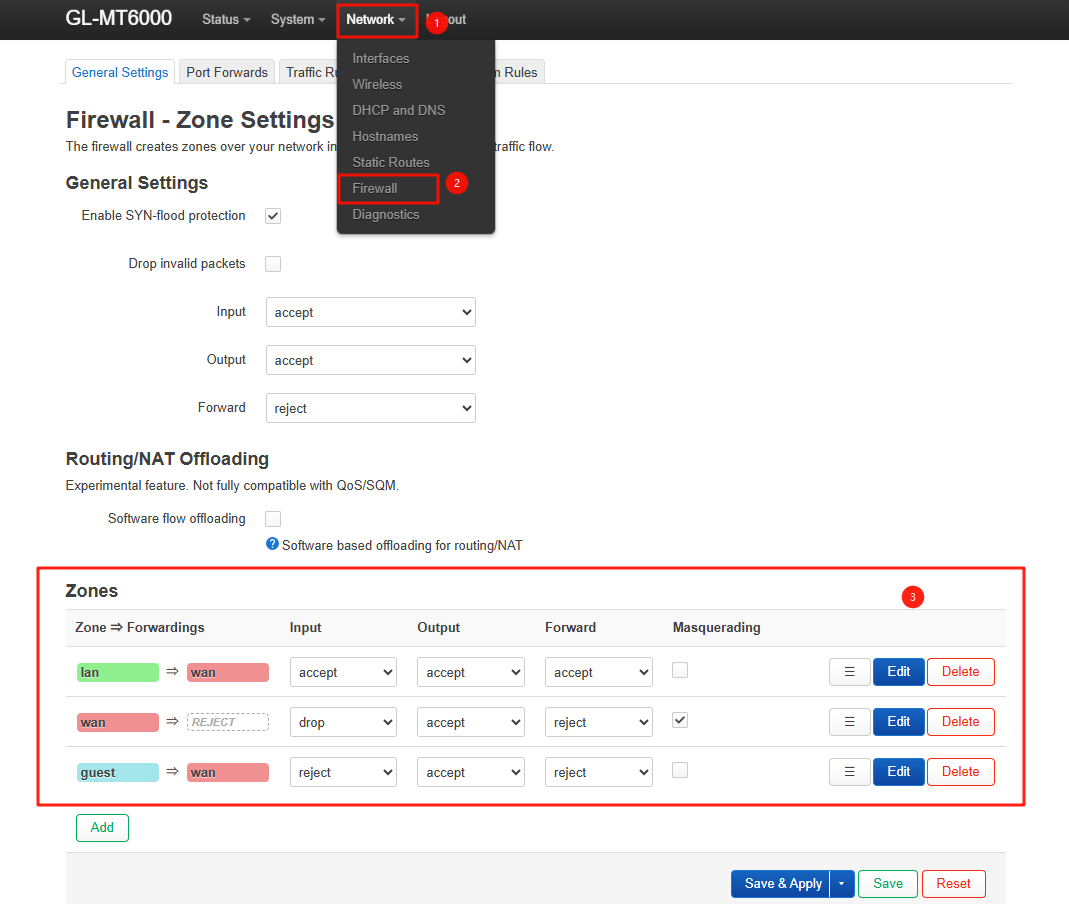
Could you take a screenshot of the configuration under Luci - Networks - Firewall - Zones so we can review it?

Hello, here it is:

I have a Wi-Fi HP printer that I would like to keep on my IoT network and allow the computers on the main LAN to send print jobs to it.

Thanks again.

The current firewall configuration looks normal.

To confirm that network isolation between the main LAN and the IoT network is working correctly, please test the following:

  1. Connect another device (such as your phone) to the IoT SSID, then attempt to ping it from a device on the main LAN.
  2. From the phone connected to the IoT SSID, attempt to ping a device on the main LAN.

The first ping should succeed, while the second should fail.

If the behavior does not match this expectation, please share the device with us via GoodCloud using the guide below so we can investigate further:

After sharing the device, please send us the device’s MAC address and WebUI login password to allow remote access.
