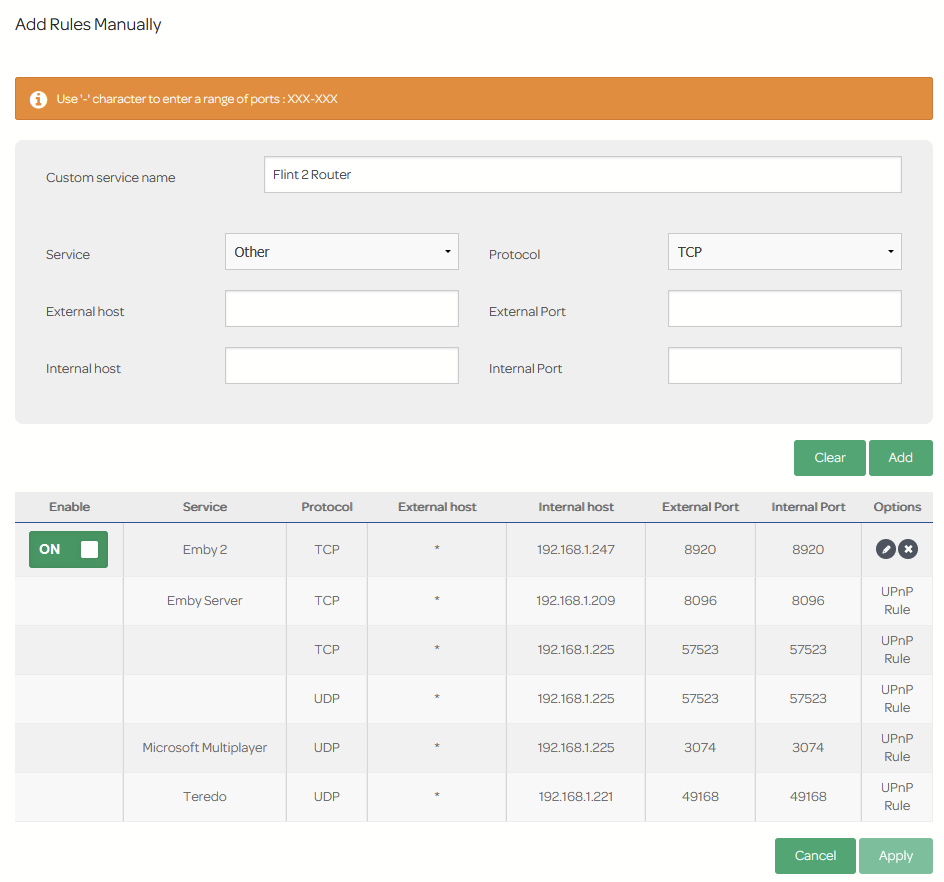
I recently got started with this router - very good; plenty I simply don’t understand but hoping I get there.
My current battle is this - I am trying to get port forwarding working with my home media server (Emby hosted on a Terra Master NAS; it’s a lot like Plex for those who haven’t heard of it). To remote access the server, I need to get port forwarding working and despite following all instructions, I simply can’t get a connection.
I am wondering if this could be because of my ISP’s locked-up router. I am with Talk Talk Business here in the UK, and realise that their router cannot be set to any kind of bridge or modem mode. I have added the new router to the DMZ, but that seems to have had no impact. I also realise that I’m now operating on a double NAT situation too - not that I know why exactly that’s a problem…
Does anyone have any ideas about how I could get remote connections to my Emby server working? Feel free to ask for any information you may need to help me
I have no idea what CG-NAT is I’m afraid (even after Googling it haha) - I can set up and run a server it seems, but this new world of networking seems to be flying way over my head.
Quick note: I’ve used AI to help me articulate this update — networking isn’t my strong suit, and I’m trying to make sure I’m asking the right questions!
I’ve done some more digging and spoken directly with TalkTalk Business support. It turns out their router (SG4K100208) can’t be set to bridge mode, and they’ve confirmed that I can’t use both routers simultaneously in a true modem/router setup. They suggested I either use their router alone or replace it with a dedicated modem.
Here’s a summary of where I’m at:
Flint 2 is connected behind the TalkTalk router via Ethernet
Flint 2 is in the DMZ of the TalkTalk router
Port forwarding is set up on Flint 2 for 8096 and 8920 (Emby server)
WAN IP matches public IP (so no CG-NAT)
UPnP via LuCI doesn’t seem to be working — no active redirects
Emby is accessible locally, but remote access still fails
Questions I’m hoping the GL.iNet community can help with:
Is there a reliable way to configure Flint 2 to handle double NAT more gracefully?
Can I verify whether DMZ is truly forwarding all unsolicited traffic to Flint 2’s WAN interface?
Are there known issues with UPnP or port forwarding on Flint 2?
Would switching to a dedicated VDSL modem (e.g. DrayTek or TP-Link) allow Flint 2 to operate as the sole router and simplify this setup? Any suggestions for inexpensive VDSL models too?
Appreciate any insights — I’m trying to get remote access working for my Emby server and feel like I’m close but missing something fundamental.
Can you try portforwarding on your ISP router (opening port to your GL.iNET’s IP from there) and then again from your GL.iNET router to your Emby server’s IP? Restarting your Emby server after doing so might also be required.
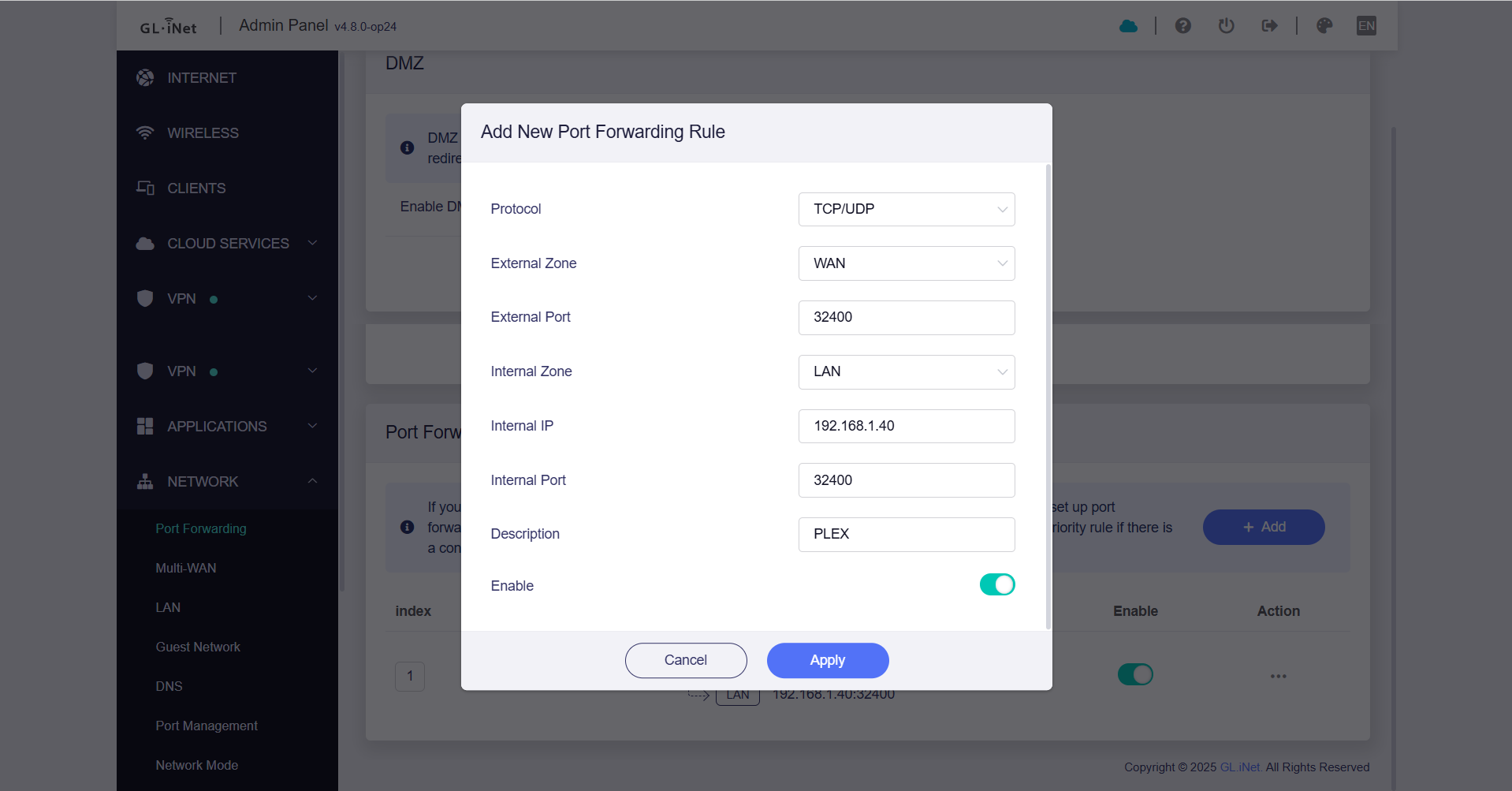
You are not being dumb at all. I am not familiar with TalkTalk router or Emby for that matter but here are my portforwarding (open port 32400 in my case) settings on my GL.iNET (IP: 192.168.1.1) to my Plex server (IP: 192.168.1.40) which might give you an idea. In addition, you would need to do the same on your ISP router but forwarding the relevant ports to your MT6000 (i.e. to IP 192.168.1.1 in my case). Hope this helps.
You are most welcome. Very glad that it has worked. Just to add a bit of fun, I would highly recommend that you explore Tailscale as well to allow you remote access to your home network resources (even with your double NAT situation).
What a clean solution to remote access… I always wanted to ditch hosted cloud storage but hadn’t found a solution half as graceful as the leaders… But i reckon i could cobble one together on my server with this.