Hello Communitty
Could you please help me send information about how to create a server to update certificate for aws configuration?
I’m trying to conect my GL-S10 to my IoT core account, but one step of the guide, is to update this certificate.
Guide:
Hi
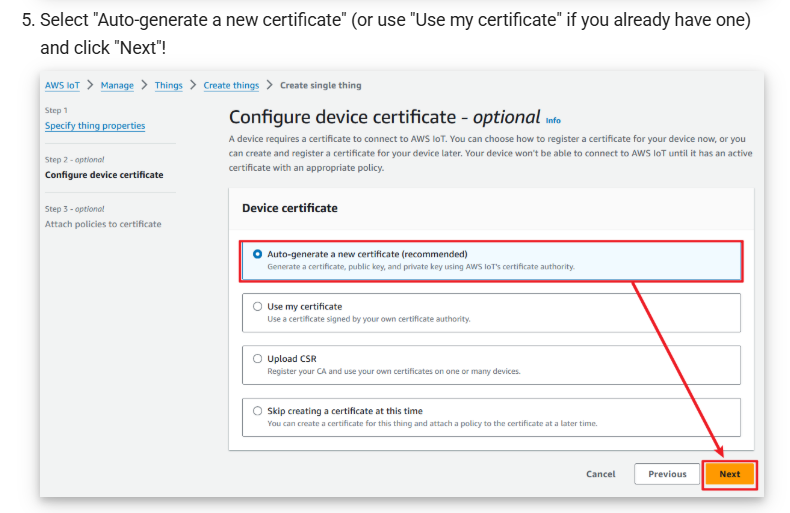
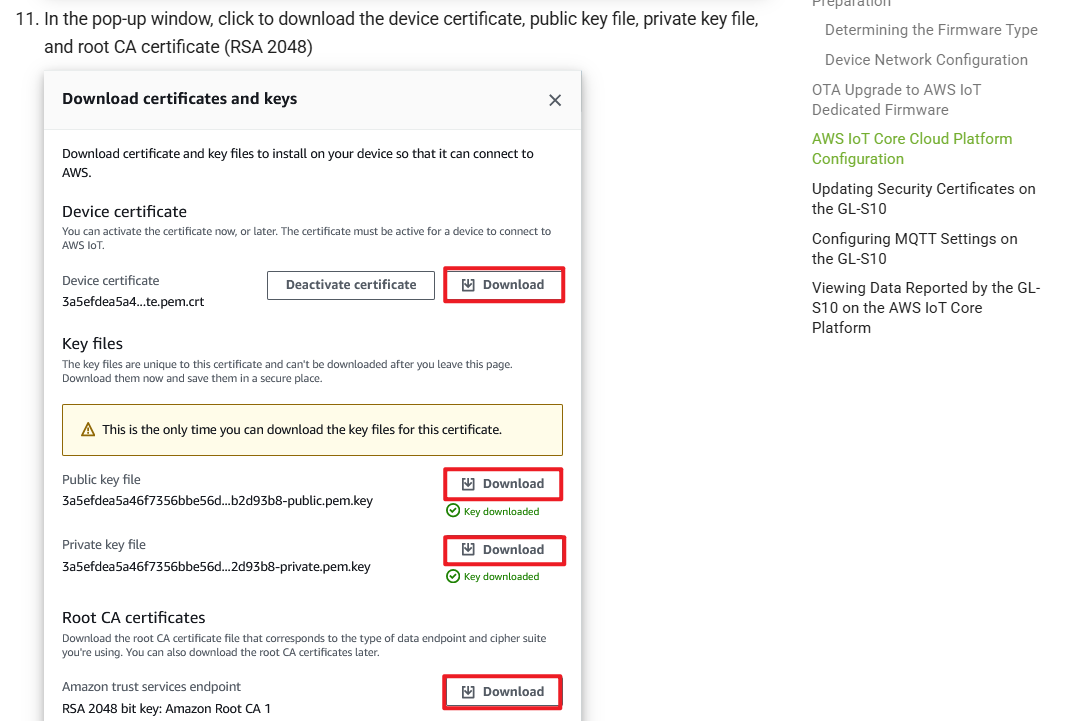
The certificate is created/selected by following the steps in the tutorial you linked.
You can download it at this step.
Hello @will.qiu , thanks so much for your help.
My question is related to “How to install this certificate in GL-S10”.
How the GL-S10 will conect to AWS account.
Best Regards
Oh, I think I misunderstood your question.
You can run a small HTTP file server on PC within local LAN same as S10 and place the certificate file there.
For example, using Python:
python -m http.server 9000
Refer: http.server — HTTP servers — Python 3.14.0 documentation
Or Caddy:
caddy file-server --browse --listen :9000
Refer: Static files quick-start — Caddy Documentation
Then you should be able to configure the LAN IP address + port number of the PC on the same LAN on S10 to import the certificate.
Please note to rename the certificate file according to the tutorial and ensure the firewall on your PC is disabled/enabled for access to the corresponding ports.
system
May 2, 2026, 9:43am
7
This topic was automatically closed 180 days after the last reply. New replies are no longer allowed.