Follow the tutorial below to unbox and set up for the first time, such as whether the 4G antenna is connected properly.
Does the SIM card work property if move it to your phone to test?
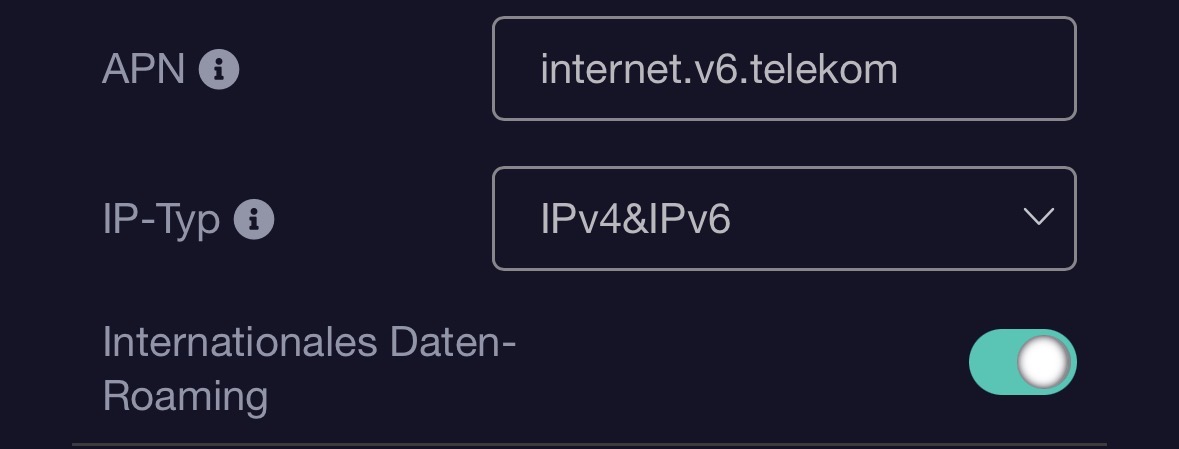
If it works on your phone, please check the APN it is using on phone and fill in the APN in the router's Modem settings.
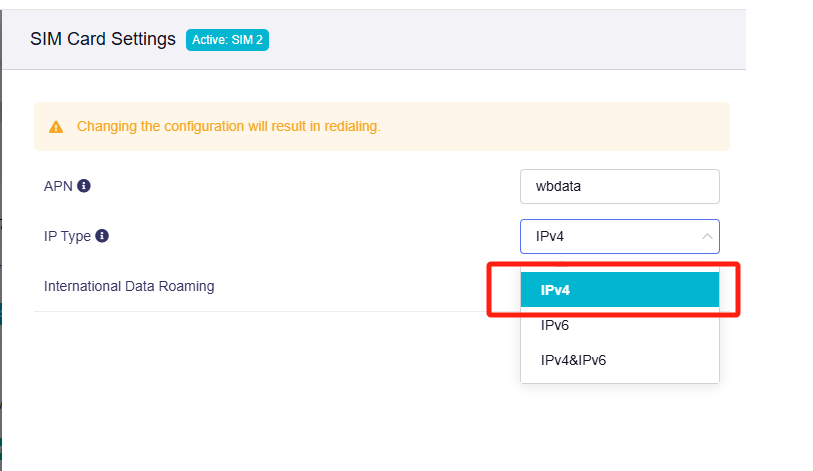
@GlennR@stivi1983it By default, the router’s software uses both IPv4 and IPv6 for dial-up connections. This configuration may lead to registration failures or connectivity issues with specific SIM cards that lack IPv6 support.
To address this, we recommend the following solution: Manually adjust the connection settings to select "IPv4 only" mode, then verify if this resolves the SIM card registration problem.
Notably, the latest firmware for the GL-X2000 has introduced the "IPv4 only" option.
Download Link: GL.iNet download center
So, sorry, but on my XE3000 4.8.2, IP4/IP6 isn't enabled by default. IP4 is enabled by default. I had this problem before, too. Only after I manually set it to IP4/IP6 did the network symbol appear on the router after 10 seconds, and the card was registered.