We have GL-X300B control and our Android application be able to communicate via TCP/IP protocol using 192.168.8.1 port 502 with our device using RS485 connection only if our phone is connected to WiFi network GL-X300B-938. We are having installed SIM card. We are unable to connect over internet to our device. What are we missing?
Hi
Could you clarify what you’re trying to achieve?
If the SIM card provides a public IP—or a privately reachable IP within your enterprise network—please open the required port under Admin Panel → Network → Firewall → Open Ports on Router. You’ll then be able to access the port directly using the SIM’s IP address and port number.
If the SIM card is a standard CGNAT SIM, you’ll likely need to set up a VPN server and access the port through the VPN instead.
Hello!
Your phone can only reach the device on local Wi‑Fi because 192.168.8.1 is a private LAN address, not routable over the internet. To access it remotely you need to expose it safely: either get a public IP and set up port forwarding, or use a VPN/Dynamic DNS. Also check firewall rules, since most routers block inbound traffic by default, and note that many SIM‑based carriers don’t allow incoming connections. Without port forwarding or a VPN, 192.168.8.1 will only ever work inside your Wi‑Fi.
My Settings for WiFi connection (which works if I close WireGuard tunnel on the phone): IP Address 192.168.8.1, Port 502. I setup WireGuard server: IP Address 10.0.0.1/24, Port 51820.
I setup both ports on router as open. I tried IP Address 10.0.0.1 and 10.0.0.1/24 with port 51820. And nothing works! With 10.0.0.1/24 my app even locked up.
Could you please clarify:
Previously mentioned:
- What is the goal of your setup?
- Does the SIM provide a public IP or a reachable IP within an enterprise private cellular network, or is it a CGNAT address?
Additionally:
3. What firmware version is the device running?
Please note that you will need:
- A SIM that provides a public IP or a reachable IP within an enterprise private cellular network in order to configure the X300B as a WireGuard VPN server and allow access from other devices
- When using the X300B as a WireGuard VPN server, you also need to open the port used by the RS485 TCP transparent transmission server (port 502, as you mentioned) on the X300B so that other devices can access it
- You can then access it using the WireGuard VPN server’s address along with the RS485 TCP transparent transmission server’s listening port (502)
-
Hostname
GL-X300B
-
Model
GL.iNet GL-X300B (NOR)
-
Architecture
Qualcomm Atheros QCA9533 ver 2 rev 0
-
OpenWrt Version
OpenWrt 22.03.4 r20123-38ccc47687
-
Kernel Version
5.10.176
Copy of page:**
IPv4**
-
IP Address10.99.77.6
-
Netmask255.255.255.252
-
Gateway10.99.77.5
-
DNS Server213.33.99.70 , 80.120.17.70
My goal is to communicate with our device attached to RS485 connector
- It’s not public IP
- IP is changeable depending of connected provider (AT&T or Verizon or T-Mobile)
- All ports are open 502, and WireGuard IP 10.0.0.1/24 and Port 51820
- Nothing is working
You are looking to access the device remotely over the internet, rather than within the local network, correct?
If so, since the X300B's SIM card does not provide a public IP address, the X300B cannot be used as a WireGuard VPN server.
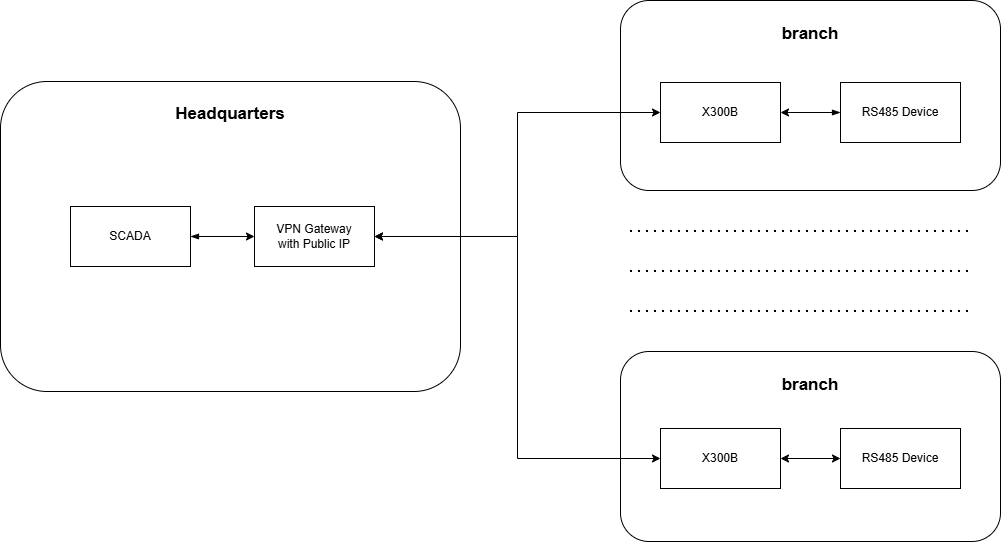
You will need to use a server/VPN firewall gateway with a public IP address as a hub, connect the X300B to it, and then remotely access the devices connected to the X300B’s RS485 port through the VPN IP.
Could you let us know where you purchased the X300B-RS485 version from?
If you are a business customer, we recommend contacting the sales representative you purchased from and seeking assistance from our 2B technical support team, providing project-specific information and configuration goals so we can serve you better.
You are looking to access the device remotely over the internet, rather than within the local network, correct?
Yes
Could you let us know where you purchased the X300B-RS485 version from?
From GL-iNet US, Order #US39589
What version of your control should we buy if we want to connect Android phone (TCP/IP protocol)<->your control with RS485 connector<->our device
Essentially, this is not an issue with the X300B or any other controller.
The key point is that if you want to access a device from the internet, that device must have a publicly reachable address, which we refer to as a public IP address. Therefore, if your ISP or SIM card cannot provide one, direct access will not be possible.
You can refer to the topology we mentioned earlier: use a server with a public IP address as an intermediary and configure a WireGuard client-to-client setup to achieve this.
Is it possible to create Site-To-Site VPN network with GL-X300B router with cellular connection and RS485 control connected to another router like GL-iNet MT2500 (Brume 2) connected to StarLink network? So, I can communicate with device connected to GL-X300 router via RS485 from any device connected to GL-iNet MT2500 network through the VPN.
For a VPN site-to-site (S2S) scenario, a public IP address is still required so that other clients (such as a phone) can connect.
However, if you have a device that supports Tailscale, ZeroTier, or AstroWarp (for example, the MT2500 you mentioned), you can use these tools to build the network without needing a public IP address.
With this setup, you can form the network through these solutions and then access the GL-X300B router behind it, allowing you to connect to the RS485 device via TCP.
Their documents are attached for your reference:
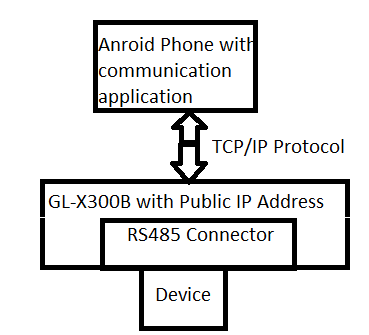
OK, I think the easiest way is to set public IP address via SIM card to GL-X300B router so I be able to communicate with device attached to RS485 connector. Is it right?
Yes, if the SIM card provides a public IP and allows inbound connections, you can communicate directly with the device connected to RS485 with TCP + public IP + port.
However, please note that TCP does not provide any encryption, so the data will be transmitted in plain text over the public internet. You may want to use a VPN to improve security.
This topic was automatically closed 90 days after the last reply. New replies are no longer allowed.